LinkedIn MCP: Let Claude Pull Jobs, Leads & Posts for You
15-Second Summary
- Claude and ChatGPT can't open LinkedIn, so unless you hand them your own browser, jobs, companies, people and posts are all out of reach
- There's no official LinkedIn MCP, and LinkedIn's API terms rule out using member data to find prospects
- Third-party servers exist, but plenty are dead, and the live ones drive your browser or split the job
- lobstr.io's MCP gets Claude working on LinkedIn: jobs, leads, search, company pages and their employees, posts and who engaged, some of it without a LinkedIn account
- People come with verified work emails, and you only pay for the ones it finds
- This guide gives you the install and a real prompt for each job
You want Claude to do your LinkedIn work.
Find the SDR jobs posted this week, size up 5 competitors, list a company's sales team, see who commented on a rival's post, and get the work emails behind all of it.
Ask, and it can't, because neither Claude nor ChatGPT can open LinkedIn.
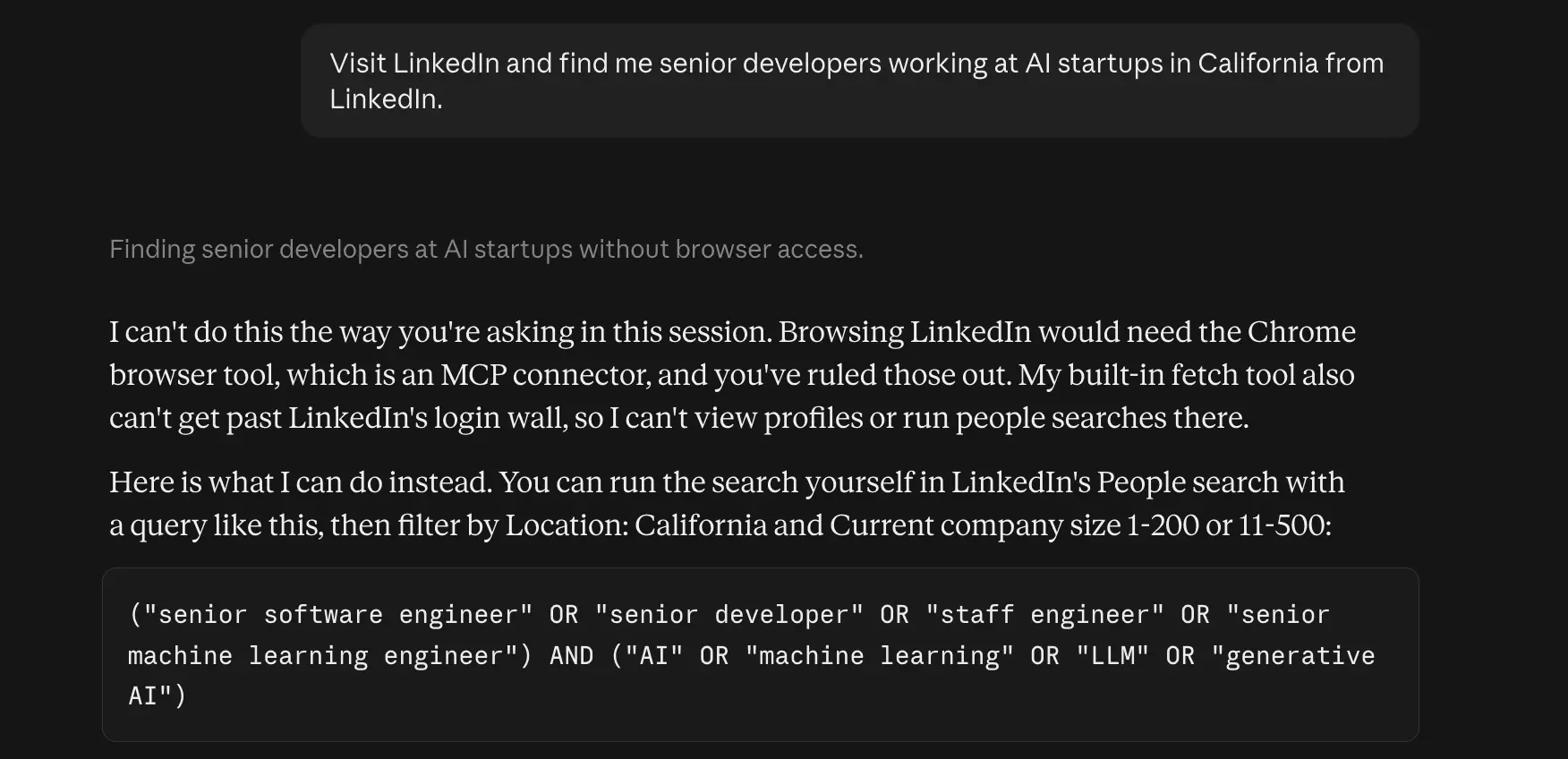
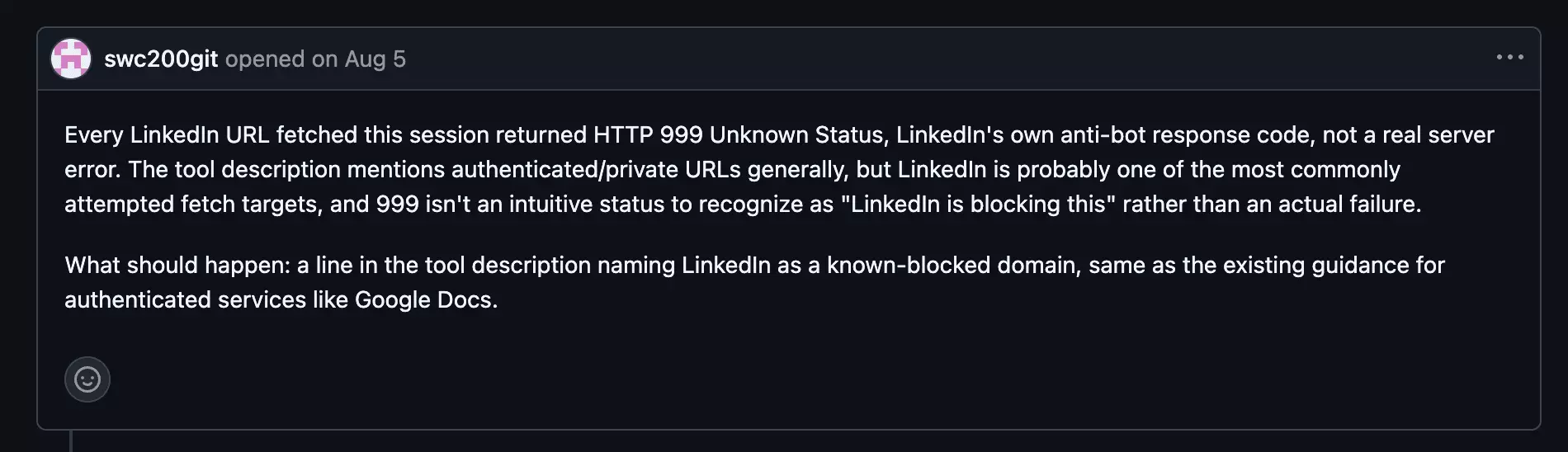
The only way in is your own browser.
Claude in Chrome can click through LinkedIn in your logged-in Chrome, but it's your account doing the clicking, and Anthropic makes you responsible for respecting the site's terms.
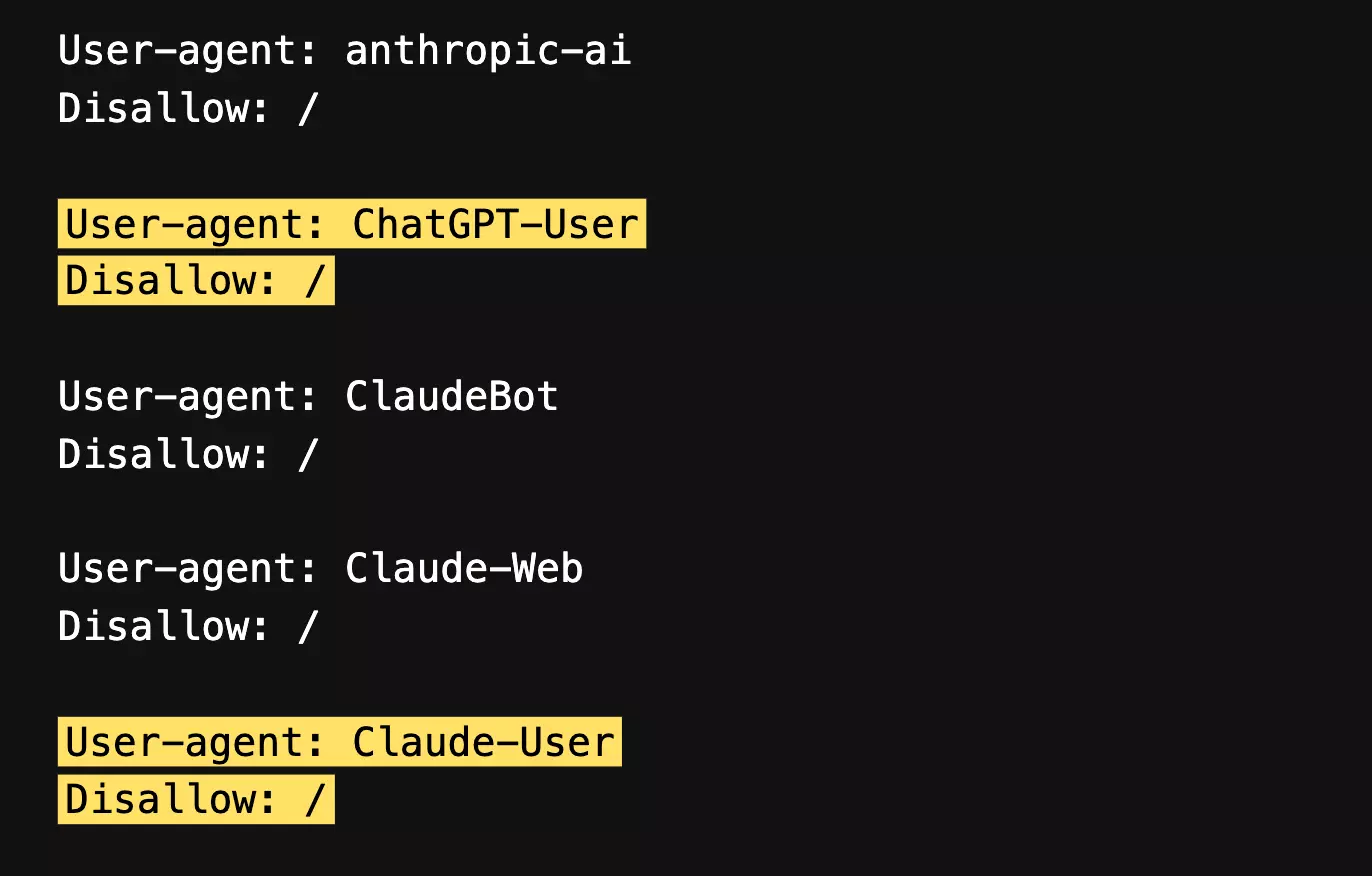
LinkedIn's robots.txt is blunt about those: automated access without its permission "is strictly prohibited".
So people fall back to doing it by hand, and as one r/LeadGeneration poster put it, "manually copying 200+ profiles is insane".
So, is there an official LinkedIn MCP?
Is there an official LinkedIn MCP?
Short answer: no, and LinkedIn's terms would stop it building a lead list anyway.
Neither LinkedIn nor Microsoft publishes one, and Claude's connector directory has nothing from LinkedIn either:
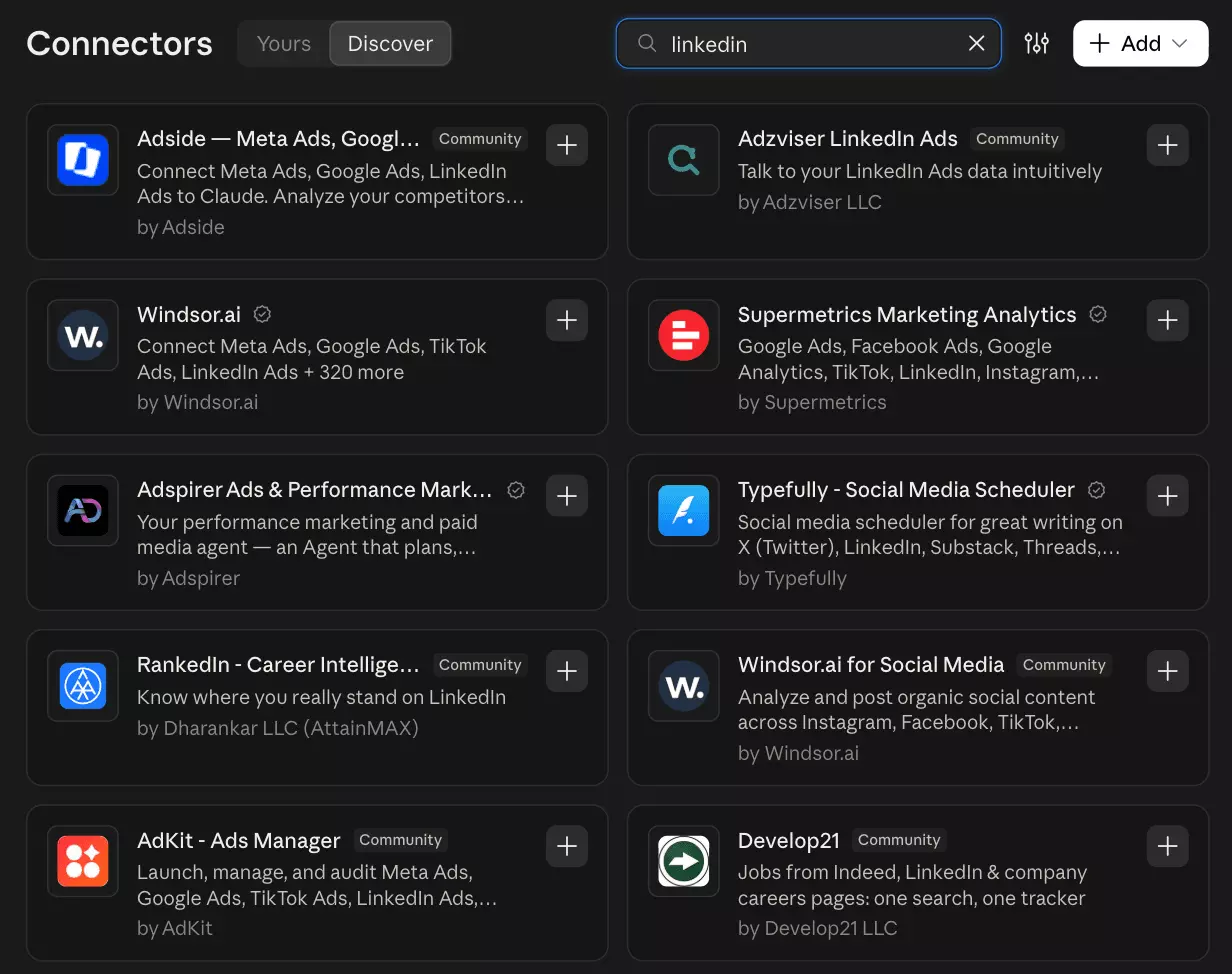
That connector only posts articles and lists pages you admin.
No search, no profiles, no people.
And even with partner access, you couldn't build a lead list.
"use Member Data (other than Lead Form Response Data or Page Messaging Data …) for advertising, sales, or recruiting use cases (including to identify sales or marketing prospects or prospective talent for hire, for lead creation, to enhance customer data in a CRM or marketing automation platform, to build an audience list, or for ad targeting purposes)"
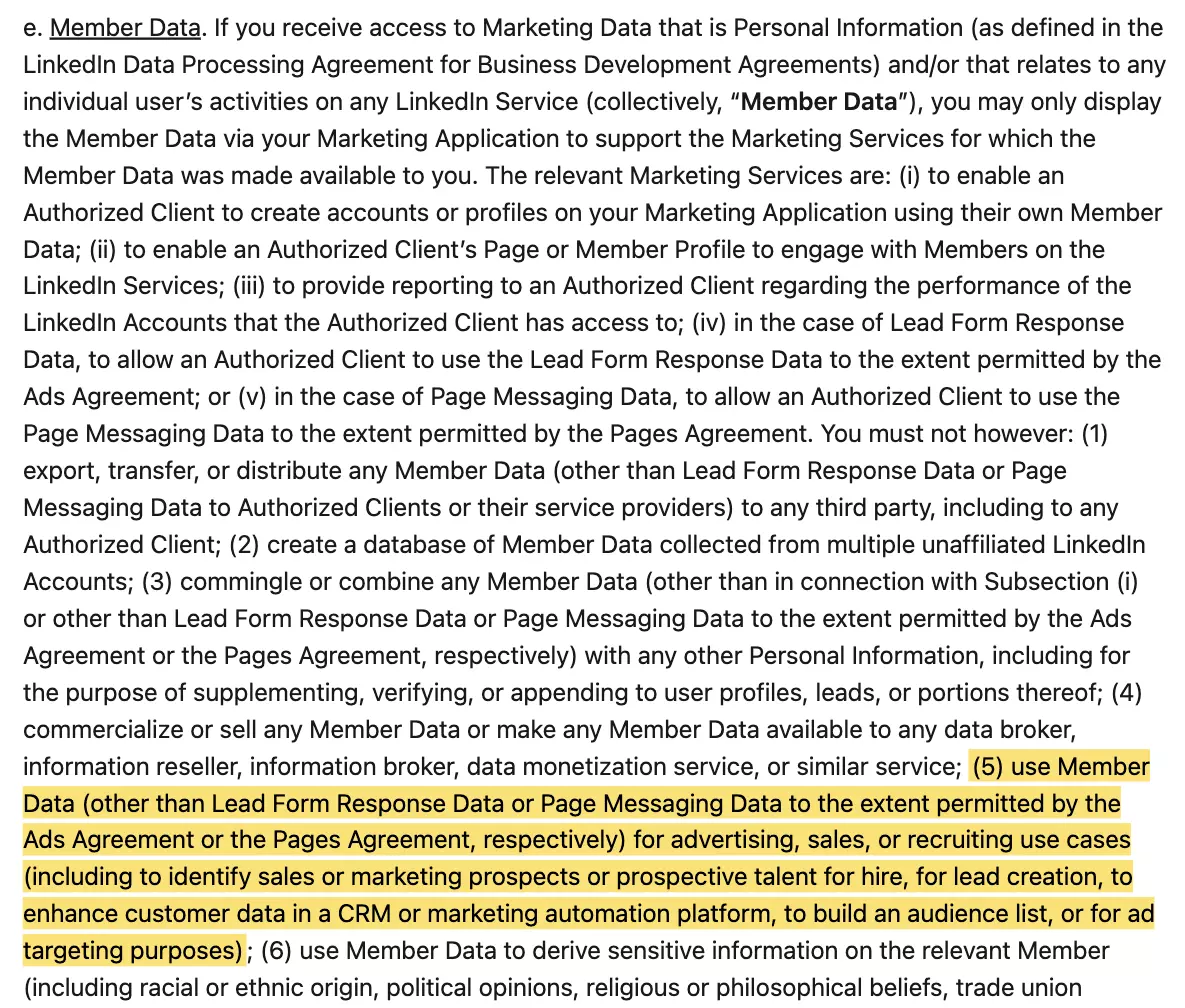
So the official route is a dead end twice.
What about the third-party ones?
What about third-party LinkedIn MCP servers?
Search GitHub for a LinkedIn MCP server and some of the first hits are already dead:
adhikasp/mcp-linkedin... the repo is gone, but PulseMCP, Glama and Smithery still list itdbogardus/proxycurl_mcp... it wraps Proxycurl, which has since shut down- Docker's MCP Catalog ... its LinkedIn entry serves a build that's over a year old, and it ranks on page one
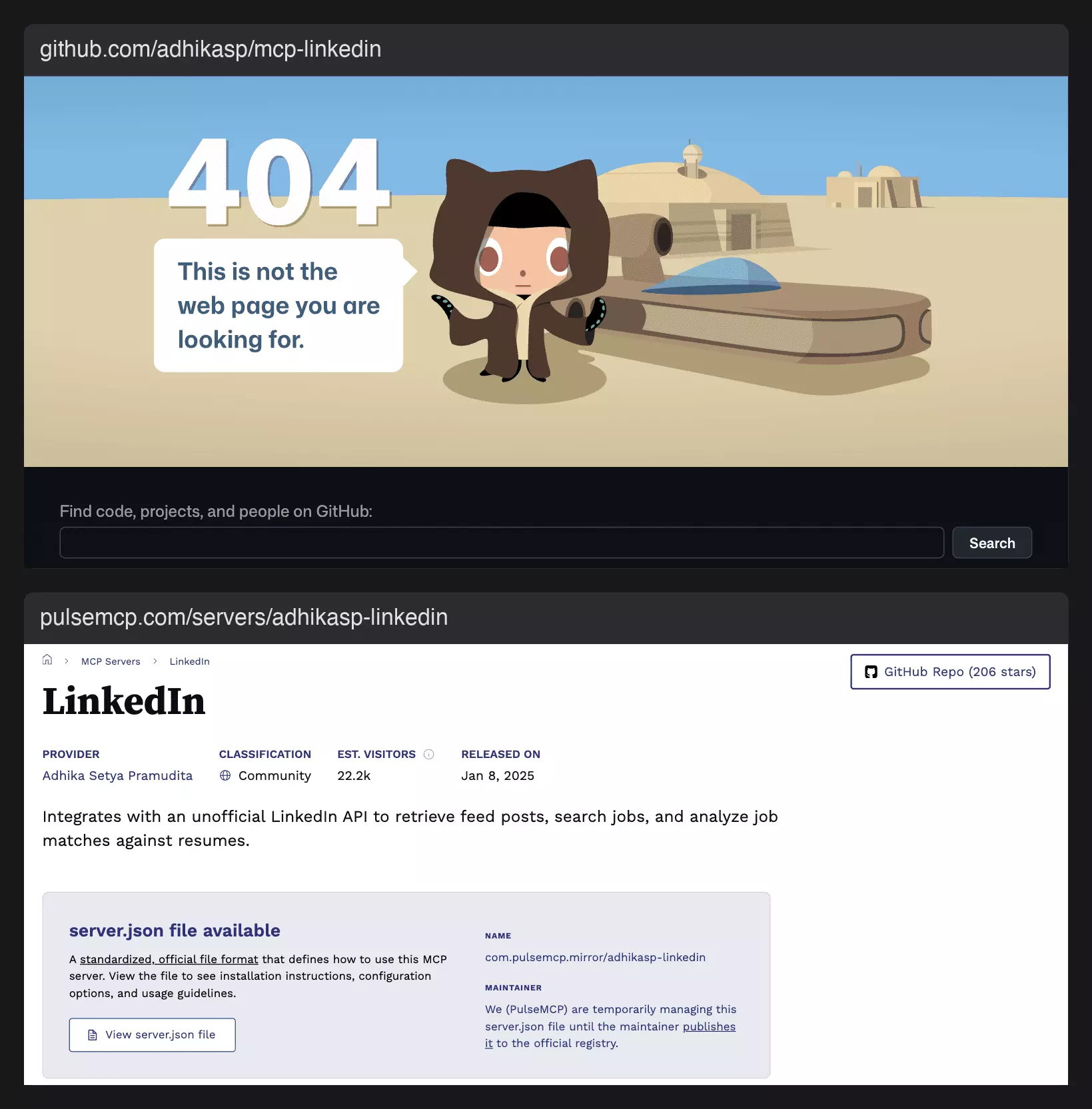
There are good ones too, and the most popular open-source server is still actively maintained.
But most share one shape.
Either the agent drives your logged-in browser, or it chains separate tools for search, profiles and emails, each billed on its own.
What I wanted was one connector that covers all of LinkedIn from the chat, emails included.
So I plugged in lobstr.io's.
What does lobstr.io's LinkedIn MCP give you?
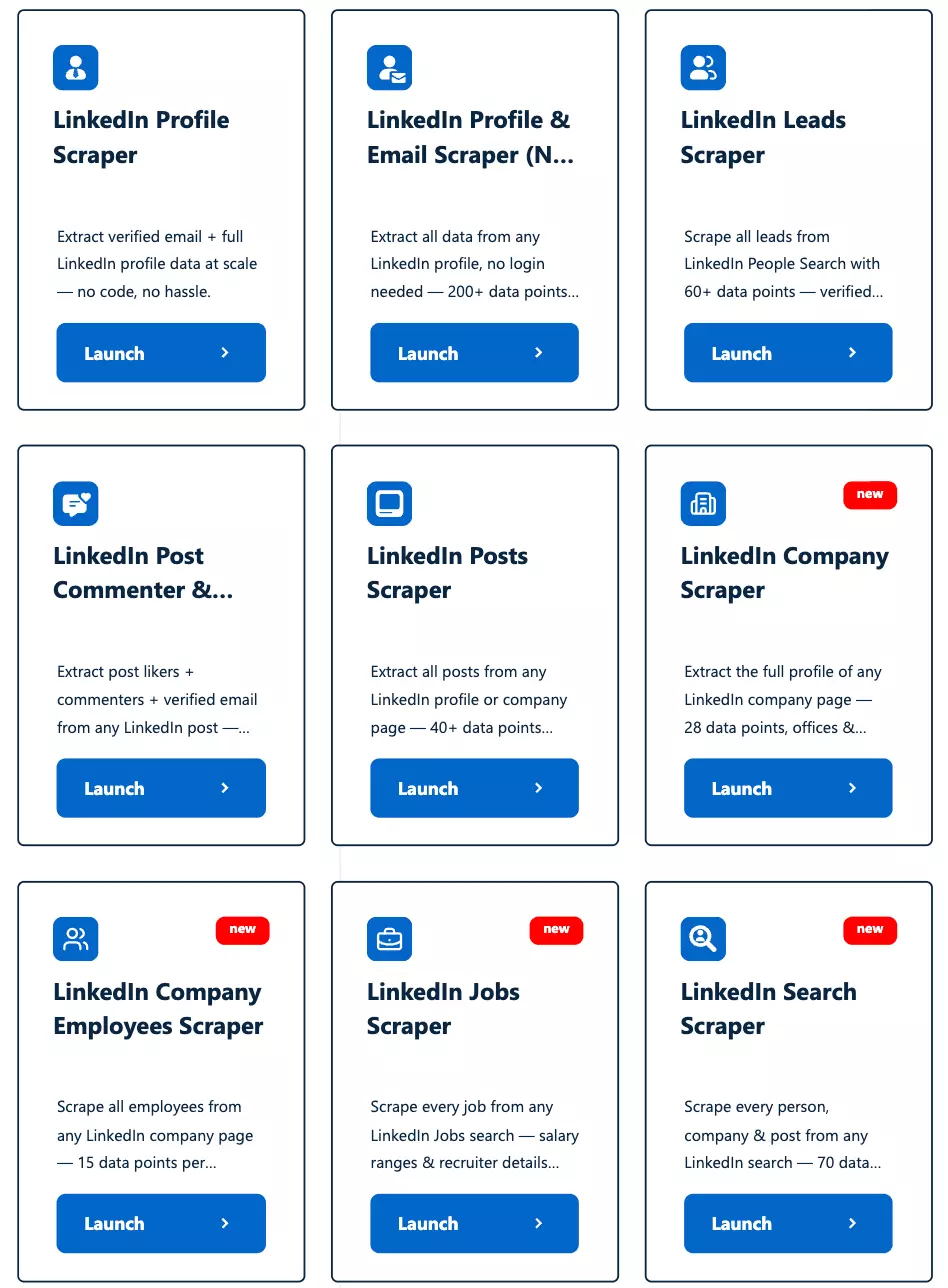
It gets past both walls: it reads LinkedIn itself, and whenever you ask about people, it finds the work email too.
- A status on every email ... and you're only charged when one is found
- Chains in one chat ... job posts to recruiters, employees to profiles, posts to commenters
- Your LinkedIn account, synced once ... 6 of the 9 use your synced session, never your password
- Any MCP client ... Claude, ChatGPT, Cursor and Codex, per the MCP docs
| Scraper | Input | You get | Account |
|---|---|---|---|
| Jobs | A job search in plain words | Job, company, location, date, salary and recruiter when listed | No |
| Profile & Email (No Login) | Profile URL | Profile, work email, email status | No |
| Company | Company URL | Size, followers, industry, HQ, website, founded, specialties | No |
| Leads | People search URL | Name, title, company, location, work email | Yes |
| Company Employees | Company URL + keyword | Name, headline, connection degree, profile URL | Yes |
| Profile | Profile URL | Current role, location, connections, work email | Yes |
| Posts | Company or profile URL | Date, text, likes, comments, shares | Yes |
| Commenters & Likers | Post URL | Name, profile URL, comment | Yes |
| Search | People, company or post search URL | Results, plus their details | Yes |
It's all priced in credits: 1 per row on 8 of the 9, 3 per profile on No Login, and 9 more per email found.
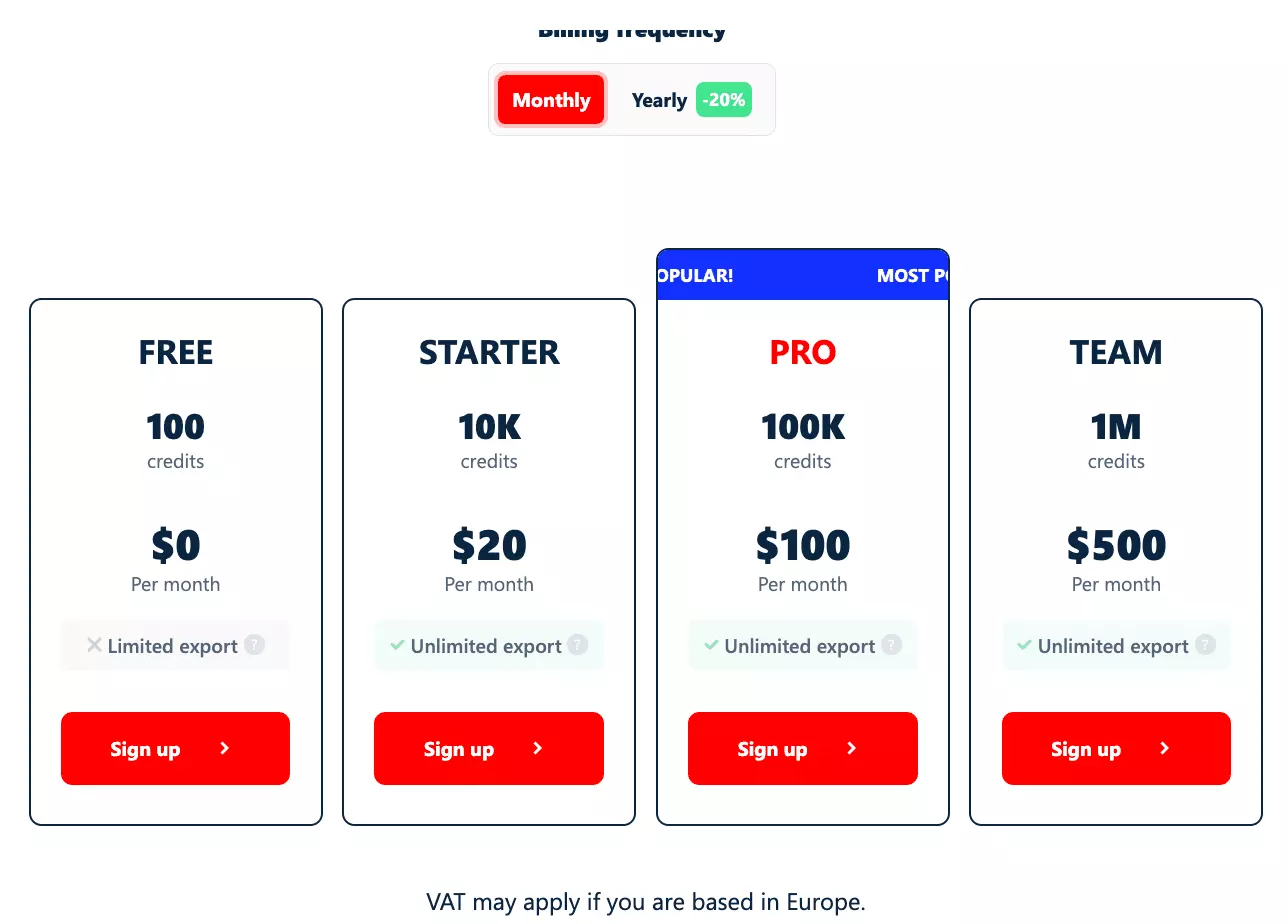
- Free tier ... 100 credits on signup, plus 2,000 through the community rewards program. On Free, the MCP reads the first 30 rows of a run
- Entry ... $2 per 1,000 rows, and $18 per 1,000 emails found
- At scale ... $0.50 per 1,000 rows, and $4.50 per 1,000 emails found
So how do you plug it in?
How to connect the LinkedIn MCP to Claude
You add lobstr.io's LinkedIn MCP as a custom connector, on claude.ai, Claude Desktop or Claude Code.
On claude.ai and Claude Desktop
Settings, then Connectors, click Add and choose Add custom connector.lobstr.io, paste https://mcp.lobstr.io/mcpContinue.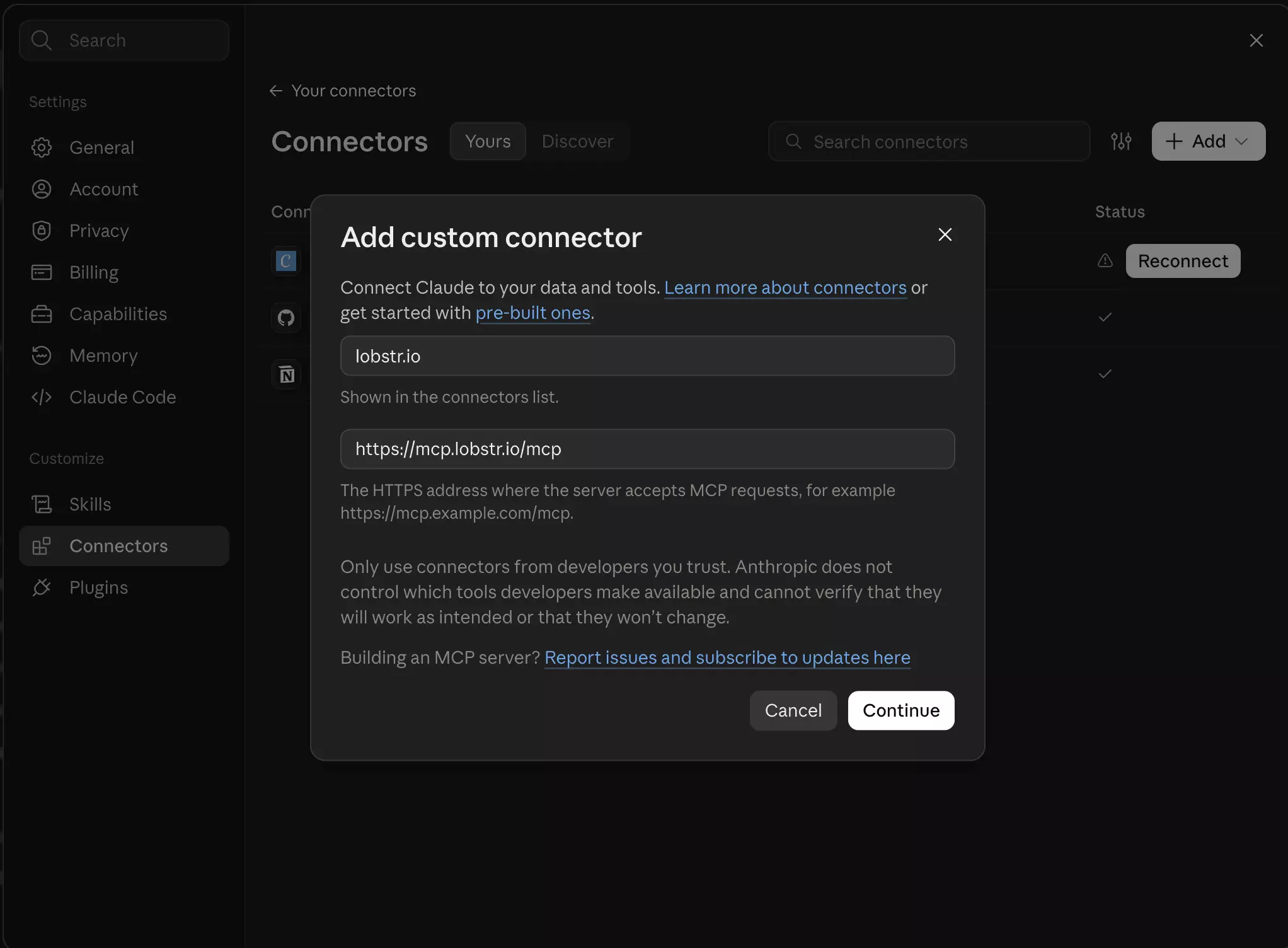
Pro tip
/mcp matters.Leave it off and nothing connects
Sign in now and Register automatically on its own, so hit Add.Then click the button under Claude's "not connected" message, and you land on lobstr.io's consent page with 6 permissions:
crawlers:read... discover and inspect scrapersruns:read... monitor run statusresults:read... read your scraped dataaccount:read... see your synced accounts, LinkedIn included, and their statusprofile:read... see your profile, plan and credit balanceruns:execute... launch runs, which spends credits
Allow access and the connector is live.There's no API key to copy anywhere.
On Claude Code
It's one command:
claude mcp add --transport http lobstr https://mcp.lobstr.io/mcpf
The first time you use it, the same approval opens in your browser.
ChatGPT works too, with a bit more setup.
How to connect the LinkedIn MCP to ChatGPT
Before you start, you need Developer mode on, or the option to add your own plugin never shows up.
On Business and Enterprise workspaces, custom plugins can also need an admin's approval.
Honestly, Claude is the smoother path: ChatGPT also wants the plugin switched on in every chat.
Step 1: Turn on Developer mode
Settings, then Plugins, then Developer mode, and switch it on:Step 2: Add the plugin
Plugins, add a new custom plugin.lobstr.io, set the server URL to https://mcp.lobstr.io/mcpOAuth, tick I understand and want to continue and hit Create: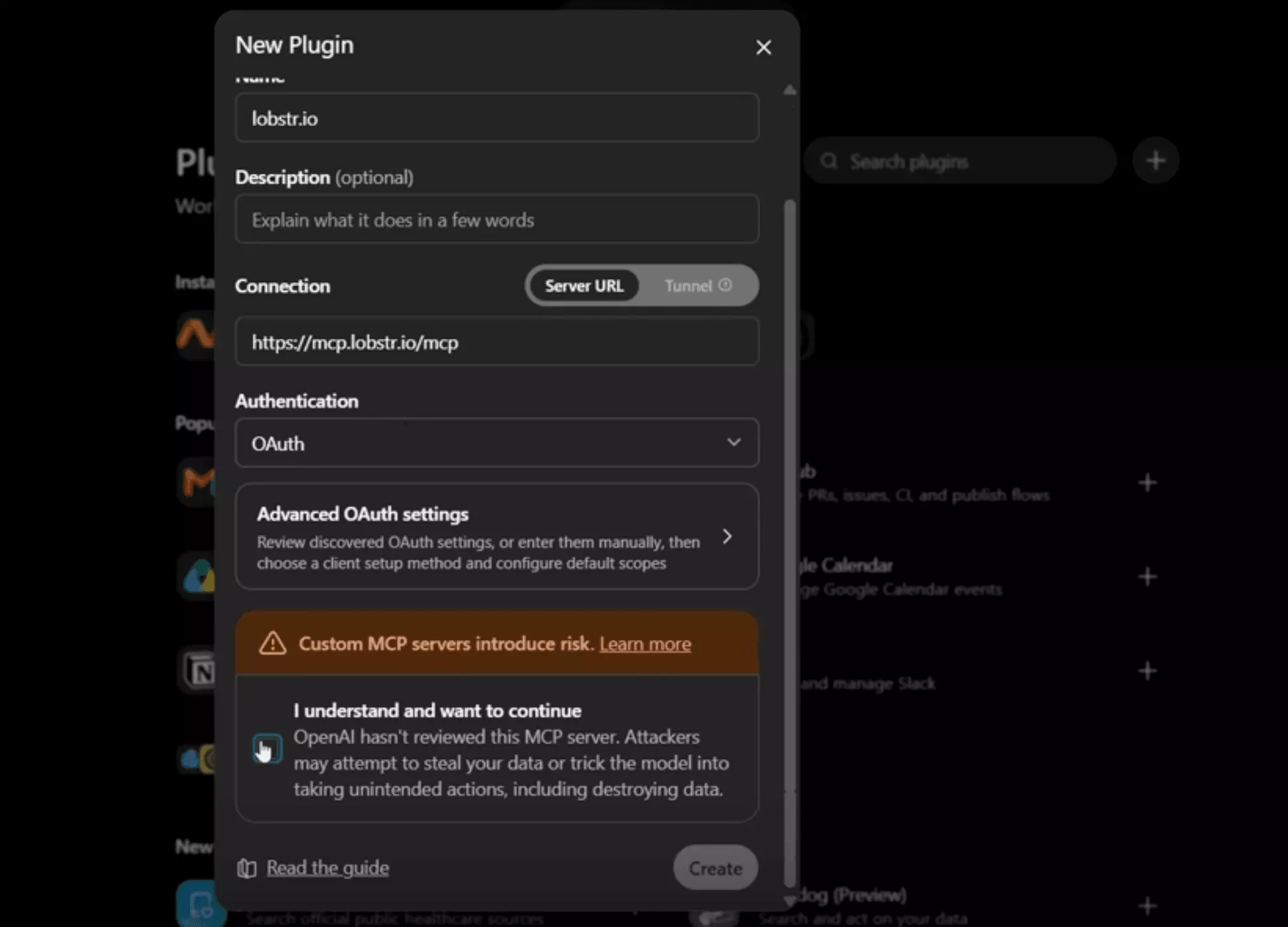
Allow access on the same consent page.Step 3: Switch it on in the chat
Turn the plugin on in the conversation you want to use it in.
Once it's connected, the prompts are the same in both.
Let's run them.
How to use lobstr.io's LinkedIn MCP for jobs, leads, companies & posts
You ask in plain English, and the AI picks the right tool, fills in the settings, runs it and reads you the results.
Here's a prompt for each job, starting with the ones that need no LinkedIn account.
Start every prompt with "Use lobstr.io", so the AI knows which connector you mean.
Step 1: Pull job posts from plain words
Jobs needs nothing but a sentence, so it's the easiest start:
Use lobstr.io to find 25 SDR jobs posted on LinkedIn in the United States in the past week, with company details. Show them in a table.f
Allow once approves just that one:
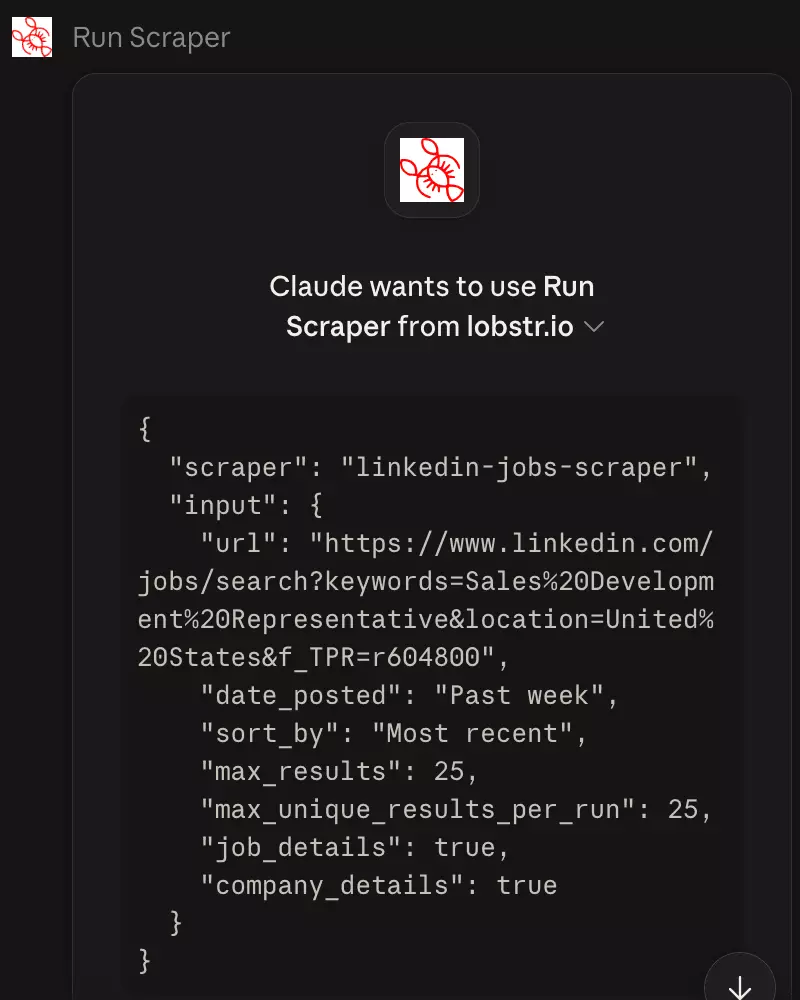
run_scraper.It's the tool that launches the run and spends your credits, and here it shows the job search Claude built from my words, past-week filter included:
Runs from the chat are real runs.
They use a Slot and show up in your dashboard, like any other.
Claude puts the jobs in a table, company details included:
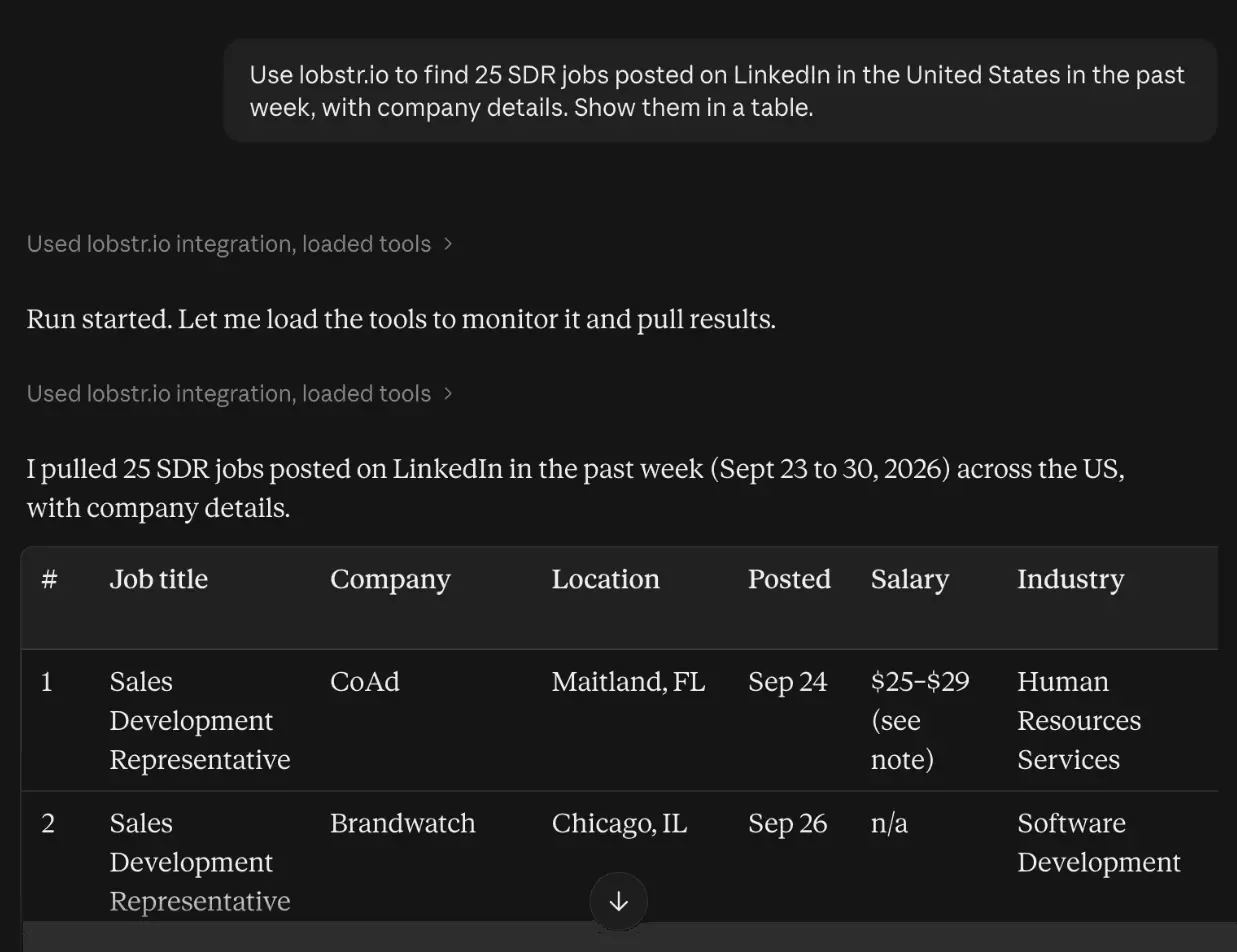
get_results.get_results_url) and get a file instead.Every run also stays in your dashboard as CSV, Excel, JSON or JSONL, for 28 days on paid plans and 7 on Free.
Jobs tell you who's hiring.
The recruiters behind them are who you email.
Step 2: Get the recruiters' work emails, no account needed
Same chat, one follow-up:
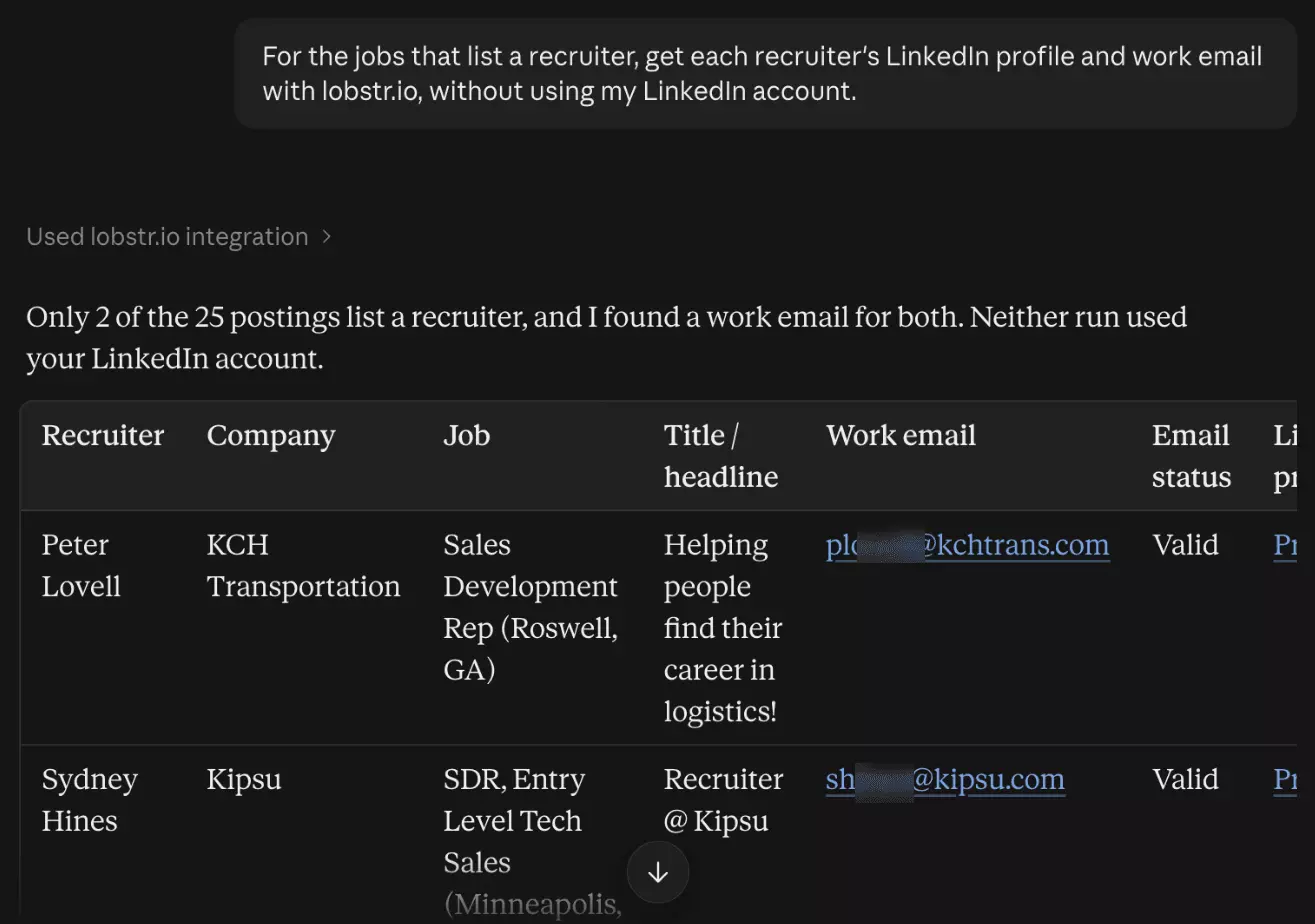
For the jobs that list a recruiter, get each recruiter's LinkedIn profile and work email with lobstr.io, without using my LinkedIn account.f
Claude handed the recruiters to Profile & Email (No Login).
That's the first chain, and I never named a scraper.
LinkedIn only lists a recruiter on some jobs, so you get the ones that do.
Each one comes back with a work email and its status:
And the companies doing the hiring?
Step 3: Compare company pages side by side
Company needs no account either:
Use lobstr.io to pull the LinkedIn company pages of HubSpot, Gong, Outreach, Salesloft and Apollo.io: size, industry, HQ, website, followers and specialties. Put them side by side in a table.f
Claude lines them up side by side:
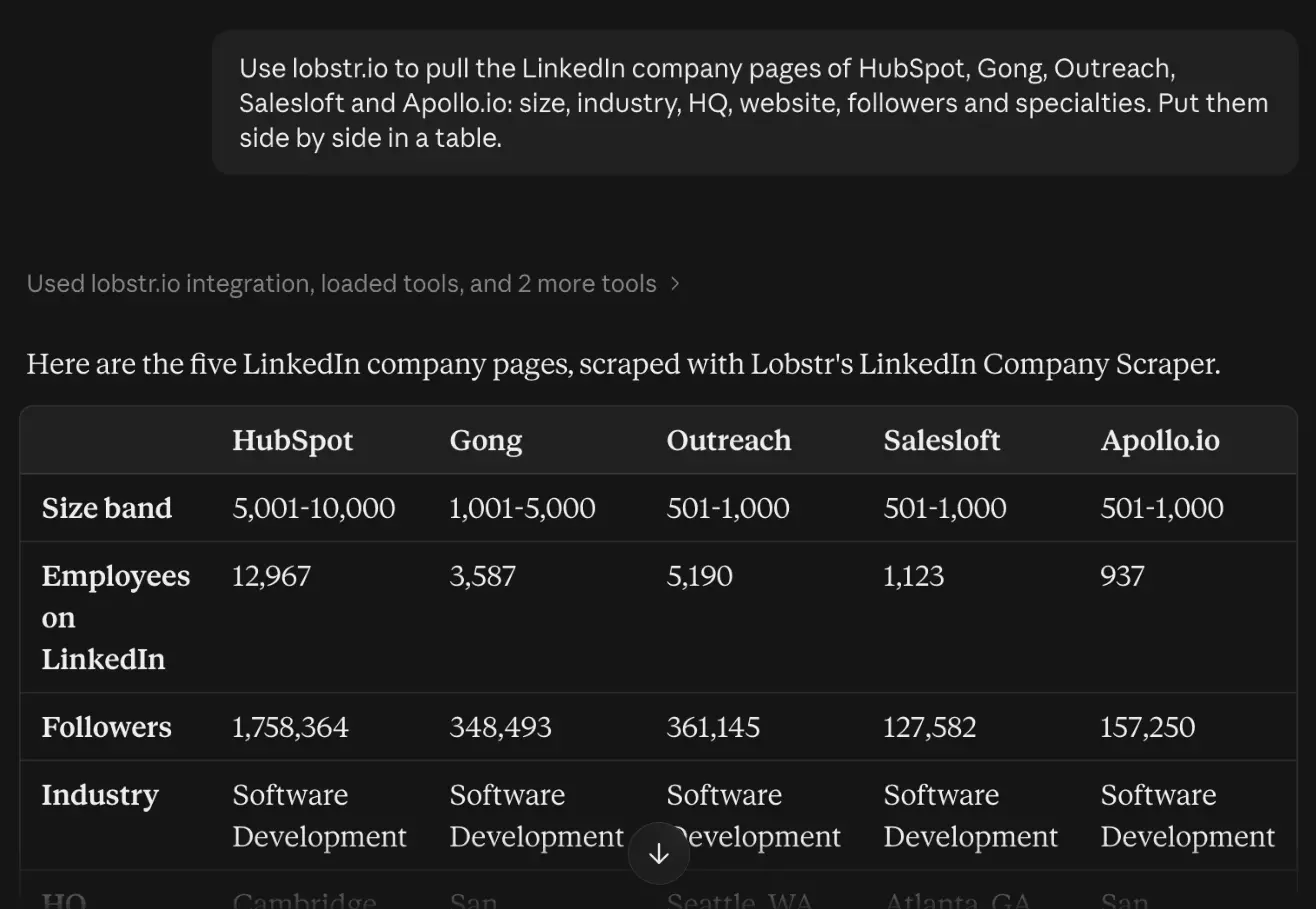
Names work, but Claude has to guess each page, and a guess can land on the wrong company.
Pro tip
Paste company URLs, not names.
That's the no-account trio.
To go deeper, you sync an account.
Step 4: Sync your LinkedIn account once
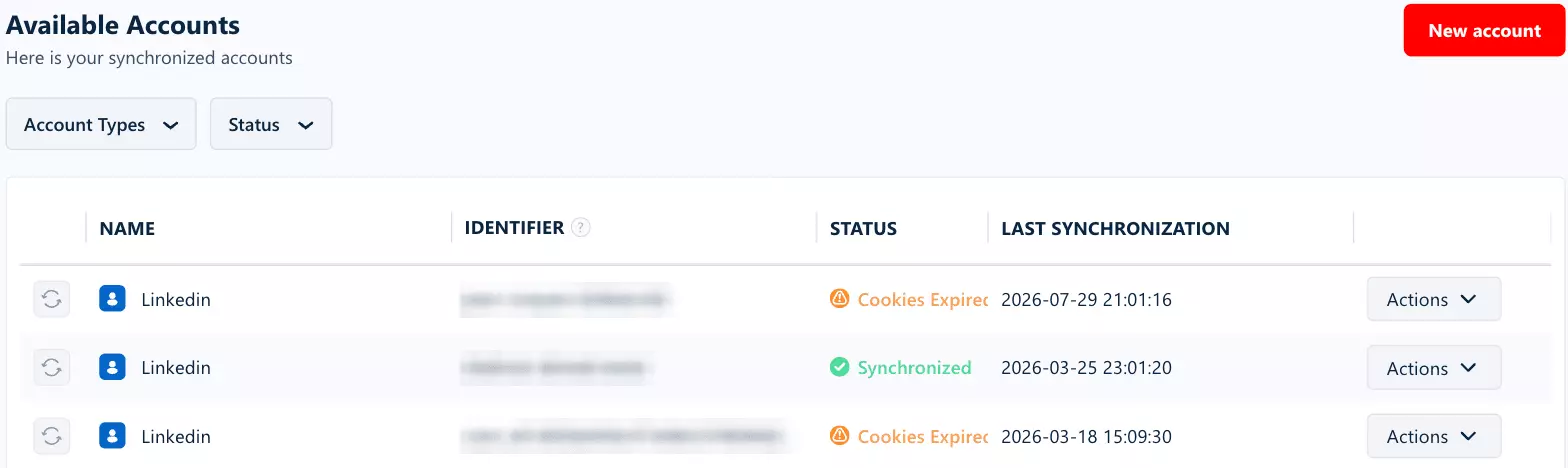
Everything from here on sees LinkedIn as a logged-in member, so it needs your LinkedIn account synced to lobstr.io.
That puts 2 accounts in play: your lobstr.io account pays for the credits, and your LinkedIn account is the one lobstr.io logs in as.
Syncing happens outside the chat, and the MCP can't do it.
It copies your login cookies, never your password.
Then the MCP takes over.
list_accounts lists your accounts, get_account checks one and attach_account links it to a Squid, lobstr.io's name for a scraper job.It checks before it runs, too.
If a synced account's cookies have expired, Claude tells you which one:
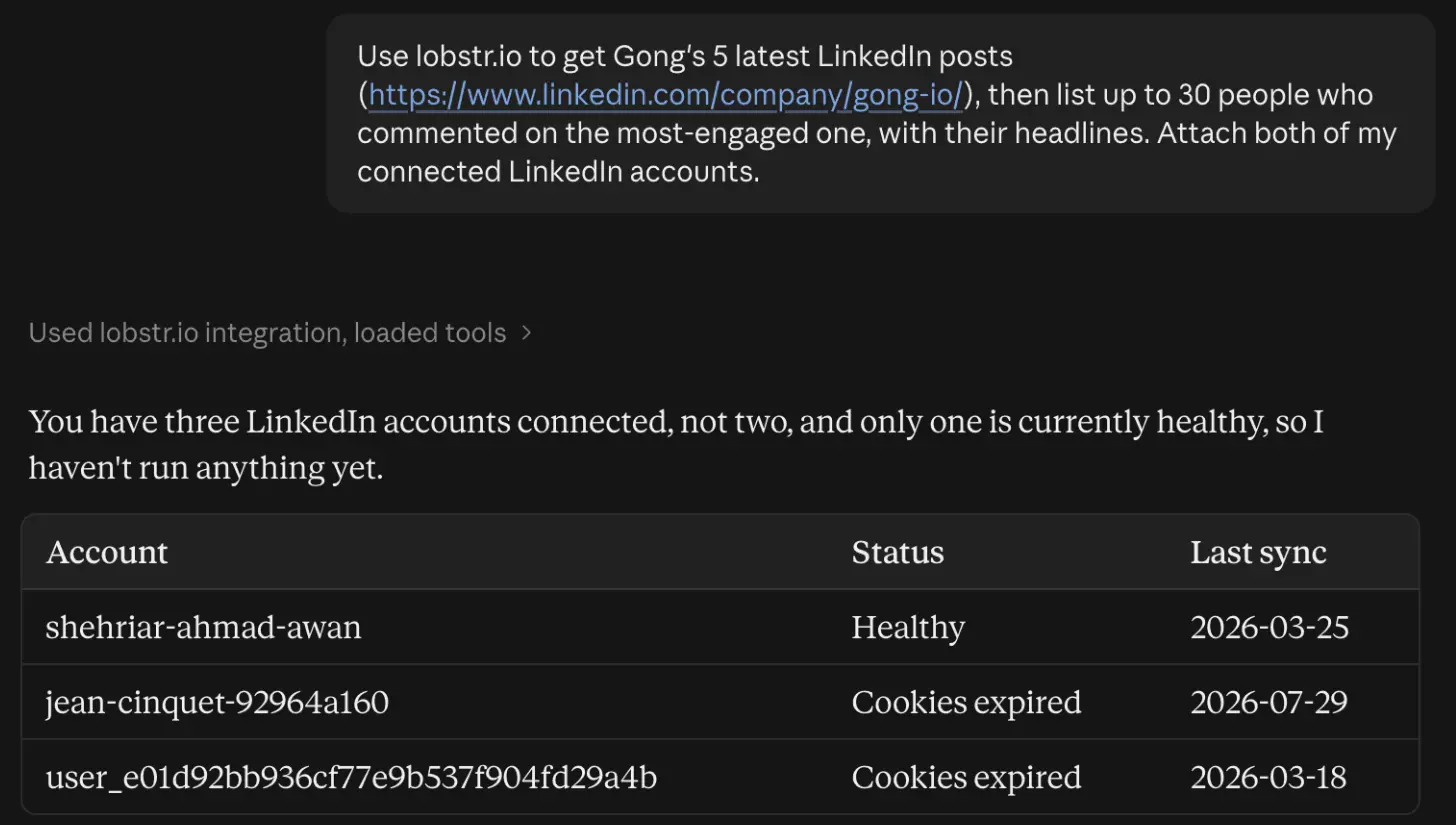
A fresh sync in the extension fixes an expired one.
With one healthy account, Claude attaches it on its own, and with more, you name the one you want.
And LinkedIn gives every account a daily limit.
Synced?
Now for leads.
Step 5: Turn a LinkedIn search into leads with work emails
The Leads scraper reads a regular LinkedIn people search, so build the search on LinkedIn and paste its URL.
"Leads" here means people from that search, not Sales Navigator's saved leads, which get their own scrapers in step 11.
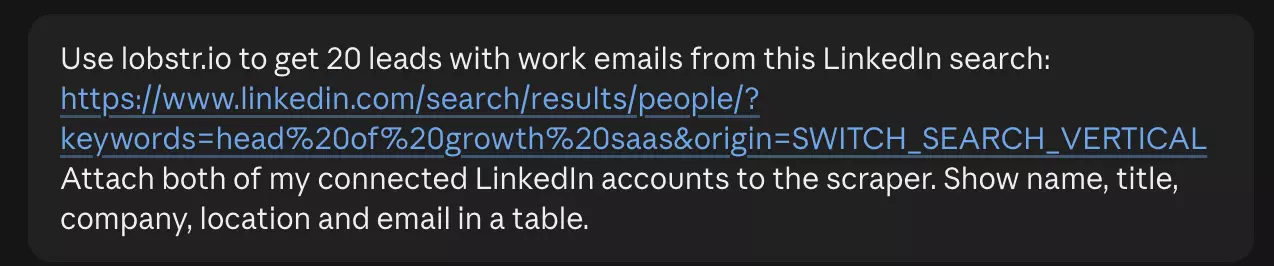
Use lobstr.io to get 20 leads with work emails from this LinkedIn search: https://www.linkedin.com/search/results/people/?keywords=head%20of%20growth%20saas&origin=SWITCH_SEARCH_VERTICAL Attach both of my connected LinkedIn accounts. Show name, title, company, location and email in a table.f
Here's how that looks in Claude, search URL and all:
Then the confirmation gate kicks in.
Above 100 credits, run_scraper won't launch until you say yes, so Claude comes back with its setup and cost first:
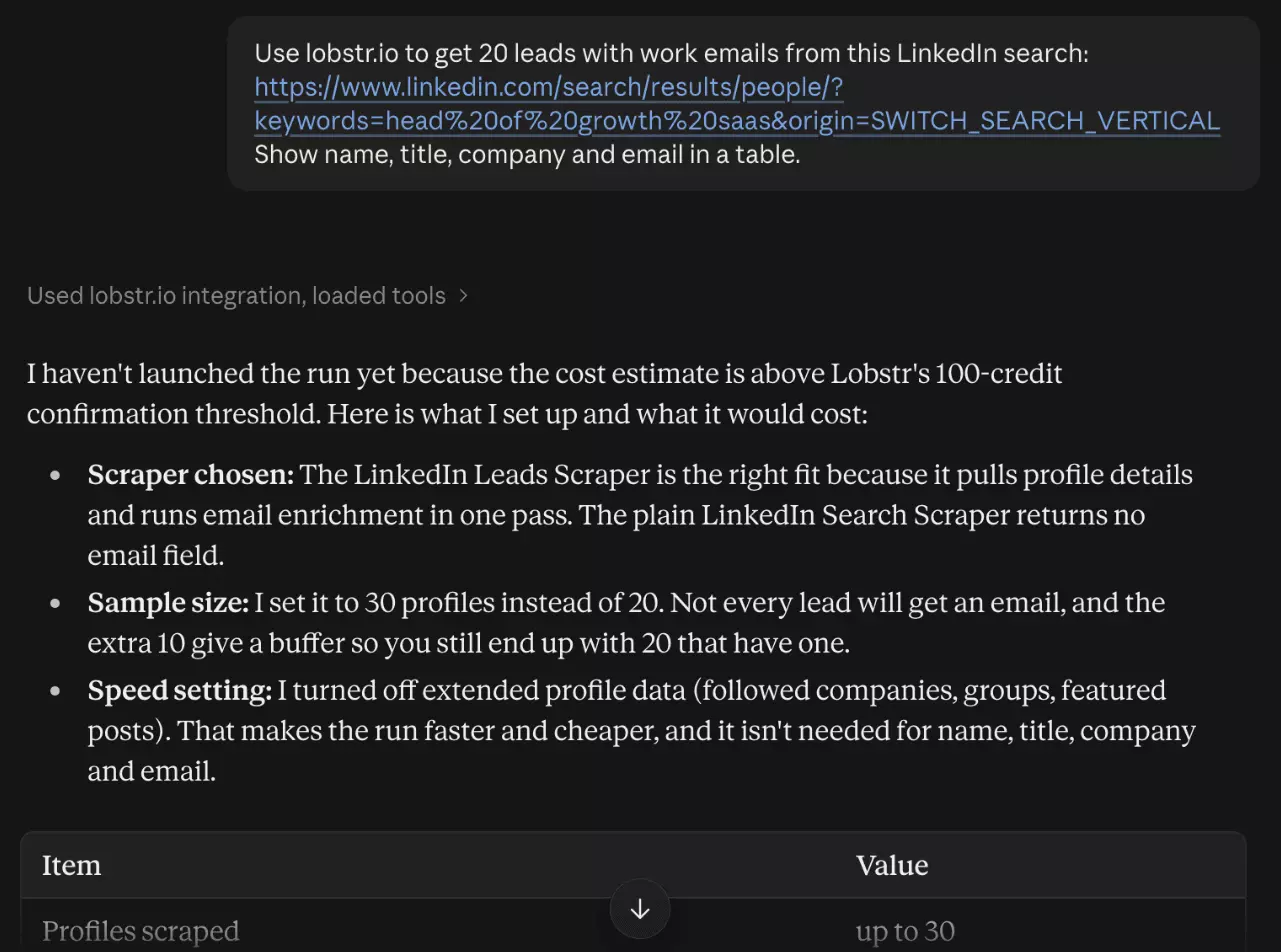
Read it before you confirm, in case Claude left out a setting you wanted.
You get each lead with their title, company, location and work email:
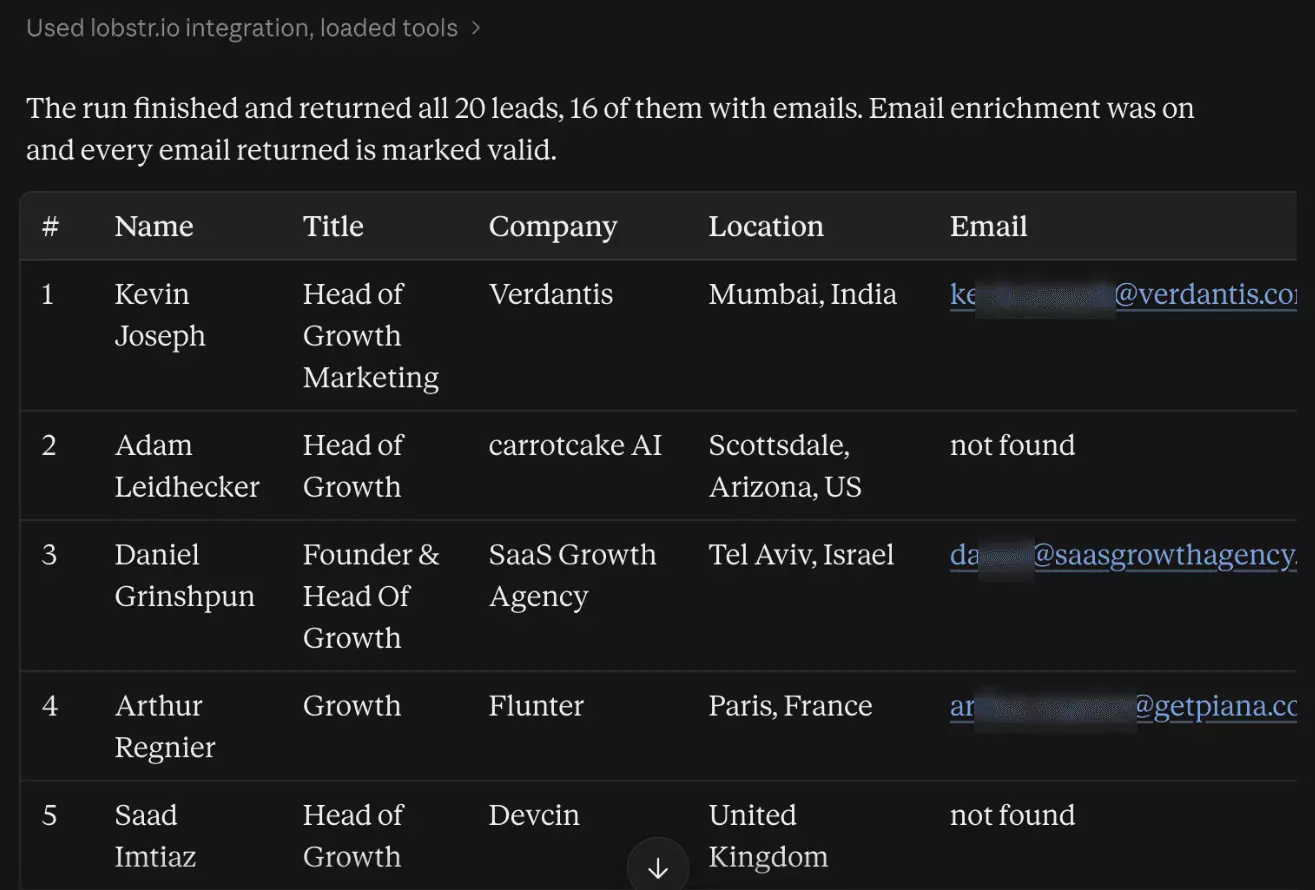
A search spans companies.
What if you want everyone at one company?
Step 6: List a company's employees
This prompt runs 2 scrapers back to back:
Use lobstr.io to list 15 people who work in sales at Gong (https://www.linkedin.com/company/gong-io/), then pull the full LinkedIn profiles with work emails of the 5 most senior ones. Attach both of my connected LinkedIn accounts.f
Company Employees goes first, with each person's name, headline and connection degree:
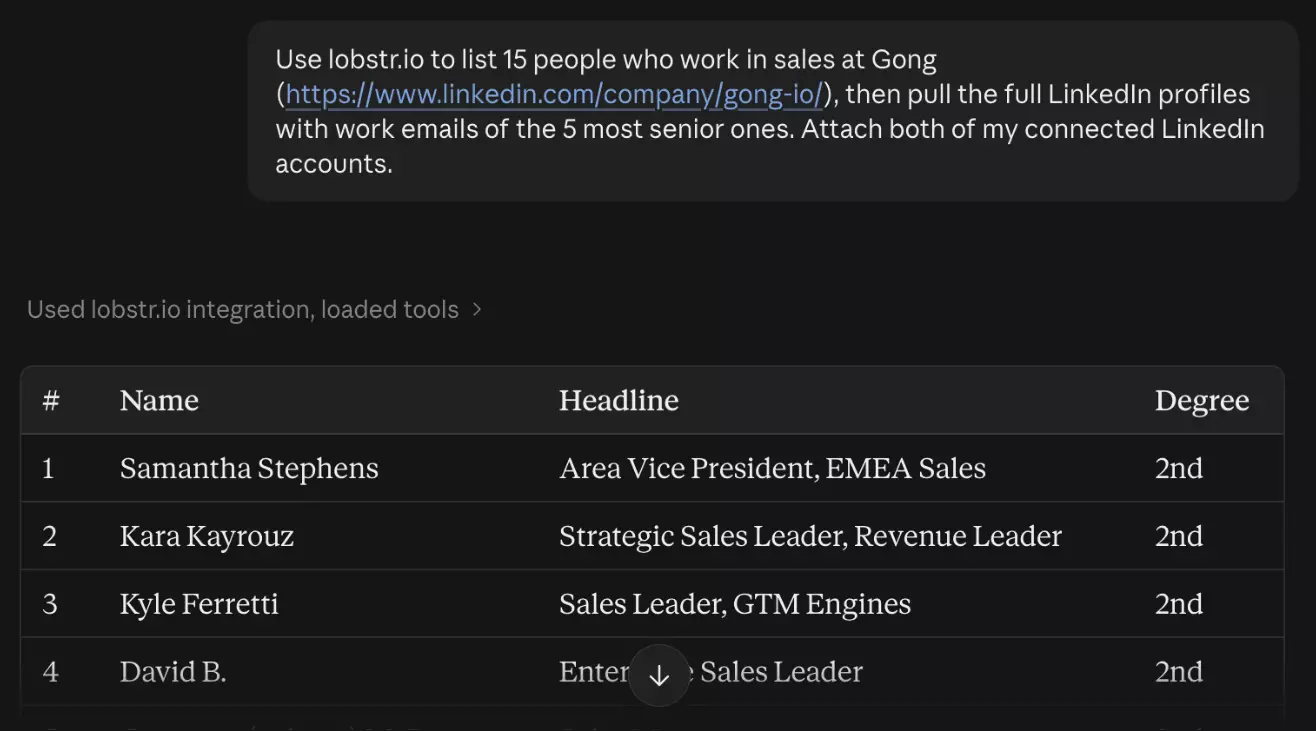
The keyword matches loosely, so "sales" can also catch sales recruiters.
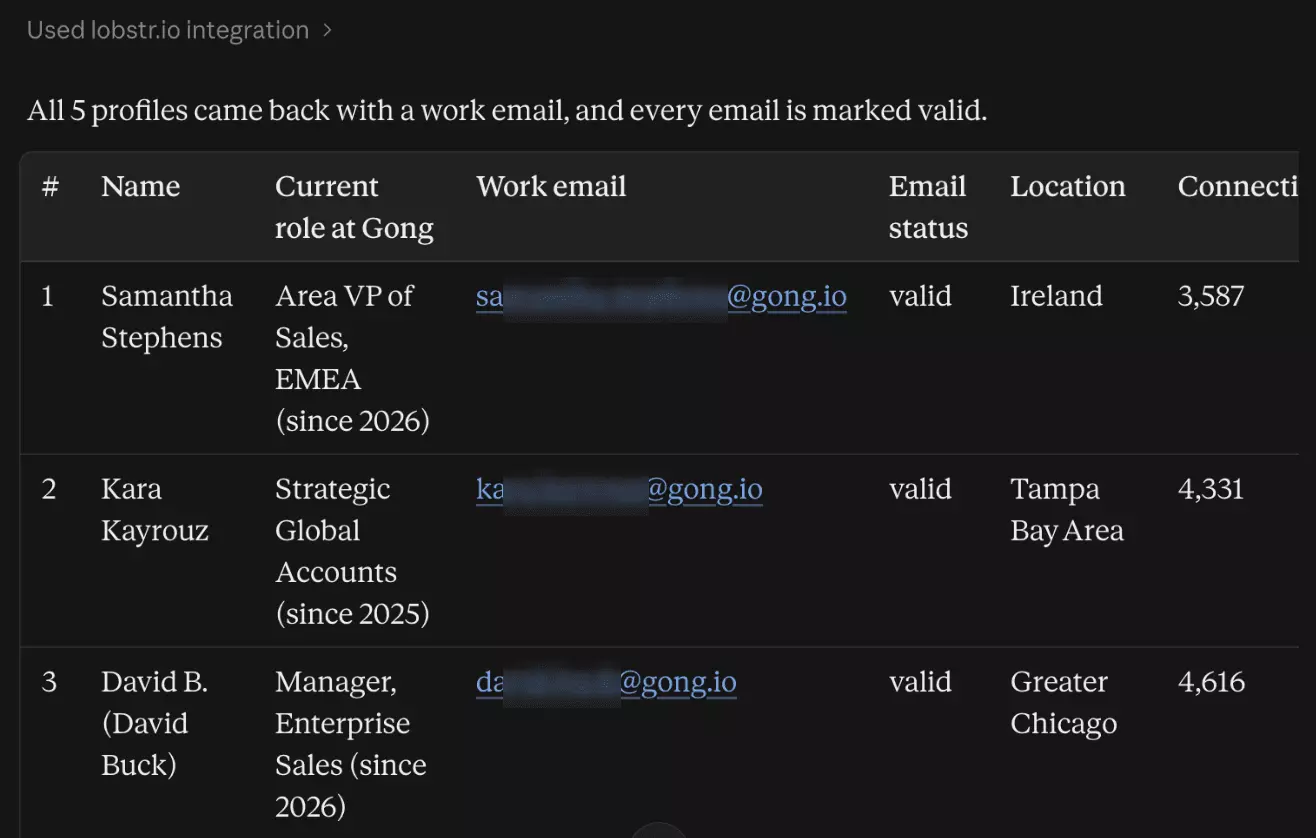
Then Claude takes the 5 most senior to the Profile scraper.
Step 7: Pull full profiles with work emails
Each profile comes back with the current role, location, connections and an @gong.io work email:
Prefer the dashboard?
People are half of it.
What a company posts, and who reacts, is the other half.
Step 8: Grab a company's latest posts
This prompt pulls a company's posts, then the people who commented:
Use lobstr.io to get Gong's 5 latest LinkedIn posts (https://www.linkedin.com/company/gong-io/), then list up to 30 people who commented on the most-engaged one, with their headlines. Attach both of my connected LinkedIn accounts.f
You get each post with its likes, comments and shares:
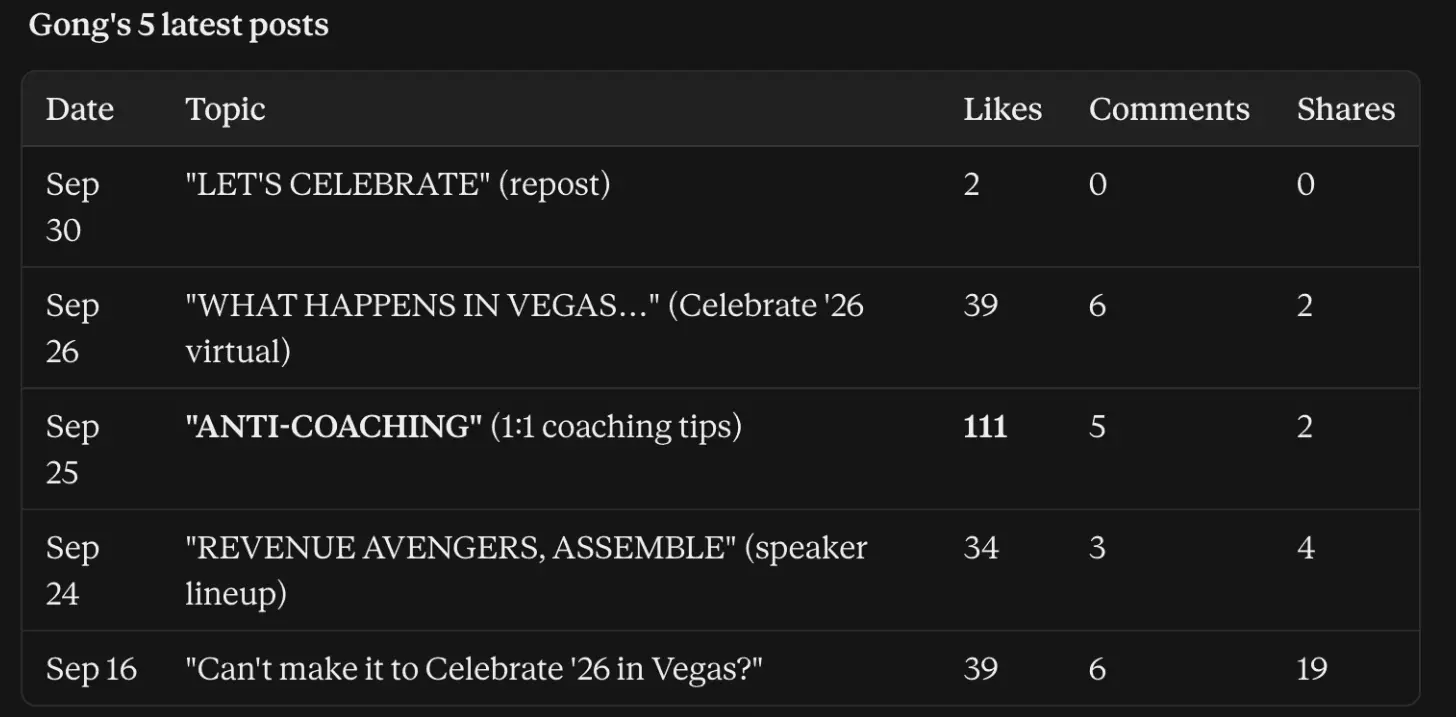
The most-engaged one is where the commenters come in.
Step 9: See who commented
Same prompt, second half.
Claude passes the top post's URL to Commenters & Likers:
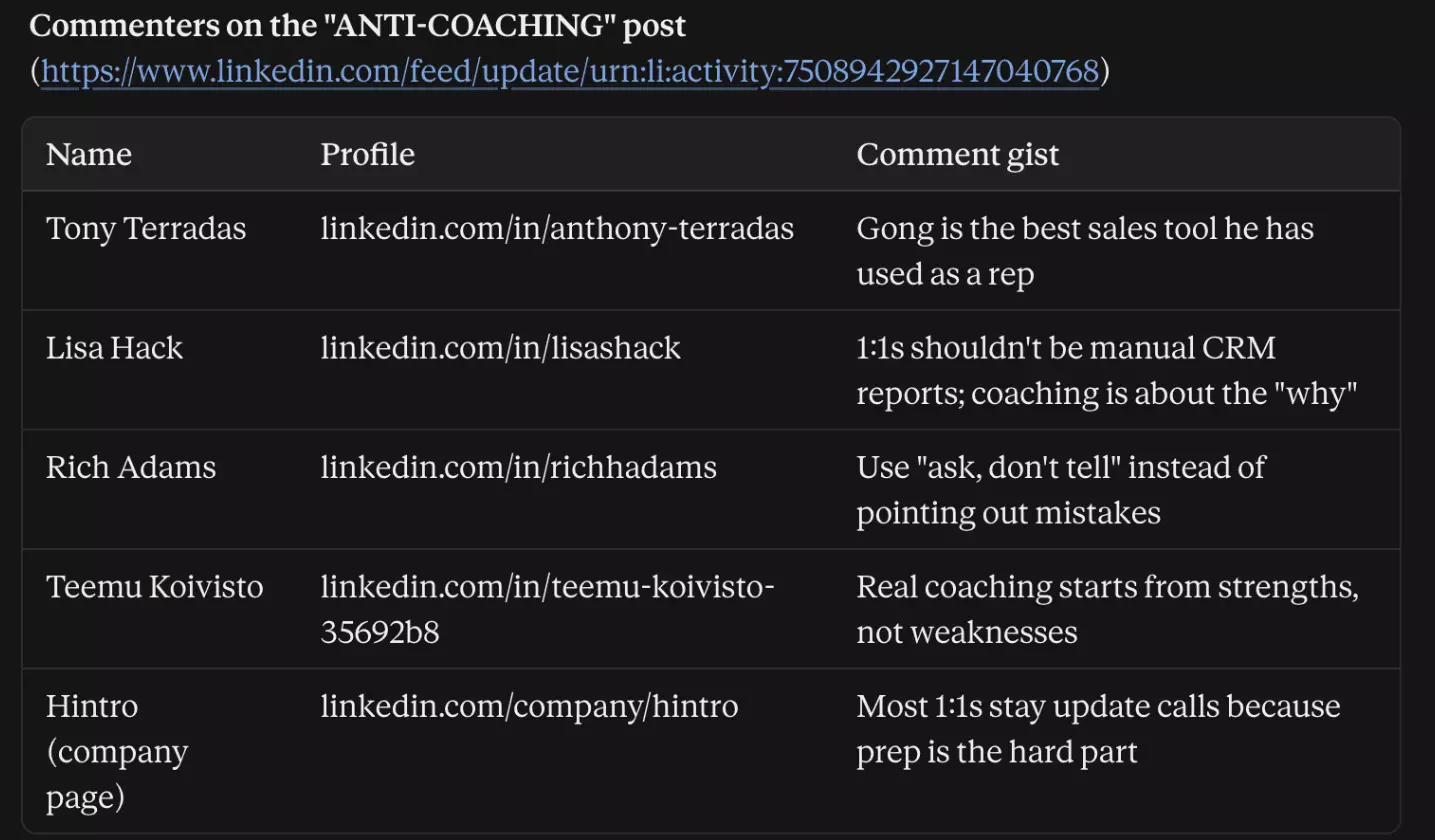
Each one comes with a name, a profile URL and the comment.
For headlines and emails, send those URLs to the Profile scraper, like step 7.
And one prompt does a bit of all of this.
Step 10: Use Search as the all-in-one
Search takes any LinkedIn people, company or post search URL, and can add each result's details:
Use lobstr.io to pull 15 companies from this LinkedIn company search, with company details: https://www.linkedin.com/search/results/companies/?keywords=sales%20engagement%20software Attach my healthy LinkedIn account. Show name, industry, size, HQ, website and followers in a table.f
Claude returns the companies with their details:
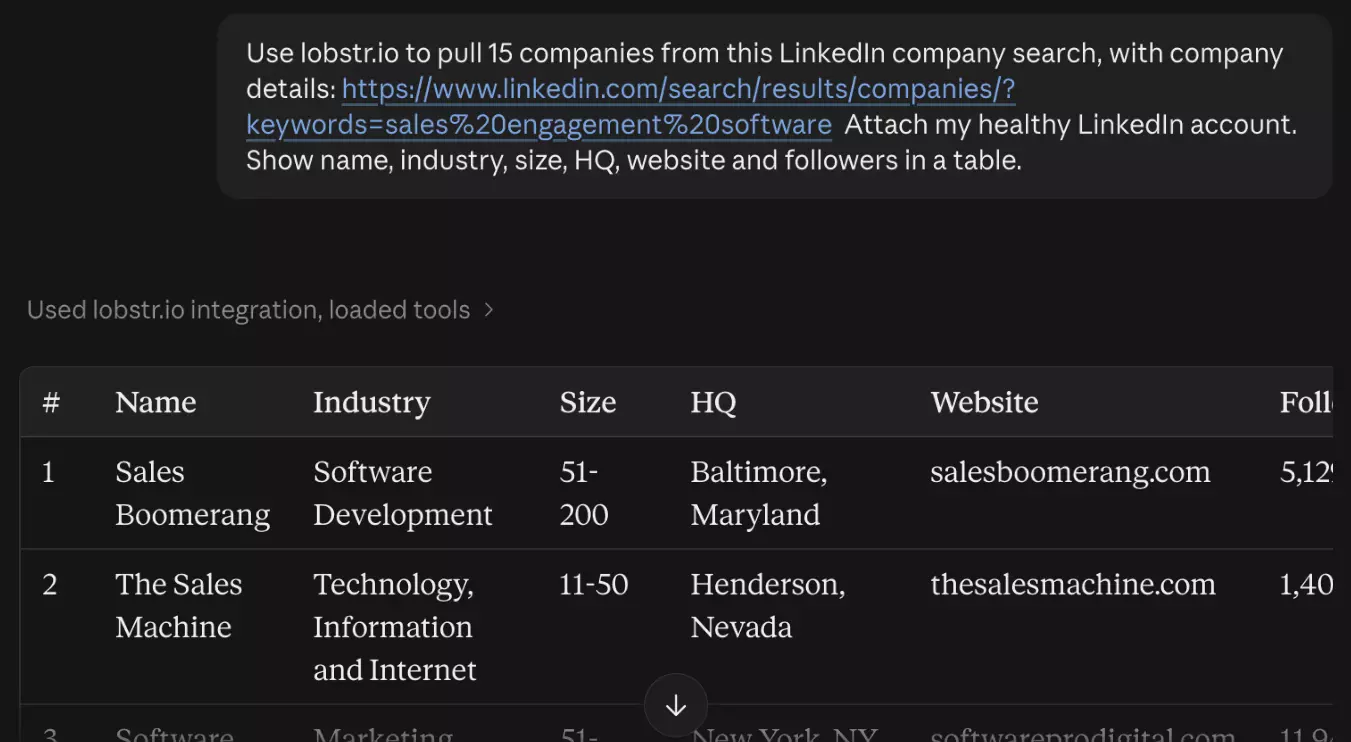
The catch is LinkedIn's own search.
It matches loosely, so a broad keyword pulls in plenty of companies that don't fit.
Pro tip
Refine the search on LinkedIn until the first page looks right, then paste that URL.
And if you live in Sales Navigator?
Step 11: Sales Navigator works the same way
lobstr.io has three more scrapers for Sales Navigator, for leads, companies and profiles.
The basics are the same, so if you have a Sales Nav seat, it's just prompting.
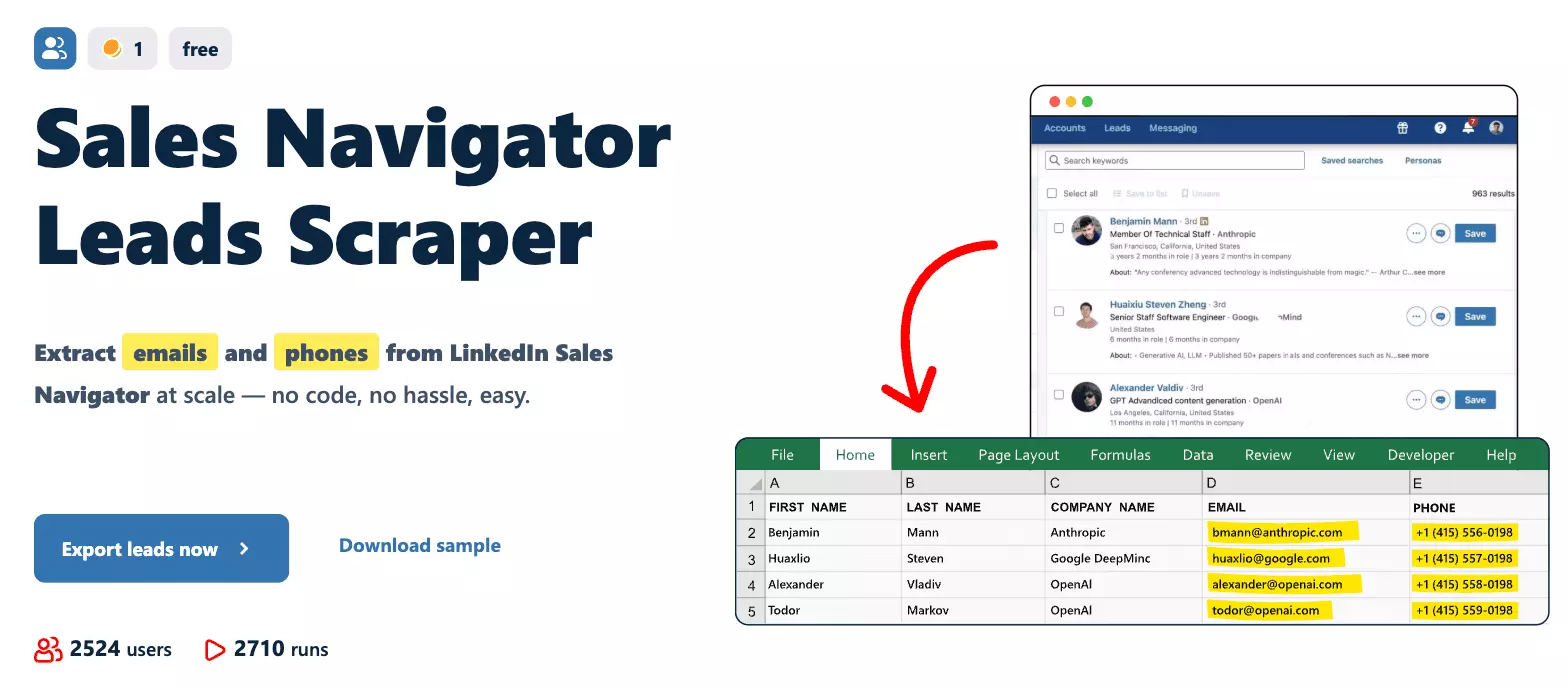
The prompt takes a Sales Navigator search URL, and the scrapers need a synced Sales Navigator account, because a LinkedIn account can't run them.
I'm giving the Sales Navigator MCP its own article soon.
So you've got the data.
What now?
What can you do with your LinkedIn data?
The data gets really useful once a few AI agents work on it together.
Here are 3 setups you can run with Claude or ChatGPT on top of lobstr.io's MCP.
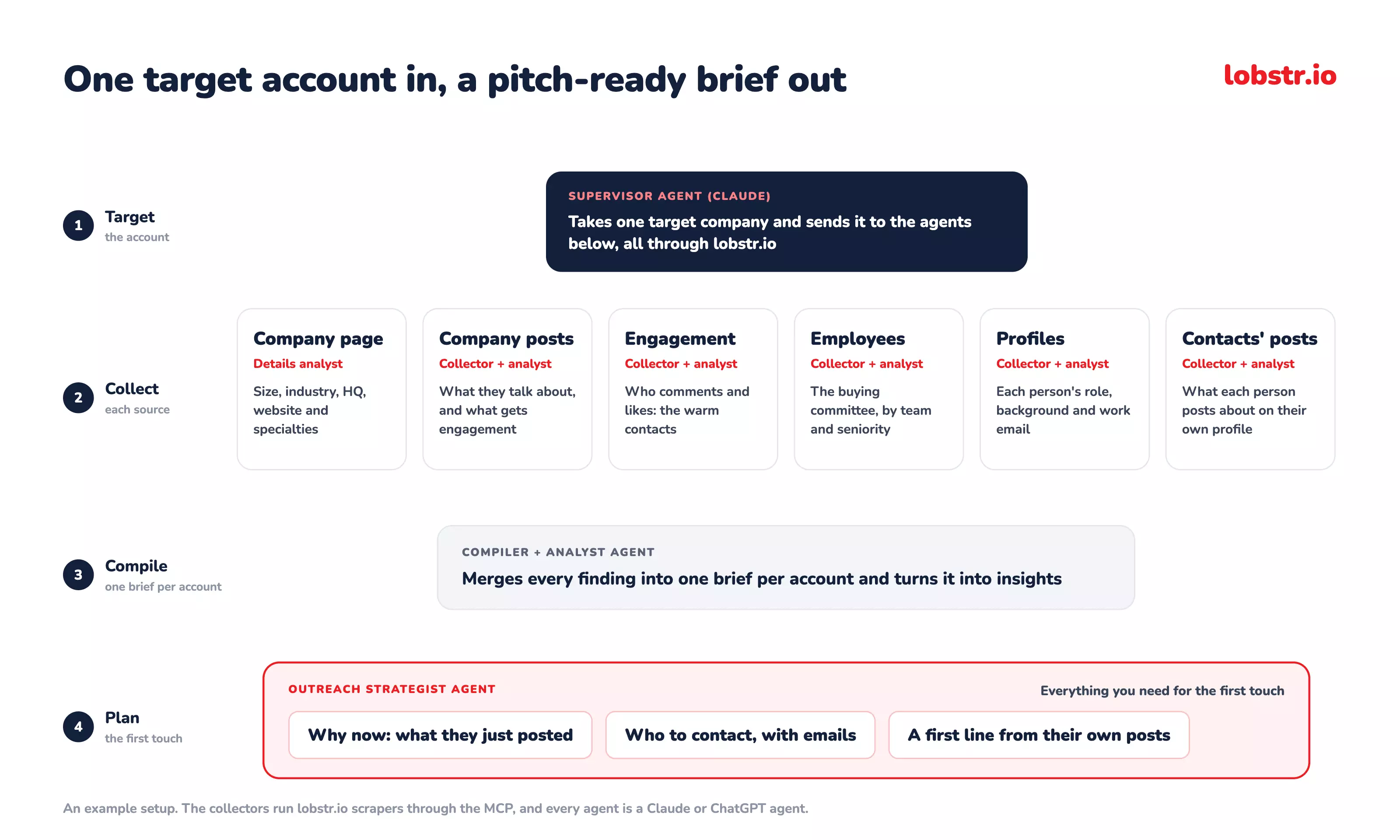
An account brief before the first touch
Give Claude one target company, and it comes back with what the company posts about, who sits on the buying committee, what each of them posts on their own, and a first line for each person.
Outreach on hiring signals
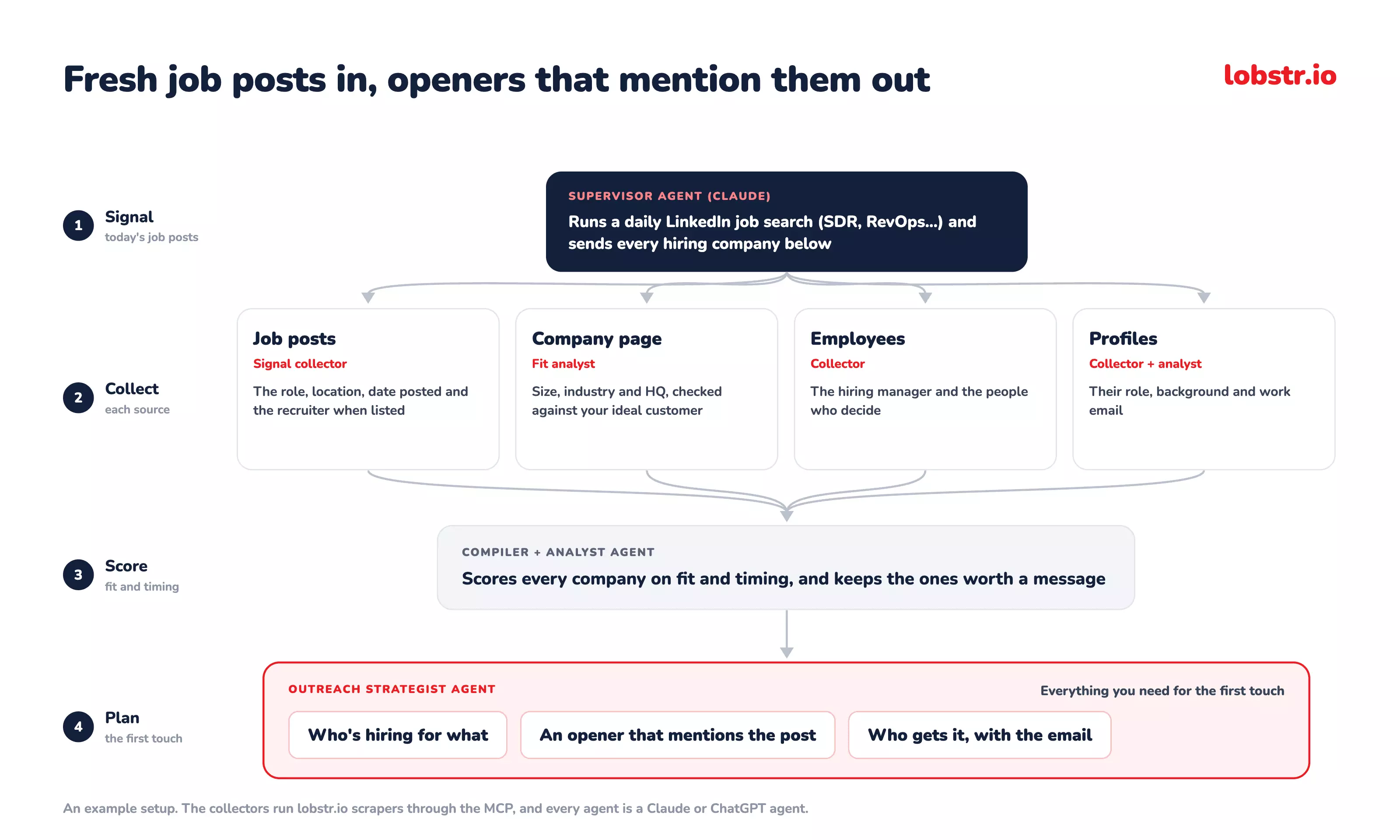
A company hiring SDRs this week is building a sales team, so every fresh job post becomes a reason to reach out.
The agents find the decision-maker, check the company fits, and write an opener around the post.
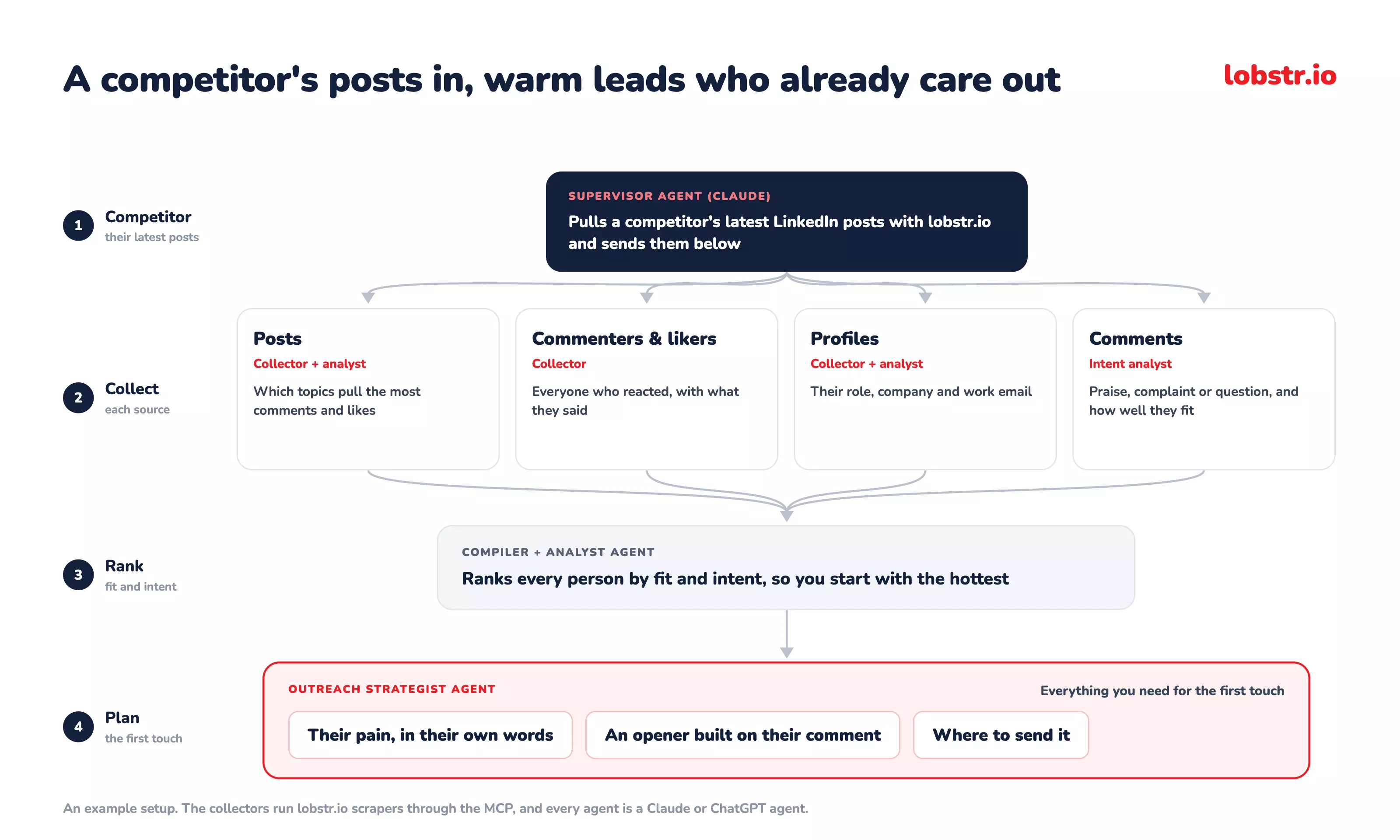
Warm leads from a competitor's audience
The people commenting on a competitor's posts already care about the problem you solve.
Claude ranks them by fit and intent, then writes each one an opener built on their own comment.
Still have questions?
Let's go through them.
FAQs
Is there an official LinkedIn MCP server?
No, LinkedIn doesn't publish one, and neither does Microsoft.
The closest official route, Microsoft's LinkedIn connector in Foundry, only posts articles and lists the company pages you admin.
Is there a LinkedIn MCP for Claude?
Not from LinkedIn, but lobstr.io's works as a custom connector on claude.ai, Claude Desktop and Claude Code.
https://mcp.lobstr.io/mcpHow do I get started with a LinkedIn MCP server?
Connect one URL and start with a job search, because it needs no LinkedIn account.
https://mcp.lobstr.io/mcpCan a LinkedIn MCP find work emails?
lobstr.io's does, and returns each one with its status.
You pay 9 credits per email found, and nothing when it can't find one.
Can ChatGPT scrape LinkedIn profiles?
ChatGPT-User, and ChatGPT agent "is no longer available", per OpenAI's help page.With lobstr.io's MCP connected, it runs the same scrapers as Claude.
Can I give Claude access to my LinkedIn?
Not your password, just a synced session, set up once with lobstr.io's Chrome extension.
Claude can then list your accounts and attach one to a run, but it can't sync or change an account itself.
Is scraping LinkedIn legal?
It depends on what you collect and how you use it, and LinkedIn's own lawsuits show where the lines sit.
Final thoughts
LinkedIn keeps Claude and ChatGPT out, publishes no MCP of its own, and writes the lead-list use case out of its API terms.
None of that stops Claude working on LinkedIn.
With an MCP in front of it, all of that is one plain-English prompt away.
One chat, verified work emails included.