Google Maps MCP: Local Leads With Verified Emails in Claude & ChatGPT
15-Second Summary
- I needed every dentist in Chicago with 100+ Google reviews, and a way to reach them. ChatGPT and Claude both had a go, and both came with very basic data
- ChatGPT never opened Google Maps. Most of its 185 dentists came from somebody else's directory
- Claude went to the source but stopped at 132, with no emails and no websites
- Google's official Maps MCP servers are a dead end for leads, and its terms forbid the use case anyway
- lobstr.io's MCP pulled 700+ dentists from live Google Maps, 80+ data points each including bounce-verified emails
- This guide gives you a complete walkthrough of how you can do it
Not just any leads, either. I wanted every dentist in Chicago with more than 100 Google reviews, and their bounce verified emails + social links to actually reach them.
But getting there took two chatbots, the official Google MCP servers and one lesson about ZIP codes. 😅
And I wasn't the only one hunting. I found somebody on r/localseo asked whether anyone else was still scraping Google Maps for client leads by hand:
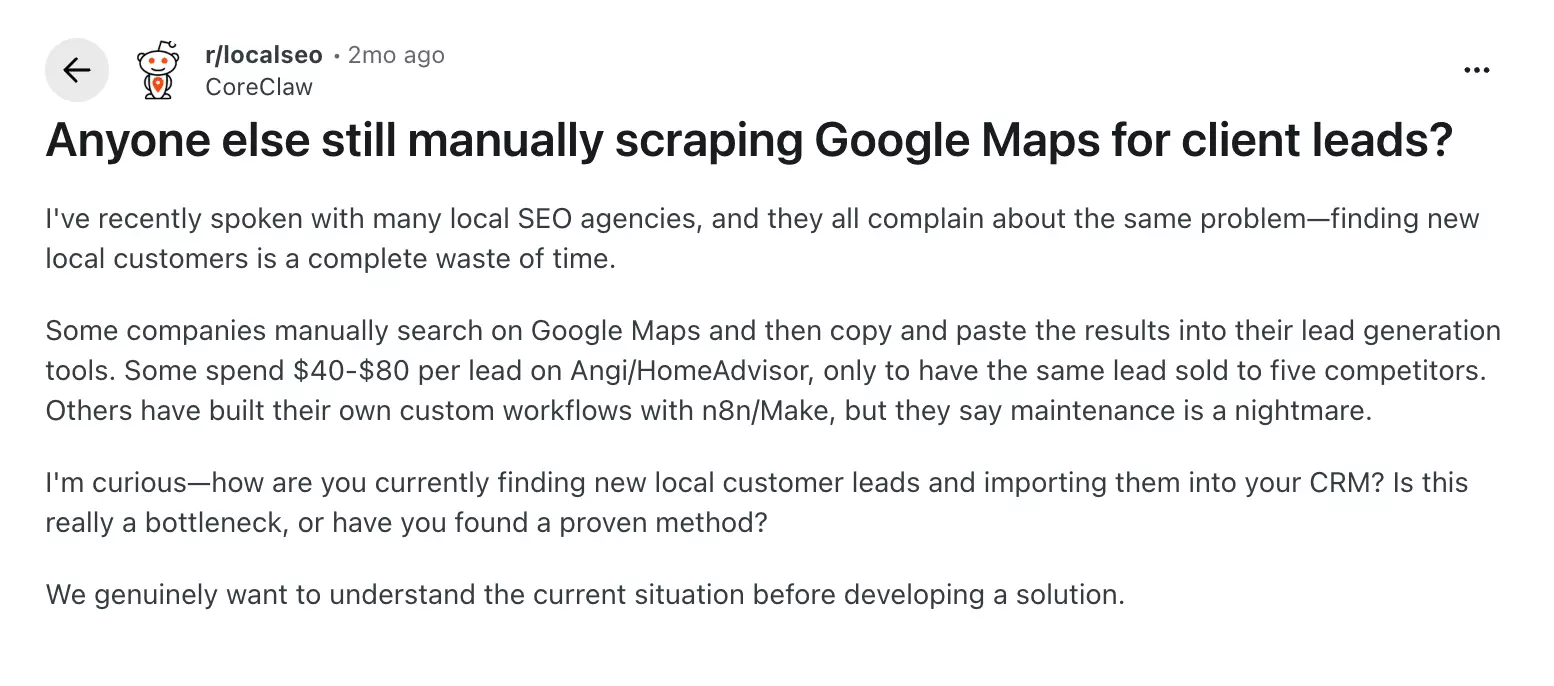
The agencies they'd talked to were either paying $40 to $80 a lead or copy-pasting from Maps into their lead tools. That's a lot of money, or a lot of wasted afternoons.
So I thought, can't AI just do this for me?
I started with ChatGPT.
Can ChatGPT or Claude find local leads on Google Maps?
Short answer: they'll find you some dentists, but not a list you can reach out to. And each one falls short in its own way.
What did ChatGPT find?
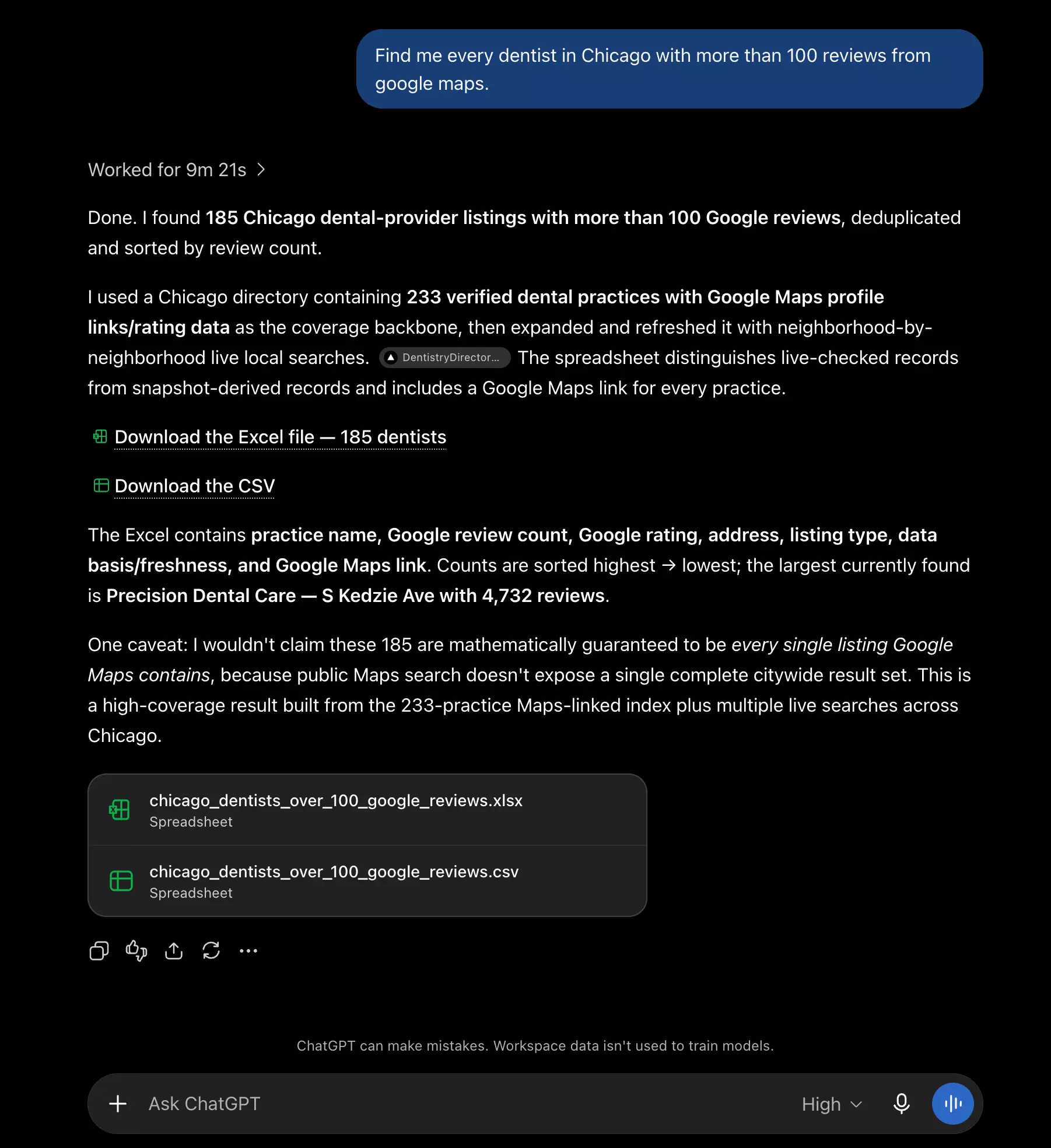
I kept the prompt simple: "Find me every dentist in Chicago with more than 100 reviews from google maps."
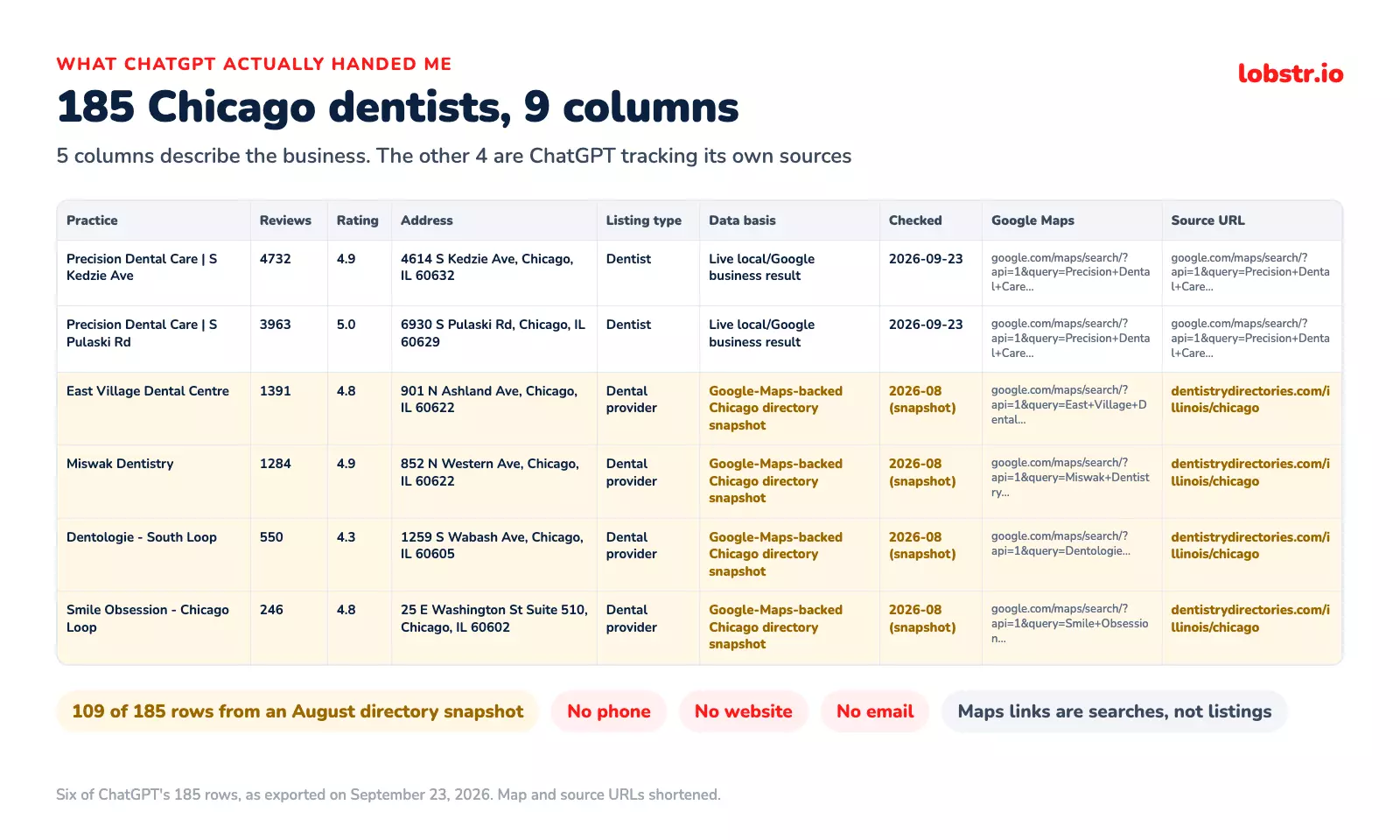
ChatGPT worked on it for 9+ minutes and came back with 180-ish dentists.
Sounded great. Right up until I read how it got them.
It never opened Google Maps. It started from a third-party dentist directory, topped it up with a few live searches and merged the two.
So I asked for Google Maps and got a copy of somebody else's copy of it.
Most of the list came from that directory's August snapshot, so the review counts were already stale: Smile Obsession in the Loop had 246 on ChatGPT's list and 391 on Maps.
And the spreadsheet itself? A name, a review count, a rating and an address. No phone, no website, no email.
So ChatGPT was out. Next up, Claude.
What did Claude find?
I expected the same story. But Claude surprised me. It actually went to the source.
places_search.It ran 20 searches, one per neighborhood, and came back with 132 dentists in about two minutes.
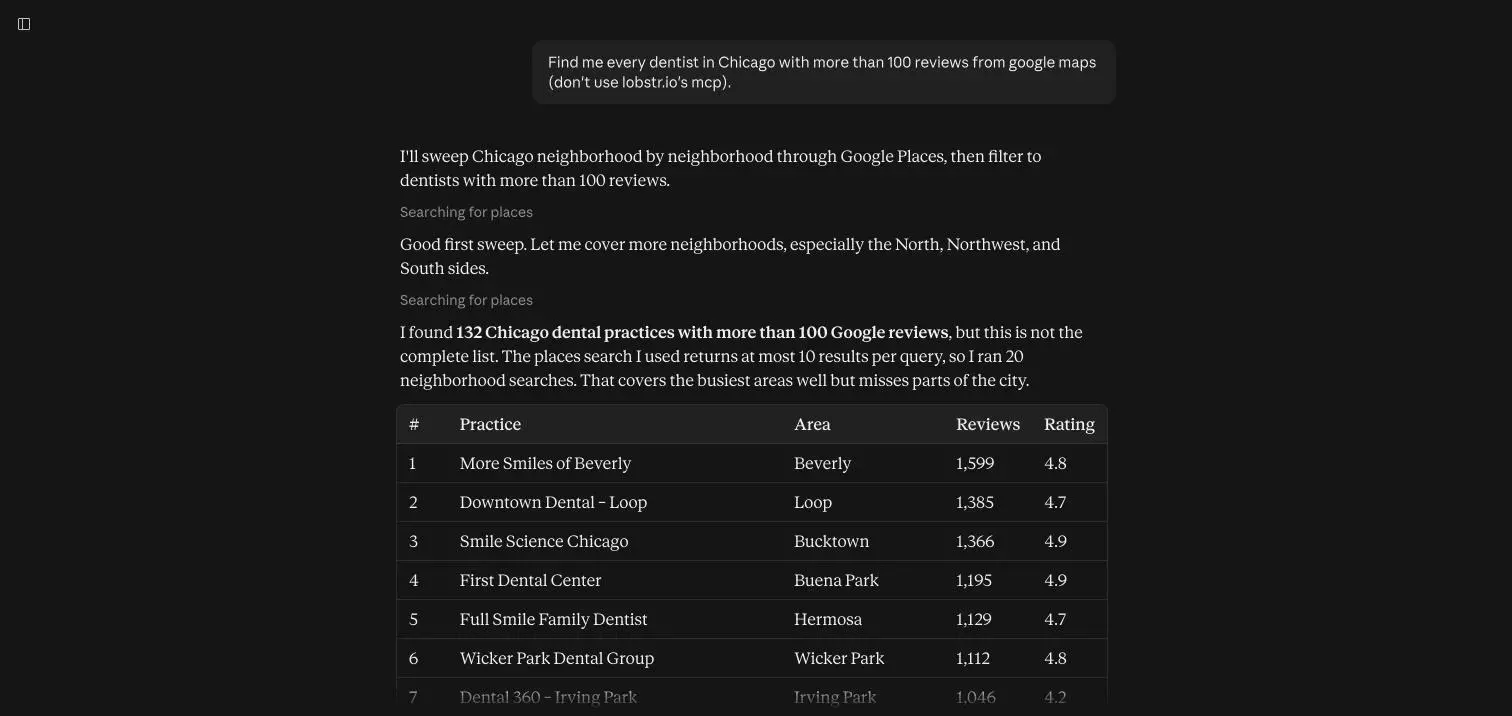
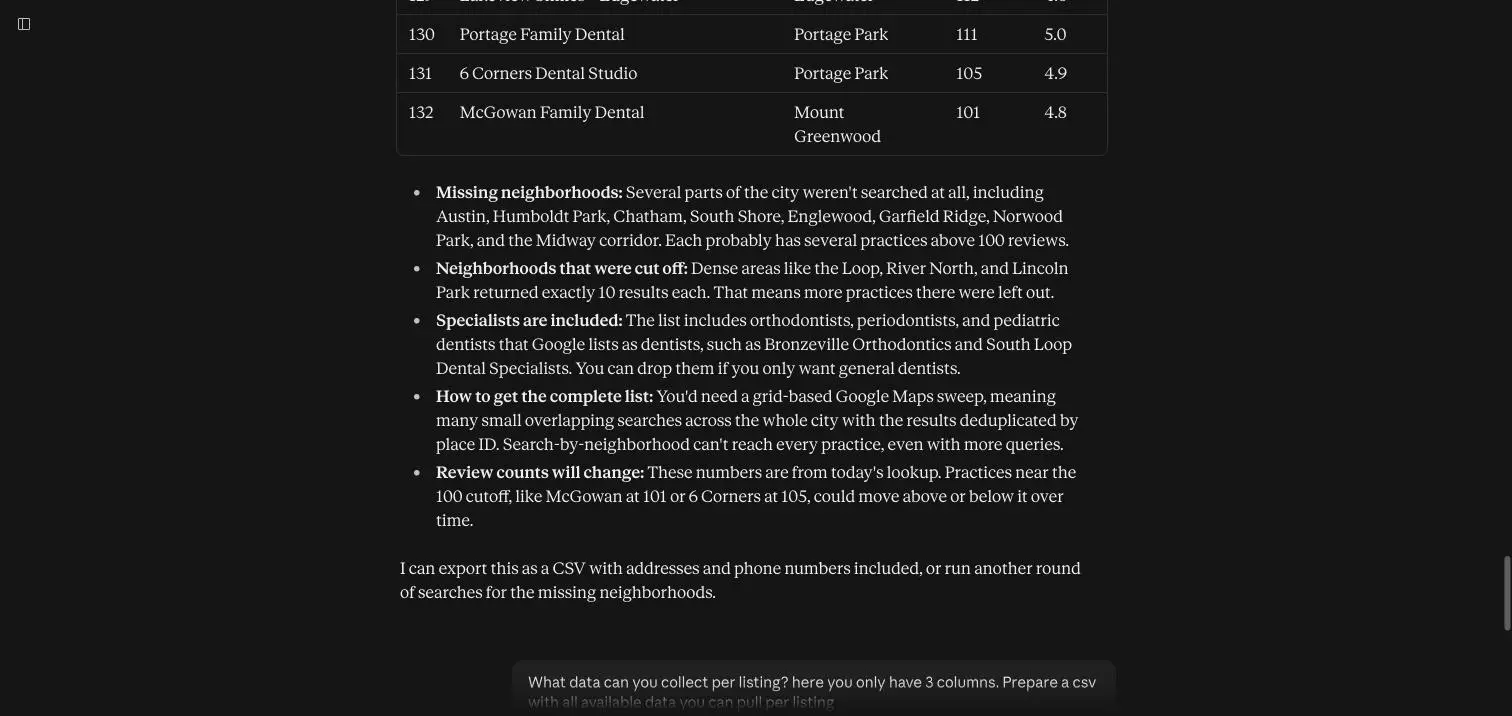
It also did something ChatGPT didn't. It told me the list wasn't complete, without me asking. Some neighborhoods had hit the tool's limit, and some were never searched at all.
So why not just run more searches?
places_search is a lookup tool, not a lead tool. Each search stops at 10 results and there's no next page, so a whole city was never going to fit.And even the dentists it found came with no way to contact them:
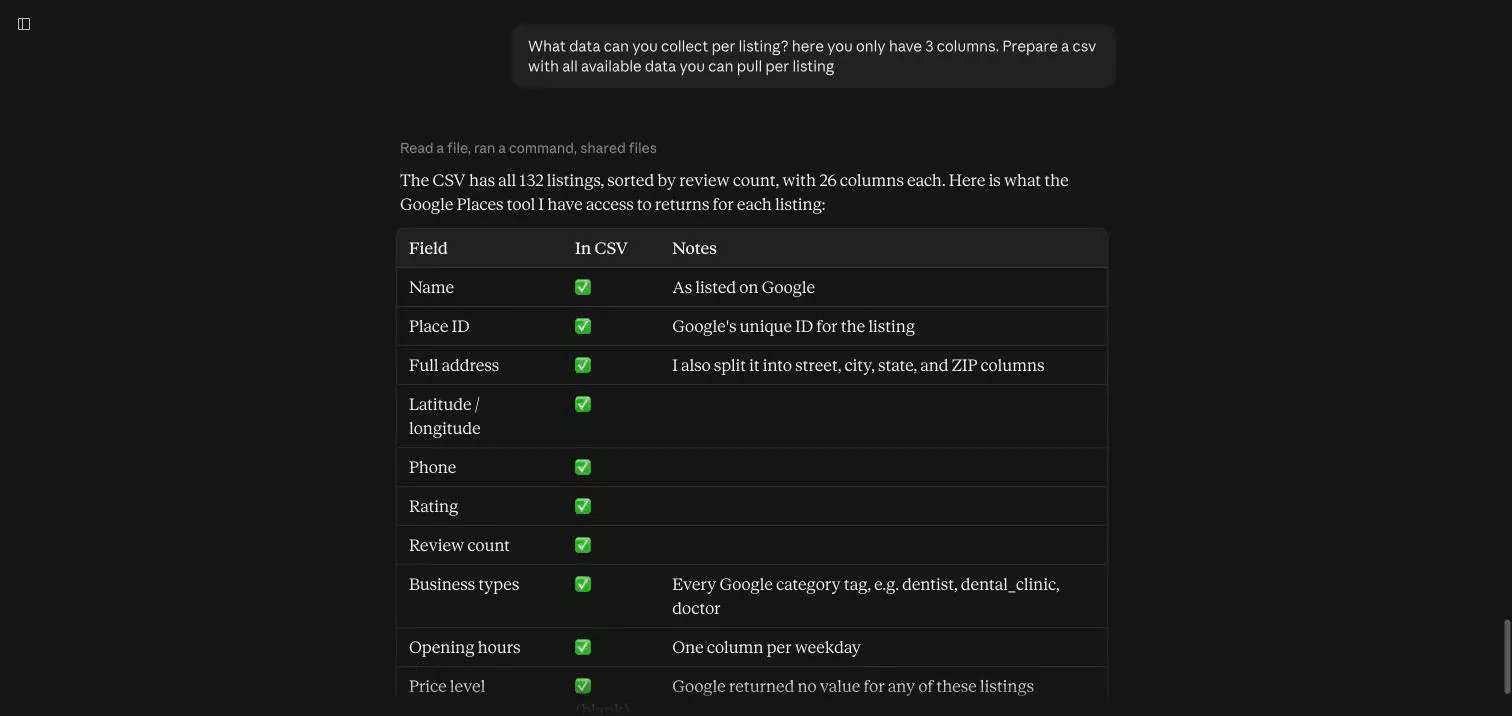
No email. That alone kills outreach. No website either, and that's actually worse, because the website is where you'd find the email.
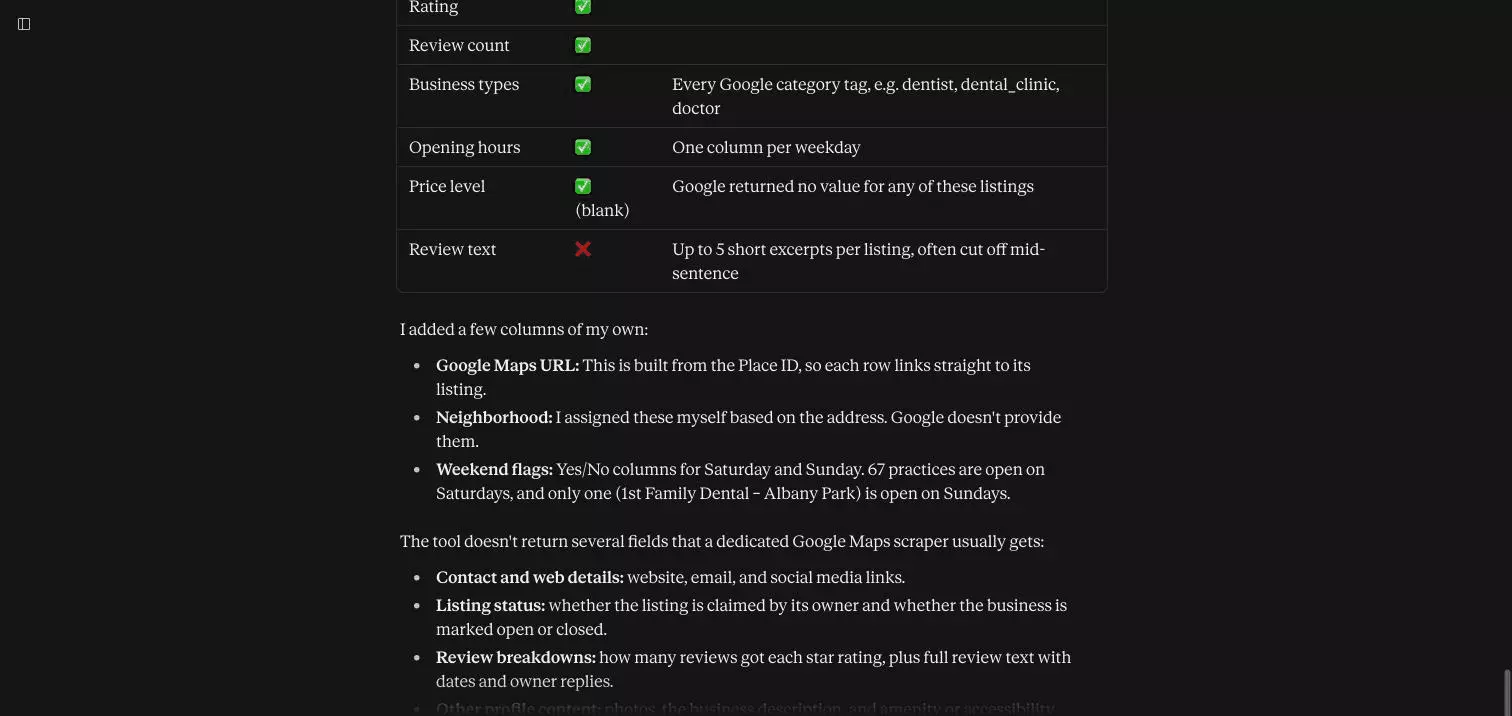
To be fair, Claude never pretended otherwise. When I pushed it, it put it better than I could:
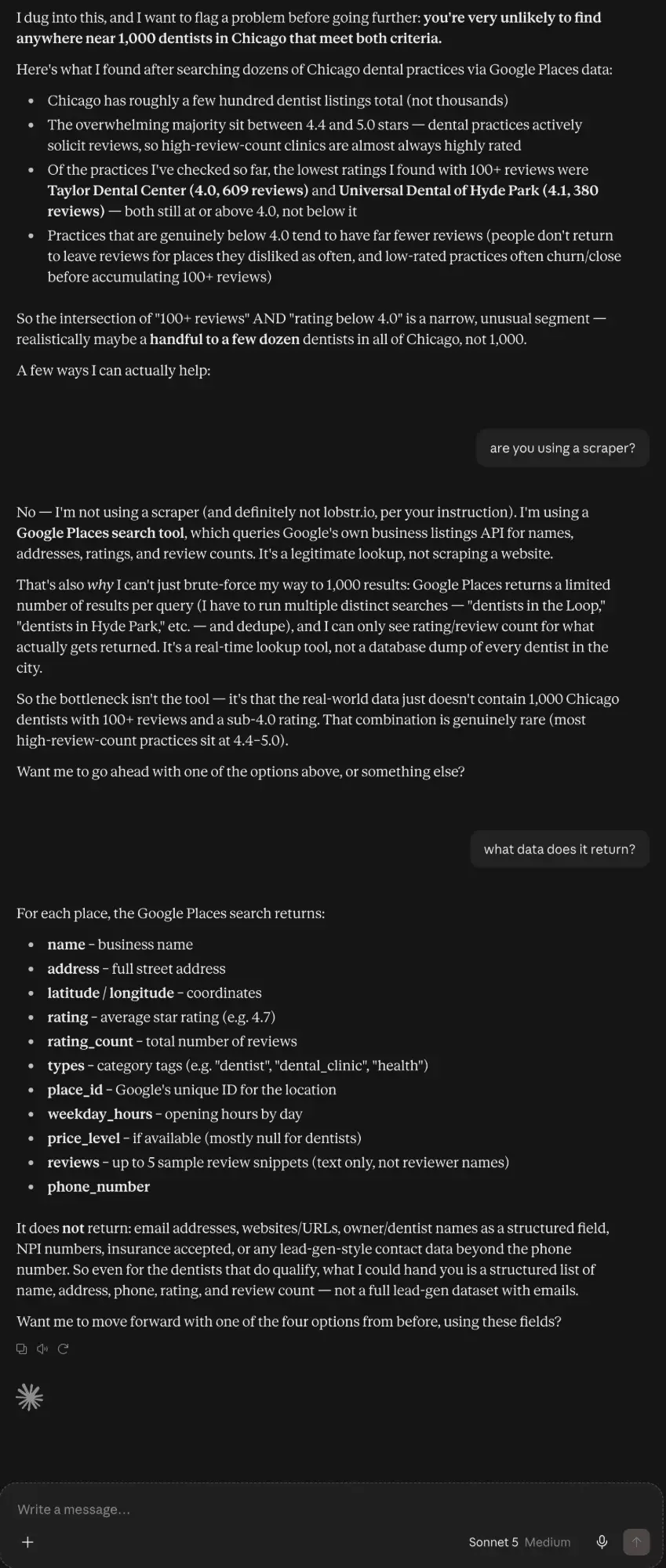
So I went looking for a Google Maps MCP. And the first place I checked was Google itself.
Is there a Google Maps MCP that can do it?
Does Google have an official Google Maps MCP?
Yes, Google has two, but neither one gives you a business email.
Maps Code Assist
It's free, experimental and built for developers. It feeds your model Google's own documentation so it can write Maps code without making things up.
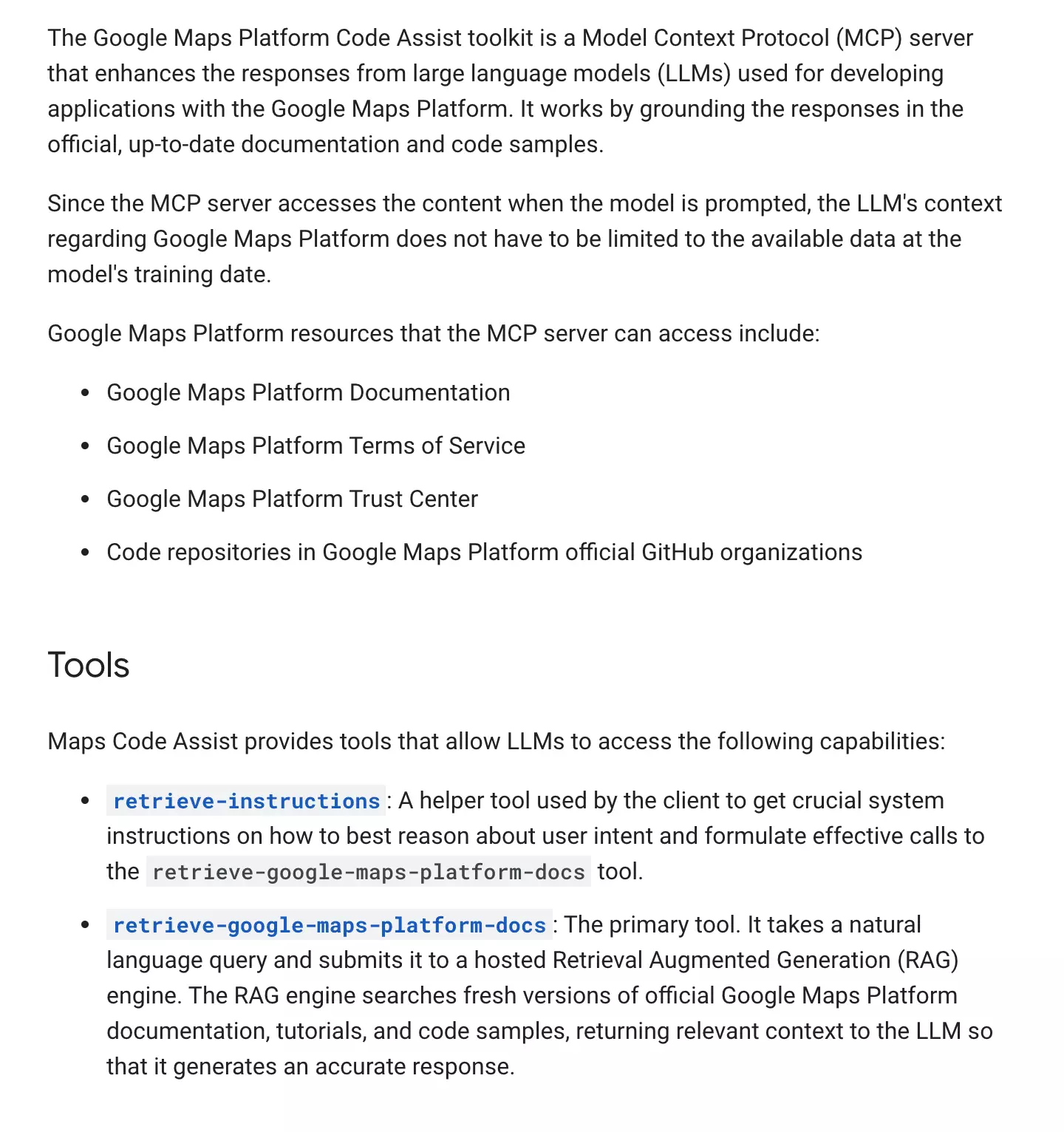
Great if you're building a store locator. No use if you want dentists.
Maps Grounding Lite
search_places. Then I read what it returns: an AI-generated summary, Place IDs, coordinates and Google Maps links.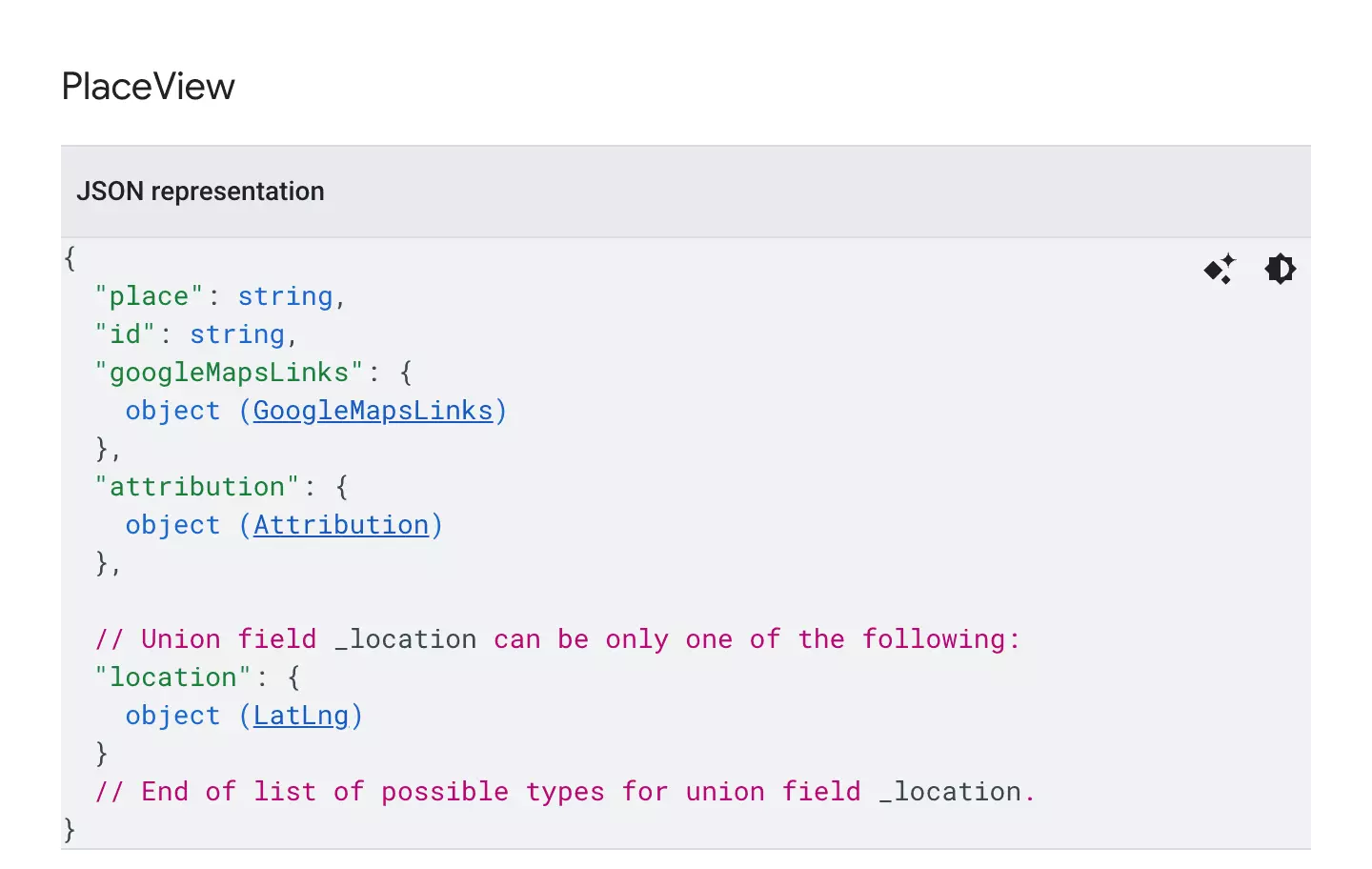
No phone, no website, no email. That's less than Claude's built-in tool already gave me.
And then I read the terms.
Can you use Google's MCP for lead generation?
No, Google's own terms rule it out.
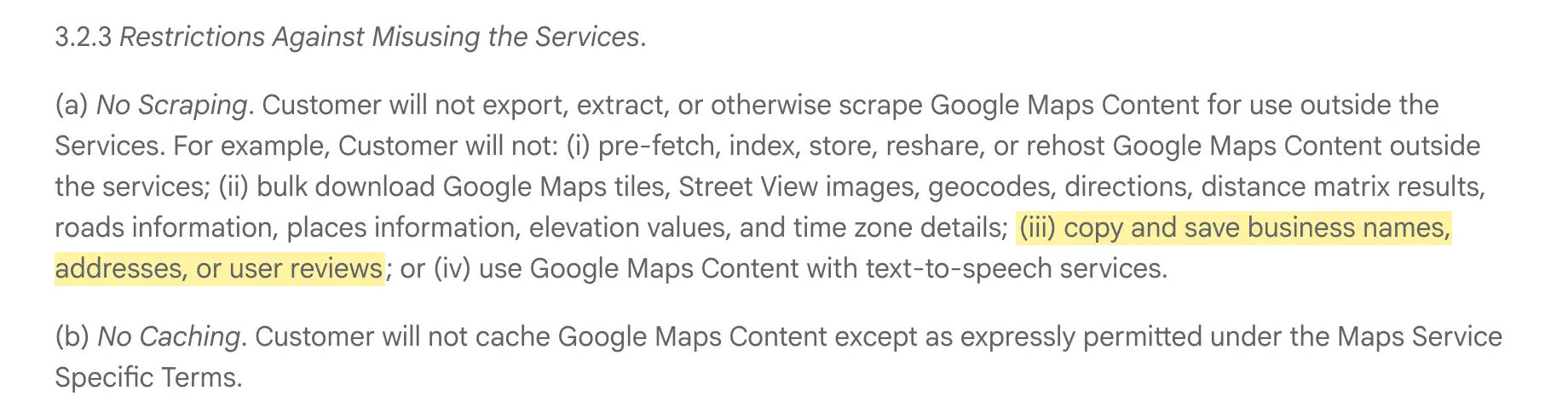
So the official route is a dead end twice. There's nothing worth exporting, and the terms say you can't export it anyway.
What about the unofficial ones?
What about third-party Google Maps MCPs?
modelcontextprotocol/google-maps, and it now sits in servers-archived.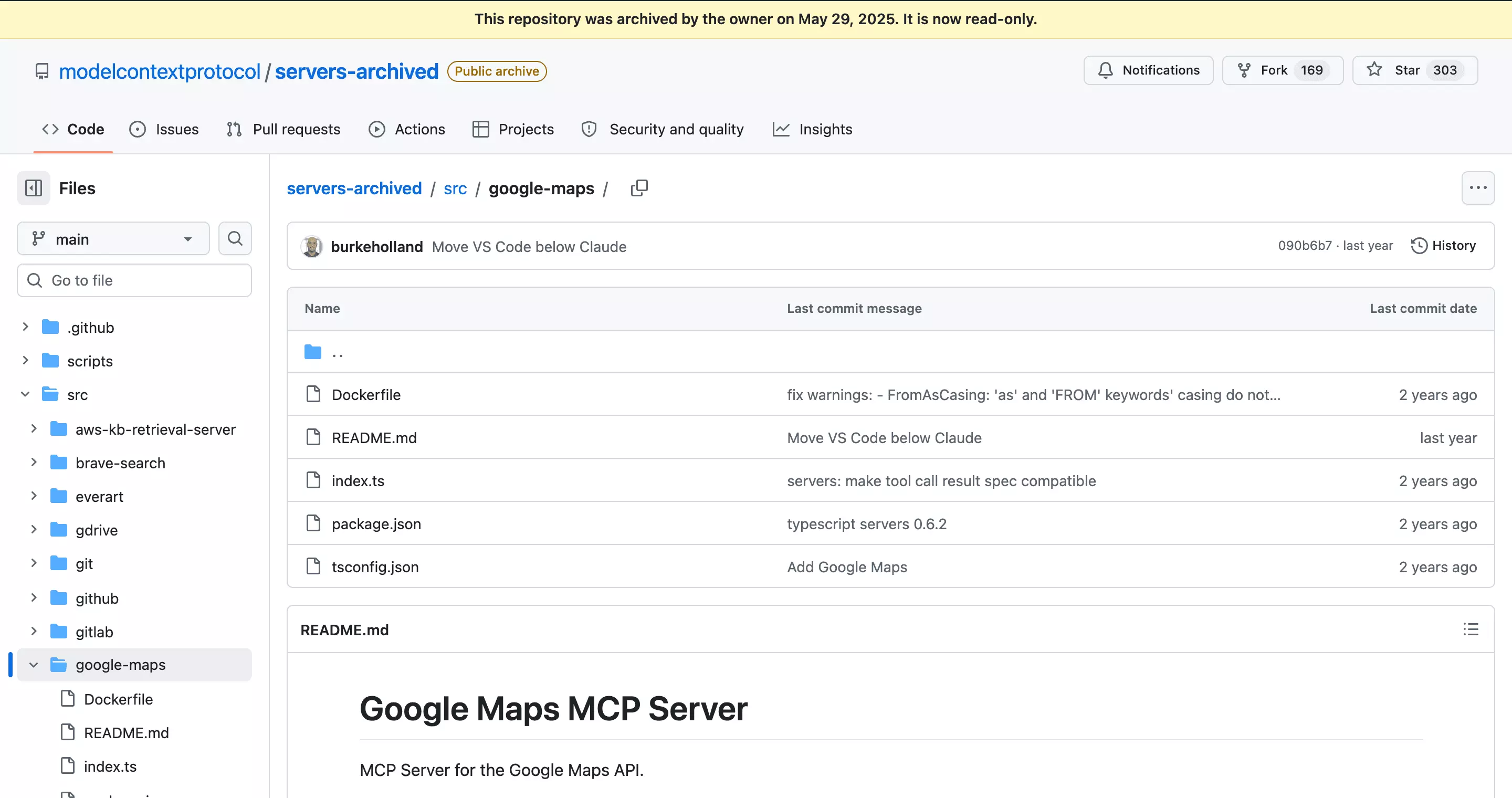
There are plenty of others, and some of them are good. But most split the job across separate tools: one to search the map, one to find emails and one to check them.
Each one is billed on its own, and your agent has to stitch the results together.
And "verified" often just means the domain exists. That's exactly how this founder ended up posting on r/Entrepreneurs:
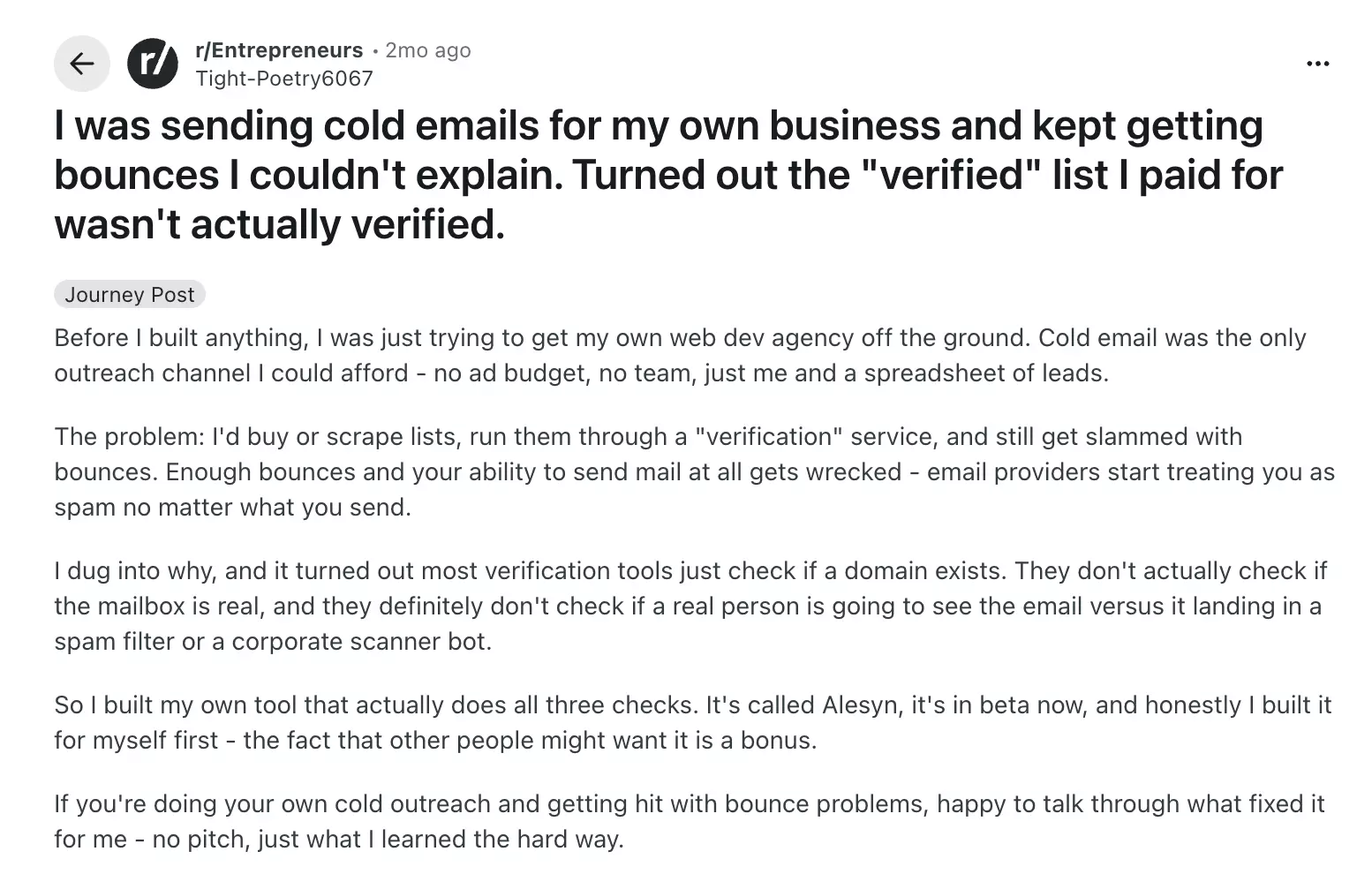
What I wanted was the whole job in one run: search, filter, find the emails and check they won't bounce. So I plugged in lobstr.io's.
How to get local leads with lobstr.io's Google Maps MCP
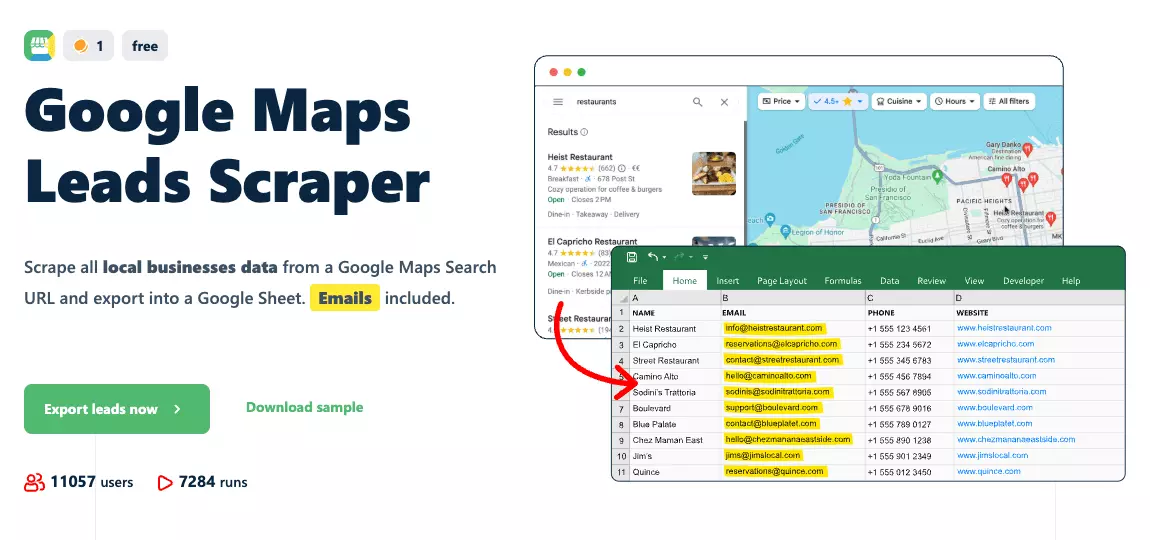
Remember everything the chatbots were missing?
This scraper covers all of it. It reads live Google Maps, and the whole job happens in one run: search, filter, visit the websites, pull the emails, bounce-check them and grab the socials.
What does lobstr.io's Google Maps MCP give you?
Features
- Live Google Maps, not a snapshot ... the listings Maps shows today, in the region and language you pick
- As broad or as narrow as you like ... a whole country, a city, a neighborhood or a single ZIP code
- Filters that shape the pitch ... with or without a website, claimed or unclaimed, review and rating ranges, no-email businesses skipped
- Emails found and bounce-checked in the same run ... a live check on the mailbox itself, not just the domain
- 87 fields per business ... socials, owner details, opening hours, the review breakdown and photos, the same set the no-code version returns
- Works in any MCP client ... Claude, ChatGPT, Cursor, Codex, all documented at mcp.lobstr.io
Email verification
This is what fixes the r/Entrepreneurs problem. Every email gets a live check with its mail server, so you know the mailbox exists, not just the domain.
email_status:| Status | What it means |
|---|---|
valid | The mailbox exists and can receive mail. Send |
invalid | Doesn't exist. Don't send |
risky | Might bounce, couldn't be confirmed either way |
catch-all | The domain accepts mail for any address, so the mailbox itself couldn't be confirmed |
unknown | The verifier couldn't get an answer |
It's 98.9% accurate, and it also resolves most catch-all domains, the ones basic verifiers just mark as risky. So you end up with a list you can actually send to.
Data
| Field group | What you get |
|---|---|
| 🏢 Identity | name, category, place_id, cid, url, description |
| 📍 Location | address, street_address, neighborhood, city, zip_code, region, lat, lng |
| 📞 Contact | phone, additional_phone, website, email, email_status, email_verified_at |
| 🔗 Social | facebook, instagram, linkedin, twitter, tiktok, whatsapp, youtube, pinterest |
| ⭐ Reputation | score, ratings, reviews_per_score_1 to _5, reviews_tags, reviews_link |
| 🏪 Business | opening_hours, is_verified, owner_name, booking_link, payment_methods, is_temporarily_closed |
Pricing
Everything is priced per function in credits, so you only pay for what you switch on.
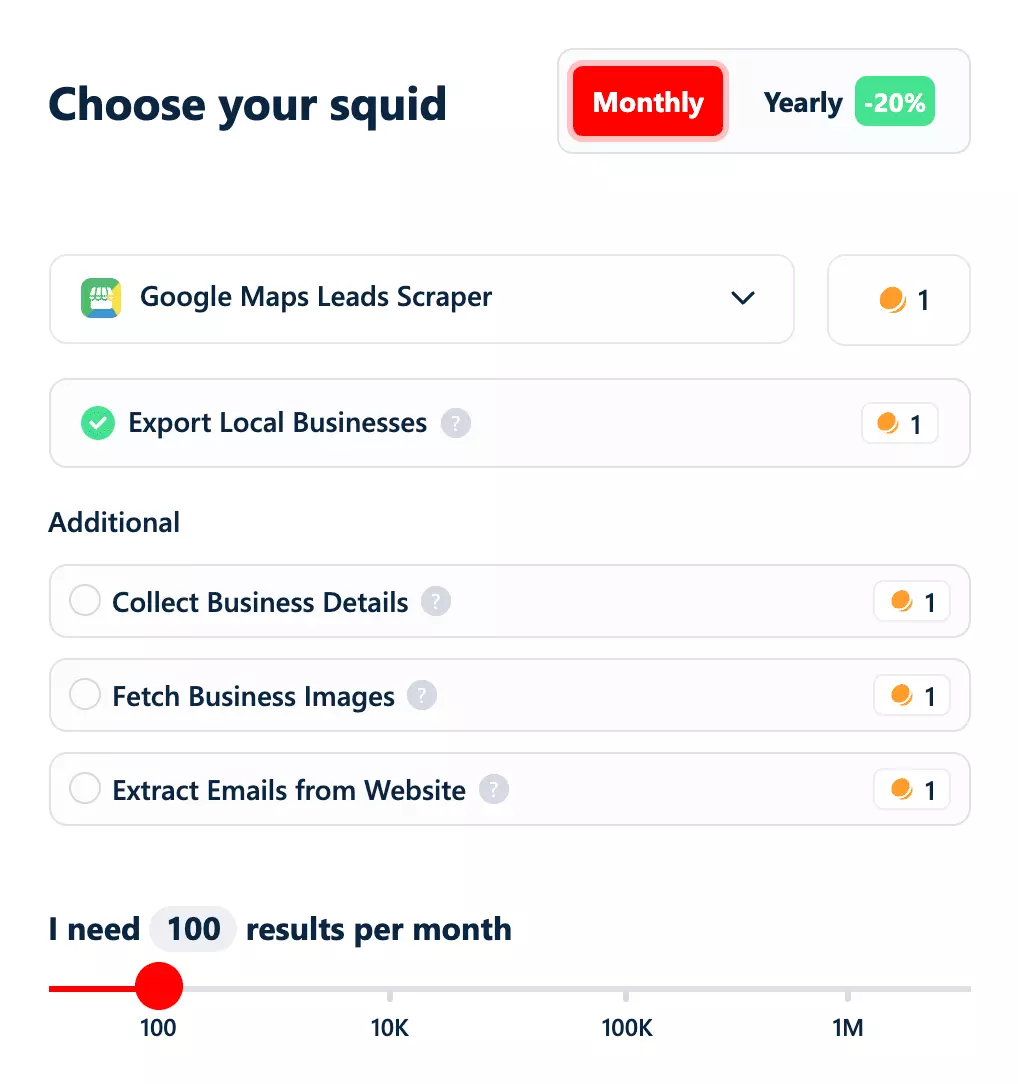
- Free tier: 100 credits on signup, plus 2,000 more through the community rewards program
- Entry: $10 / 1,000 for a full lead record with verified emails
- At scale: $2.50 / 1,000 for the same thing
And a business with no email to find costs nothing on the email steps. So how do you plug it in?
How to connect lobstr.io's MCP to Claude
You can use it on claude.ai, Claude Desktop and Claude Code, and it's the same endpoint for all three.
On claude.ai and Claude Desktop
Settings, then Connectors, click Add and choose Add custom connector. Name it lobstr.io, paste in https://mcp.lobstr.io/mcpContinue.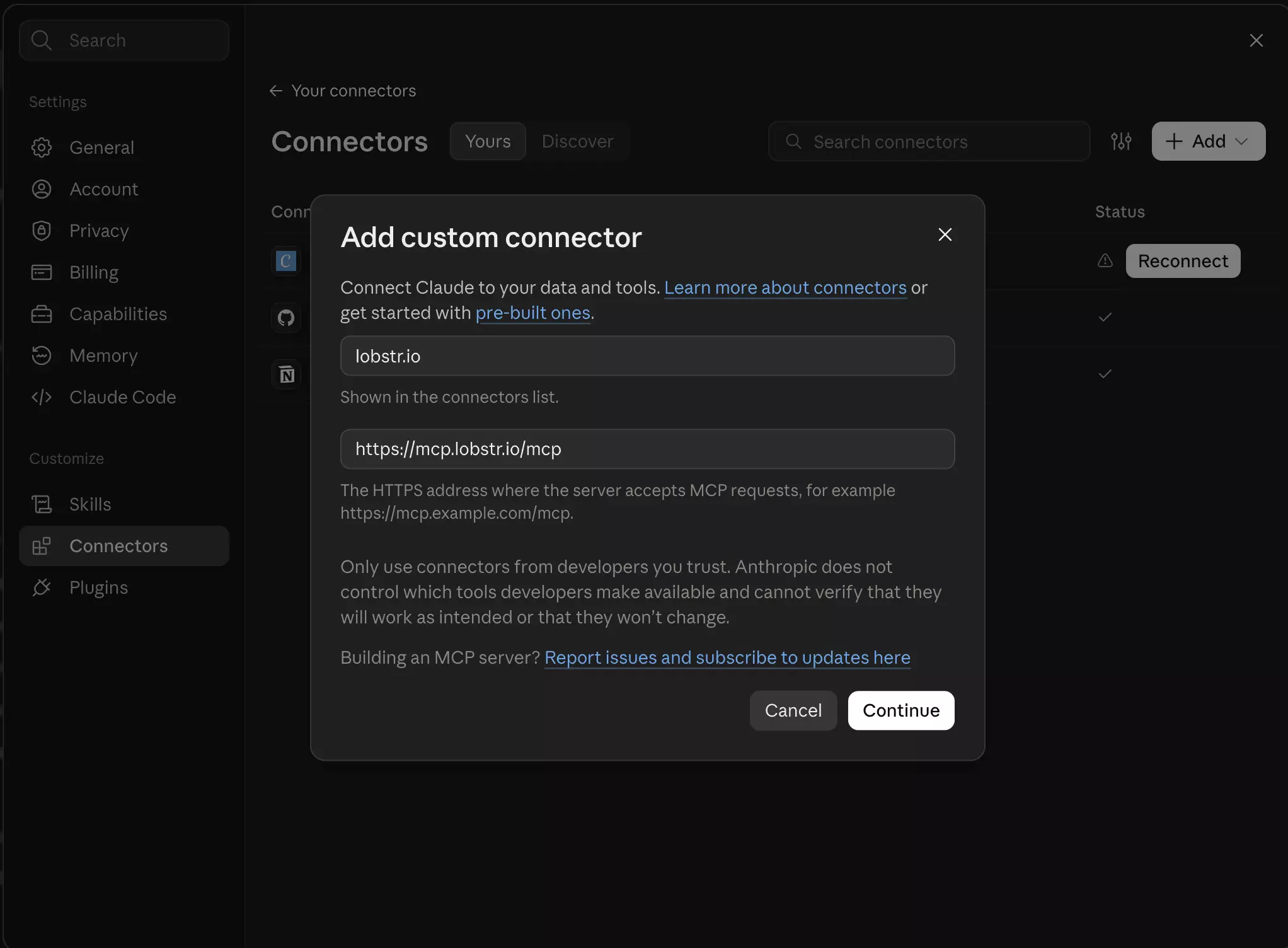
Pro tip
/mcp matters. Leave it off and nothing connectsSign in now for authentication and Register automatically for the OAuth client. Leave both as they are and hit Add.Claude then checks the connection and tells you you're not connected to lobstr.io yet.
Click the button under that message, and it sends you to lobstr.io's consent page, where you're already signed in. Five permissions show up:
crawlers:read... discover and inspect scrapersruns:read... monitor run statusresults:read... read your scraped dataaccount:read... see your account and creditsruns:execute... launch runs, which spends credits
Allow and you're back in your chat with the connector live. There's no API key to copy anywhere. Approval happens on lobstr.io's own site, so no credential ever reaches Claude.On Claude Code
It's one command:
claude mcp add --transport http lobstr https://mcp.lobstr.io/mcpf
The first time you use it, the same approval opens in your browser.
ChatGPT works too, it just needs a bit more setup.
How to connect lobstr.io's MCP to ChatGPT
One thing before you start: you need Developer mode on.
Without it, the option to add your own plugin doesn't show up at all, and you'll spend ten minutes looking for a button that isn't there.
Step 1: Turn on Developer mode
Settings, then Plugins, then Developer mode, and switch it on.Step 2: Add the plugin
Plugins, add a new custom plugin. Name it lobstr.io, set the server URL to https://mcp.lobstr.io/mcpOAuth for authentication.I understand and want to continue, then hit Create.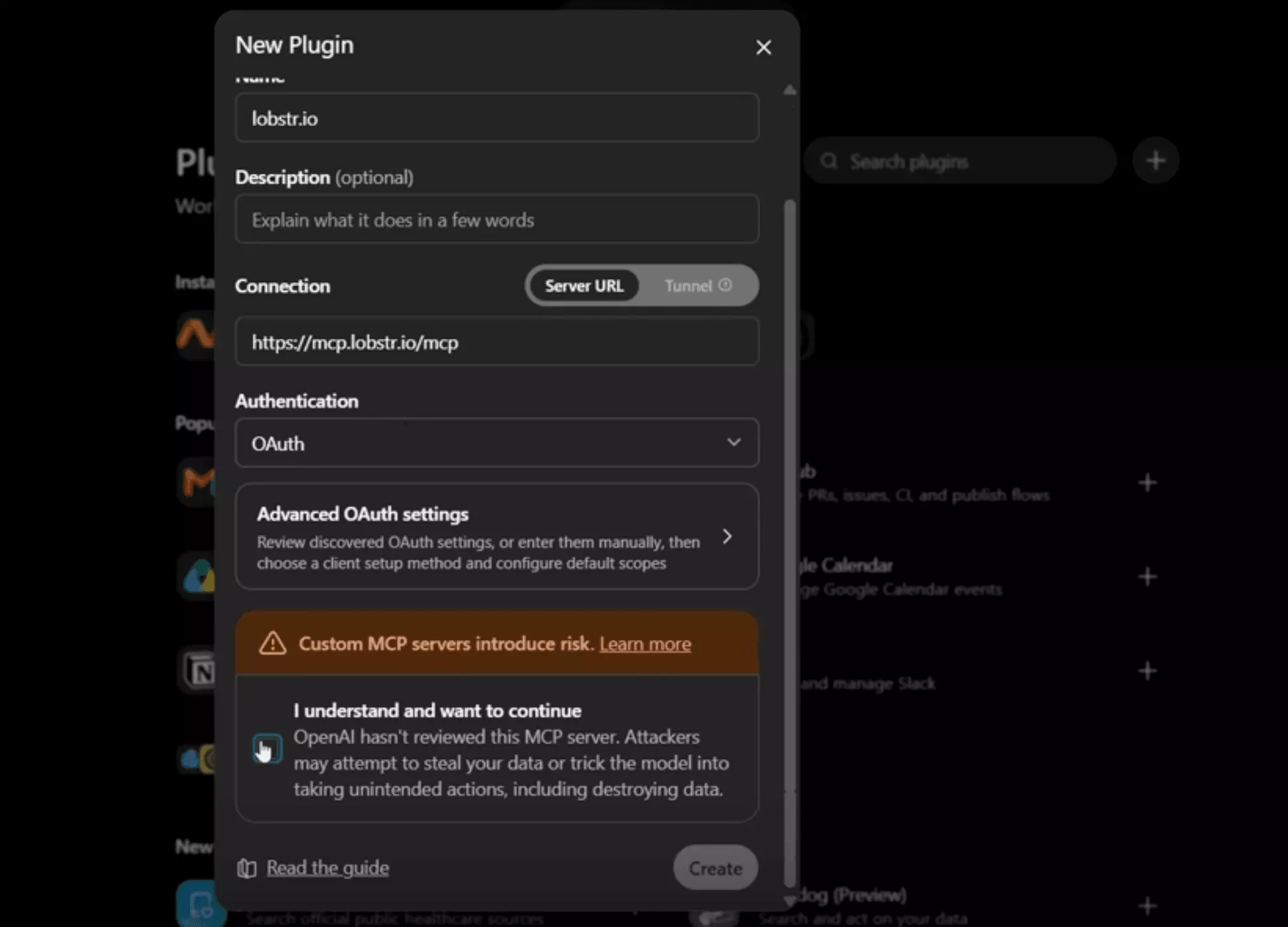
Allow. The MCP docs list every tool the plugin exposes, if you want to see what you're granting.Step 3: Switch it on in the chat
This is the one step Claude doesn't need: turn the plugin on in the conversation where you want to use it.
Once it's connected, it works the same way in Claude, ChatGPT or any other AI app that supports MCP.
How to use lobstr.io's Google Maps MCP
There's nothing to learn here.
You ask for what you want in plain English, and the AI does the rest in the background: it picks the scraper, sets the filters, runs it and hands you a file to download.
Start with a simple prompt
Start every prompt with "Use lobstr.io". Claude has its own Places tool and may reach for it first, and you might have other MCPs connected too.
Here's the prompt for my Chicago list:
Use lobstr.io to find every dentist in Chicago with more than 100 reviews. Run one search per Chicago ZIP code, get their emails and verify every one.f
The ZIP code part is there for a reason.
My first try was one search for "Chicago", and it found only 58 dentists, fewer than Claude's 132. 🤦
One Maps search tops out at 200 listings, so a whole city doesn't fit in one search.
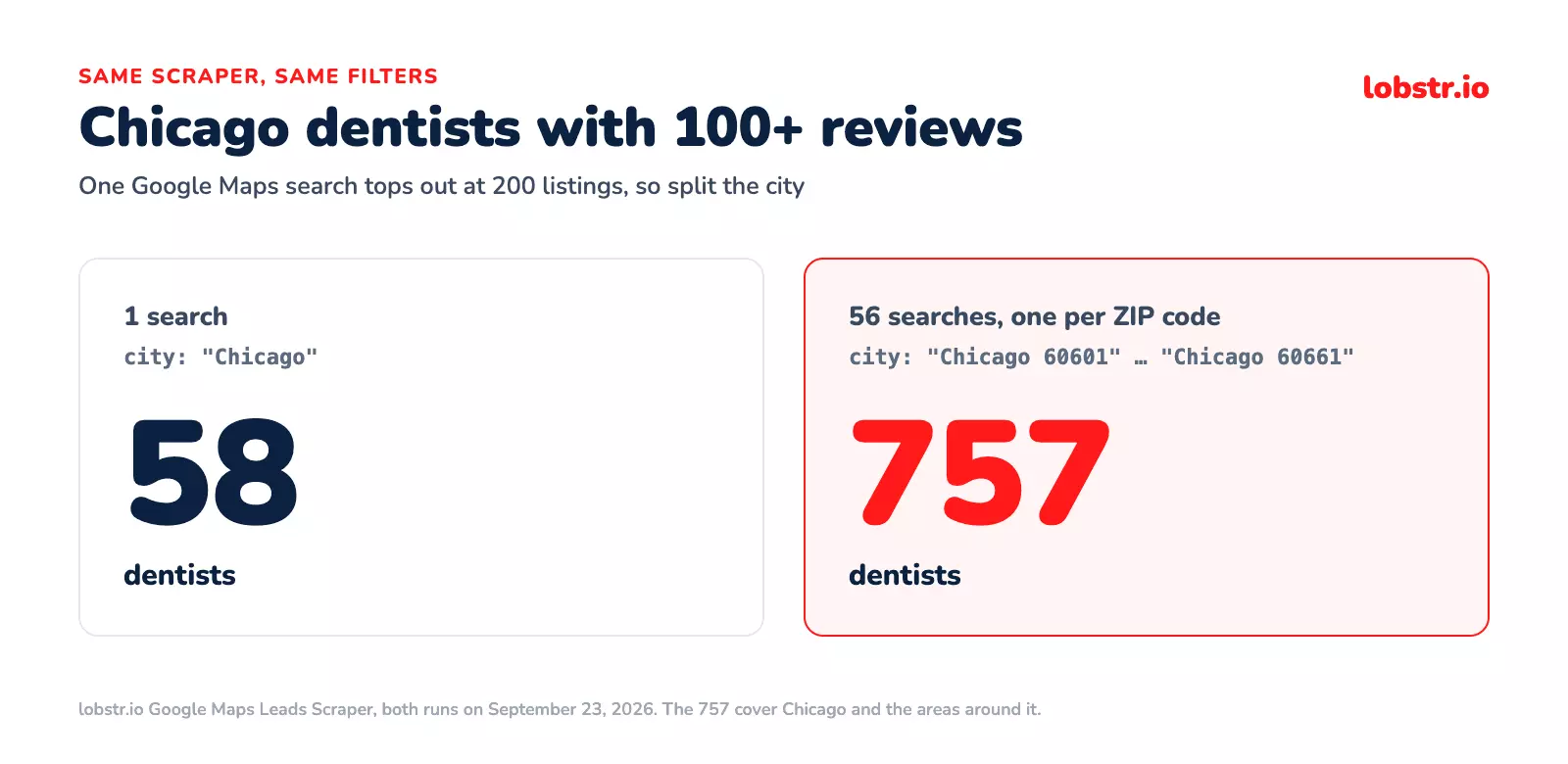
Splitting the city into 56 ZIP codes is what got it to 757.
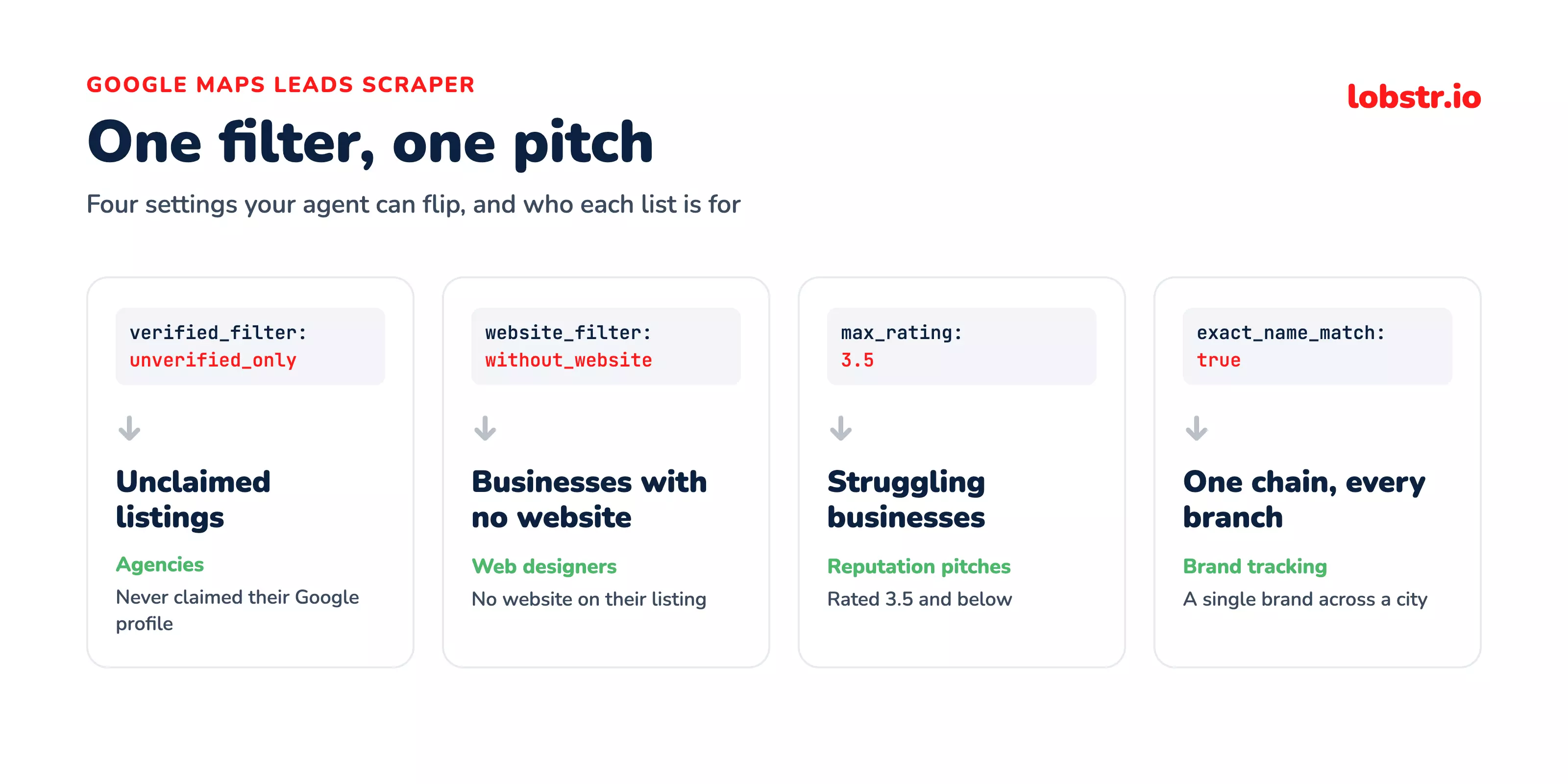
Then add filters. The scraper has one for most of the cleanup you'd otherwise do by hand, and you reach every one of them just by asking.
Businesses with or without a website
If you're a web designer or an SEO agency, a business with no website is your best lead.
Use lobstr.io to find plumbers in Austin, Texas that don't have a website.f
Only places that are still open
Nothing wastes outreach like pitching a business that shut down last year.
Use lobstr.io to find every coffee shop in Manchester, UK, and skip any place that's closed.f
Claimed or unclaimed listings
If you're a local SEO consultant, a business that never claimed its Google profile is an easy opener.
Use lobstr.io to find hair salons in Miami that haven't claimed their Google Business Profile.f
Only businesses with an email
If email is your only channel, there's no point getting rows you can't reach.
Use lobstr.io to find accountants in Toronto, only keep the ones with an email, and verify the emails.f
Ratings and reviews
Businesses with a low rating already know they have a reputation problem.
Use lobstr.io to find restaurants in Chicago rated 3.5 stars or lower.f
Geo Match, Category Match and Exact Name Match
Geo Match keeps only businesses within 50 km of the place you searched. Google Maps likes to throw in results from far away, sometimes from another country, and this cuts them out.
Category Match keeps only businesses that match what you searched for, even when Google lists them in another language or under a similar name. So "Plumbing Service" still counts as a plumber.
Exact Name Match is for chasing one brand or chain. It keeps a business when your search appears anywhere in its name, whatever the capitals or accents.
One catch: when you're hunting a brand, turn Category Match off. A brand name usually isn't a Google category, so Category Match drops it before Exact Name Match even sees it.
Use lobstr.io to find every Precision Dental Care location in Chicago. Use exact name match and turn category match off.f
In my Chicago run, Precision Dental Care alone had eight locations.
Mix and match
You can combine filters in one prompt too:
Use lobstr.io to find dentists in Houston that are still open, have no website and haven't claimed their Google profile. Only keep the ones with a phone number.f
What did I end up with?
Back to my Chicago prompt. Here's the same request, three answers, side by side:
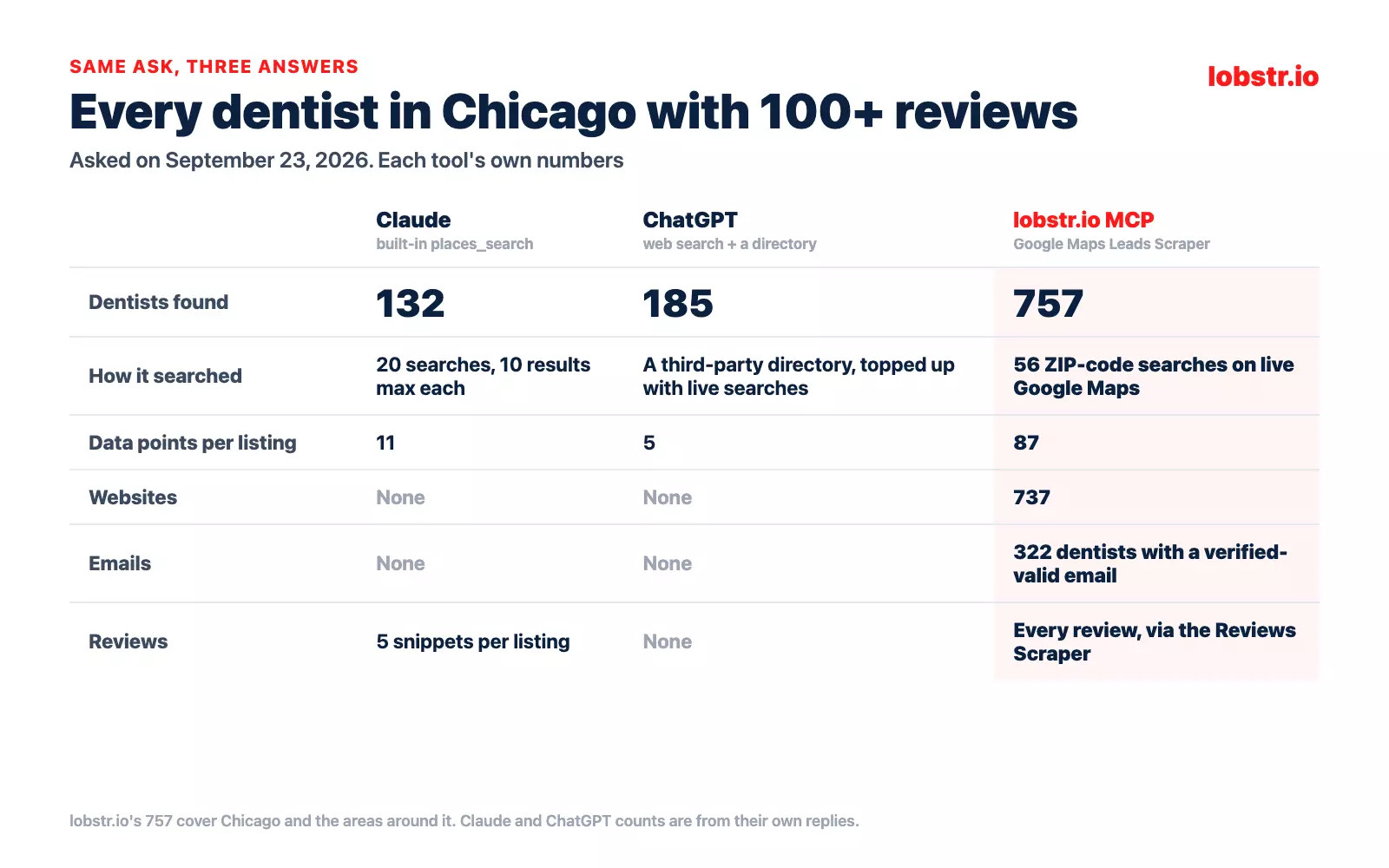
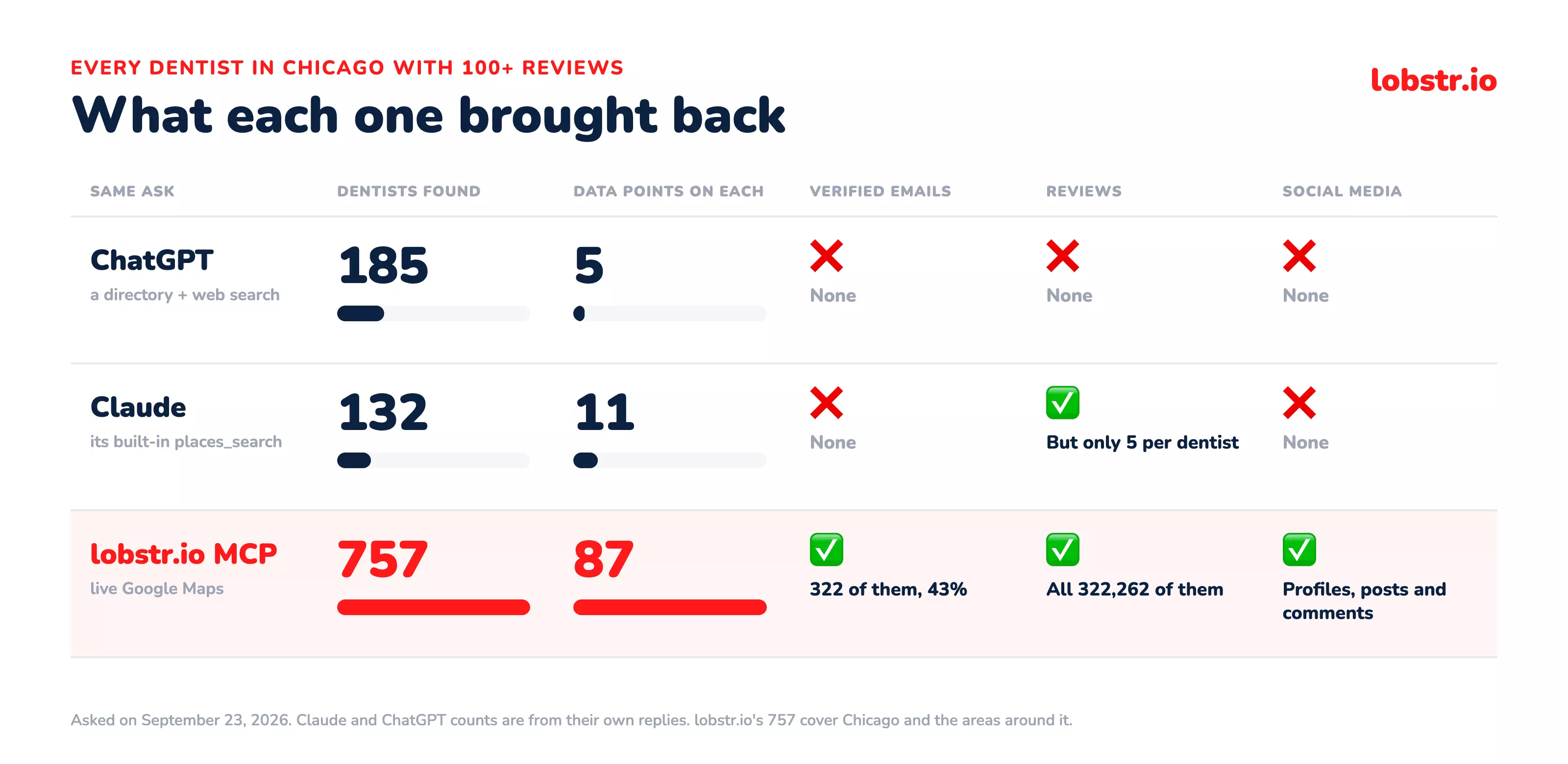
757 dentists with more than 100 reviews, across Chicago and the areas around it. That's more than four times ChatGPT's 185 and almost six times Claude's 132.
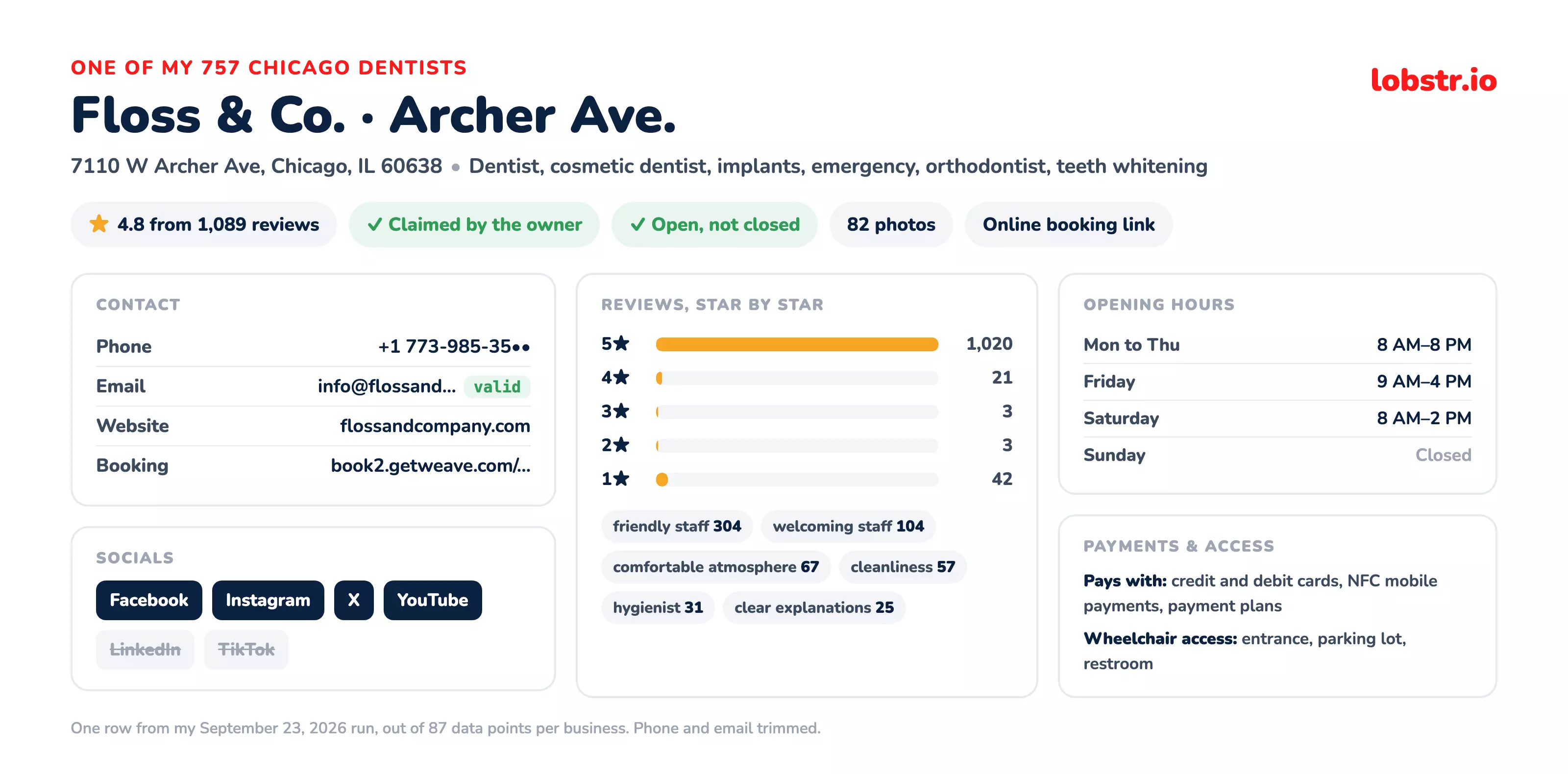
And each row has a lot more on it. 737 of them have a website, 754 a phone number and 435 a Facebook page. Here's one of them, with the details that matter when you're qualifying a lead:
Then there's the part neither chatbot could give me: 322 dentists came with an email that passed the bounce check.
john@doe.com, right next to its real address.invalid and the real one valid. This is exactly why bounce verification matters.And it wasn't a one-off. About one email in ten came back invalid, so that's one in ten you won't waste a send on.
What else can you ask for?
The leads are only the start. The same chat can pull a lot more on the businesses you just found.
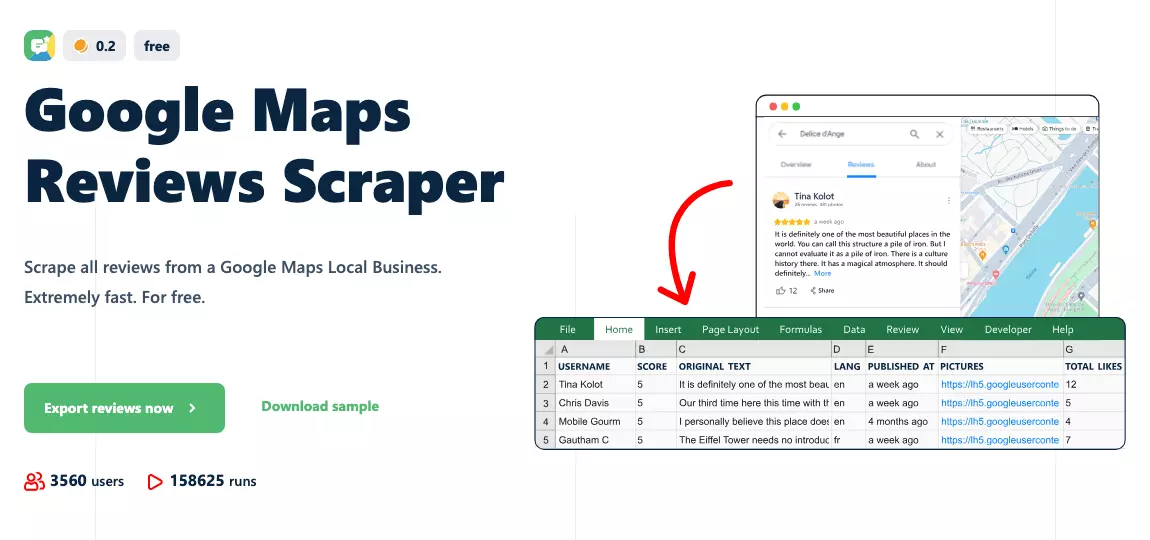
All their Google reviews
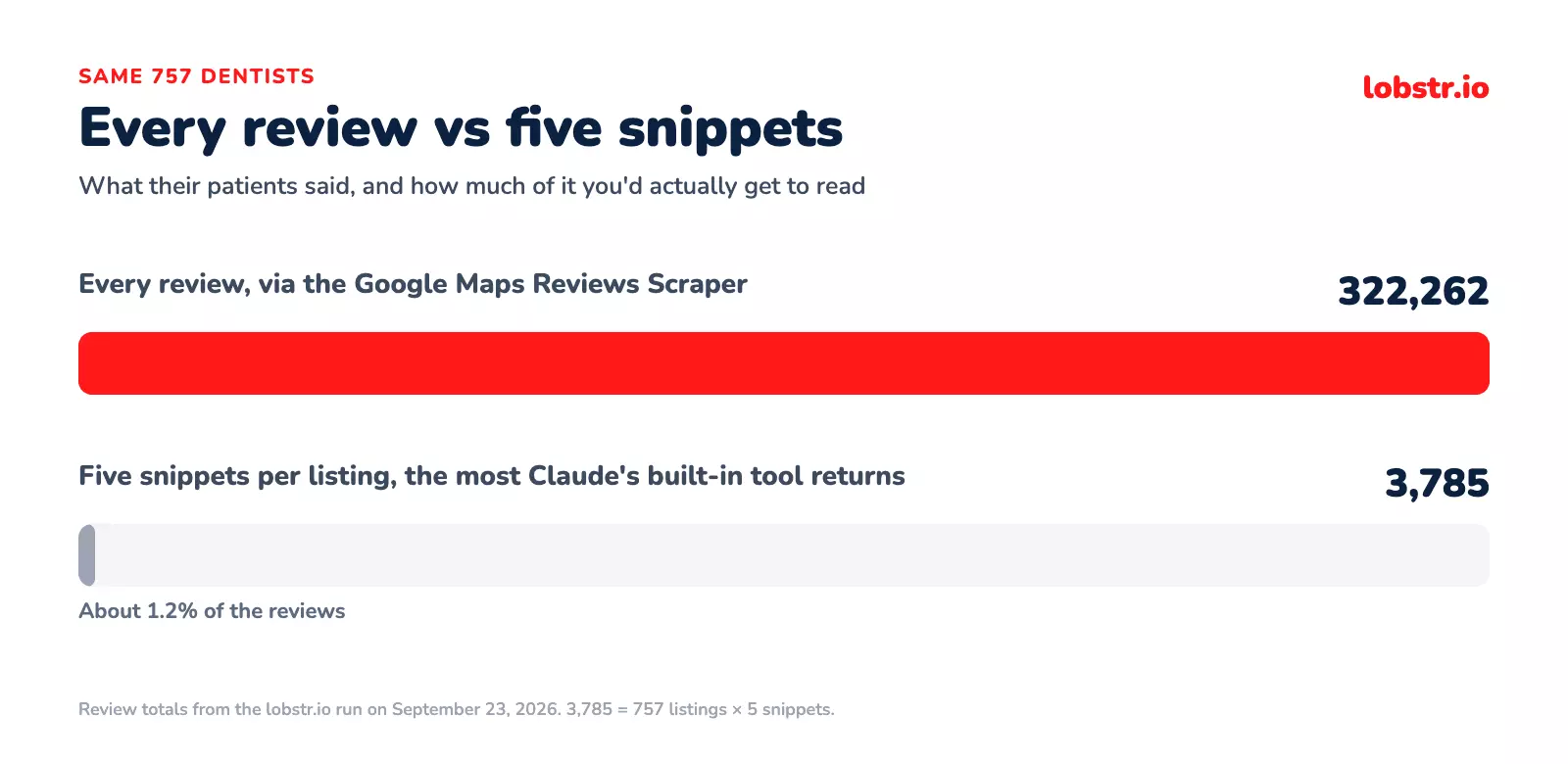
My 757 dentists have 300k+ reviews between them.
Their social media profiles and posts
The scraper hands you each business's social profiles too.
Ask Claude or ChatGPT to use lobstr.io on those links and it'll pull the profile, what the business posts and the comments under it:
- Facebook: the business page and the comments on its posts
- Instagram: the profile, its posts and reels, and their comments
- X: the profile, every tweet and its followers
- YouTube: the channel, its videos, their comments and transcripts
- LinkedIn: the company page, its employees, its posts and who comments on them
- TikTok: the profile, every video it posted and their comments
- Pinterest: every pin from the business's profile or boards
A detailed profile on every lead
Remember the agencies in that Reddit post, paying $40 to $80 a lead? This is where you leave that behind.
If you're a data-pagloo like me 😁, or you want to study every bit of a prospect before you reach out, you can run a multi-agent Claude or ChatGPT workflow.
One search goes in, the agents pull the reviews, socials, posts, engagement and comments, and you get a detailed profile per lead with everything you need for the first touch.
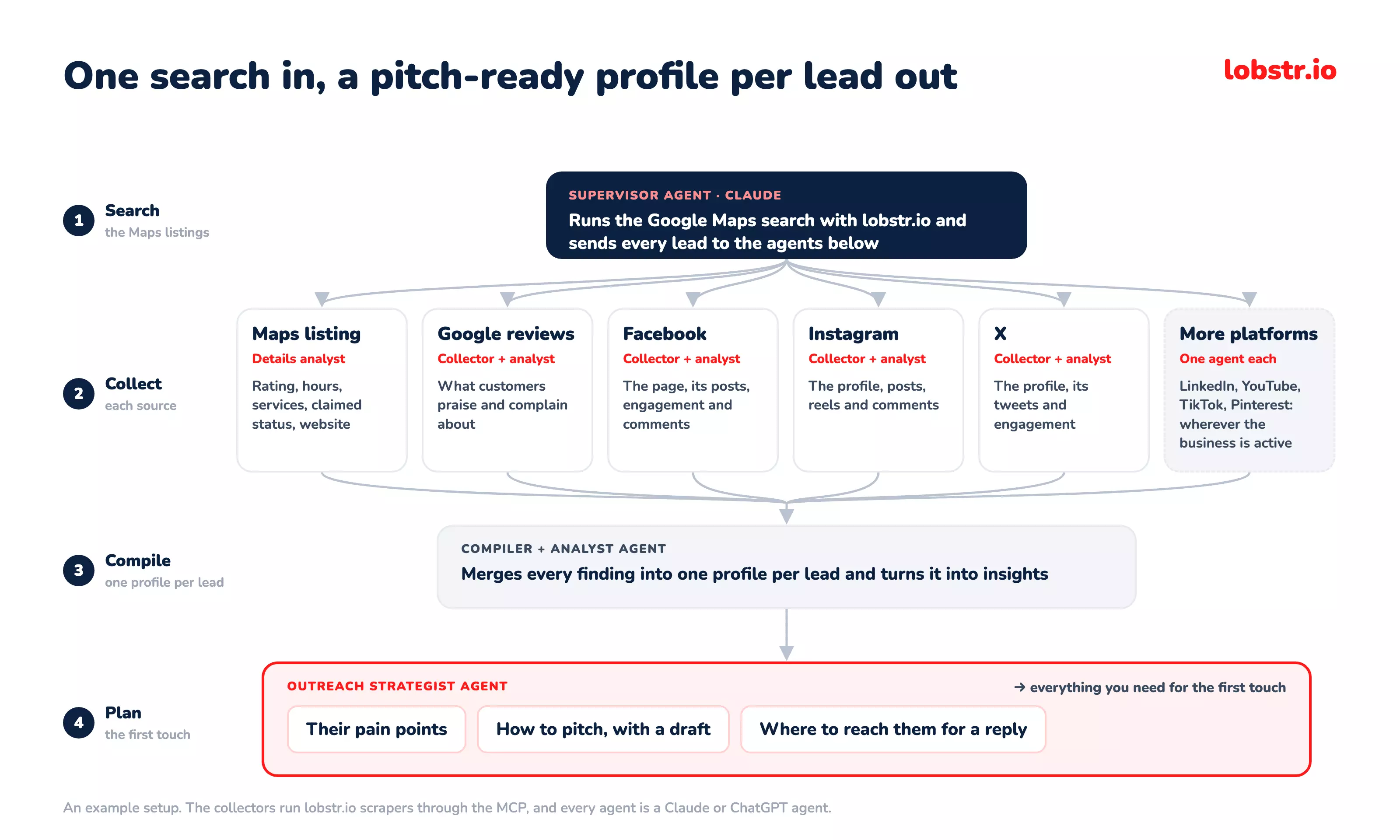
Tbh, that whole workflow would cost you 10x less per lead than what those agencies pay, AI costs included.
Still have questions? Let's go through them.
FAQs
Is there an official Google Maps MCP server?
Yes, two, but neither returns contact data, because Maps Code Assist helps developers write Maps code and Maps Grounding Lite returns Place IDs, coordinates and AI summaries.
Google's terms also forbid storing what either returns.
Why can't Claude or ChatGPT just do this already?
Their built-in search finds places, not leads, so you get names and addresses but no emails. On the same prompt they found 132 and 185 Chicago dentists, against 757 from live Google Maps.
Is scraping Google Maps legal?
Public business data sits on firmer ground than most people assume, though terms of use and state-law claims add real nuance.
Do I need a Google API key?
No, there's nothing to paste anywhere, because the connection runs on OAuth, approved on lobstr.io's own site, so no credential reaches Claude or ChatGPT.
How much does 1,000 leads cost?
$2.50 per 1,000 at scale and $10 per 1,000 at entry, for a full record with verified emails. A business with no email to find costs nothing on the email steps.
Can I search by ZIP code or neighborhood?
Yes, one task per area, from a whole country down to a single ZIP code.
Can I try it without paying?
Does it work in ChatGPT as well as Claude?
Yes, once Developer mode is on, because ChatGPT only lets you add a custom plugin with it switched on. Claude doesn't need it, and the prompts are the same in both.
Final thoughts
I started with one simple ask. ChatGPT gave me somebody else's directory, Claude gave me an honest but incomplete 132, and Google's own MCP servers gave me a terms-of-service quote.
None of them are broken. They're built for "where's the nearest dentist?", not "every dentist in the city with an email that won't bounce".
That's a scraper's job, and with an MCP in front of it, you can still ask for it in plain English.
So grab the free credits and try it on your own city. 🦞