
Google Maps Scraper API: 8 Benchmarked on Data, Cost & Speed
I compared 8 Google Maps scraper APIs and Google's own Places API on data, cost, speed and usability, here are my findings:
- Most complete, accurate and verified data: lobstr.io, but it's the slowest
- Most raw data fields: Apify, but unverified emails, some off-target results, and costliest
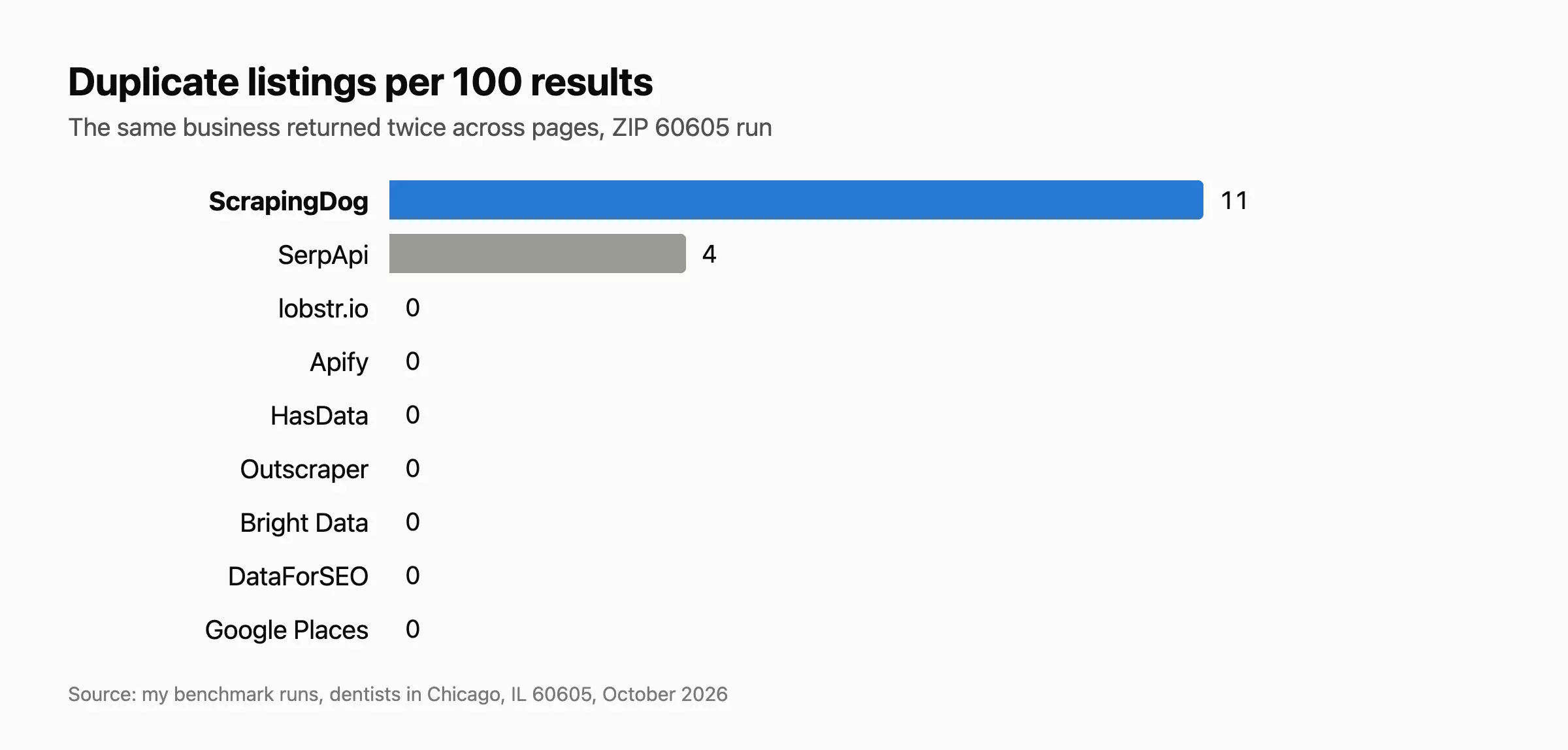
- Fastest: ScrapingDog and SerpApi, but listings only, with duplicates
- Cheapest: DataForSEO and ScrapingDog, but less data, with ads and duplicates mixed in
| API | Score | Data | Cost | Speed | Usability | Per 1K places at scale | Main limitation |
|---|---|---|---|---|---|---|---|
| lobstr.io | 9.3 | 8.0 | 5.6 | 5.5 | 9 | $2.00 | The slowest |
| Apify | 9.0 | 6.5 | 4.3 | 6.8 | 10 | $4.64 to $5.18 | Off-target results, costliest |
| HasData | 8.1 | 3.4 | 6.5 | 5.7 | 6 | $0.37 | Less data, and slow |
| Outscraper | 5.5 | 4.9 | 6.0 | 9.2 | 6 | $1.00 | No emails |
| DataForSEO | 5.4 | 4.1 | 10 | 10 | 10 | $0.02 | Less data, ads mixed in |
| Bright Data | 5.2 | 3.6 | 5.3 | 6.5 | 7 | $1.30 | Less data, and slow |
| SerpApi | 2.0 | 2.7 | 6.4 | 10 | 10 | $0.36 | Listings only, duplicates |
| ScrapingDog | 1.9 | 2.1 | 9.2 | 9.8 | 10 | $0.02 | Listings only, the most duplicates |
| Google Places API (baseline) | 5.3 | 4.2 | 5.1 | 10 | 7.5 | $2.00 | 60 results max, no emails |
All scores are out of 10. I adjusted cost and speed for how much data each API returns, so none loses points for returning more.
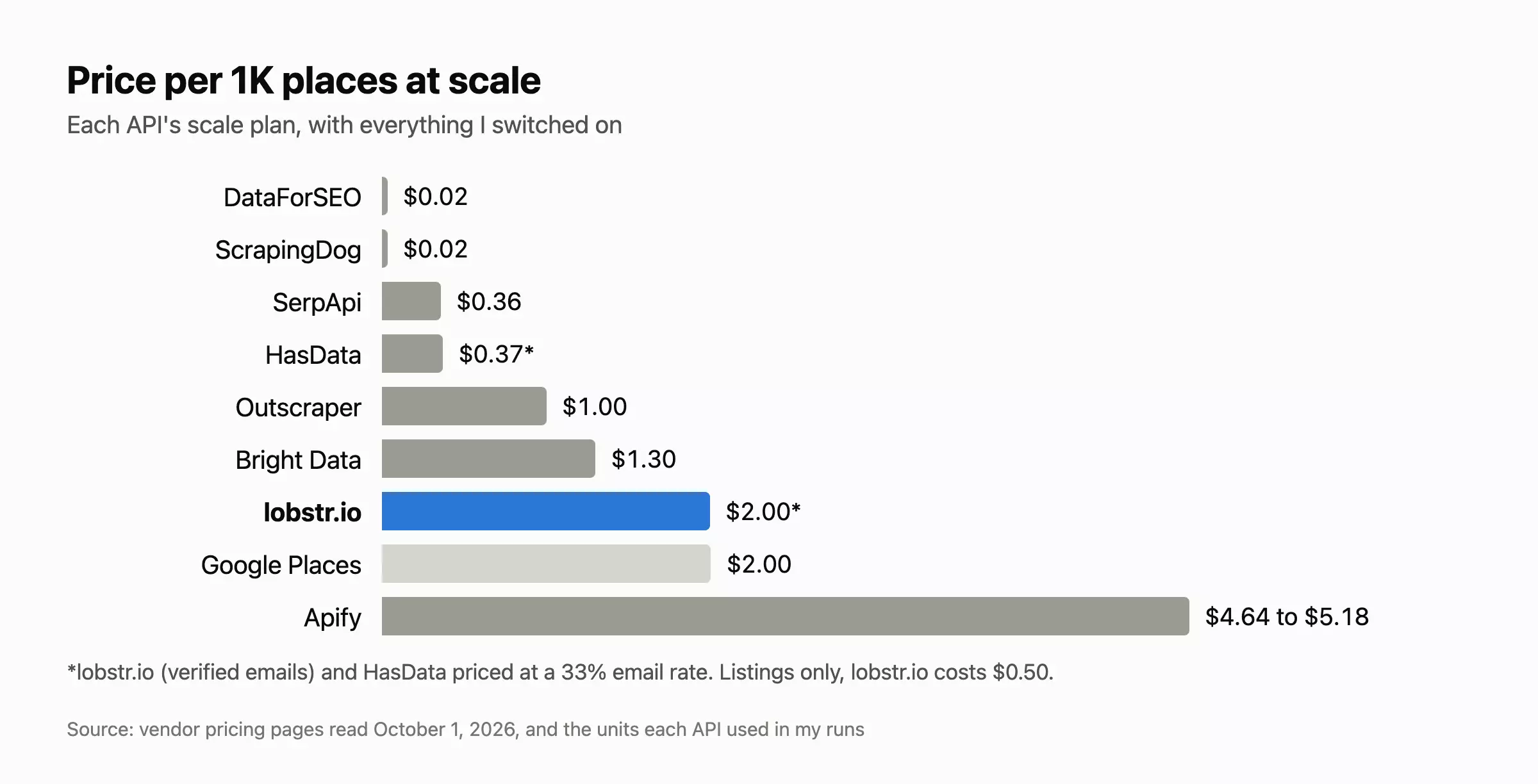
lobstr.io and HasData charge extra for each place with an email, so I priced them at a 33% email rate, lobstr.io's average across millions of rows.
If you're here, you probably want 1 of 3 things from Google Maps:
- Leads: every business of a type in an area, with an email you can actually send to (Google Maps lead generation guide)
- Local SEO data: ratings, review counts and positions by area (Google Maps rank checking)
- Market research: counting competitors in a ZIP, or filling gaps in a CRM
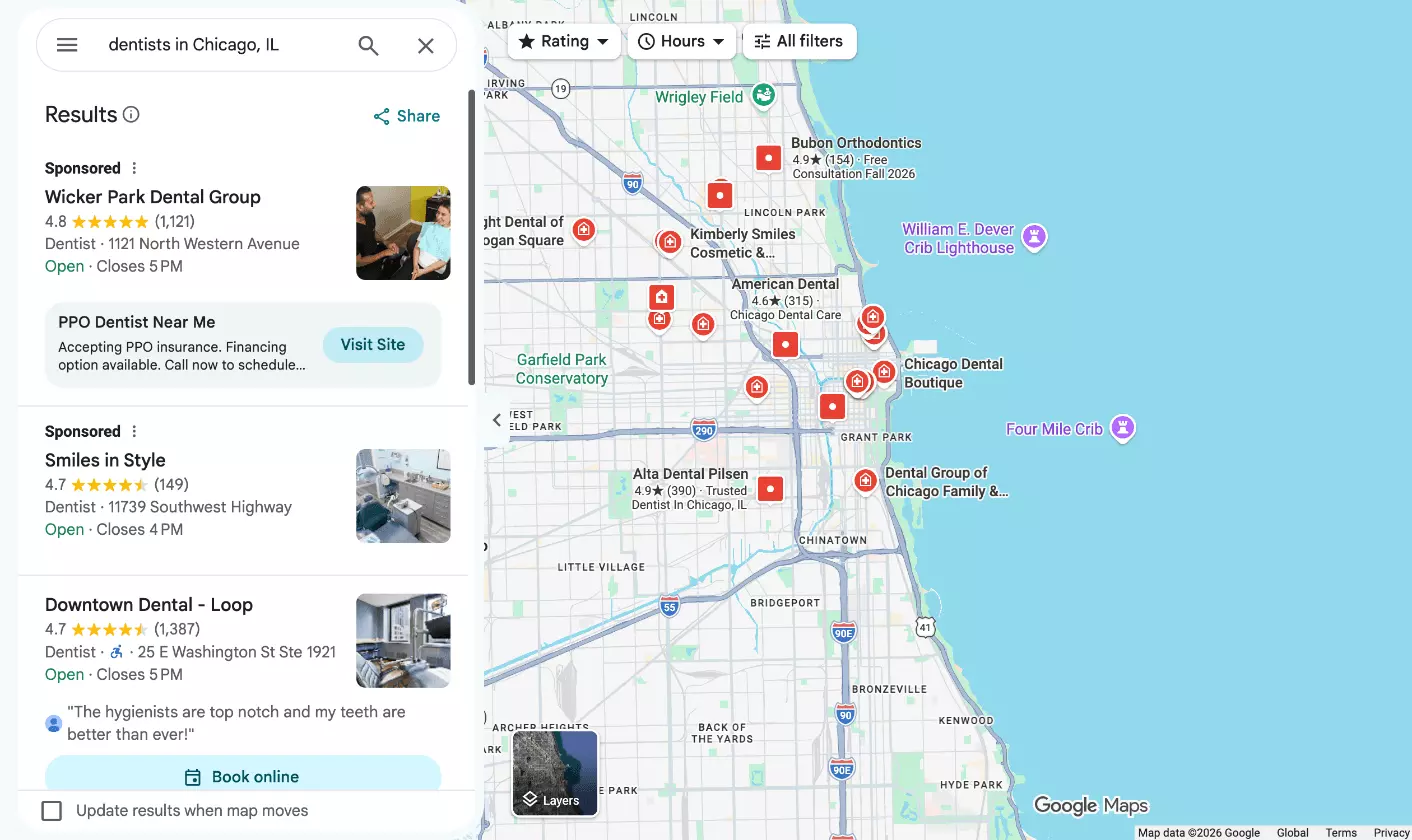
Don't worry, I've got you covered, my list covers APIs for all 3 use cases.
But hey, who needs a scraper when you have Google Places API?
Google Places API vs 3rd Party Scraper APIs
It's fast (8 to 10s for 60 places in my runs) and accurate, but it hits 2 walls for a scraping job.
1. 60 results per search, max.

Google Maps itself shows up to about 200 per search.
Splitting by ZIP code works (my second run's query was "dentists in Chicago, IL 60605"), but every ZIP stops at 60 too.
Here's the request I ran, page by page.
import requests

URL = "https://places.googleapis.com/v1/places:searchText"
HEADERS = {
    "X-Goog-Api-Key": "YOUR_API_KEY",
    # my mask listed every Pro, Enterprise and Atmosphere field except reviews (full list in the repo);
    # "*" bills the same SKU: Text Search Enterprise + Atmosphere
    "X-Goog-FieldMask": "*",
}

places, token = [], None
for _ in range(3):  # 3 pages of 20 = Google's 60 cap
    body = {"textQuery": "dentists in Chicago, IL 60605", "pageSize": 20}
    if token:
        body["pageToken"] = token
    r = requests.post(URL, headers=HEADERS, json=body).json()
    places += r.get("places", [])
    if not (token := r.get("nextPageToken")):
        break

print(len(places))  # 60f
It returns 22 data points per listing, in these fields:
{
  "places": [{
    "id": "", "types": [""], "nationalPhoneNumber": "", "internationalPhoneNumber": "",
    "formattedAddress": "",
    "addressComponents": [{"longText": "", "shortText": "", "types": [""], "languageCode": ""}],
    "plusCode": {"globalCode": "", "compoundCode": ""},
    "location": {"latitude": "", "longitude": ""},
    "viewport": {
      "low": {"latitude": "", "longitude": ""}, "high": {"latitude": "", "longitude": ""}
    },
    "rating": "", "googleMapsUri": "", "websiteUri": "",
    "regularOpeningHours": {
      "openNow": "",
      "periods": [{
        "open": {"day": "", "hour": "", "minute": ""},
        "close": {"day": "", "hour": "", "minute": ""}
      }],
      "weekdayDescriptions": [""], "nextOpenTime": "", "nextCloseTime": ""
    },
    "utcOffsetMinutes": "", "adrFormatAddress": "", "businessStatus": "", "userRatingCount": "",
    "displayName": {"text": "", "languageCode": ""},
    "primaryTypeDisplayName": {"text": "", "languageCode": ""},
    "currentOpeningHours": {
      "openNow": "",
      "periods": [{
        "open": {
          "day": "", "hour": "", "minute": "", "date": {"year": "", "month": "", "day": ""},
          "truncated": ""
        },
        "close": {
          "day": "", "hour": "", "minute": "", "date": {"year": "", "month": "", "day": ""},
          "truncated": ""
        }
      }],
      "weekdayDescriptions": [""], "nextOpenTime": "", "nextCloseTime": ""
    },
    "primaryType": "", "shortFormattedAddress": "",
    "photos": [{
      "name": "", "widthPx": "", "heightPx": "",
      "authorAttributions": [{"displayName": "", "uri": "", "photoUri": ""}],
      "flagContentUri": "", "googleMapsUri": ""
    }],
    "restroom": "",
    "paymentOptions": {
      "acceptsCreditCards": "", "acceptsDebitCards": "", "acceptsCashOnly": "", "acceptsNfc": ""
    },
    "accessibilityOptions": {
      "wheelchairAccessibleEntrance": "", "wheelchairAccessibleRestroom": "",
      "wheelchairAccessibleSeating": "", "wheelchairAccessibleParking": ""
    },
    "googleMapsLinks": {
      "directionsUri": "", "placeUri": "", "writeAReviewUri": "", "reviewsUri": "",
      "photosUri": ""
    },
    "timeZone": {"id": ""},
    "postalAddress": {
      "regionCode": "", "languageCode": "", "postalCode": "", "administrativeArea": "",
      "locality": "", "addressLines": [""]
    },
    "containingPlaces": [{"name": "", "id": ""}],
    "parkingOptions": {
      "paidParkingLot": "", "freeStreetParking": "", "paidStreetParking": "",
      "freeParkingLot": "", "paidGarageParking": "", "freeGarageParking": ""
    },
    "generativeSummary": {
      "overview": {"text": "", "languageCode": ""}, "overviewFlagContentUri": "",
      "disclosureText": {"text": "", "languageCode": ""}
    }
  }],
  "nextPageToken": ""
}f
If that's enough for you, here's what it costs with these fields:
- Per 1K places: $2.00
- Per 100K places: about $200, spread over at least 1,667 searches
- Free: the first 1,000 requests a month, about 20K places
- Photos: billed separately, $7.00 per 1K images after 1,000 free
A few more catches:
- The fields you ask for set the price: name and address alone are cheaper, but add a phone number and the whole request moves up a price tier
- You can't store the results: Google only lets you keep place IDs, so no lead list or CRM
- Few filters: 1 business type per search, and no filter for ZIP, website or claimed status
- 10 photos max per place, each billed separately
So who is it for? It's accurate data, straight from Google.
If you need basic listing data, can live with 60 places per search and the price works at your volume, use it.
For lead data or in-depth profile data, it's the wrong tool.
How I tested
I ran the same test on every API: 2 searches of about 100 dentists each, with everything the tool offers switched on.
- City run: "dentists in Chicago, IL"
- ZIP run: "dentists in Chicago, IL 60605"
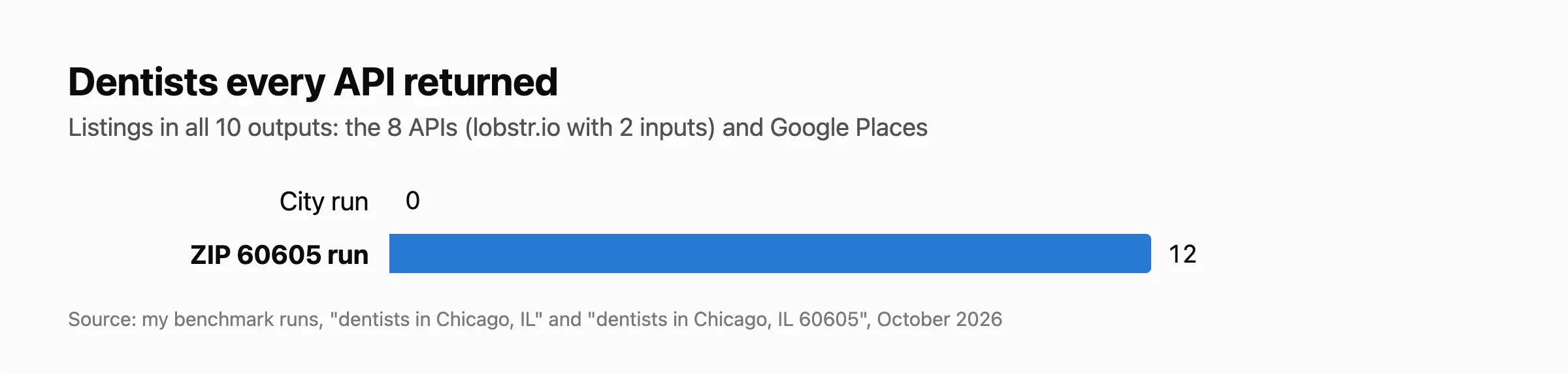
I added the ZIP run because the city outputs didn't share a single dentist, so I had nothing to compare side by side.
In ZIP 60605, 12 dentists showed up in every output.
A few ground rules:
- No reviews: I kept them out for every tool, since they have their own benchmark
- No separate products: a scraper's own add-ons count, but services a vendor sells as a product of their own don't
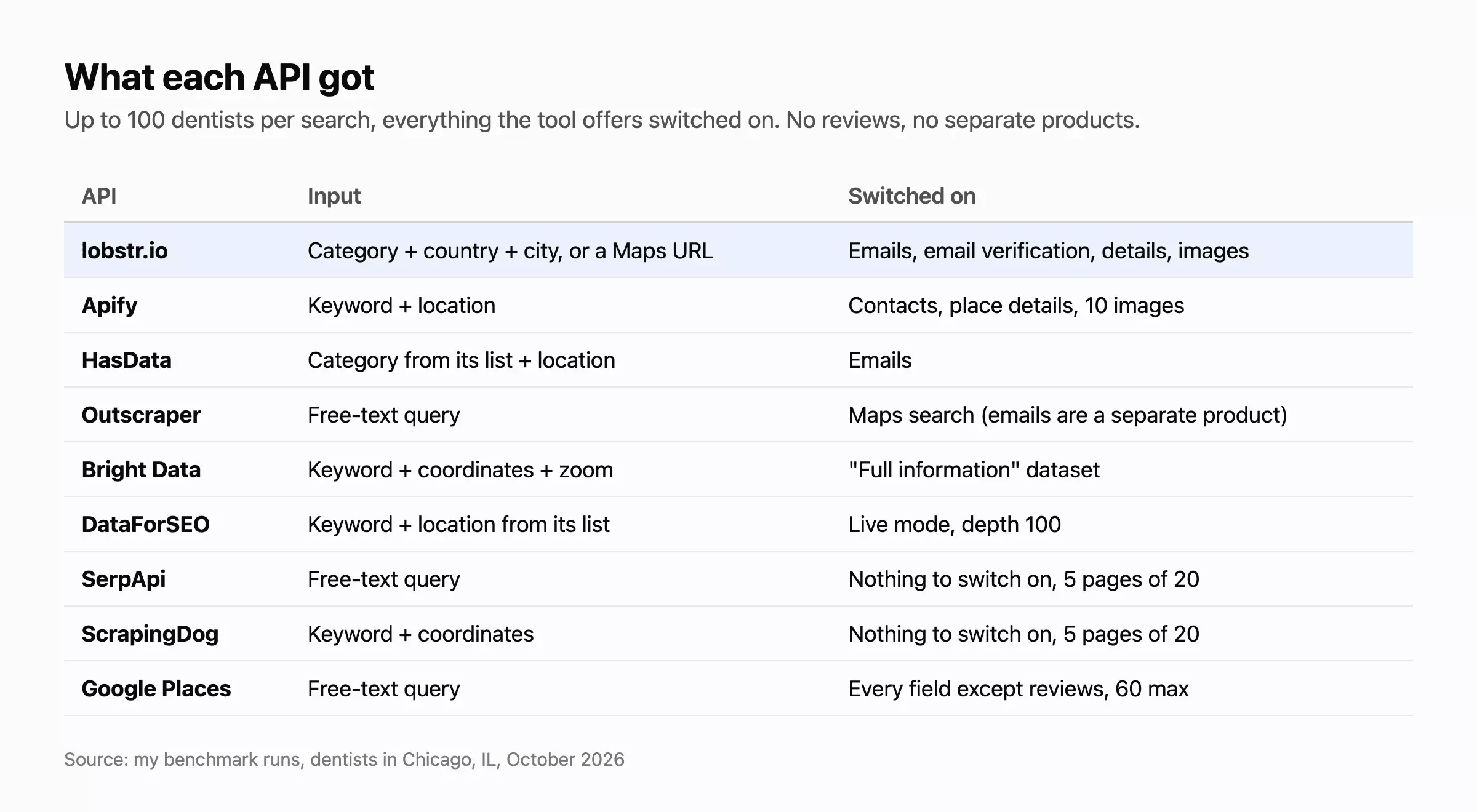
Scoring apples against oranges. These APIs don't do the same job.
Some read the search results page and hand back a listing in seconds, for cents. Others visit every business's website for emails and take minutes, for dollars.
A fixed rubric (say data 40%, cost 30%, speed 30%) would crown the fastest, cheapest API that returns the least, the opposite of what a lead list needs.
So I scored in 2 steps.
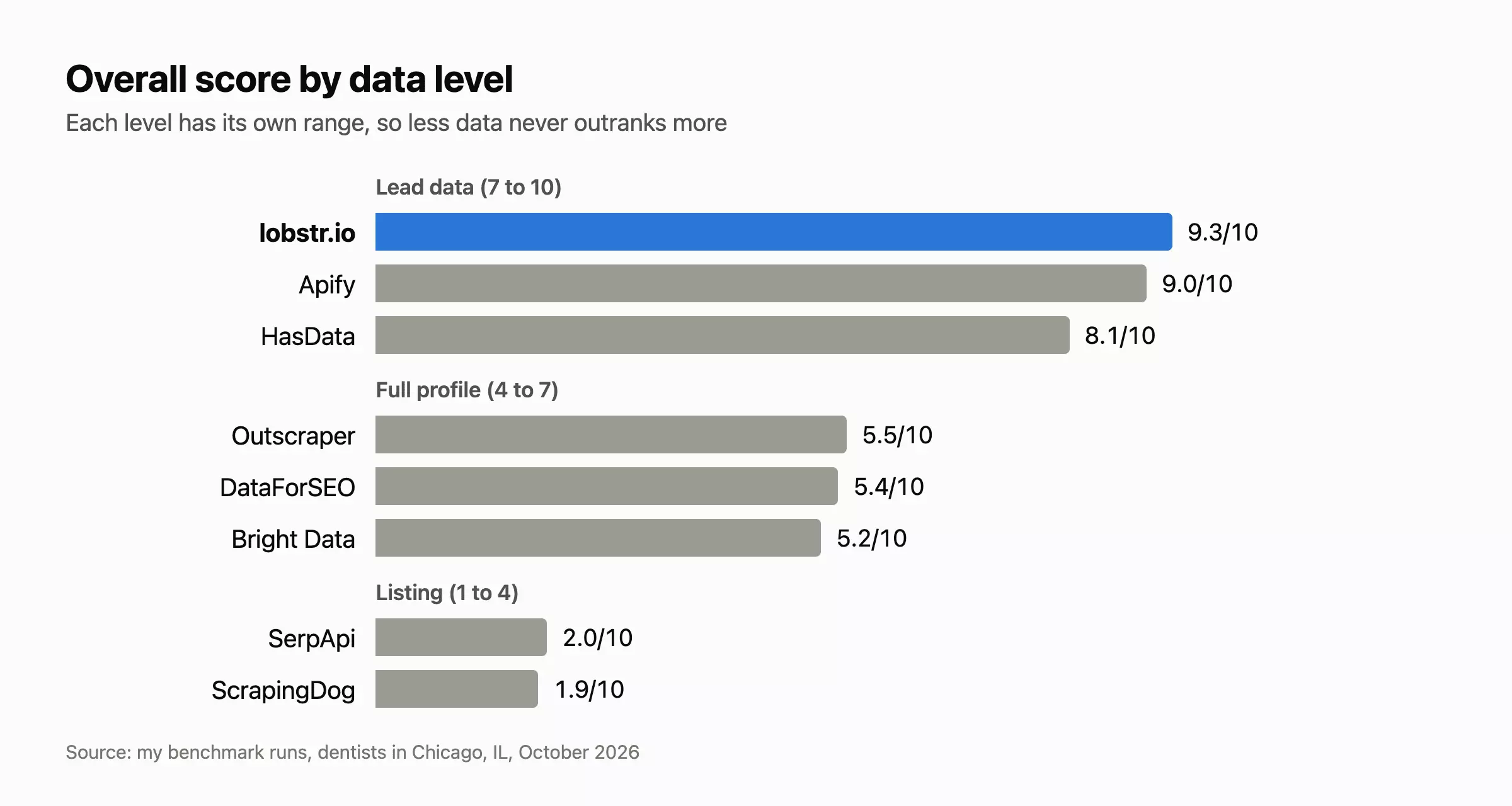
Step 1: the data level sets the score range.
Remember the 3 use cases at the top? Each needs a different depth of data, and each API lands in 1 of 3 levels by how deep it goes:
- Lead data, for lead generation (scores 7 to 10): the full profile plus each business's website, with emails, email verification, socials and extra phones
- Full profile, for market research (scores 4 to 7): each place's own page, with claimed and closed status, the review breakdown and booking links
- Listing, for local SEO (scores 1 to 4): the search results page, with rating, review count and position
That's how less data never outranks more data: the weakest lead-data API still scores above the best full profile.
Step 2: inside its range, data carries 90% of the score.
Cost, speed and usability share the last 10%, so they only decide between APIs whose data is close.
The Data score rolls up 4 checks:
- Volume: how much business data each listing carries, matched by what each field holds rather than its name, with emails, verified emails and socials counting most
- Fill rate: a field only counts when it's filled on at least 10% of the results
- Cleanliness: off-target results, duplicates, closed places and placeholder contacts pull it down
- Accuracy: I checked every value against the other tools on the dentists they shared
Cost and speed go by price per 1K places and time per 100 places, adjusted for how much data each place carries, so an API that returns 3 times the data isn't punished for costing more or taking longer.
Every API sits on the same scale: the cheapest or fastest scores 10, and every 10x dearer or slower loses 2.5.
Usability is up to 10 yes/no checks, scored on the ones that apply:
- Official SDK
- Integrations (Make, Zapier, n8n or webhooks)
- MCP server
- Flexible input: at least 2 of free text, structured location parameters and a Google Maps URL
- One typed record per business
- Run cost visible through the API
- No blocker in my runs
- Error handling: a failure comes back with a clear status or error code, and you either don't pay for it or can resume it
- No data lost when a run fails (only for APIs that queue a job)
- Results kept in the cloud for at least 7 days (only for APIs that queue a job)
I ranked all 8 third-party APIs and scored Google Places as a baseline, outside the ranking.
User ratings come from the platform where each tool has the most and freshest reviews.
Every request and response is in the benchmark repo, so you can check any number yourself.
Now let's dive into my review.
lobstr.io: best for complete, verified lead data
- Overall: 9.3/10 (Data 8.0, Cost 5.6, Speed 5.5, Usability 9)
- User rating: Capterra 5.0 (34 reviews)
- Accessible via: no-code app, API, Python SDK, MCP
- Tested: Google Maps Leads Scraper
| Pros | Cons |
|---|---|
| The most complete data: 35.8 weighted data points per place | The slowest |
| The widest ICP filter set of the ranked APIs | |
| Cost per function visible through the API | |
| Listings only for $0.50 per 1K places at scale | |
| Results stay in the cloud, even if a run errors or stops early | |
| Failing runs pause and auto-resume once fixed, so you never pay to start over |
Data: 8.0/10
Volume: lobstr.io's output carries 136 fields, covering the full profile plus emails, email verification and socials.
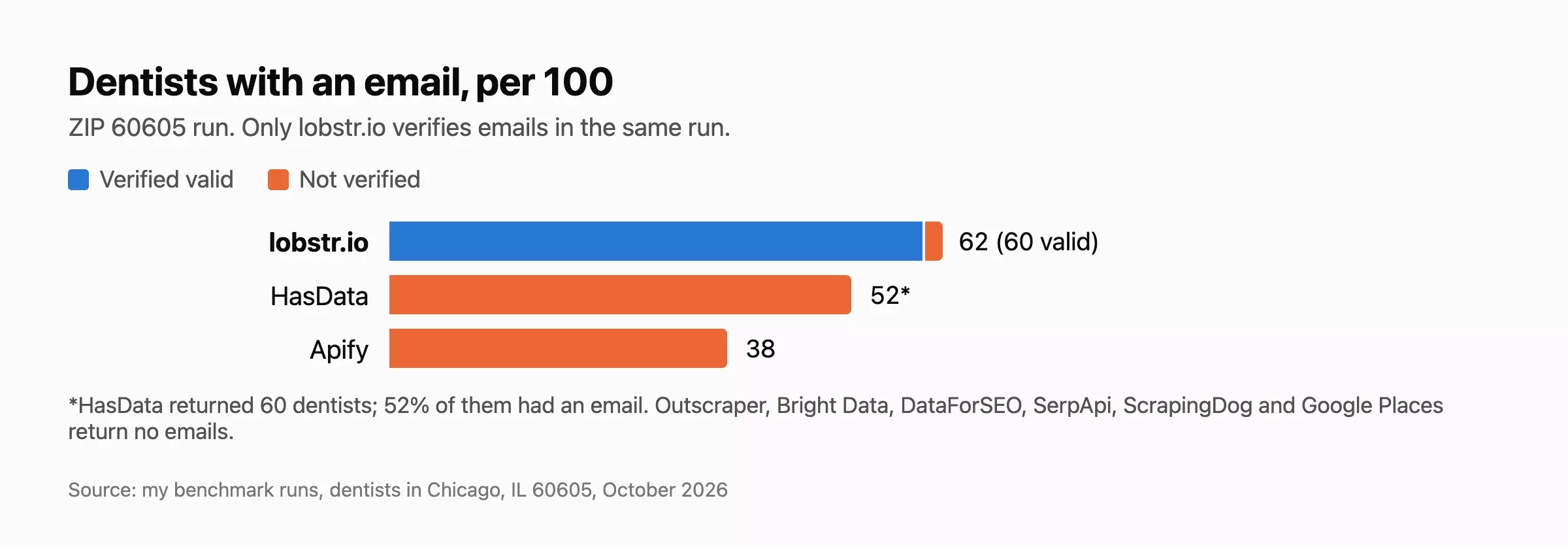
Fill rate: lobstr.io filled more of each listing than any other tool on the dentists they all returned, with an email for 62% of dentists, a verified-valid one for 60% and a description for 79%.
Cleanliness: lobstr.io returned no off-target results or duplicate businesses, but 2 to 4% of its listings carried a placeholder phone.
Accuracy: It matched the other tools 100% on every dentist they shared.
Cost: 5.6/10
So a place costs 3 credits, plus 3 more when lobstr.io finds and verifies an email.
Across millions of rows, about 33% of the places lobstr.io scrapes come back with an email, and it swings by industry: lawyers list one far more often than restaurants, and my dentists hit up to 60%.
At that 33% rate, which I used for every email API:
- Starts at $7.98 per 1K places on Starter ($20 for 10K credits)
- Drops to $2.00 per 1K places at scale on Team ($500 for 1M credits)
- Listings only: 1 credit per place, so $0.50 per 1K places at scale
The Free plan gives 100 credits a month, with no card.
Speed: 5.5/10
With everything on, lobstr.io took 19 to 29 minutes for 100 places, plus 1 to 2 minutes of email verification.
The listing itself is fast (24 s for 100 with nothing switched on). The emails, details and images take the time, because lobstr.io fetches them one business at a time.
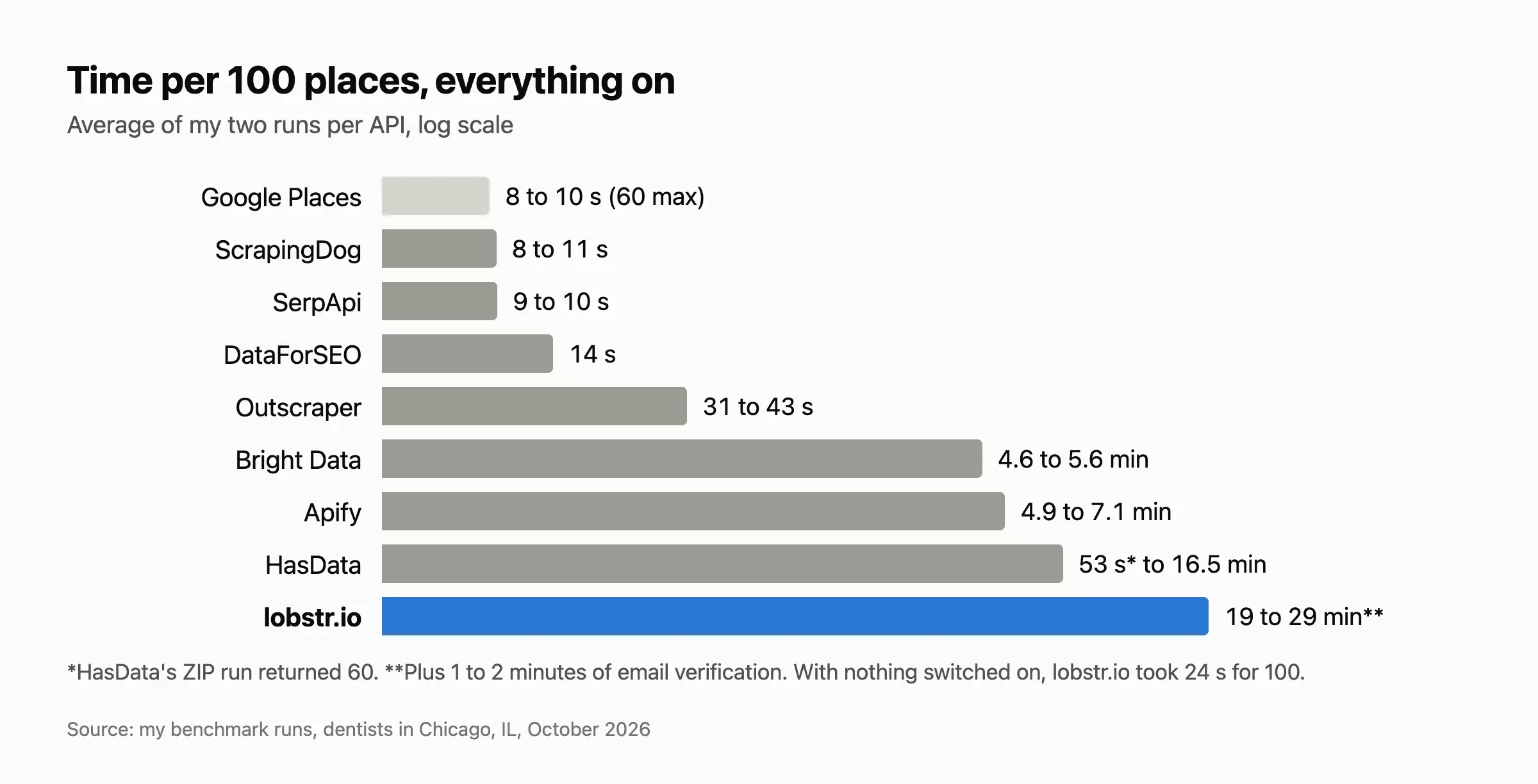
But I'd recommend splitting the search into multiple tasks (by ZIP code or any other location setting), and lobstr.io runs up to 20 of them in parallel per Squid.
"concurrency": 20,f
Usability: 9/10
lobstr.io passed 9 of the 10 checks. A failed run pauses and resumes on its own, a stopped run keeps what it collected, and results stay in the cloud for 28 days on paid plans.
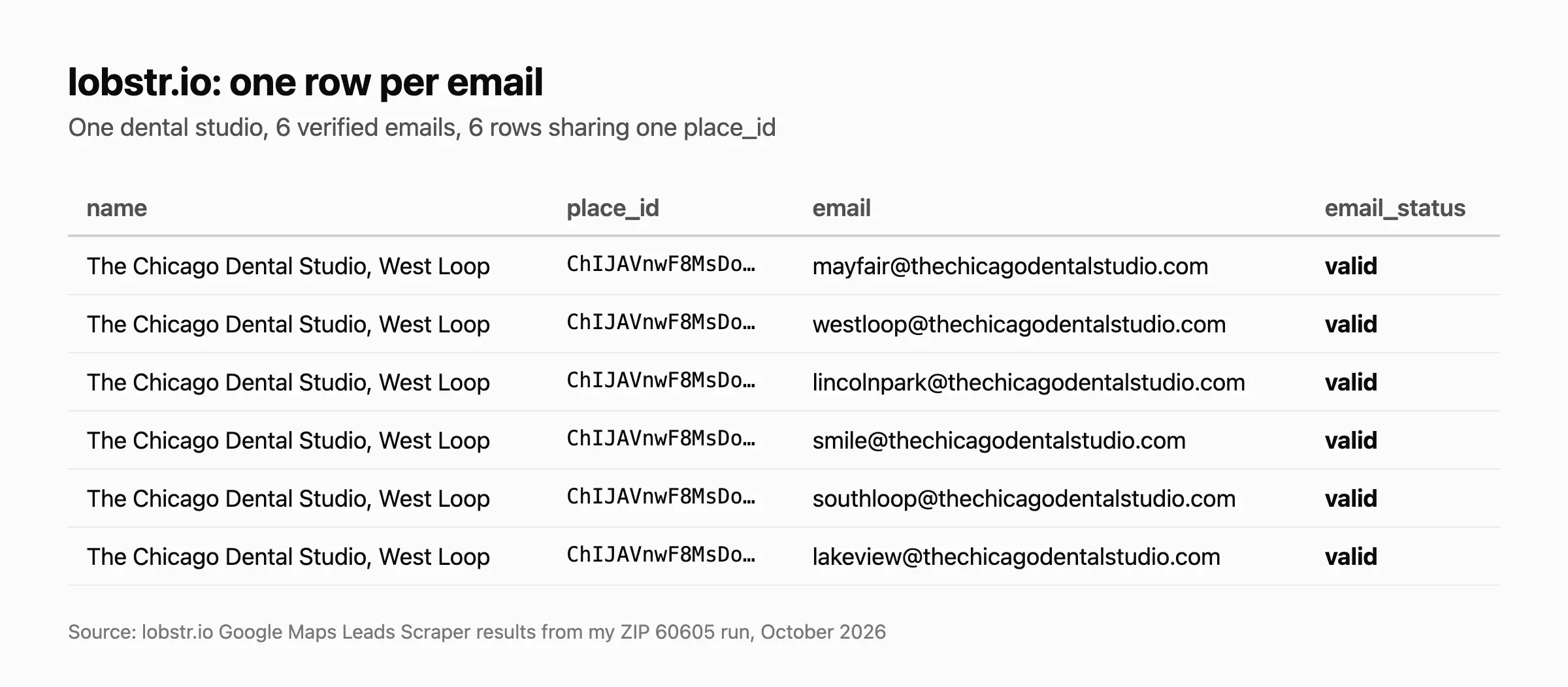
It missed one: lobstr.io returns 1 row per email, with numbers as text, instead of one typed record per business.
For lead generation, that's an upside: each row gives you one email, ready to load into a CRM or outreach tool.
Convinced, or at least curious?
Here's the whole setup in 4 calls.
Quickstart
import requests

BASE = "https://api.lobstr.io/v1"
H = {"Authorization": "Token YOUR_API_KEY"}

# create a Squid from the Google Maps Leads Scraper
squid = requests.post(f"{BASE}/squids", headers=H, json={"crawler": "4734d096159ef05210e0e1677e8be823"}).json()["id"]

# add the search: category + country + city (or a Maps URL: {"url": "..."})
requests.post(f"{BASE}/tasks", headers=H, json={"squid": squid, "tasks": [
    {"category": "dentist", "country": "United States", "city": "Chicago 60605"}]})

# switch on emails, verification, details and images
requests.post(f"{BASE}/squids/{squid}", headers=H, json={"params": {
    "max_results": 100, "auto_verify_emails": True,
    "functions": {"extract_emails_from_website": True, "collect_business_details": True, "fetch_business_images": True}}})

# start the run
run = requests.post(f"{BASE}/runs", headers=H, json={"squid": squid}).json()["id"]f
Want me to build a ZIP-by-ZIP lead pipeline on top of this?
Apify: best for the most raw data fields
- Overall: 9.0/10 (Data 6.5, Cost 4.3, Speed 6.8, Usability 10)
- User rating: Trustpilot 4.8 (768 reviews)
- Accessible via: no-code app, API, SDK, MCP
- Tested: Google Maps Scraper actor, by compass
| Pros | Cons |
|---|---|
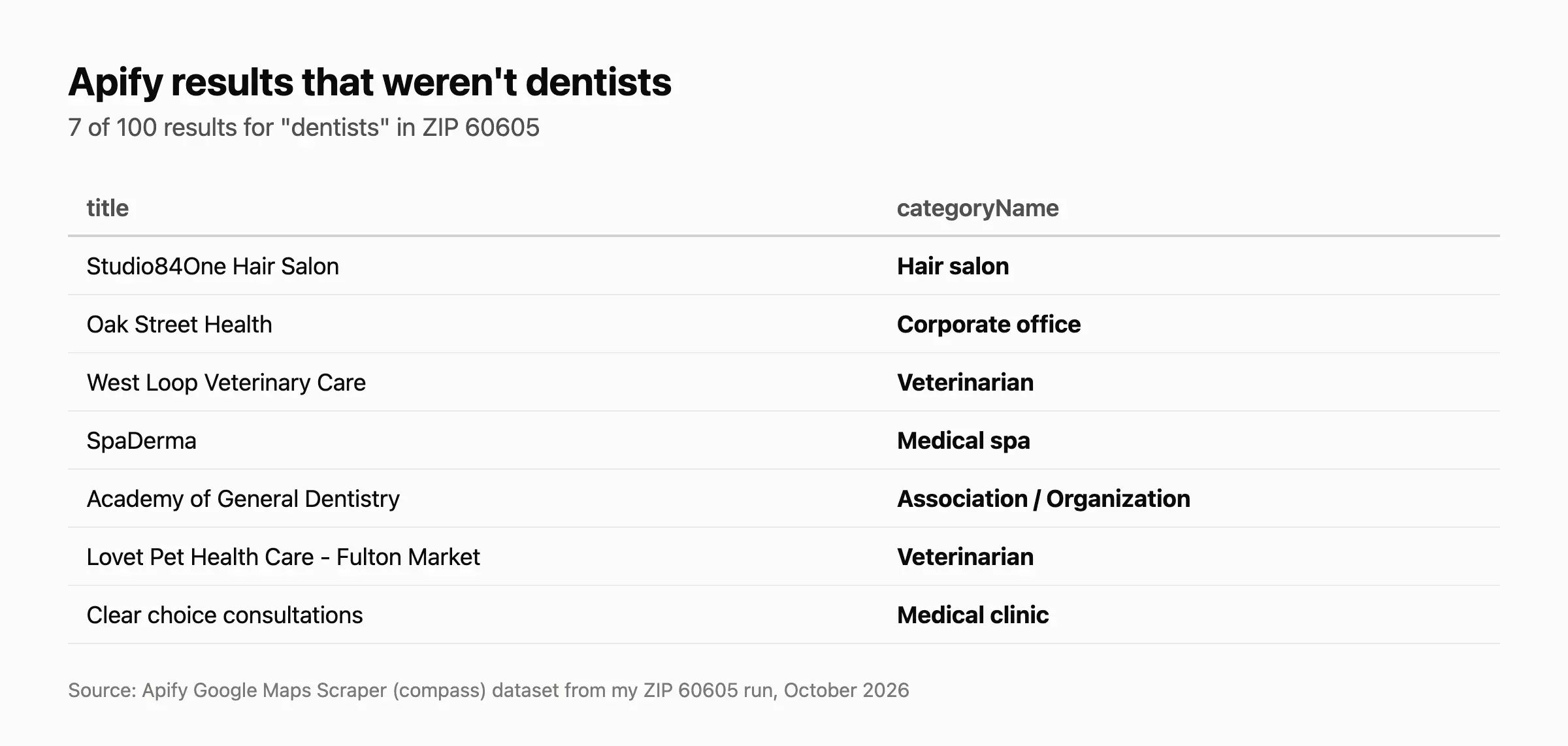
| The most fields of any API | 7% of results weren't dentists |
| More emails and socials than lobstr.io on the shared dentists | Emails aren't verified |
| 5 to 7 minutes per 100, everything on | The most expensive at scale |
| A perfect 10 on usability |
Data: 6.5/10
Volume: Apify's output carries 138 fields, the most of any API, covering the full profile plus emails and socials.
Fill rate: Apify returned an email for 38% of dentists (none verified), a social profile for 60% and a description for 66%. On the 12 dentists every API returned, it found emails for 11 to lobstr.io's 9, and every email both found came back valid in lobstr.io's verification.
Cleanliness: Apify returned no duplicates, but 7% of its results weren't dentists, like a hair salon, 2 vets and a med spa.
Accuracy: Apify matched the other tools 100% on every dentist they shared.
Cost: 4.3/10
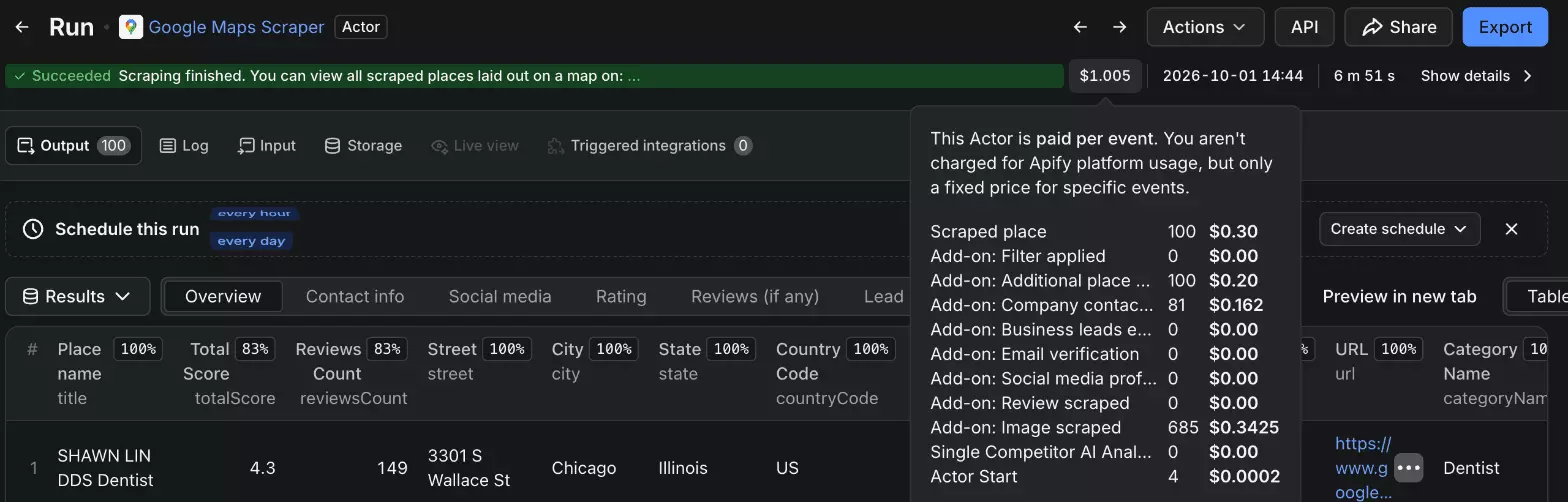
Apify charges per event: per place, per detail page, per contact lookup on each place with a website, and per image.
- Starter ($19): $9.00 to $10.05 per 1K places
- Scale ($199): $6.47 to $7.25
- Business ($999): $4.64 to $5.18
- Free: $5 of usage a month
Since the contact lookup is billed per website, not per email, a 100% email rate barely moves it: $9.84 to $10.43 on Starter, $5.08 to $5.38 on Business.
Speed: 6.8/10
Apify took 4 min 53 s to 7 min 5 s for 100 places with everything on, because it works on several businesses at once.
Usability: 10/10
Apify passed all 10 checks. A failed run can be resurrected with its data intact, or set to restart on its own after an error.
Quickstart
import requests

# start the Google Maps Scraper with contacts, details and images on
run = requests.post("https://api.apify.com/v2/acts/compass~crawler-google-places/runs",
    headers={"Authorization": "Bearer YOUR_API_TOKEN"}, json={
    "searchStringsArray": ["dentists"], "locationQuery": "60605, Chicago, IL, USA",
    "maxCrawledPlacesPerSearch": 100, "language": "en", "maxReviews": 0,
    "scrapeContacts": True, "scrapePlaceDetailPage": True, "maxImages": 10}).json()["data"]["id"]f
HasData: best for the cheapest emails
- Overall: 8.1/10 (Data 3.4, Cost 6.5, Speed 5.7, Usability 6)
- User rating: Trustpilot 4.5 (45 reviews)
- Accessible via: API, CLI, MCP
- Tested: Google Maps Scraper
| Pros | Cons |
|---|---|
| The cheapest emails: $0.37 per 1K places at scale | Emails only: no socials, profile or photos |
| Emails scraped live | Emails aren't verified |
| A free tier with no card | Speed swings from under a minute to 16 minutes |
Data: 3.4/10
Volume: HasData's output carries 42 fields: the listing plus emails.
Fill rate: HasData returned an email for 52% of dentists in the ZIP run and 45% in the city run, none verified.
Cleanliness: HasData returned no off-target results or duplicates.
Accuracy: HasData matched the other tools 100% on every dentist they shared.
Cost: 6.5/10
HasData charges 3 credits per place, plus 7 when it finds emails, however many. At a 33% email rate:
- Startup ($49 for 200K credits): $1.30 per 1K places
- Growth ($208 for 3M): $0.37
- Free: 1,000 credits a month, no card
At 100%, it's $2.45 on Startup and $0.69 on Growth.
Speed: 5.7/10
HasData took 16 min 28 s for 100 places in the city run, then 53 s for 60 in the ZIP run, with the same settings.
Usability: 6/10
HasData passed 6 of the 10 checks. Each job shows the credits it spent, and a stopped job keeps the rows it collected.
finished_with_error) with no retry, and no stated time it keeps results.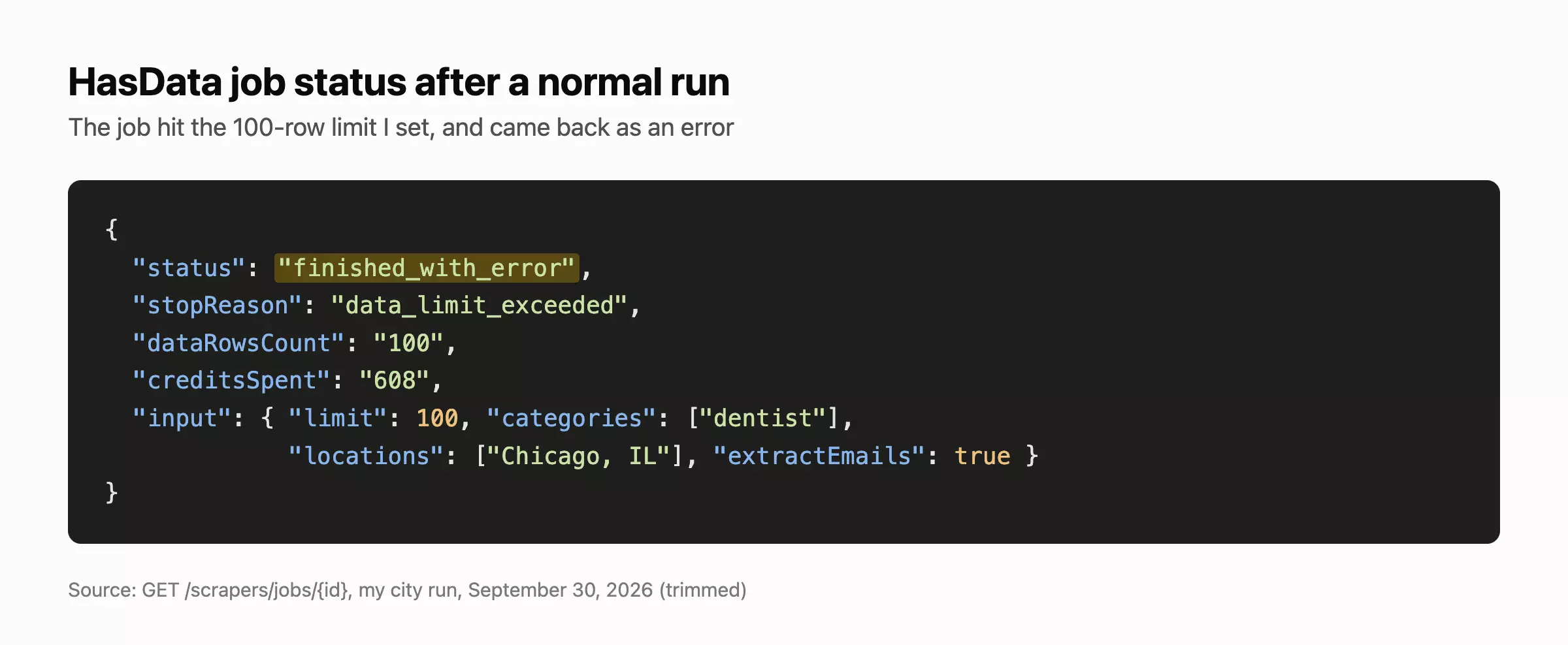
Quickstart
import requests

# start a Google Maps job with emails on (categories come from HasData's fixed list)
job = requests.post("https://api.hasdata.com/scrapers/google-maps/jobs", headers={"x-api-key": "YOUR_API_KEY"}, json={
    "categories": ["dentist"], "locations": ["Chicago, IL 60605"], "limit": 100, "extractEmails": True}).json()["id"]f
Outscraper: best for the richest profile without emails
- Overall: 5.5/10 (Data 4.9, Cost 6.0, Speed 9.2, Usability 6)
- User rating: Trustpilot 4.6 (318 reviews)
- Accessible via: API, SDK, MCP, Zapier
- Tested: Google Maps Search
| Pros | Cons |
|---|---|
| The richest profile of the APIs without emails | Emails and verification are separate products |
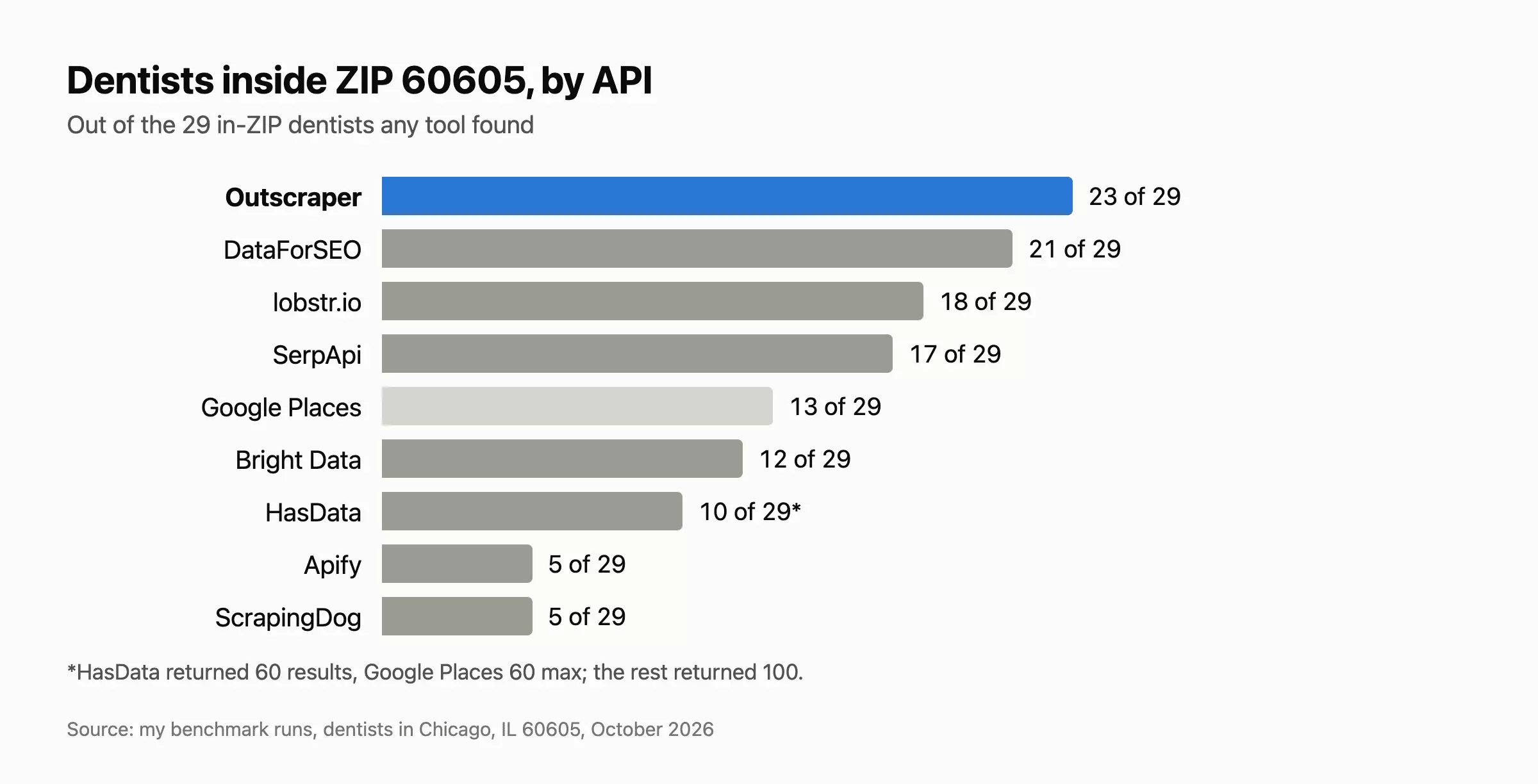
| The best ZIP coverage: 23 of the 29 dentists inside ZIP 60605 | Billing shows up a day late |
| Up to 500 places per query | |
| 31 to 43 s per 100 |
Data: 4.9/10
Volume: Outscraper's output carries 65 fields: the full profile, without contacts.
Fill rate: Outscraper returned claimed status and the star breakdown for 100% of dentists, opening hours for 91% and booking links for 67%.
Cleanliness: Outscraper returned no duplicates and 1 off-target result, a marketing agency.
Accuracy: Outscraper matched the other tools 100% on every dentist they shared.
Cost: 6.0/10
Outscraper charges per place, pay as you go, and its prepaid credits never expire:
- Free: 500 places a month
- Up to 100K places: $3.00 per 1K
- Above 100K: $1.00 per 1K
Emails ($3 per 1K websites) and verification ($3 per 1K emails) are separate products I didn't run.

Speed: 9.2/10
Outscraper took 42.9 s and 30.7 s for 100 places.
Usability: 6/10
Outscraper passed 6 of the 10 checks, with SDKs in 6 languages and input as free text, coordinates, place IDs or Maps URLs.
It missed 4: the run's cost showed up on my invoice only the next morning, a failed request returns no results with no documented retry, and each response is kept for just 4 hours.
Quickstart
import requests

# queue a Maps search
req = requests.post("https://api.app.outscraper.com/google-maps-search", headers={"X-API-KEY": "YOUR_API_KEY"}, json={
    "query": ["dentists in Chicago, IL 60605"], "language": "en", "region": "US",
    "organizationsPerQueryLimit": 100, "async": True}).json()["id"]f
DataForSEO: best for the cheapest listings at volume
- Overall: 5.4/10 (Data 4.1, Cost 10, Speed 10, Usability 10)
- User rating: Trustpilot 4.5 (57 reviews)
- Accessible via: API, SDK, MCP, Make, Zapier
- Tested: Google Maps SERP API, Live mode
| Pros | Cons |
|---|---|
| $0.02 per 1K places | Less data: no closed status, description or attributes |
| 100 places in 1 call, in about 14 s | Ads mixed into the results |
| A perfect 10 on usability | A $50 prepaid minimum |
| Up to 700 deep per task |
Data: 4.1/10
Volume: DataForSEO's output carries 51 fields: the listing plus claimed status, the star breakdown and a photo count.
Fill rate: DataForSEO returned claimed status for 100% of dentists, the star breakdown for 98%, a review snippet for 88% and booking links for 32%.
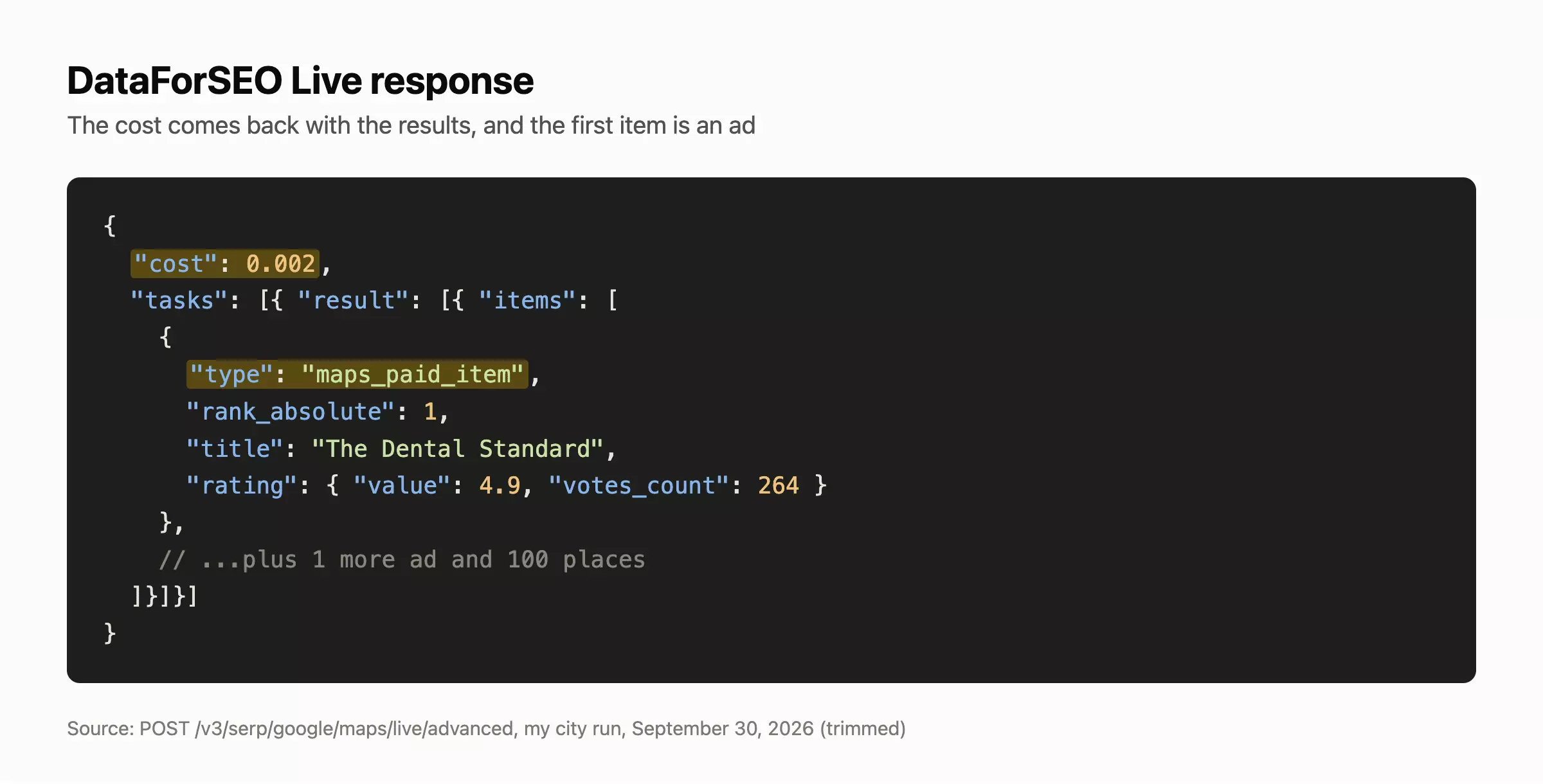
Cleanliness: DataForSEO returned no duplicates, but 1 off-target result (a corporate office) and 2 ads mixed into the city run.
Accuracy: DataForSEO matched the other tools 100% on every dentist they shared.
Cost: 10/10
DataForSEO charges per task, and 1 Live call returned 100 places for $0.002: $0.02 per 1K places, or $0.006 on its slower standard queue. It's prepaid, with a $50 minimum and $1 of credit on sign-up.
Speed: 10/10
DataForSEO took 14.3 s and 13.9 s for 100 places.
Usability: 10/10
DataForSEO passed all 8 checks that apply to Live mode. Each response carries its own cost, and you're charged only when you get a result.
The location has to match its own list exactly, though.
Quickstart
import requests

# one Live call returns up to 100 places
r = requests.post("https://api.dataforseo.com/v3/serp/google/maps/live/advanced",
    auth=("YOUR_LOGIN", "YOUR_PASSWORD"), json=[{
    "keyword": "dentists in Chicago, IL 60605", "location_name": "Chicago,Illinois,United States",
    "language_code": "en", "depth": 100}]).json()
places = r["tasks"][0]["result"][0]["items"]f
Bright Data: best for review texts in every record
- Overall: 5.2/10 (Data 3.6, Cost 5.3, Speed 6.5, Usability 7)
- User rating: Trustpilot 4.3 (1,024 reviews)
- Accessible via: API, SDK, MCP
- Tested: Google Maps full information dataset
| Pros | Cons |
|---|---|
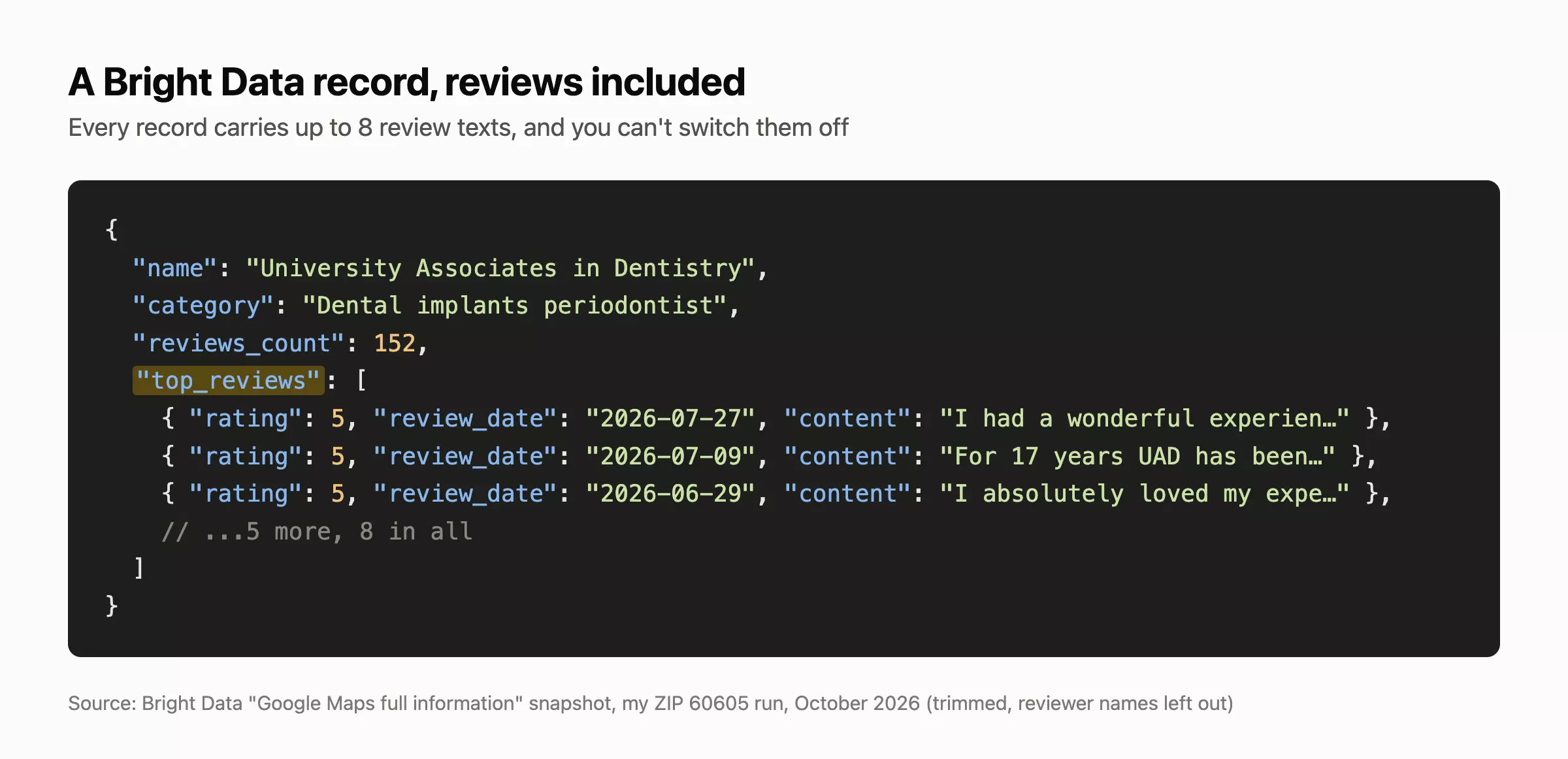
| Up to 8 review texts per place, in every record | No emails, and no city or ZIP field |
| Delivery straight to S3, GCS, Azure, Snowflake or SFTP | 4.5 to 5.5 minutes per 100 |
| 5K free records a month, no card | Coordinates only, no free-text location |
Data: 3.6/10
Volume: Bright Data's output carries 77 fields: the full profile plus review texts, which you can't switch off.
Fill rate: Bright Data returned the star breakdown and review texts for 100% of dentists, "people also search" for 62% and booking links for 36%.
Cleanliness: Bright Data returned no off-target results or duplicates.
Accuracy: Bright Data matched the other tools 100% in the ZIP run, and missed once in the city run (a 4.7 rating against 4.8).
Cost: 5.3/10
Bright Data charges per record:
- Free: 5K records a month, no card
- Pay as you go: $1.50 per 1K places
- Scale ($499 for 384K records): $1.30
Speed: 6.5/10
Bright Data took 5 min 36 s and 4 min 34 s for 100 places, and 1 download stalled for about 5 minutes.
Usability: 7/10
Bright Data passed 7 of the 10 checks. A failed snapshot comes back flagged with per-input errors, failed deliveries aren't charged, and snapshots stay downloadable for 30 days.
It missed 3: my key couldn't read the account balance, a blocked domain and that stalled download held up my runs, and its docs don't say whether a failed snapshot keeps partial data.
Quickstart
import requests

# trigger a snapshot: keyword + coordinates + zoom (there's no city field)
snapshot = requests.post("https://api.brightdata.com/datasets/v3/trigger", headers={"Authorization": "Bearer YOUR_API_KEY"},
    params={"dataset_id": "gd_m8ebnr0q2qlklc02fz", "type": "discover_new", "discover_by": "location", "include_errors": "true"},
    json={"input": [{"country": "US", "lat": 41.8703, "long": -87.6236, "zoom_level": 14, "keyword": "dentists"}],
          "limit_per_input": 100}).json()["snapshot_id"]f
SerpApi: best for fast listings with an uptime SLA
- Overall: 2.0/10 (Data 2.7, Cost 6.4, Speed 10, Usability 10)
- User rating: Trustpilot 4.9 (105 reviews)
- Accessible via: API, SDK, MCP, Make
- Tested: Google Maps API
| Pros | Cons |
|---|---|
| 9 to 10 s per 100 | Listings only |
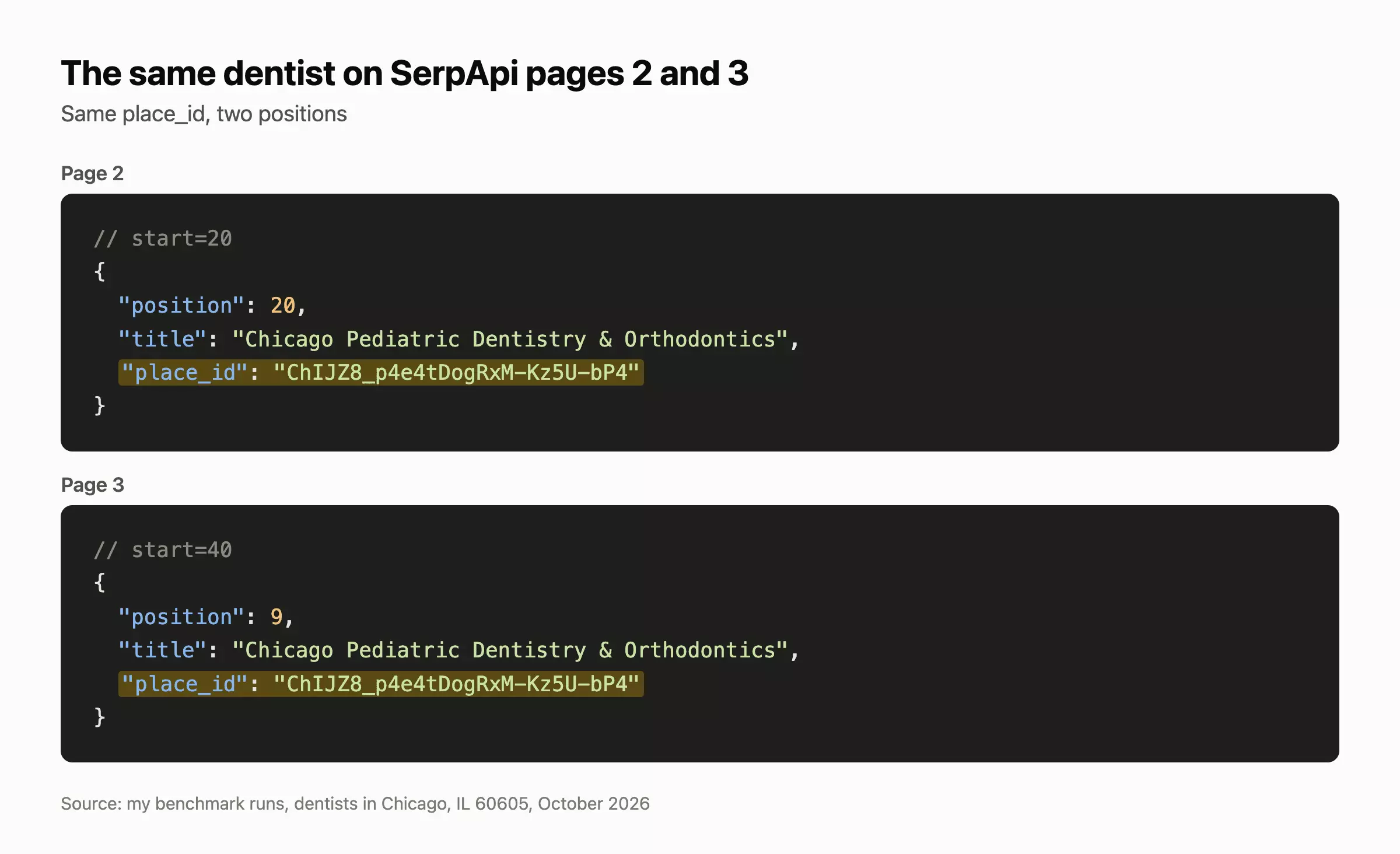
| A 99.95% SLA on every plan | 4 to 5% duplicates |
| Libraries in 10 languages |
Data: 2.7/10
Volume: SerpApi's output carries 41 fields: the search-result listing plus claimed status and booking links.
Fill rate: SerpApi returned opening hours for 97% of dentists, a review snippet for 61% and booking links for 34%.
Cleanliness: SerpApi returned no off-target results, but 4 to 5% of its results were duplicates across pages.
Accuracy: SerpApi matched the other tools 100% on every dentist they shared.
Cost: 6.4/10
SerpApi charges per search of 20 places, and doesn't count cached searches (a 1-hour cache):
- Free: 250 searches a month
- Starter ($25 for 1K searches): $1.25 per 1K places
- Searcher ($725 for 100K): $0.36 at full use
Speed: 10/10
SerpApi took 9.0 s and 9.9 s for 100 places.
Usability: 10/10
SerpApi passed all 8 checks that apply to an API that answers in the same call. Errored, failed and cached searches don't count toward your plan, and every search stays in its archive for 31 days.
Quickstart
import requests

places = []
for start in range(0, 100, 20):  # 20 places per page
    r = requests.get("https://serpapi.com/search.json", params={"engine": "google_maps", "type": "search",
        "q": "dentists in Chicago, IL 60605", "hl": "en", "gl": "us", "start": start, "api_key": "YOUR_API_KEY"}).json()
    places += r.get("local_results", [])f
ScrapingDog: best for cheap, fast listing pages
- Overall: 1.9/10 (Data 2.1, Cost 9.2, Speed 9.8, Usability 10)
- User rating: Trustpilot 4.7 (586 reviews)
- Accessible via: API, SDK, MCP
- Tested: Google Maps API
| Pros | Cons |
|---|---|
| $0.02 per 1K places at scale | Listings only |
| 8 to 11 s per 100 | 9 to 11% duplicates |
| Coordinates needed to page through results |
Data: 2.1/10
Volume: ScrapingDog's output carries 38 fields, the fewest of any API: the search-result listing only.
Fill rate: ScrapingDog returned opening hours and a website for 92% of dentists.
Cleanliness: 9 to 11% of ScrapingDog's results were duplicates, and 2 weren't dentists (corporate offices).
Accuracy: ScrapingDog matched the other tools 100% on every dentist they shared.
Cost: 9.2/10
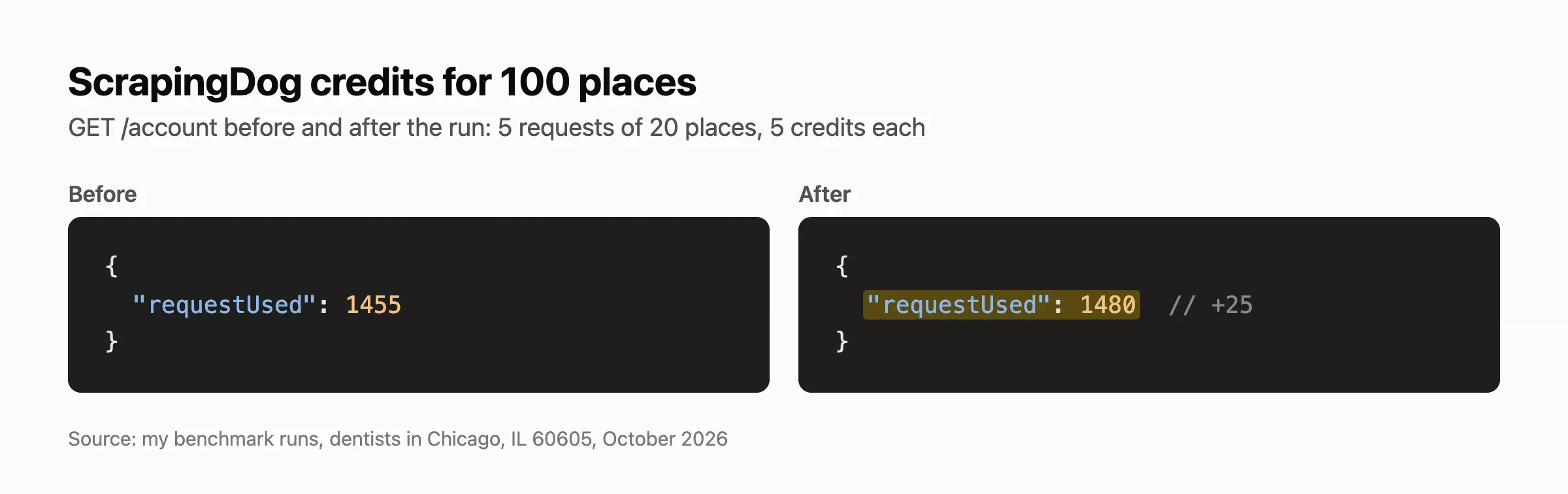
ScrapingDog charges 5 credits per request of 20 places, so 100 places cost 25 credits:
- Lite ($40 for 200K credits): $0.05 per 1K places
- Standard ($90 for 1M): $0.02 at full use
- Free: 100 credits once, on sign-up, no card
Speed: 9.8/10
ScrapingDog took 7.9 s and 10.9 s for 100 places, the fastest single run in the test.
Usability: 10/10
ScrapingDog passed all 8 checks that apply. Failed requests are never charged, though retrying them is up to your code.
Paging past the first 20 results needs coordinates.
Quickstart
import requests

places = []
for page in range(0, 100, 20):  # 20 places per page; paging needs coordinates
    r = requests.get("https://api.scrapingdog.com/google_maps", params={"api_key": "YOUR_API_KEY",
        "query": "dentists", "ll": "@41.8703,-87.6236,14z", "page": page}).json()
    places += r.get("search_results", [])f
FAQ
Is it legal to scrape Google Maps with an API?
Generally legal in the US for public, logged-out data, but it breaks Google's terms, which ban automated access and building "business listings" databases from Maps.
How much does scraping Google Maps cost at scale?
From $0.02 to about $5 per 1K places, depending on how much data you take.
Which Google Maps API gives verified emails?
Only lobstr.io verified emails in the same run: 60 of 100 dentists came back with a valid email (61 on the Maps URL input).
Apify (38 of 100) and HasData (31 of 60) don't verify theirs, and Outscraper sells verification separately.
What about Scrap.io?
I tested it but left it unranked, because it serves its own database, not a live scrape.
That makes it fast, 42.3 s for 100 places with emails on 64% of them, but 9 permanently closed dentists came back and review counts lagged Google on 2 of 16 shared dentists.
It costs $4.90 to $4.99 per 1K places, and the 7-day trial needs a card and stops at 100 exports.
Can I get every business in a ZIP code or city from a single search?
No, the best tool found 23 of 29 in-ZIP dentists, and no tool stayed inside ZIP 60605.
Why do different APIs return different businesses for the same search?
Each one sees a different slice of Google's ranking: no dentist appeared in all 10 outputs of the city run, out of 364 found.
The center, the zoom and the wording all change what comes back.
Can I reproduce these benchmark results?
The Places files keep only place IDs (Google's terms), with the full method to rerun them.
Final thoughts
lobstr.io is the best Google Maps scraper API for lead data in this test, at 9.3/10: the most complete data, and the only emails verified in the same run. The catch is that, with everything on, it's the slowest here (19 to 29 minutes per 100).