Best PagesJaunes Scrapers 2026 [No-Code + API Edition]
(updated)
lobstr.io is the best PagesJaunes scraper in 2026, tested across data, cost, usability, scalability, speed, and support. It wins on the richest dataset tested (46 fields, only tool with email extraction), and the best value at scale, tying Apify's $1.50/1K but with 10 more fields. Apify is the runner-up, with 36 fields and 74.32 results/min, but has no email extraction and its pricing never drops with volume.
⚡ 30-Second Summary
- I tested four PagesJaunes scrapers across data, cost, usability, scalability, speed, and support.
- lobstr.io is the best PagesJaunes scraper overall. It returns the richest dataset tested (46 fields), is the only tool that extracts email, and is fastest in base mode (428.57/min) and best value at scale. Full enrichment (including email) drops its speed to 9.44/min, behind Apify's 74.32/min.
- Apify is the best second choice. It returns a clean 36-field dataset in a single mode with no toggles to manage, and has the fastest support response tested (0.89 hours). The trade-off: no email extraction, and pricing never drops as volume grows.
- Piloterr is an API-only option, not a no-code tool. It returns 20 fields across two separate calls, at a mid-pack cost and speed, but needs code to use at all.
- WebScraper.io is the weakest tool tested, across every criterion. It returns only 10 fields, is the slowest (5.24/min) and most expensive ($10.54–$5.27/1K), and its workflow is spread across multiple technical tabs.
- PhantomBuster didn't make the final list. It failed on CAPTCHA protection even after switching to the France-based proxy its own instructions require.
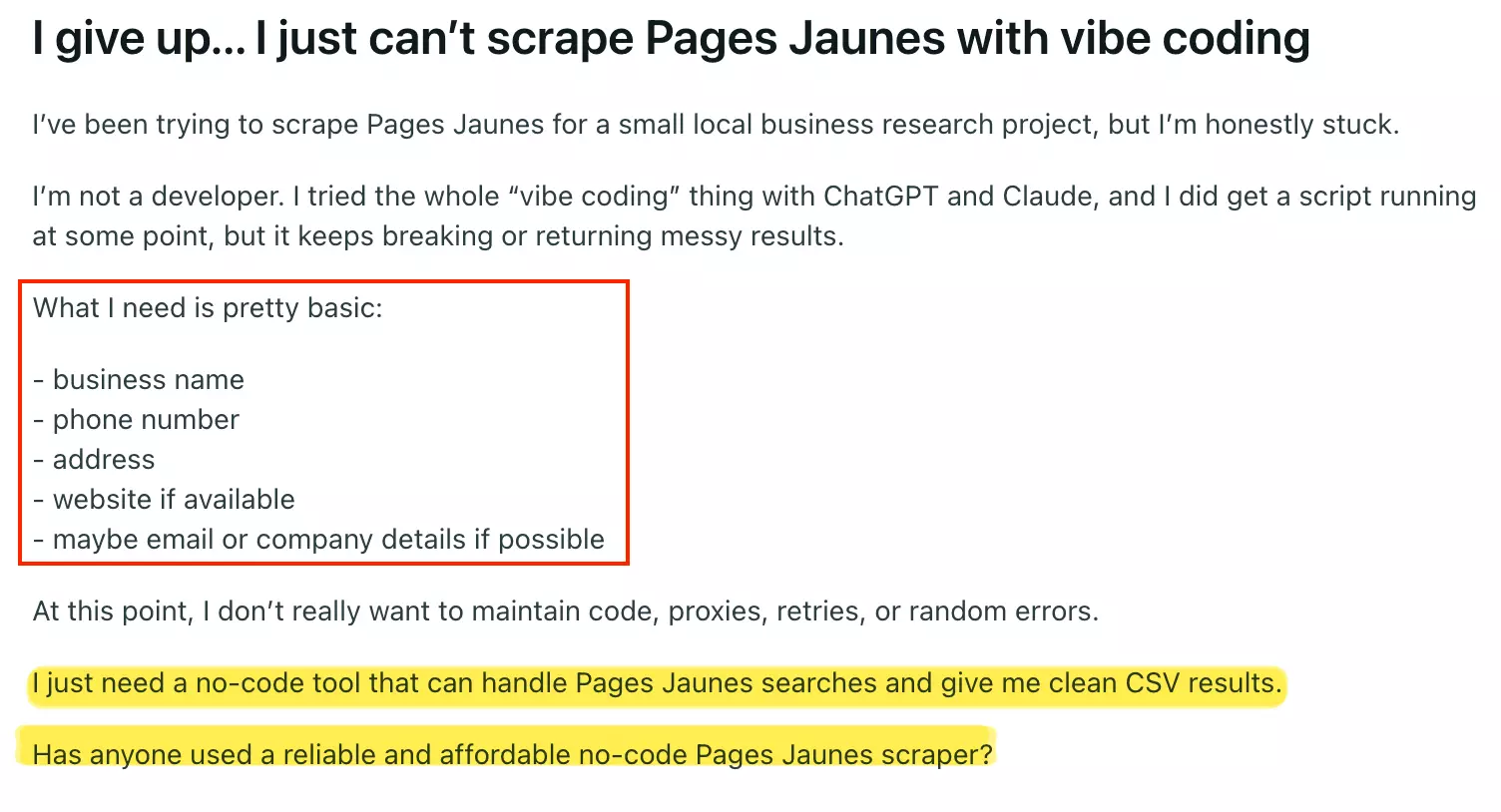
Getting a few PagesJaunes results is easy.
The real problem is getting a clean, usable list at scale, without code or surprise costs.
Most scraping tools you find online are either built for developers, unreliable past a few hundred rows, or wildly overpriced once you need volume.
I tested the best no-code plus api options so you don't have to sit through the same trial-and-error.
Here's what actually works.
Quick Comparison
| Criteria | lobstr.io | Apify | Piloterr | WebScraper.io |
|---|---|---|---|---|
| User rating | 5/5 | 5/5 | 4.8 | N/A |
| Data fields | 46 | 36 | 20 | 10 |
| Email extraction | ✅ | ❌ | ❌ | ❌ |
| Phone extraction | ✅ | ✅ | ✅ | ✅ |
| Website extraction | ✅ | ✅ | ✅ | ✅ |
| Geo coordinates | ✅ | ❌ | ❌ | ❌ |
| Individual review text | ✅ | ❌ | ❌ | ❌ |
| Review count on every result | ✅ | ❌ | ❌ | ❌ |
| Legal/company data | ✅ | ✅ | ✅ | ❌ |
| Cost per 1,000 (entry) | $6.00 | $1.50 | $2.92 | $10.54 |
| Cost per 1,000 (scale) | $1.50 | $1.50 | $2.43 | $5.27 |
| Free tier | ✅ | ✅ | ❌ | ❌ |
| Speed (results/min) | 9 | 74 | 17 | 5 |
| Speed (per 1,000 results) | 1 hr 45 min 54 sec | 13 min 27 sec | 58 min 20 sec | 3 hr 10 min 47 sec |
| Result control | Max results + max pages | Max cost per run | No built-in limit | No pages/result cap |
| Concurrency | ✅ | ✅ | ❌ | ✅ |
| Scheduling | ✅ | ✅ | ❌ | ✅ |
| Export formats | CSV, JSON, XLSX, JSONL | CSV, JSON, XLSX, XML, JSONL | JSON | CSV, JSON, XLSX |
| Webhook | ✅ | ✅ | ❌ | ✅ |
| Programmatic access | API + SDK + CLI + MCP | API + SDK + MCP | API + MCP | API + SDK + MCP |
| Customer support | Live chat + Email | Issues tab (community-maintained) | Email + live chat |
How do the scores stack up?
| Criterion | lobstr.io | Apify | Piloterr | WebScraper.io |
|---|---|---|---|---|
| Data | 4/5 | 3/5 | 1/5 | 2/5 |
| Cost | 5/5 | 3/5 | 3/5 | 1/5 |
| Usability | 5/5 | 3/5 | 1/5 | 2/5 |
| Speed | 4/5 | 3/5 | 3/5 | 1/5 |
| Scalability | 5/5 | 4/5 | 3/5 | 2/5 |
| Support | 4/5 | 5/5 | 4/5 | 2/5 |
| Overall | 4.5/5 | 3.5/5 | 2.5/5 | 1.7/5 |
Each category is scored out of 5 based on the test results below. The overall score is a simple average across all six categories.
Just tell me which PagesJaunes scraper to use
| If you want... | Go with | Why |
|---|---|---|
| The most complete data, including email | lobstr.io | 46 fields, and it's still the only one that gets you an inbox to email into. |
| The best value at scale | lobstr.io | Same price as Apify per 1,000 results, you just get ten more fields for it. |
| Duplicates handled automatically | lobstr.io | Built-in deduplication. Apify has no equivalent, so you'd clean up repeat listings yourself. |
| Phone and business details at scale | lobstr.io | 95.85/min — still faster than Apify's 74.32/min, and scales to ~4.1M/month. |
⚠️ Disclaimer
The information in this section is for general informational purposes only. It reflects publicly available sources and my own interpretation of them.
It does not constitute legal advice and should not be treated as such. Laws vary by jurisdiction and can change.
If you need guidance on compliance, data use, contracts, or platform-specific risks, consult a qualified legal professional who can evaluate your situation in detail.
Is it legal to scrape PagesJaunes?
Yes, it's legal under certain conditions.
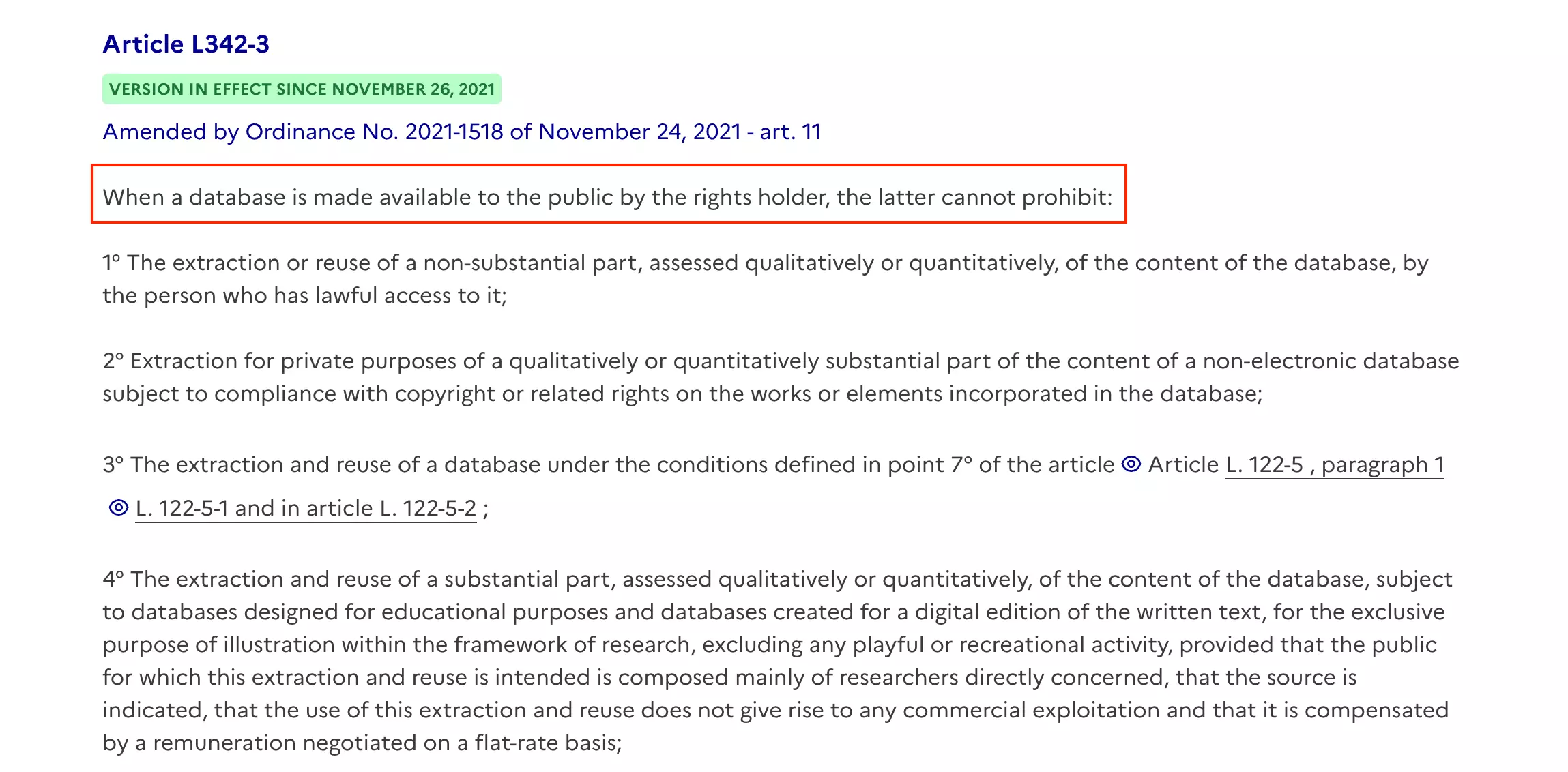
For most business use cases, like lead generation, market research, or competitive analysis, you're well within those boundaries.
A few things to keep in mind:
- Use the data internally, not for republishing listings publicly
- Don't extract the full catalogue
- Don't build a competing directory from the scraped data
Further reading:
How I chose the best PagesJaunes scrapers
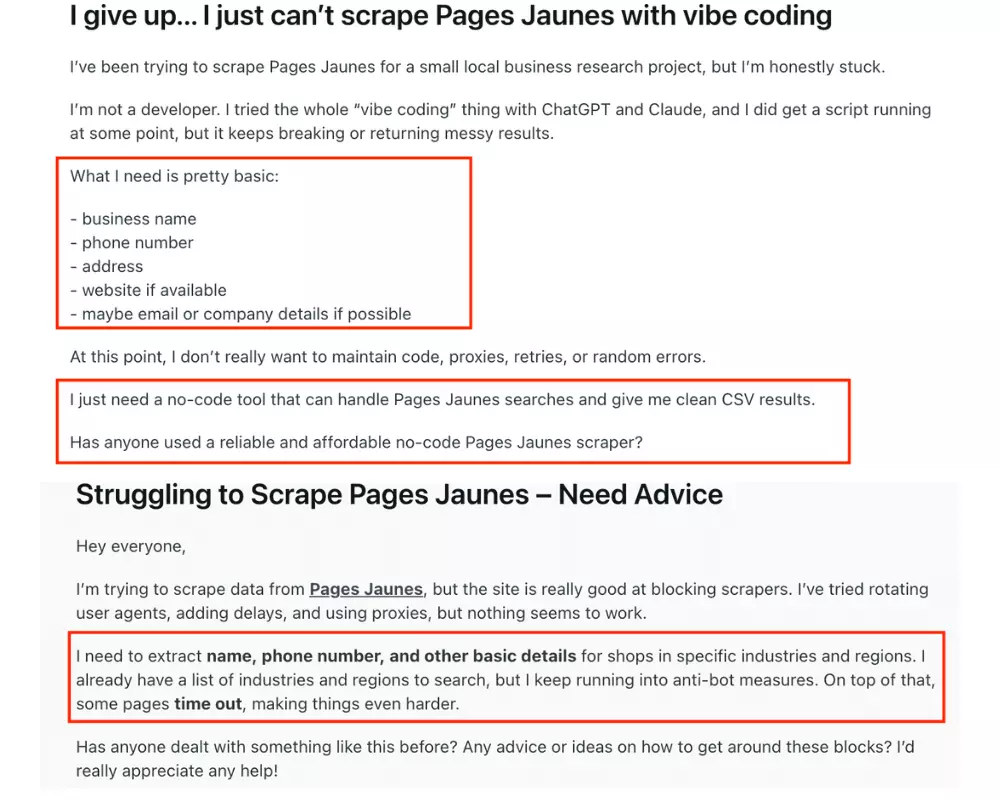
From there, I narrowed the comparison down to six criteria:
- Data
- Cost
- Usability
- Speed
- Scalability
- Support
Here's what I checked for each one.
Data
For data, I counted how many fields each tool returns, which fields are exclusive, and whether the output is clean enough to use without cleanup.
Cost
I normalized pricing into cost per 1,000 results and compared entry-level vs scale-level pricing.
Usability
For usability, I looked at the full workflow from the start.
I wanted to see whether each tool could handle more than a one-off scrape: setup, inputs, run controls, exports, and repeat jobs.
I evaluated:
- Input support: search pages, business pages, or bulk lists.
- Run controls: limits, scheduling, and scrape settings.
- Export options: downloads, cloud delivery, or workflow integrations.
- Automation: APIs, webhooks, SDKs, or external tools.
- Friction: unclear settings, awkward setup, or extra manual work.
The goal was to judge each scraper as a repeatable workflow, not just a data export.
Speed
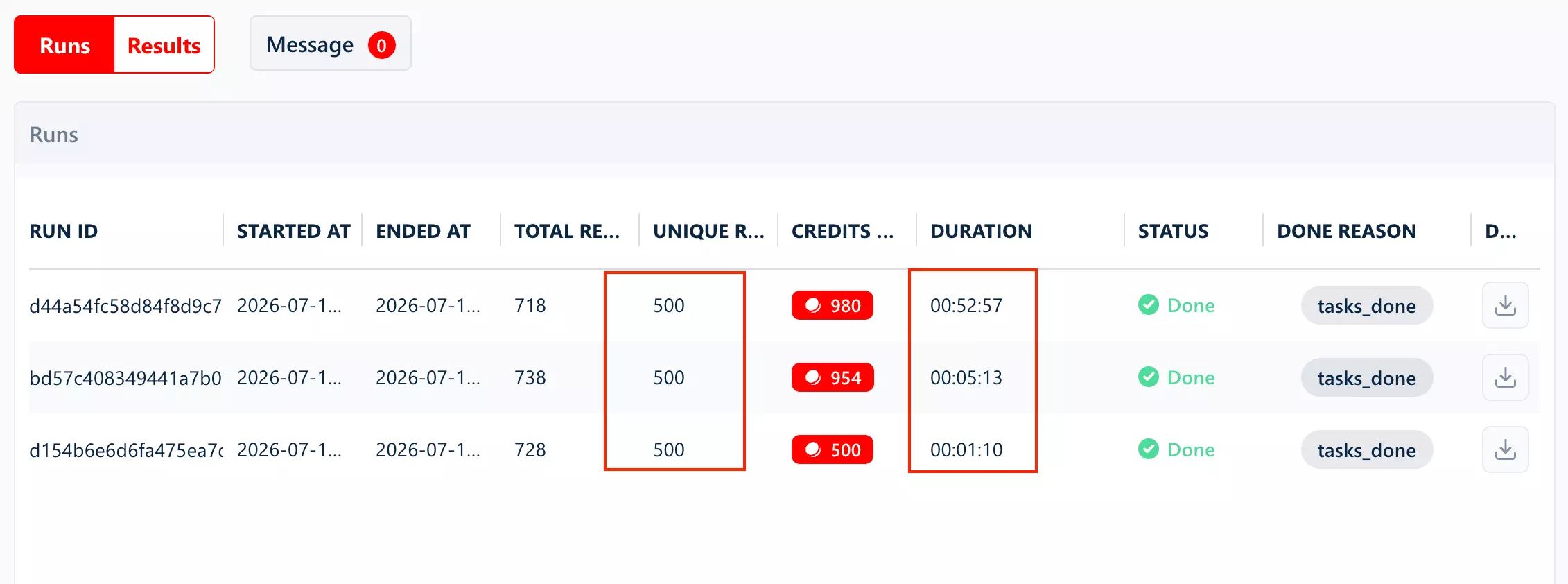
For speed, I ran timed tests and converted everything into results per minute, then normalized that to minutes per 1,000 results so the numbers are easy to compare side by side.
Scalability
For scalability, I converted each tool's measured speed into a monthly ceiling using 43,200 min/month (24/7 for 30 days).
That estimates how many results each tool can produce in a month.
I also noted whether concurrency controls exist to push throughput, or if scaling is mostly linear.
Support
I also looked at customer support, since a tool's real reliability tends to show up in how it handles things going wrong, not just when everything runs smoothly.
For every tool, I noted which support channels actually exist, like live chat, email, tickets, and community.
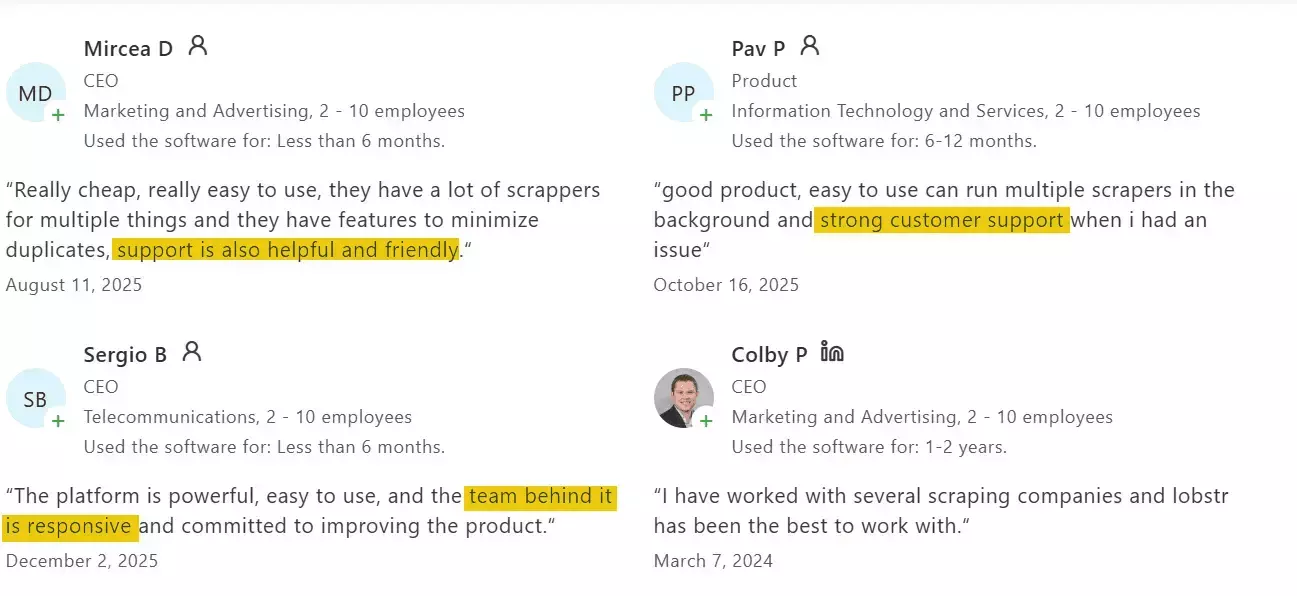
Then I checked what's on record: response times where published, and third-party reviews mentioning the support experience.
What I left out and why
After defining the criteria, I listed every PagesJaunes scraper I could find through Google results and AI recommendations.
Then I cut the list down.
- Browser extensions and visual scrapers were out because they are unreliable at scale. They can work for small manual jobs, but they tend to break when you need repeatable scraping runs.
- Desktop apps with unreliable setup were out. A couple of tools failed before testing even started, either during download or launch. If a scraper cannot install cleanly, it is hard to recommend for a repeatable workflow.
- Abandoned GitHub repos were out too. I found
l-portet/yellow-scraperandSorelz/PagesJaunes-Scraper, but both looked old and unchecked for years. - Low-use Apify actors were also skipped. There are multiple community PagesJaunes actors on Apify, so I picked the one with the most users for this comparison. It is not a perfect signal, but it beats choosing a ghost actor with confidence.
The final list only includes tools that were accessible, maintained, and practical for scalable PagesJaunes data collection.
The best PagesJaunes scrapers
| Criteria | lobstr.io | Apify | Piloterr | WebScraper.io |
|---|---|---|---|---|
| User rating | 5/5 | 5/5 | 4.8 | N/A |
| Data fields | 46 | 36 | 20 | 10 |
| Email extraction | ✅ | ❌ | ❌ | ❌ |
| Phone extraction | ✅ | ✅ | ✅ | ✅ |
| Website extraction | ✅ | ✅ | ✅ | ✅ |
| Geo coordinates | ✅ | ❌ | ❌ | ❌ |
| Individual review text | ✅ | ❌ | ❌ | ❌ |
| Review count on every result | ✅ | ❌ | ❌ | ❌ |
| Legal/company data | ✅ | ✅ | ✅ | ❌ |
| Cost per 1,000 (entry) | $6.00 | $1.50 | $2.92 | $10.54 |
| Cost per 1,000 (scale) | $1.50 | $1.50 | $2.43 | $5.27 |
| Free tier | ✅ | ✅ | ❌ | ❌ |
| Speed (results/min) | 9 | 74 | 17 | 5 |
| Speed (per 1,000 results) | 1 hr 45 min 54 sec | 13 min 27 sec | 58 min 20 sec | 3 hr 10 min 47 sec |
| Result control | Max results + max pages | Max cost per run | No built-in limit | No pages/result cap |
| Concurrency | ✅ | ✅ | ❌ | ✅ |
| Scheduling | ✅ | ✅ | ❌ | ✅ |
| Export formats | CSV, JSON, XLSX, JSONL | CSV, JSON, XLSX, XML, JSONL | JSON | CSV, JSON, XLSX |
| Webhook | ✅ | ✅ | ❌ | ✅ |
| Programmatic access | API + SDK + CLI + MCP | API + SDK + MCP | API + MCP | API + SDK + MCP |
| Customer support | Live chat + Email | Issues tab (community-maintained) | Email + live chat |
1. lobstr.io
User rating: 5/5 ⭐⭐⭐⭐⭐ (33 reviews, Capterra)
| Category | Score |
|---|---|
| Data | 4/5 |
| Cost | 5/5 |
| Speed | 4/5 |
| Scalability | 5/5 |
| Usability | 5/5 |
| Support | 4/5 |
| Overall | 4.5/5 |
| Pros | Cons |
|---|---|
| Only tool with email extraction | Slower than Apify once email is included (9.44/min vs 74.32/min) |
| Only tool with review data, not just counts | COMPANY HQ always returns null |
| 46 fields at full enrichment, more than any other tool tested | |
| Fastest measured speed at base tier, ~428.57/min | |
| Geo-coordinates, payment methods, products, brands | |
| CSV bulk upload | |
| Adjustable concurrency via Slots | |
| Strong live chat support |
Data
Richness
lobstr.io returns up to 46 PagesJaunes fields, across three tiers depending on which toggles are enabled.
Collect Additional Details adds 31 more (44 total). Turning on Collect Emails from Website on top of that adds 2 more (46 total).Fields (46 total)
| Category | Fields |
|---|---|
| Identity & listing | TITLE, ITEM ID, URL, REF, TAGS, ACTIVITY, DESCRIPTION |
| Location | FULL ADDRESS, STREET ADDRESS, ZIP CODE, CITY, LATITUDE, LONGITUDE |
| Contact | PHONE, ADDITIONAL PHONE, EMAIL, WEBSITE, EXTERNAL LINKS, FACEBOOK, INSTAGRAM |
| Business & legal | SIRET, SIREN, NAF CODE, RAISON SOCIAL, FORME JURIDIQUE, AUTRES DENOMINATIONS, COMPANY CREATION DATE, COMPANY SIZE, NOMBRE ETABLISSEMENTS, IS VERIFIED, LISTING TYPE |
| Commercial details | SHOP TYPE, SHOP SIZE, PAYMENT METHODS, PRESTATIONS, PRODUCTS, BRANDS, ACCEPTS QUOTE REQUESTS, MULTI ACTIVITE, OPENING HOURS |
| Media | IMAGE URL, IMAGES |
| Reviews & ratings | SCORE, RATINGS, REVIEWS |
| Always null | COMPANY HQ |
PHONE and DESCRIPTION require the Collect Additional Details toggle. They're not part of the base tier.Exclusive
| Category | Fields |
|---|---|
| Identity & listing | TAGS, LISTING TYPE |
| Location | STREET ADDRESS, LATITUDE, LONGITUDE |
| Contact | EMAIL |
| Business & legal | COMPANY SIZE, NOMBRE ETABLISSEMENTS, AUTRES DENOMINATIONS |
| Commercial details | SHOP TYPE, SHOP SIZE, PAYMENT METHODS, PRESTATIONS, PRODUCTS, BRANDS, ACCEPTS QUOTE REQUESTS |
| Reviews & ratings | SCORE, REVIEWS |
REVIEWS returns individual review objects (author, rating, date, text), not just a count.lobstr.io also returns a review count for every business tested (100%), including a confirmed 0 when there are none. Apify and WebScraper.io only return a count for 19.7% and 39.2% of businesses respectively.
Want to verify the numbers yourself?
COMPANY HQ) is the only gapCost
lobstr.io runs on a monthly subscription model, from $20/month up to $500/month.
- Free tier available
- Starts at $2.00 per 1,000 results
- At scale → $0.50 per 1,000 results
lobstr.io has two optional enrichment toggles: Collect Additional Details and Collect Emails from Website. Turning both on increases the cost because you're getting more data per result.
With enrichment enabled:
- Starts at $6.00 per 1,000 results
- At scale → $1.50 per 1,000 results
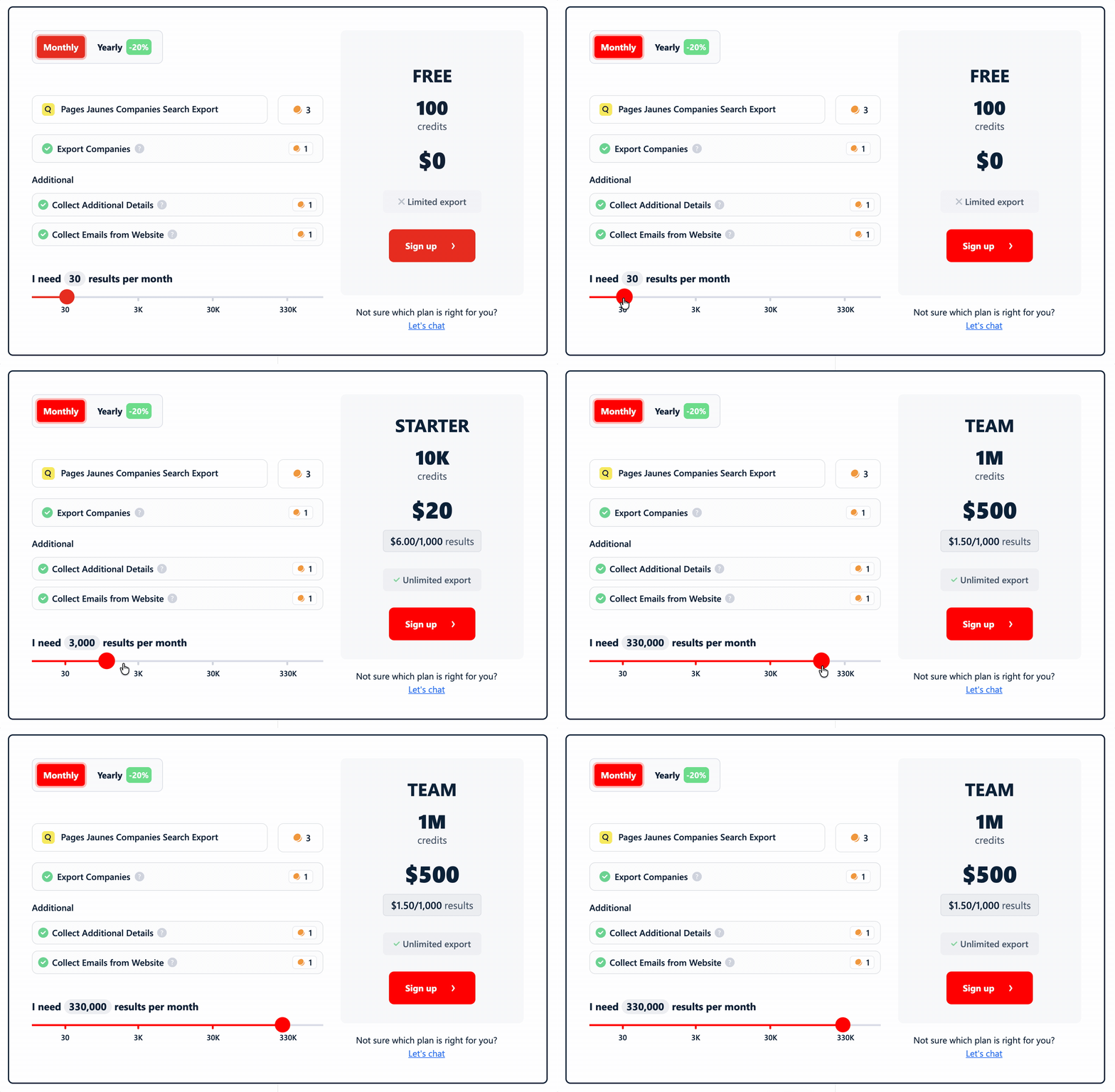
Cost score: 5/5 — ties Apify's $1.50/1K at scale but delivers 46 fields including email vs. Apify's 36 with none; drops to $0.50/1K on the leaner base tier
Usability
lobstr.io keeps the workflow simple and practical.
Ways to feed it a job
- PagesJaunes search URL
You can also upload a CSV if you want to process multiple search URLs in bulk.
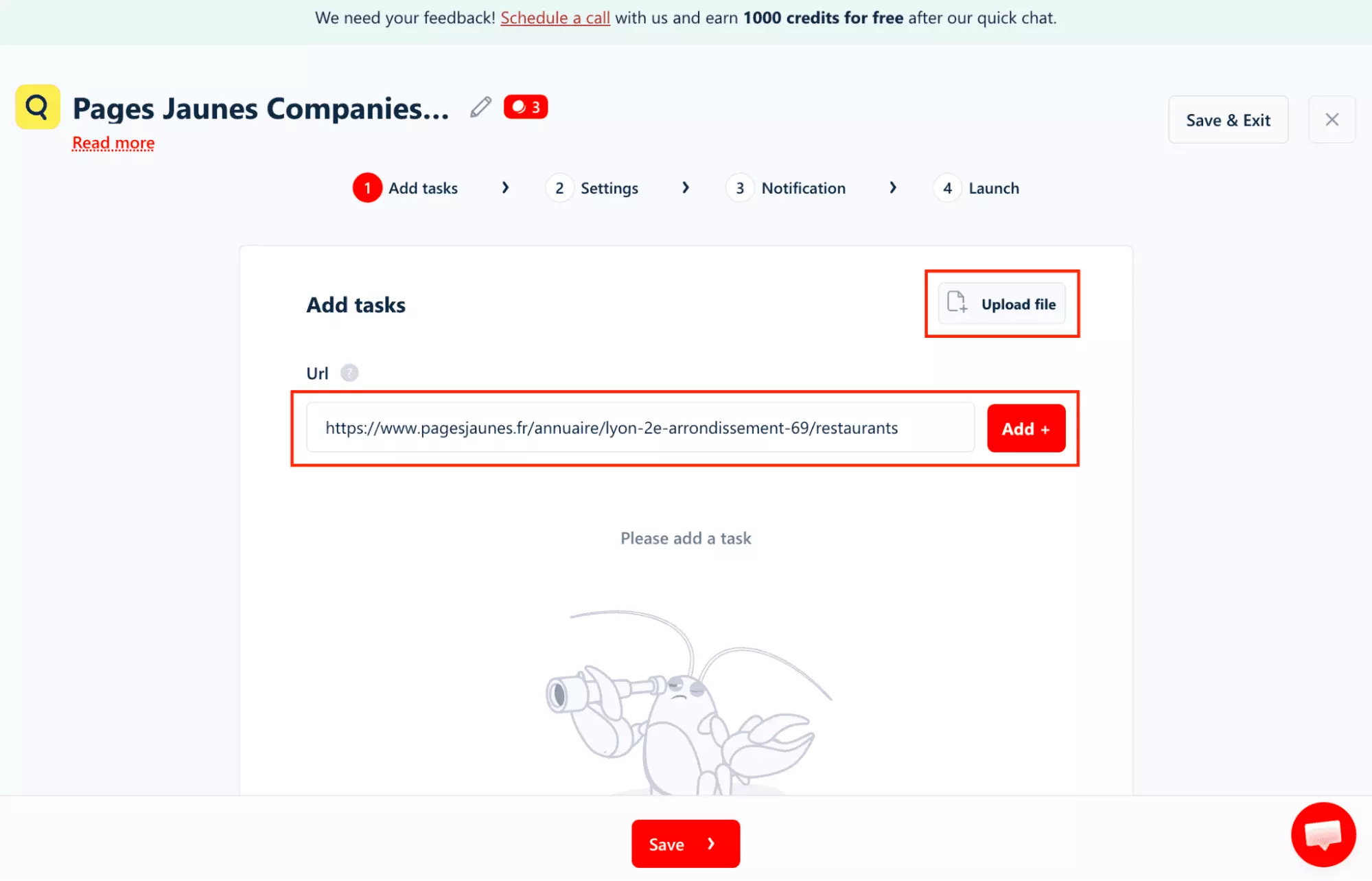
Pre-scrape settings
- Max unique results cap
- Max pages cap (how many PagesJaunes search result pages lobstr.io is allowed to crawl)
Collect Additional DetailstoggleCollect Emails from Websitetoggle- Number of processing slots
- Unique results only
- Remove line breaks
The scheduling flow supports minutes, hours, days, weeks, and months, with timezone control. That makes it practical for monitoring, not just pulling a one-off dataset.
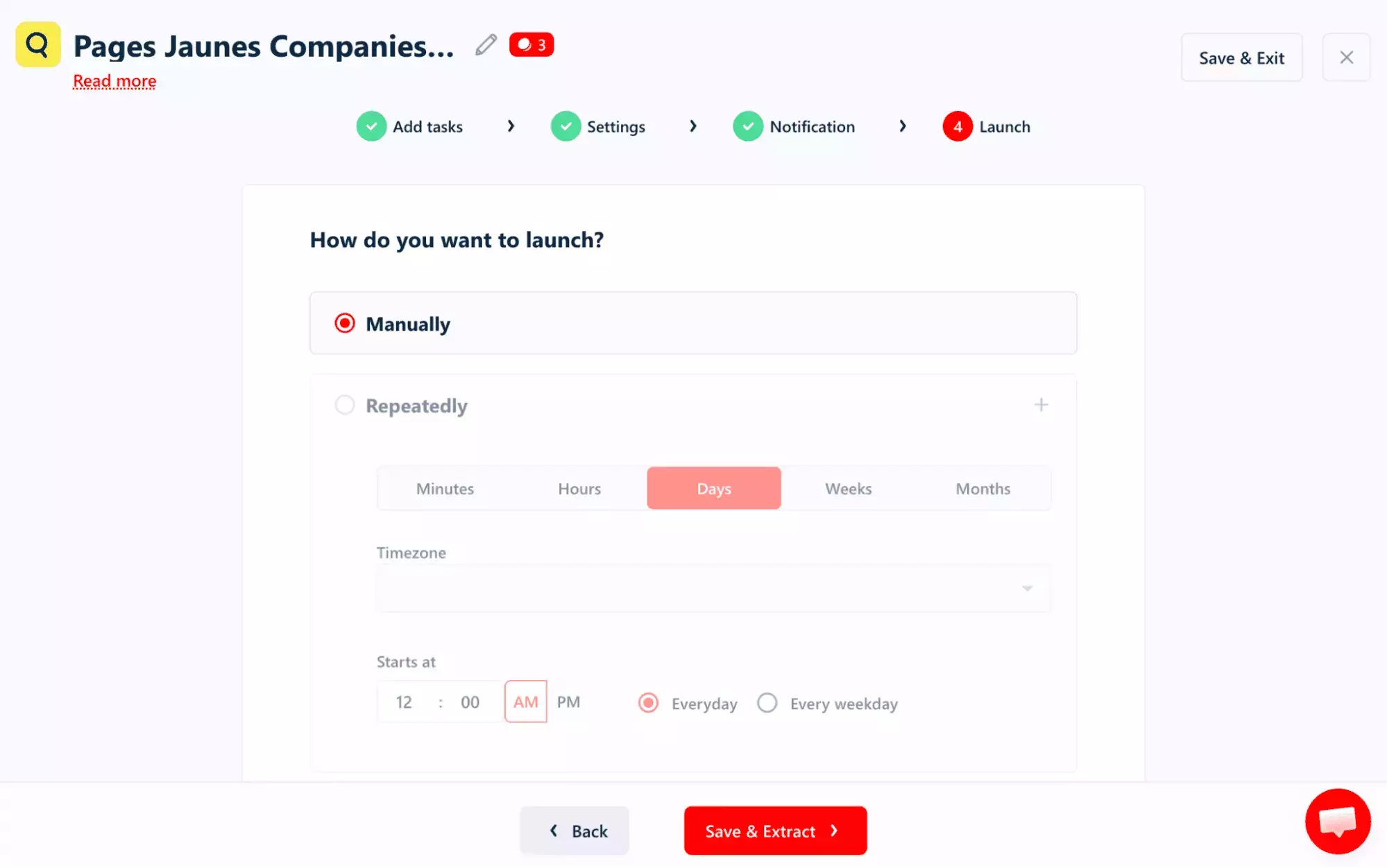
Standout features
- Stop runs anytime
- Built-in deduplication
- Bulk input via file upload
- Webhook and email alerts
- Exports to CSV, JSON, Excel, JSONL, Sheets, S3, SFTP, or email
- API, Python SDK, CLI, and MCP support
Usability score: 5/5 — most complete toggle set, timezone-aware scheduling, built-in deduplication
Speed
lobstr.io's speed depends on which toggles are enabled:
- Base (no toggles): 500 results in 1 minute 10 seconds → ~428.57 results/min
Collect Additional Details: 500 results in 5 minutes 13 seconds → ~95.85 results/min
Collect Additional Details+Collect Emails from Website: 500 results in 52 minutes 57 seconds → ~9.44 results/min
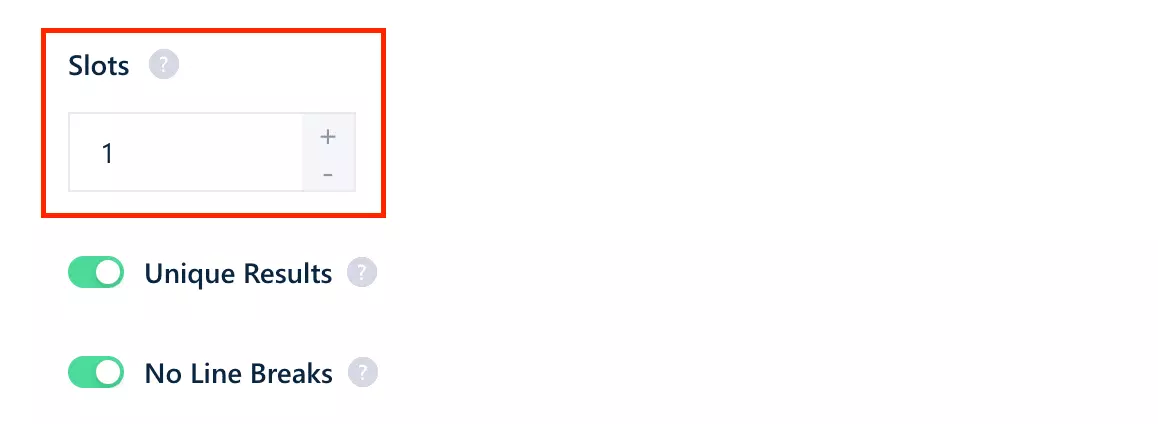
The tier tradeoff is direct: more data per result costs more time. Speed is adjustable via Slots, which let you run more work in parallel.
Speed score: 4/5 — 428.57/min base tier is fastest tested by a wide margin, but full enrichment drops to 9.44/min, slower than Apify's single-mode 74.32/min
Scalability
At the base speed of 428.57 results/min, lobstr.io can collect roughly ~18.5M results/month if it runs continuously.
That ceiling changes depending on how much extra data you collect.
Collect Additional Details enabled, throughput drops to 95.85 results/min, or about ~4.1M results/month.Collect Emails from Website, and it drops again to 9.44 results/min, or roughly ~408K results/month.That is the trade-off: basic PagesJaunes data scales very fast, but enrichment slows the run down.
Slots. Each Slot runs another scraper in parallel, up to 20 per task, so throughput is not capped at the single-worker rates above.In practice, lobstr.io scales with concurrent requests.
Scalability score: 5/5 — highest ceiling tested (~18.5M/month, base tier) plus Slots concurrency, up to 20 parallel
Customer support
lobstr.io offers support through a live chat pop-up on the website, plus email.
Support is one of the things users consistently praise. The team is known for quick replies, technical answers, and actually helping when something breaks.
Support score: 4/5 — live chat + email, users specifically praise support in Capterra reviews
Best for: Teams that want the richest PagesJaunes data without building a separate enrichment workflow.
It is the strongest all-rounder here: fastest on base scraping, cheapest at scale, best for email extraction, most reliable review data, and easiest to run repeatedly.
The trade-off is that full enrichment slows down hard, so use the deeper mode when quality matters more than speed.
2. Apify
User rating: 5/5 ⭐⭐⭐⭐⭐ (6 reviews, Apify)
| Category | Score |
|---|---|
| Data | 3/5 |
| Cost | 3/5 |
| Speed | 3/5 |
| Scalability | 4/5 |
| Usability | 3/5 |
| Support | 5/5 |
| Overall | 3.5/5 |
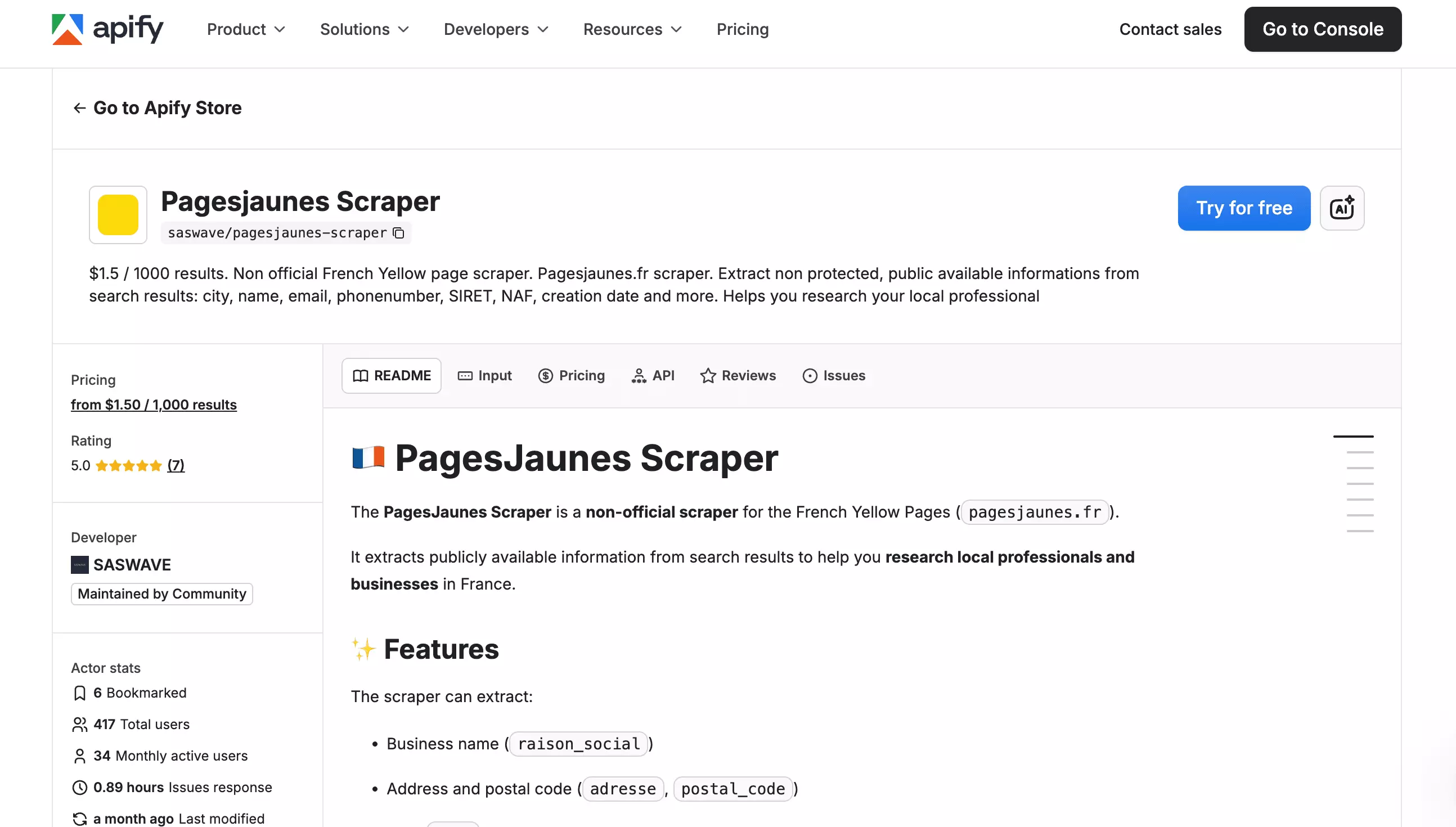
| Pros | Cons |
|---|---|
| Widest single-tier schema, no toggles needed | No CSV bulk upload |
| Multiple export formats (CSV, JSON, XML, Excel, JSON Lines) | No email extraction |
| Fast issue response (0.89h average) | Flat pricing, unit cost never drops at scale |
| Concurrent runs included by default | Review count only on 19.7% of businesses |
Data
Richness
Apify returns 36 unique data fields.
The raw export has far more columns (up to 176) because repeated data (like external links, opening hours, and images) gets flattened into multiple numbered columns per business.
Fields (36 total)
| Category | Fields |
|---|---|
| Identity & listing | id, ref, url, raison_social, type, activite, multi_activite, description |
| Location | adresse, city, postal_code |
| Contact | tel, site_externe, instagram, facebook, linkedin, twitter, youtube, tiktok, minisite, pinterest, site_essentiel |
| Business & legal | NAF, forme_juridique, creation_date, employee_count, siren, siret, is_verified |
| Media | image, images |
| Reviews & ratings | ratingValue, reviewCount, bestRating, worstRating |
| Hours | opening_hours (7 days) |
| Always null | None |
Exclusive
Fields only Apify has:
| Category | Fields |
|---|---|
| Contact | tiktok, minisite, site_essentiel |
| Reviews & ratings | bestRating, worstRating |
Apify still has no email extraction. If outreach beyond phone is part of your workflow, you'll need to enrich the data separately.
Want to verify the numbers yourself?
Data score: 3/5 — 36 fields, zero duplicates across the run, 0 always-null, but reviewCount populates on just 19.7% of businesses, only 5 exclusive fields, and no email extraction
Cost
Apify uses a monthly subscription mode + pay-per-result pricing model.
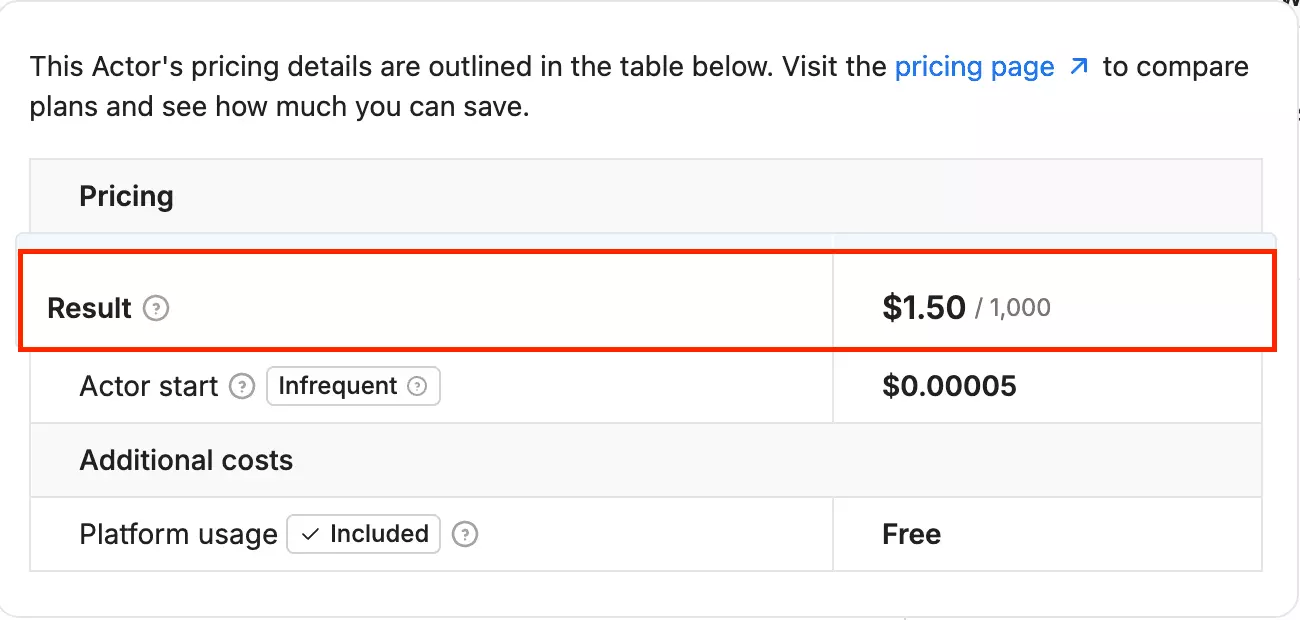
- Free tier available ($5/month platform credit)
- Flat rate → $1.50 per 1,000 results
The cost does not drop as you scale. Whether you scrape 1,000 or 100,000 results, the per-result rate stays the same.
Cost score: 3/5 — $1.50/1K flat, no scale discount as volume grows
Usability
Apify keeps the interface simple, and most of the setup is straightforward.
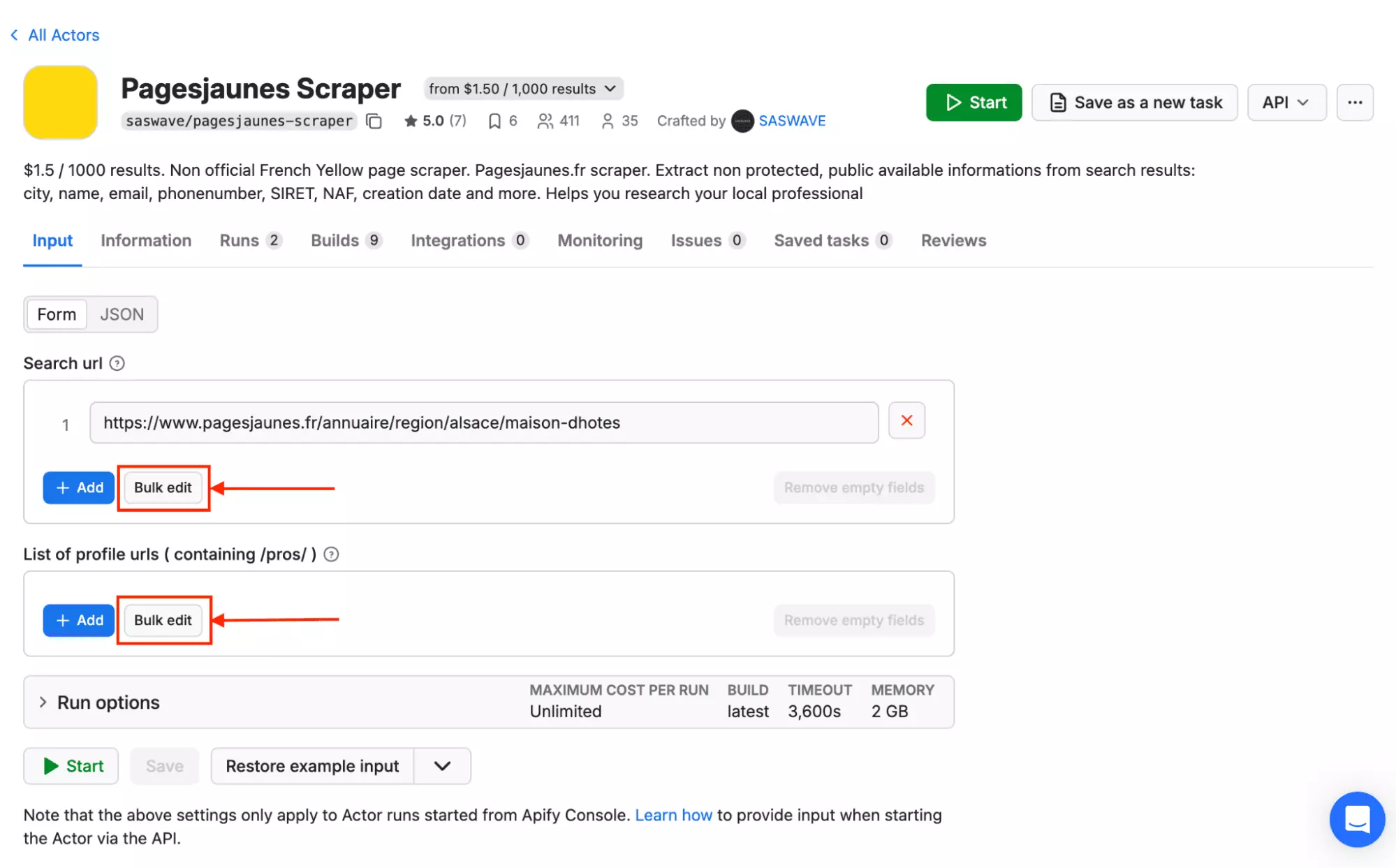
Ways to feed it a job
- PagesJaunes search URLs
- Specific profile URLs
There's no CSV import in the main setup. Instead, you paste PagesJaunes profile URLs using Bulk edit.
Pre-scrape settings
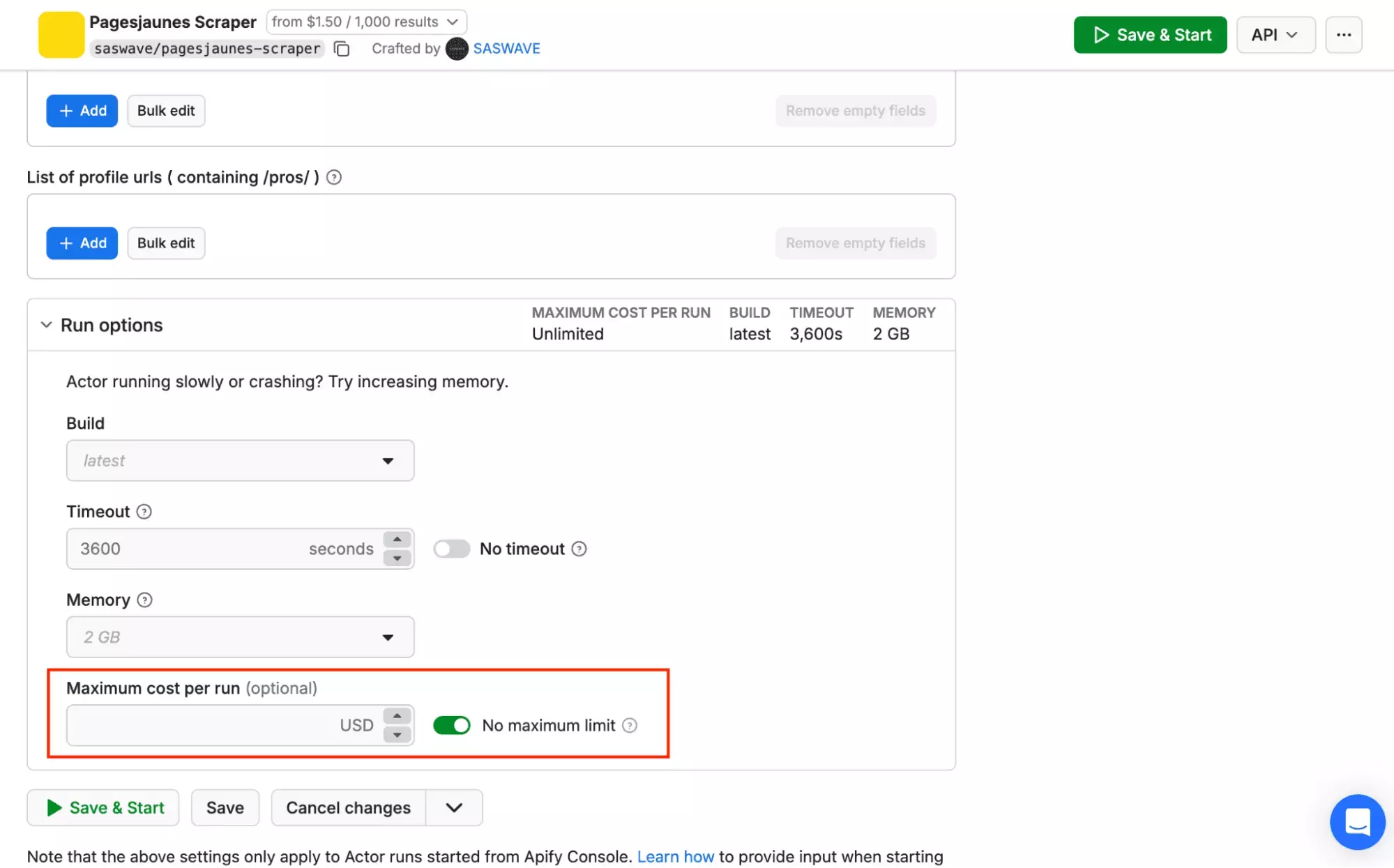
- Maximum cost per run (no direct row-limit setting)
Standout features
- Scheduling and webhooks through Apify
- Export to JSON, CSV, Excel, XML, and JSON Lines
- API access with Python and JavaScript SDKs
- MCP server available
Keep in mind
Limiting the scrape is the one part that feels unintuitive. There's no clear "max results/URL" setting in the main setup.
Instead, you cap the run using a maximum cost per run, which works, but it's less natural than setting a simple row limit.
Usability score: 3/5 — no CSV import in the main setup, cost-based limiting instead of a direct row cap
Speed
Apify collected 680 PagesJaunes results in 9 minutes 9 seconds (a cost-limited run, since Apify has no fixed row-count control), roughly ~74.32 results per minute.
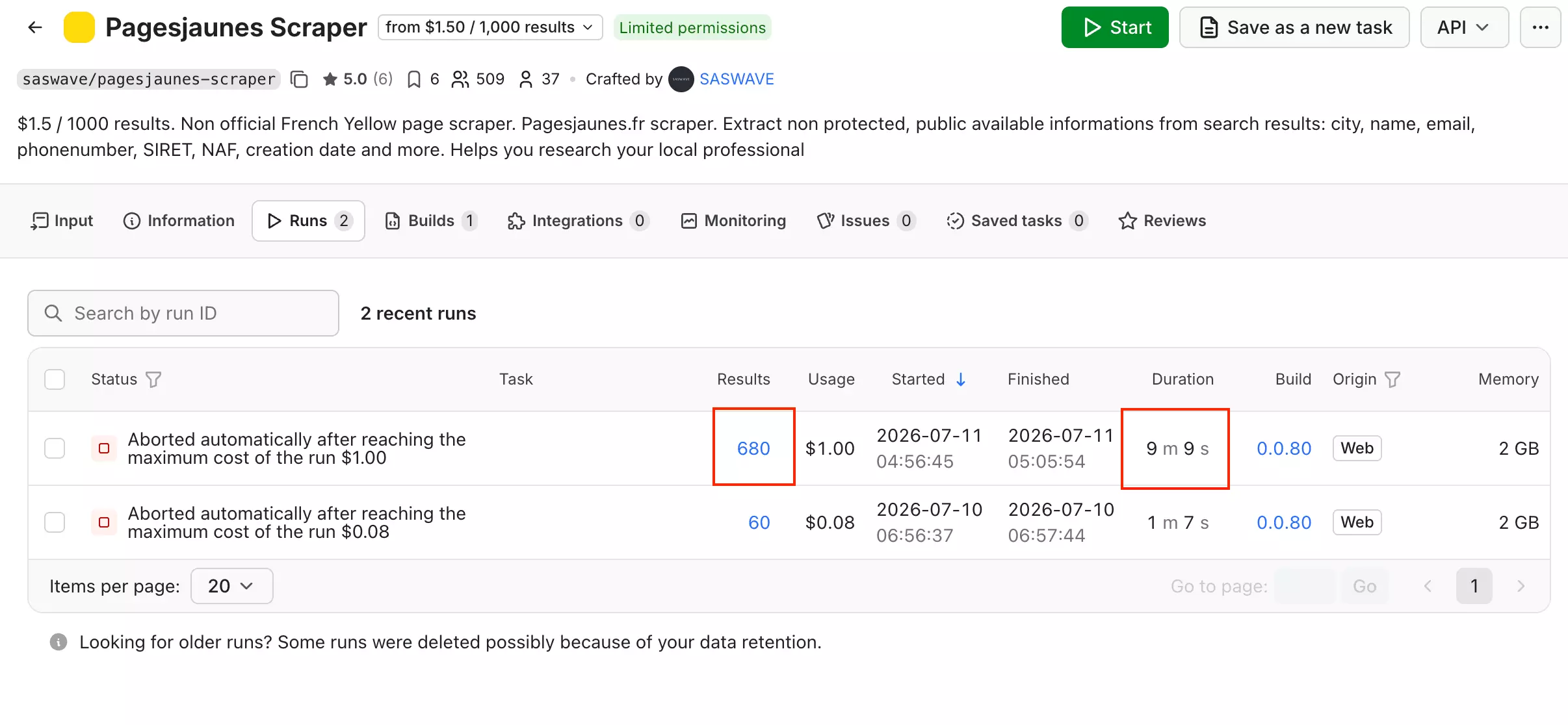
Speed score: 3/5 — 74.32/min, solid but well behind lobstr.io's base tier
Scalability
At 74.32 results/min, Apify can pull roughly ~3.2M results/month if it runs 24/7.
Concurrent runs are included by default: 25 on the Free plan up to 256 on Business, with a $5/run add-on available beyond that.
In practice, Apify scales the same way lobstr.io does: more parallel runs, more throughput.
Scalability score: 4/5 — ~3.2M/month ceiling with concurrency included by default, but still below lobstr.io's ~4.1M/month
Customer support
Issues tab.Apify does not provide direct, live-chat technical support for community-maintained Actors. Because independent developers own these tools, they are responsible for their own maintenance and user inquiries.
For this PagesJaunes actor, average issue response time is 0.89 hours.
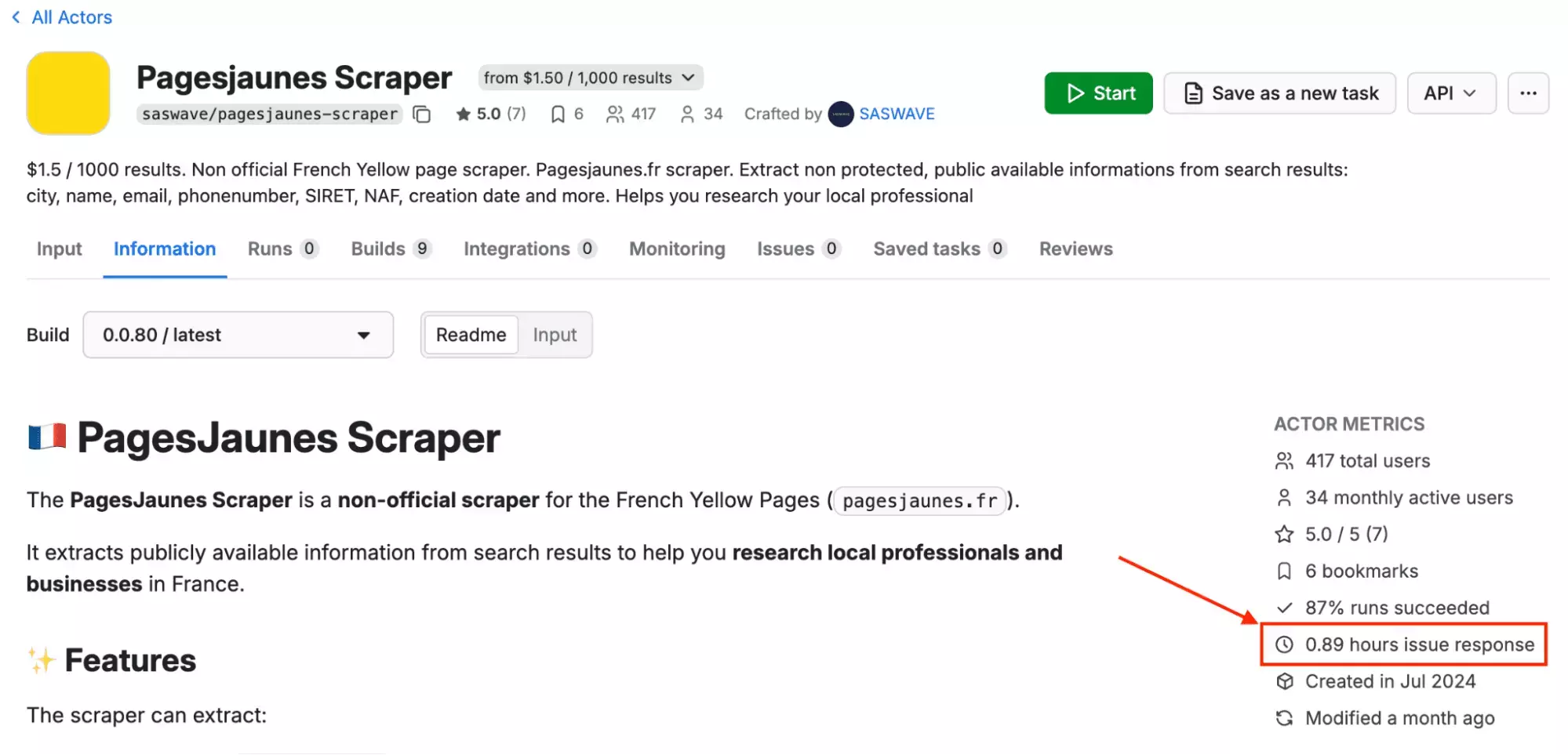
Support score: 5/5 — Issues tab only (community-maintained Actor), 0.89-hour average issue response time
Best for: Users who want a straightforward PagesJaunes scraper with broad data coverage and strong support. It gives a clean 36-field dataset in one mode, so there is less tuning before a run.
The trade-off: pricing stays flat as volume grows, there is no email extraction, and scaling is mostly linear.
3. Piloterr
User rating: 4.8/5 (Capterra) · 3.6/5 (G2)
| Category | Score |
|---|---|
| Data | 1/5 |
| Cost | 3/5 |
| Speed | 3/5 |
| Scalability | 3/5 |
| Usability | 1/5 |
| Support | 4/5 |
| Overall | 2.5/5 |
| Pros | Cons |
|---|---|
| MCP server available | No no-code interface, API/developer only |
| No SDKs, webhooks, or scheduling | |
| Only 347 of 500 results were unique businesses |
Data
Richness
Piloterr's PagesJaunes search endpoint returns 10 fields per business.
Fields (10 total)
| Category | Fields |
|---|---|
| Identity & listing | id, name, url, activity, tags, description |
| Location | address |
| Media | image_url |
| Reviews & ratings | rating, reviews_count |
| Always null | None |
No phone, email, or website field on this endpoint.
Page Info adds 10 more fields, including phone.
Page Info fields (10 total)
| Category | Fields |
|---|---|
| Contact | phone |
| Social & web | websites |
| Business & legal | siren, forme_juridique, effectif_entreprise, creation_d_entreprise, autres_denominations |
| Commercial details | services, payment_methods |
| Always null | opening_hours |
Still no email, on either endpoint.
Exclusive
None found.
Worth noting: pagination returned duplicates. Of 500 results collected across 25 pages, only 347 were unique businesses (69.4%).
That means, roughly 3 in 10 results were repeats across different pages.
Data score: 1/5 — 10 fields, no exclusives, no contact data, and duplicate-results issue.
Cost
Piloterr runs on a credit-based subscription model. No free tier.
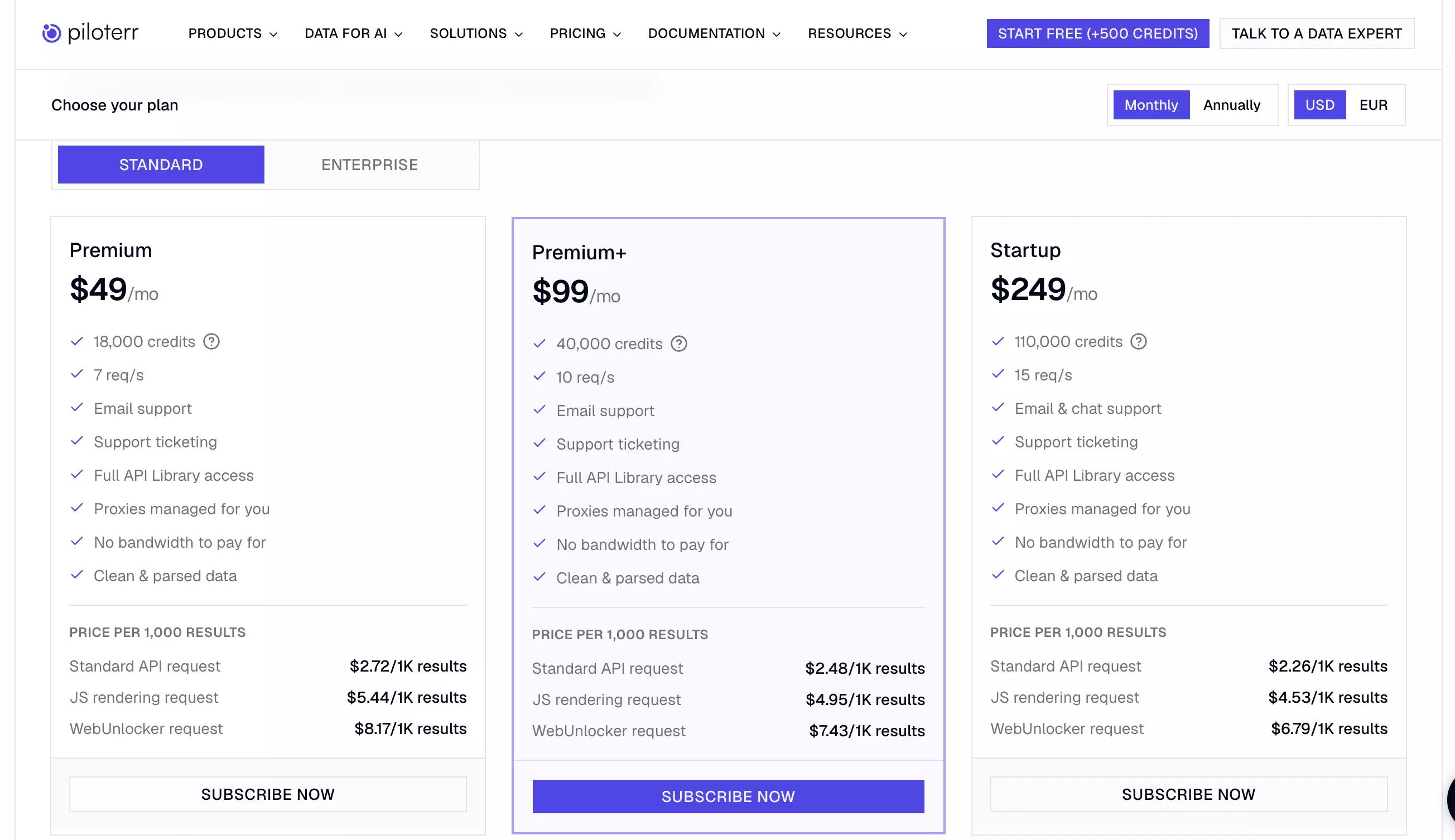
- Starts at $49/month for 18,000 credits, 7 req/s
- At scale → $249/month for 110,000 credits, 15 req/s
A complete business record needs two calls: search to find it, then Page Info for detail.
I only counted the 347 unique businesses and removed duplicates from the raw 500 results.
For those 347 complete records, the run used 372 total credits: 25 for search and 347 for Page Info.
That's roughly 1,072 credits per 1,000 results.
- Starts at ~$2.92 per 1,000 results
- At scale → ~$2.43 per 1,000 results
Cost score: 3/5 — entry price is 2nd cheapest of the four, but scale price ($2.43/1K) is worse than lobstr.io and Apify, with no real scale discount
Usability
Piloterr's PagesJaunes search is API-only. There is no no-code interface for this endpoint.
Ways to feed it a job
- A PagesJaunes search URL, passed as a
queryparameter to the API
Pre-scrape settings
None. This is a single GET request per page.
Standout features
- MCP server available
- API available
Keep in mind
There are no SDKs, webhooks, or built-in scheduling for recurring runs.
Exports are raw JSON only, so anything beyond that needs your own processing or delivery workflow.
Usability score: 1/5 — no no-code interface at all, no SDKs, webhooks, or scheduling, and raw JSON exports only
Speed
Getting a complete record still takes two calls: search, then Page Info.
372 calls (25 search plus 347 Page Info) took 1,214.82 seconds, about 20.25 minutes.
That's roughly 17.14 results per minute for a complete record.
Speed score: 3/5 — 17.14/min beats lobstr.io's full-enrichment tier and WebScraper.io, but well behind Apify and lobstr.io's base tier
Scalability
At 17.14 results/min for a complete record, Piloterr could theoretically produce ~740K results/month if it ran continuously.
Piloterr has no built-in concurrency. Scaling up just takes longer, in a straight line.
Scalability score: 3/5 — ~740K/month ceiling beats lobstr.io's full-enrichment tier and WebScraper.io, but no concurrency to push past it
Customer support
Piloterr offers email support (hello@piloterr.com) on all plans, and live chat on the Startup plan ($249/month) specifically.
A G2 review also highlights fast support.
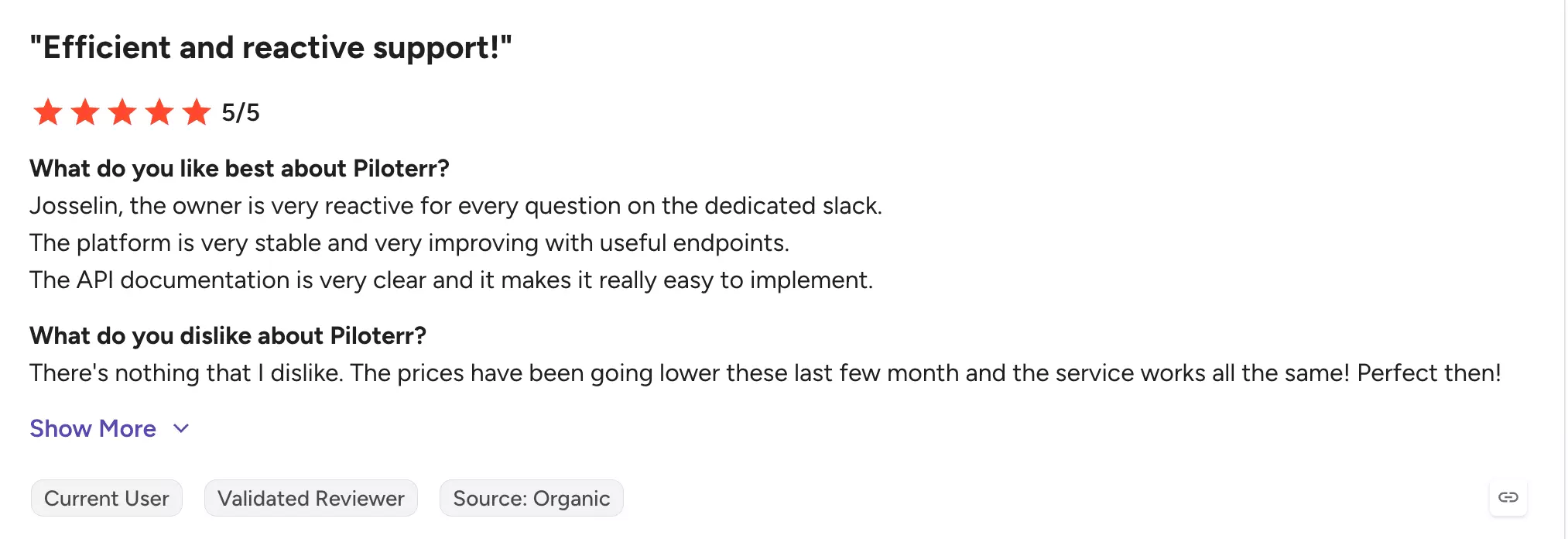
Support score: 4/5 — two channels, positive sentiment on support, but live chat requires the $249/mo plan
Best for: Developers who want raw PagesJaunes search data via API and are comfortable handling deduplication and pagination themselves. Not a fit for anyone looking for a no-code workflow.
4. WebScraper.io
User rating: N/A (0 reviews on G2, not listed on Capterra)
| Category | Score |
|---|---|
| Data | 2/5 |
| Cost | 1/5 |
| Speed | 1/5 |
| Scalability | 2/5 |
| Usability | 2/5 |
| Support | 2/5 |
| Overall | 1.7/5 |
| Pros | Cons |
|---|---|
| Data quality control checks | Slowest speed |
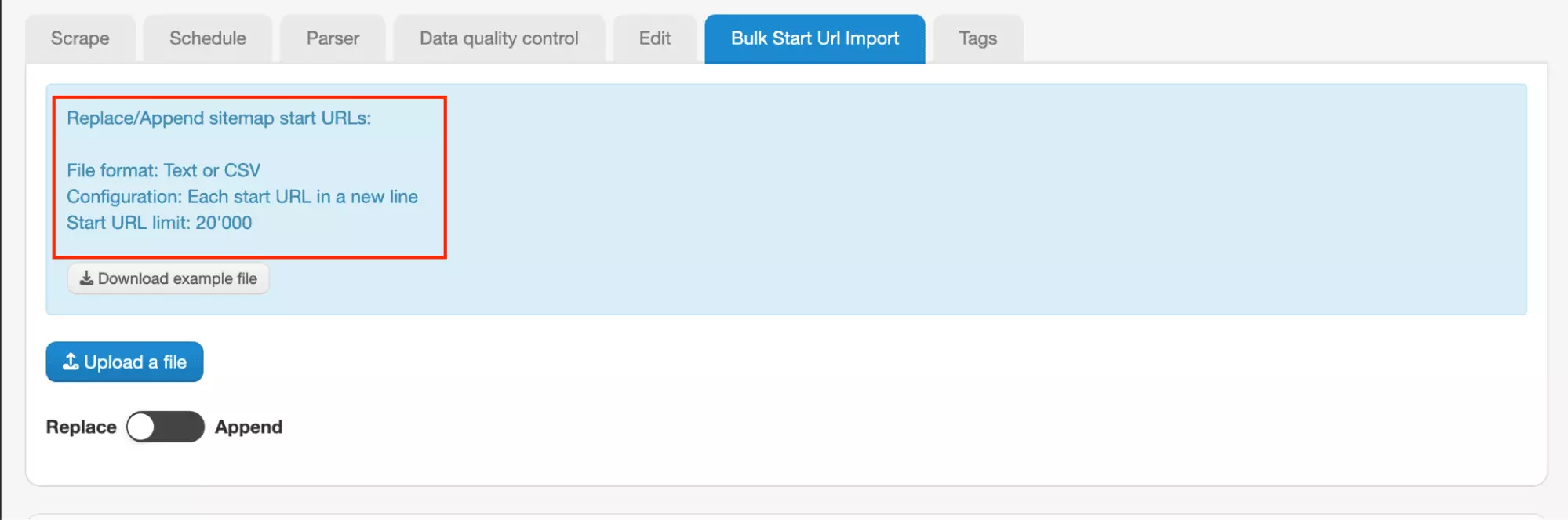
| Bulk import available (up to 20,000 URLs) | Most expensive |
| Concurrency control via parallel tasks | Heavy interface |
| Review count only on 39.2% of businesses |
Data
Richness
WebScraper.io returns 10 data fields per listing. The address comes as one unstructured string: no separate city, zip, or street field.
Fields (10 total)
| Category | Fields |
|---|---|
| Identity & listing | business_url, business_id, business_name, category, description |
| Location | address |
| Contact | phone_number, website_url |
| Reviews & ratings | rating, review_count |
| Always null | None |
Exclusive
None found.
Want to verify the numbers yourself?
Data score: 2/5 — only 10 fields, zero duplicates across the run, unstructured address, no exclusive fields
Cost
WebScraper.io runs on a monthly subscription model, with a free 7-day trial.
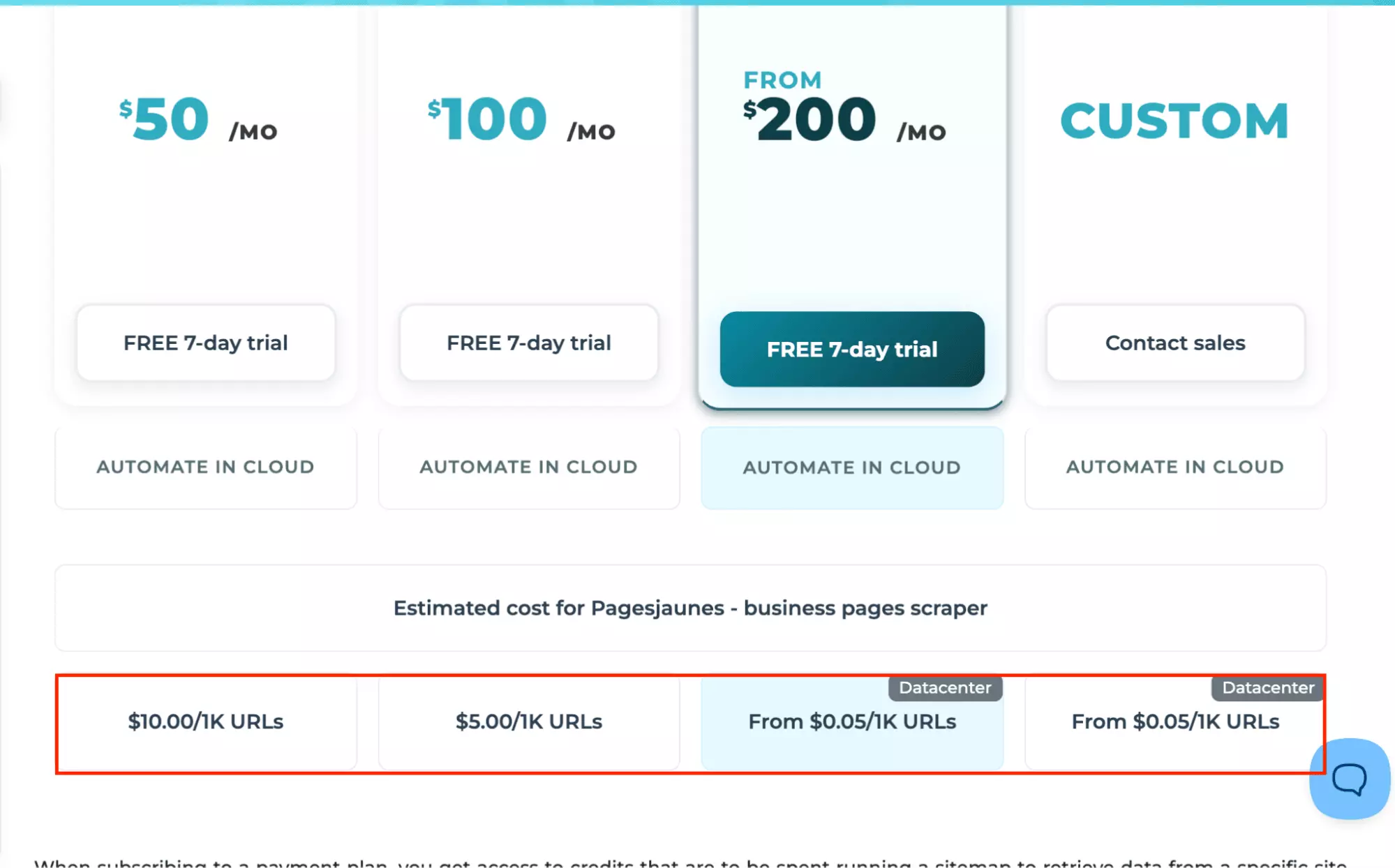
Pricing is based on URL credits, where 1 credit = 1 page loaded by the cloud scraper, not 1 business result.
Measured in this test: 517 pages loaded → 472 records (1.0953 pages/record).
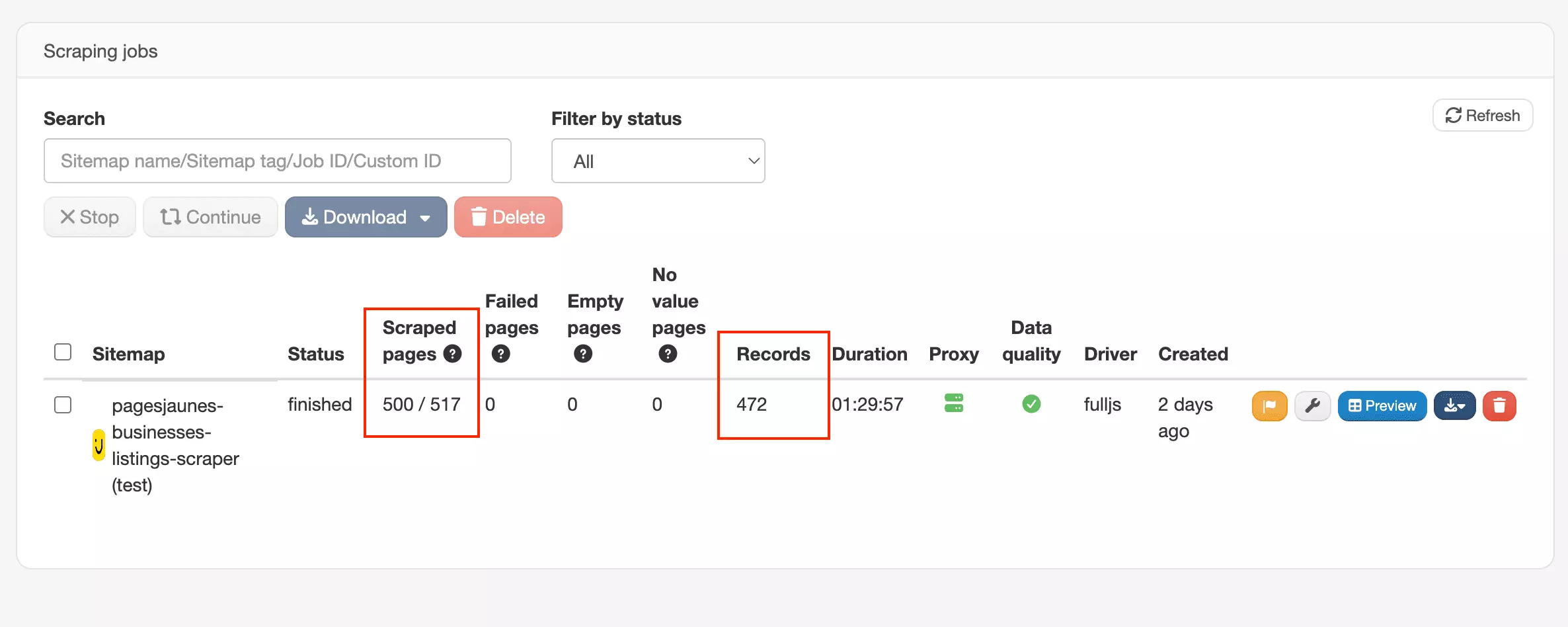
That works out to roughly:
- Starts at $10.54 per 1,000 records
- At scale → $5.27 per 1,000 records
At scale, cost is driven by parallel running jobs rather than URL credits.
Cost score: 1/5 — $10.54/$5.27 per 1K (test-derived), most expensive tested by a wide margin, no free tier
Usability
WebScraper.io is URL-first, but the workflow feels more technical than the others.
Ways to feed it a job
- PagesJaunes URL
Bulk input via text paste or CSV upload, with Replace and Append modes
Pre-scrape settings
WebScraper.io has no output-shaping toggles, not even a clear max-records or max-pages setting.
Instead, there are settings for how the scrape runs:
- Request interval and page load delay (ms): throttles request pace, defaults to 2000ms
- Driver: Full (JavaScript) rendering or lighter fetch-only mode
- Proxy: Datacenter or Residential, by country
- Priority: queue priority for the run
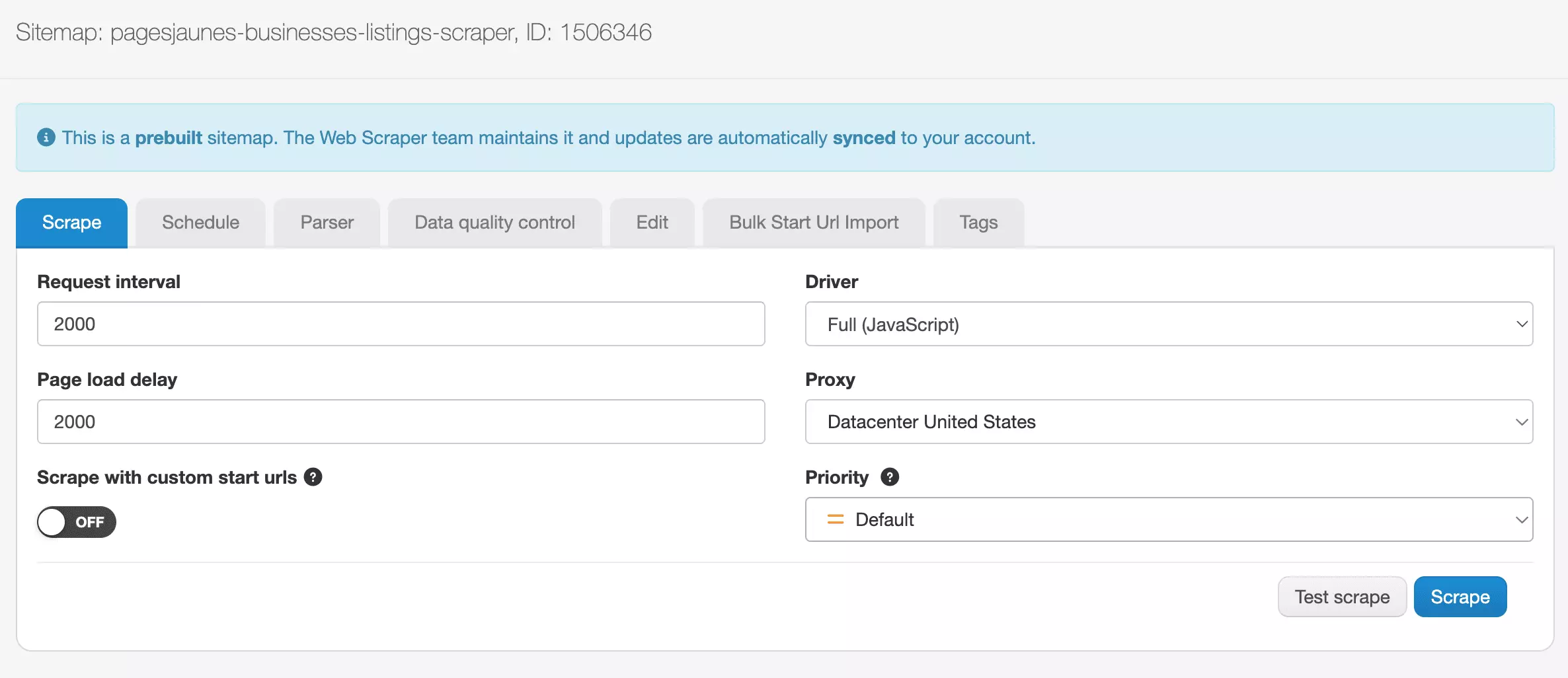
Every setting here requires knowing why it matters (proxy type, JS rendering, request pacing), not just what result you want.
The pre-scrape choices map to scraper mechanics rather than a business decision like more data or more budget.
Standout features
- Parser: built-in post-processing (regex, strip HTML, virtual columns)
- Data quality control: automated run checks with email or Cloud notifications
- Export to CSV, JSON, or XLSX
- Automated delivery to Dropbox, Google Sheets, Google Drive, Google Cloud Storage, Amazon S3, Azure Blob Storage
- API, webhooks, PHP SDK, and MCP available
Keep in mind
Billing runs on pages loaded, not results returned. Without a "stop after X pages" control, big runs are harder to cap or predict confidently.
The workflow spreads across multiple tabs: Scrape, Schedule, Parser, Data Quality Control, Edit, Bulk Start URL Import, Tags.
It's messy.
Usability score: 2/5 — no output-shaping controls at all, technical settings, workflow spread across many tabs
Speed
WebScraper.io is the slowest tool tested: 472 results in 1 hour, 30 minutes, 3 seconds, roughly 5.24 results per minute.
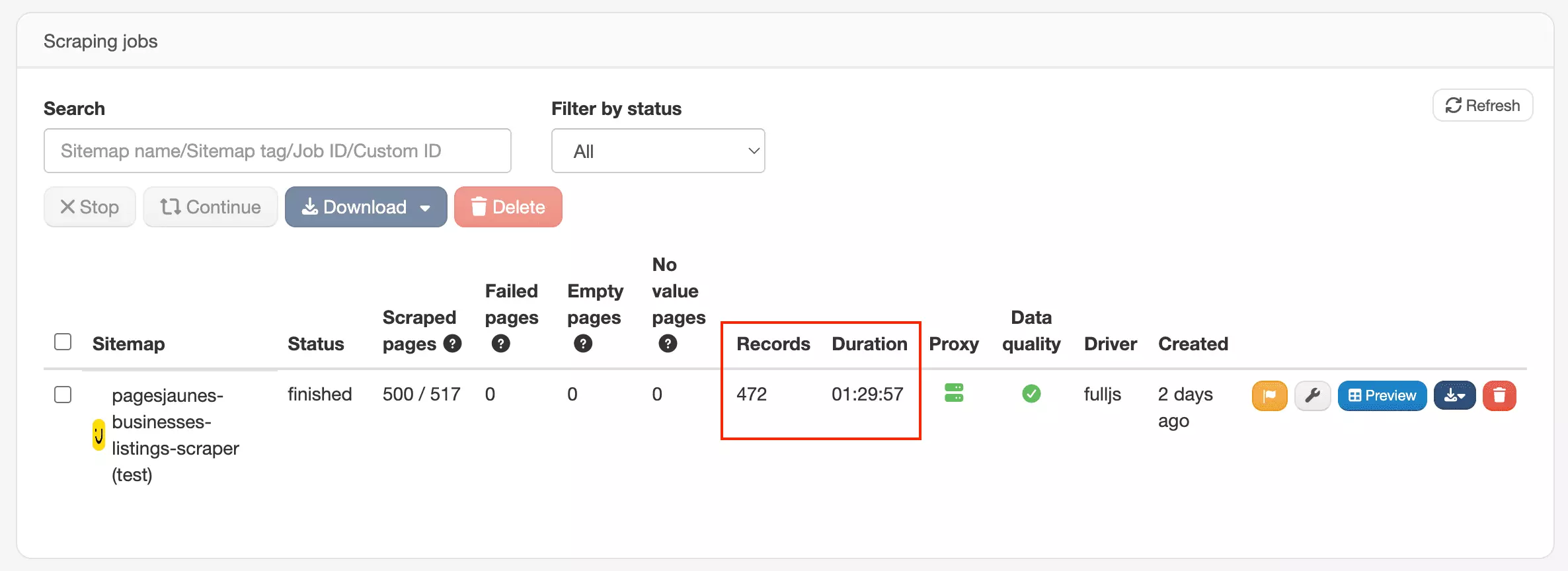
Speed score: 1/5 — 5.24/min, confirmed slowest tool tested
Scalability
At 5.24 results/min, this tool can collect roughly ~226K results/month if it runs 24/7.
The main limit is speed. At the single-run rate, large jobs will move steadily, but not quickly.
Parallel tasks help on the Scale plan. They let you run multiple jobs at once, so bigger workloads do not have to scale wait time in a straight line.
In practice, this is workable for large lists if you have concurrency available. Without it, patience becomes part of the pricing model.
Scalability score: 2/5 — ~226K/month ceiling, roughly 14x lower than Apify's
Customer support
WebScraper.io offers AI Answers for quick questions, help docs, and email support.
Third-party presence is thin: 0 reviews on G2, and not listed on Capterra.

Support score: 2/5 — email + AI answers only, no live-agent channel, zero third-party review presence
Best for: Existing WebScraper.io users who want to keep PagesJaunes scraping inside the same hosted workflow.
It has useful cleanup and scheduling tools, but it is slow, expensive, and light on data. Not the first tool I'd pick unless your team is already living there.
The scraper that didn't make the list
PhantomBuster
PhantomBuster didn't make the final list because it failed on CAPTCHA protection.
I checked PhantomBuster's PagesJaunes instructions, which said the scraper requires a France-based proxy.
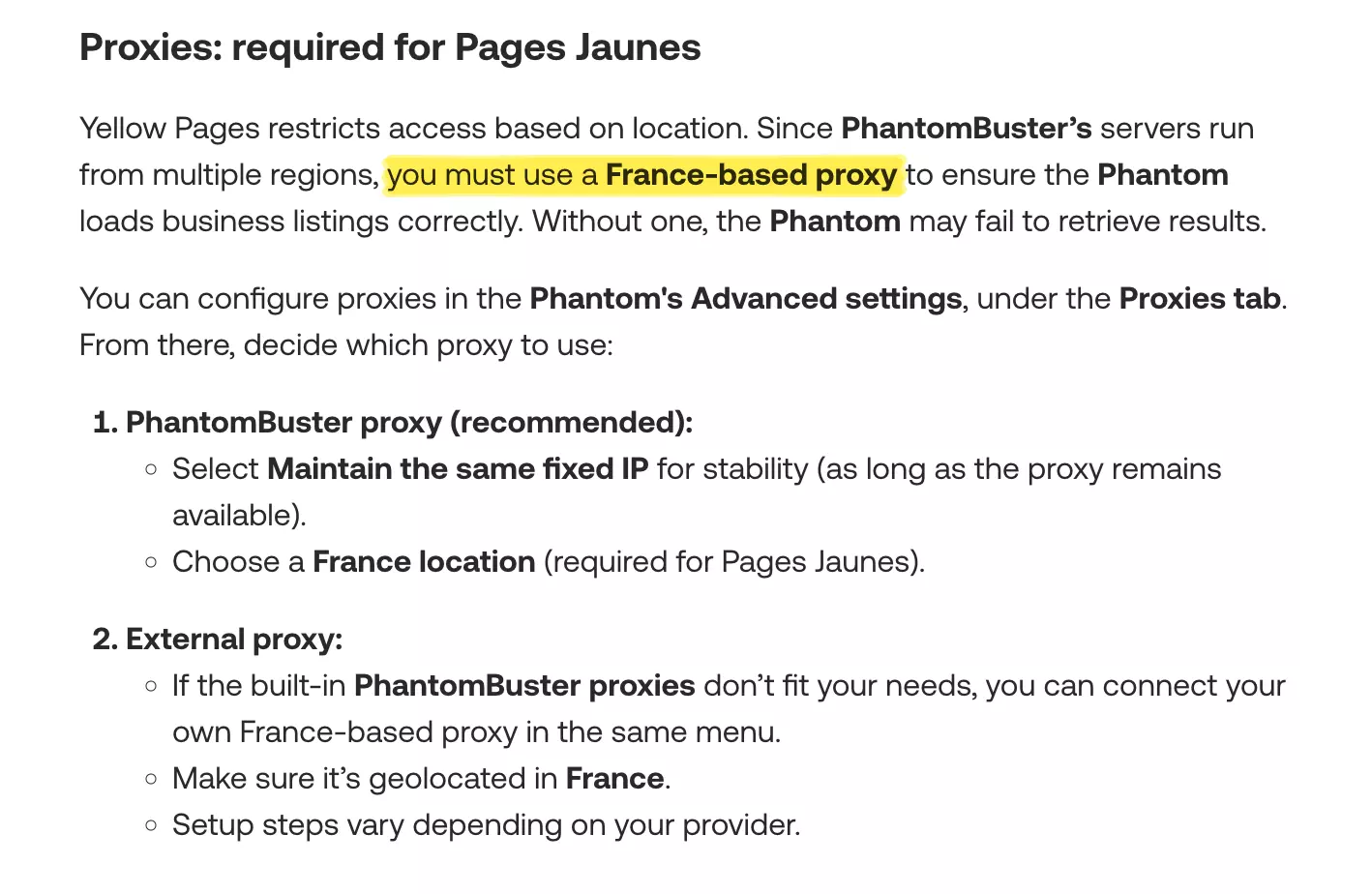
I configured a France location, kept the same fixed IP, and ran the scraper again using the recommended setup.
The second run failed with the same CAPTCHA error and returned no results.
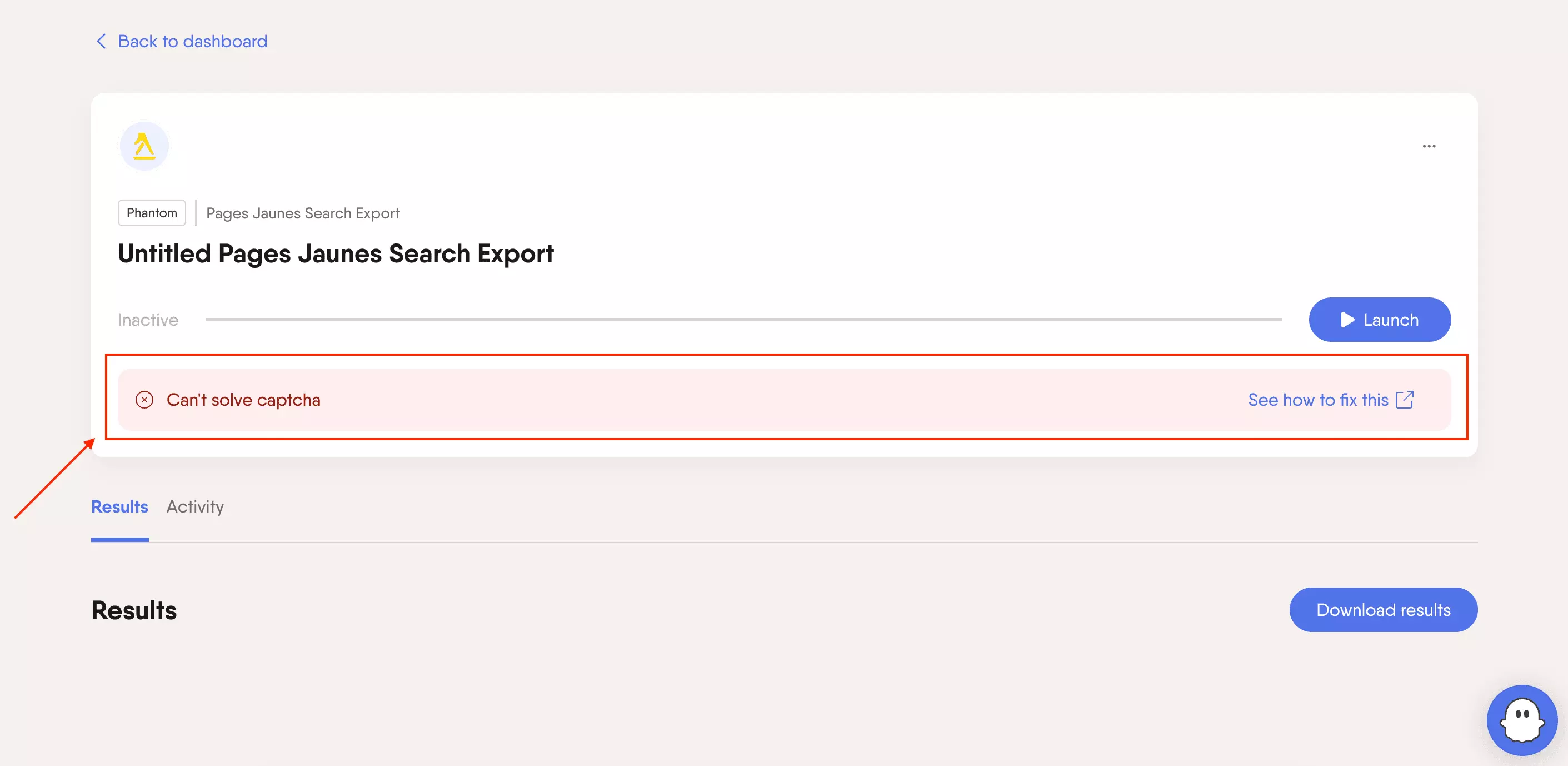
Since PhantomBuster still could not complete a basic scrape after the required setup, I left it out of the final list.
FAQ
What is the best PagesJaunes scraper for email outreach?
lobstr.io is the best fit if email outreach matters.
It is the only tool on this list that extracts email contacts from business websites, though it only succeeds on 43% of businesses in testing.
What should beginners look for in a PagesJaunes scraper?
Beginners should prioritize URL-first input, simple result limits, CSV export, and support.
If you are new to scraping, avoid tools that require API setup, proxy management, or custom code just to get a basic business list.
Can no-code PagesJaunes scrapers replace a custom scraper?
For most business use cases, yes.
If your goal is to collect leads, compare local businesses, or export clean CSV data, no-code tools remove that work. You don't need to maintain scripts, retries, or scraping infrastructure.
A custom scraper only makes sense if you need full control over the scraping logic or highly specific fields.
What is the cheapest PagesJaunes scraper at scale?
lobstr.io and Apify tie at $1.50 per 1,000 results at scale, but lobstr.io includes 46 fields with email, while Apify includes 36 with none, making lobstr.io the better value at that price.
lobstr.io's leaner base tier (fewer fields, no contact data) drops to $0.50 per 1,000 for anyone who doesn't need the extra depth.
WebScraper.io is the most expensive tested at $10.54–$5.27 per 1,000, since its pricing is based on pages loaded rather than results. Piloterr lands in between, at $2.92–$2.43 per 1,000 for a complete record.
What is the fastest PagesJaunes scraper?
Apify is the fastest, at 74.32 results per minute.
Collect Additional Details tier (phone, business info) runs at 95.85/min, already ahead of Apify. Add email extraction, and it drops to 9.44/min.In base mode (no add-ons at all), lobstr.io is far faster than either, at 428.57 results per minute.
Which PagesJaunes scraper has the most reliable review data?
lobstr.io is the only tool that returns a review count for every business tested (100%), including a confirmed 0 when a business genuinely has none. Apify returns a count for just 19.7% of businesses, WebScraper.io for 39.2%, and Piloterr for 18.8%. For the rest, there's no way to tell whether the business has no reviews or the data just wasn't captured.
lobstr.io is also the only tool that returns individual review text (author, rating, date), not just a number.