
Best Instagram Post Scrapers 2026 [No-Code + API Edition]
(updated)
lobstr.io is the best Instagram Post scraper in 2026 (9.4/10), tested on data, usability, scalability, cost, speed, and support. It was the fastest baseline scraper at 494 posts per minute and returned the deepest comment coverage at 15 comments per post. Apify ranks second (6.8/10) with broader metadata, but had the highest cost and the slowest baseline speed.
⚡ 30-Second Summary
- I tested 7 Instagram Post scrapers on the same 1,000-post job, scoring them on data, cost, usability, speed, scalability, and support. Four made the ranked list.
- lobstr.io is the best overall pick (9.4/10). It was the fastest baseline scraper at 494.47 posts/min, reached all 15 available comments on nearly every post, and supports both no-code and developer workflows. Pick it for high-volume scraping without giving up workflow flexibility. Trade-off: comments slow runs by 7.89×, and carousels cap at 10 items.
- Apify is the strongest research pick (6.8/10). It returned the broadest data coverage (37 distinct fields), full 133/133 carousel capture, and the richest video, music, and tagged-user metadata. Pick it for metadata-heavy analysis and flexible automation. Trade-off: $1.60/1K at scale and the slowest baseline speed (127.12 posts/min).
- ScrapeCreators is the budget API pick (6.7/10). It costs just $0.08/1K, completed 1,000/1,000 posts with 0 duplicates, and returns a normal JSON array. Pick it for inexpensive, straightforward API collection. Trade-off: no comment text, username-only input, and most workflow automation is on you.
- SociaVault is the faster ScrapeCreators alternative (6.6/10). It reached 207.98 posts/min at $0.17/1K, with the same clean 1,000/1,000-post run and complete carousel capture. Pick it for the same developer-first workflow when speed matters more than shaving the last few cents. Trade-off: no comments, limited controls, and
itemsarrives as an index-keyed object. - Three more tools were worth testing, but each found a different way to disqualify itself.
- CoreClaw failed on reliability... spectacularly. Three identical 1,000-post runs returned 13, 206, and 653 posts, and every one still reported
status: "succeeded". Apparently success is more of a mood than a result. - Scrapfly failed on practical throughput... it managed only 16.53 posts/min, and the test exhausted the available credits after 492 posts.
- Bright Data failed on workload control... its profile discovery ignored the 1,000-post limit and collected 6,648 posts instead.
- I also screened out login-required tools, abandoned projects, and thin marketplace wrappers where maintenance or ownership was too unclear for a production recommendation.
Instagram Post scraping looks simple until you try to make it repeatable.
One profile URL. A few recent posts. Captions, hashtags, likes, comments, maybe video data.
Then the problems start: login walls, broken selectors, missing fields, and pagination that behaves like it has plans of its own.
So I tested seven Instagram Post scrapers against the same profile.
I compared them on data quality, pricing, usability, scalability, speed, and support.
The goal was simple: find which tools can reliably turn an Instagram account into usable post data, without needing constant hand-holding.
Quick Comparison
| lobstr.io | Apify | ScrapeCreators | SociaVault | |
|---|---|---|---|---|
| User rating | 5/5 (33) | 4.75/5 (135) | 4.6/5 (197) | 5/5 (1) |
| Distinct data fields | 33 | 37 | 25 | 25 |
| Comments included | ✅ | ✅ | ❌ | ❌ |
| Input format | Username, profile URL, post URLs, reels | Username, profile URL, post URLs, reels | Username only | Username only |
| Price /1K (entry → scale) | $2.00 → $0.50 | $2.30 → $1.60 | $0.16 → $0.08 | $0.40 → $0.17 |
| Free tier | ✅ | ✅ | ❌ | ❌ |
| Billing model | Subscription | Subscription | Credit packs, no expiry | Credit packs, no expiry |
| Speed (per 1,000 posts) | 2.0 min | 7.9 min | 5.8 min | 4.8 min |
| Concurrency | ✅ | ✅ | ❌ | ❌ |
| Monthly ceiling | ~21.36M | ~5.49M | ~7.44M | ~8.98M |
| Batch input (multiple handles/request) | ✅ | ✅ | ❌ | ❌ |
| No-code UI | ✅ | ✅ | ❌ | ❌ |
| Skip pinned posts | ✅ | ✅ | ❌ | ❌ |
| Built-in scheduling | ✅ | ✅ | ❌ | ❌ |
| Export formats | CSV, JSON, XLSX, JSONL | CSV, JSON, XLSX, XML, JSONL | JSON only | JSON only |
| Webhook | ✅ | ✅ | ❌ | ❌ |
| Programmatic access | API + MCP + SDK + CLI | API + SDK + MCP | API | API |
| Support | Live chat + email | Live chat + Discord + tickets | Email only | Email only |
Score summary and how I scored each criterion
| Criterion (weight) | lobstr.io | Apify | ScrapeCreators | SociaVault |
|---|---|---|---|---|
| Data (2.2) | 9.1 | 8.6 | 6.6 | 6.6 |
| Cost (2.2) | 8.0 | 3.6 | 9.7 | 9.3 |
| Usability (1.8) | 10 | 10 | 6 | 5 |
| Speed (1.8) | 10 | 2.6 | 3.5 | 4.2 |
| Scalability (1.0) | 10 | 10 | 8 | 8 |
| Support (1.0) | 10 | 8 | 6 | 6 |
| Weighted overall /10 | 9.4 | 6.8 | 6.7 | 6.6 |
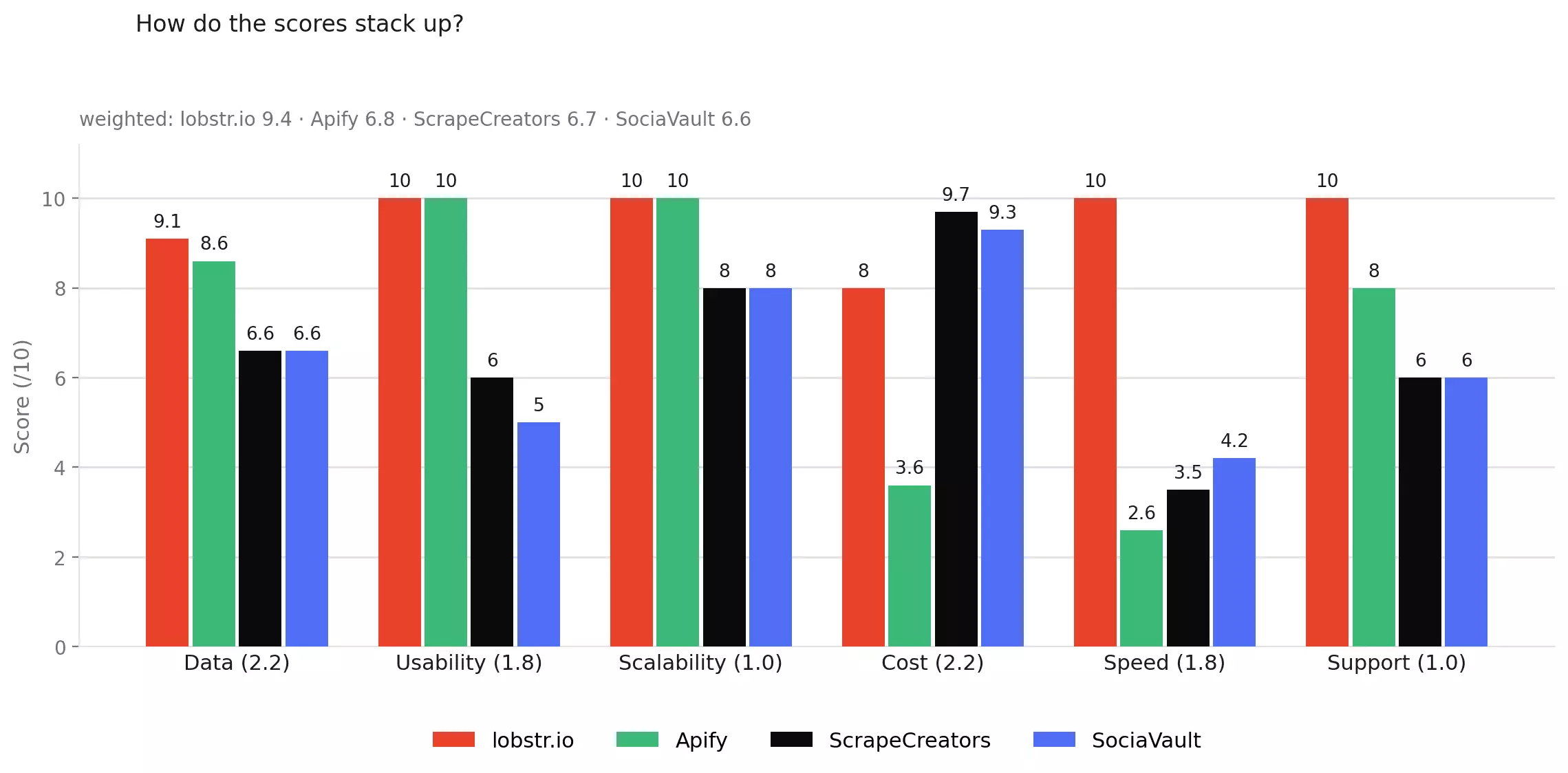
Every criterion is scored from 0–10, then weighted based on how much it matters to the overall buying decision.
The weights are Data 2.2 · Cost 2.2 · Usability 1.8 · Speed 1.8 · Scalability 1.0 · Support 1.0.
Worked out for lobstr.io: (9.1×2.2 + 8.0×2.2 + 10×1.8 + 10.0×1.8 + 10×1.0 + 10×1.0) ÷ 10 = 9.36 → 9.4/10.
lobstr.io doesn't win every category. ScrapeCreators is roughly 6x cheaper at scale, and lobstr.io ties Apify on both Usability and Scalability (10/10 each). It wins Data, Speed, and Support outright, which is what carries the overall score.
Just tell me which Instagram Post scraper to use
| If you need... | Pick | Why |
|---|---|---|
| The best overall | lobstr.io | 9.4/10; Fastest tested at 494 posts/min + deepest comments + strongest support |
| Comment depth | lobstr.io | 15 comments/post avg., highest tested |
| Metadata-heavy research | Apify | Broadest coverage, best video/music/tag data |
| The cheapest API | ScrapeCreators | $0.08/1K |
| The faster low-cost API | SociaVault | 207.98 posts/min at $0.17/1K |
| The biggest scale ceiling | lobstr.io | ~21.36M posts/month per Slot + up to 20 Slots |
| The best support | lobstr.io | live chat + email, 5/5 Capterra |
⚠️ Disclaimer
The information in this section is for general informational purposes only. It reflects publicly available sources and my own interpretation of them.
It does not constitute legal advice and should not be treated as such. Laws vary by jurisdiction and can change.
If you need guidance on compliance, data use, contracts, or platform-specific risks, consult a qualified legal professional who can evaluate your situation in detail.
Is it legal to scrape Instagram Posts?
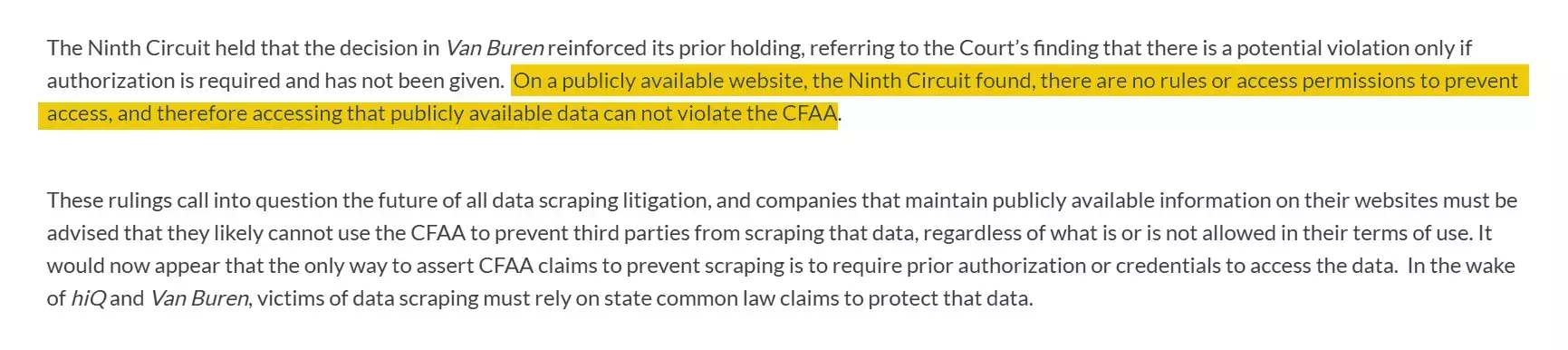
Yes, it's legal under certain conditions.

That does not automatically make scraping illegal.
The bigger legal risk is usually how the data is used.
Storing, republishing, reselling, or combining scraped data with personal information can create copyright, privacy, contract, or data-protection issues.
How to stay on the right side:
- Collect data internally... research, analysis, model training
- Don't republish Instagram Posts content on a public-facing surface
- Don't combine with PII for profiling without a legal basis
- Respect rate limits... don't hammer the platform
Here's how I evaluated the scrapers.
How I chose the best Instagram Post scrapers
I started with Reddit threads, developer discussions, review sites, Google, and commonly recommended Instagram scraping tools.
From that longlist, I tested seven tools against the same job: collect up to 1,000 posts from @9gag without logging into Instagram.
Four were strong enough to rank. Three had dealbreakers that I cover later.
I judged them on six things:
- Data... Is the output broad, complete, and deep enough to use?
- Cost... What does the same workload actually cost?
- Usability... How much work sits between input and usable data?
- Speed... How quickly does the same job finish?
- Scalability... Can it sustain larger, repeat workloads reliably?
- Customer support... What help is available when something breaks?
Data
I compared the data actually returned from the same target.
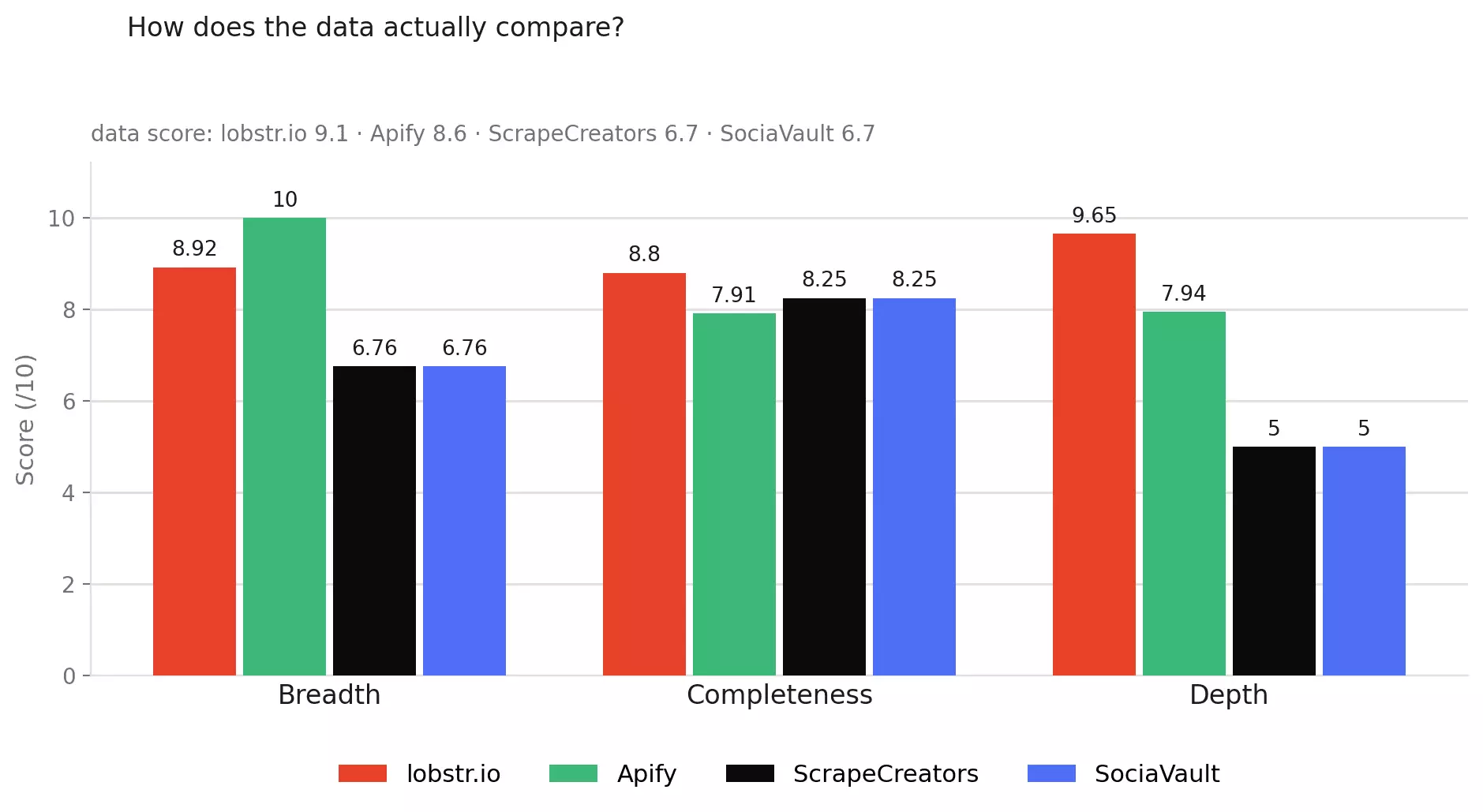
I looked at breadth, completeness, and depth rather than simply counting JSON fields.
Breadth covers distinct useful data. Completeness checks whether fields populate when they should.
Depth looks where quantity matters here: comment coverage and whether complete carousel posts survive the scrape.
Cost
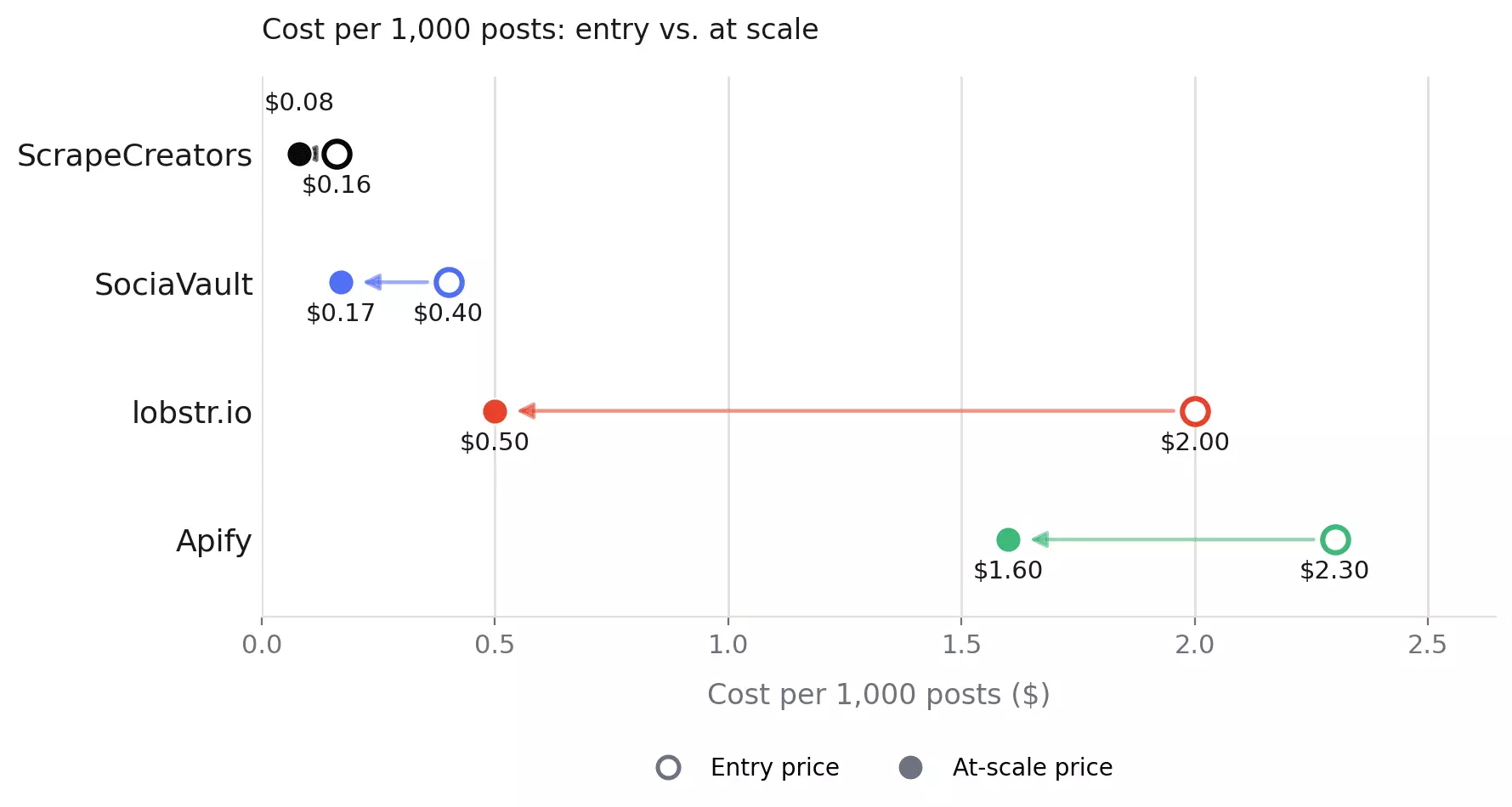
I normalized each pricing model to cost per 1,000 posts.
I checked both entry pricing and the cheapest realistic scale tier, so subscriptions, credit packs, and per-result pricing could be compared on the same workload.
Usability
I followed the full workflow from entering a target to getting usable data out.
That included input flexibility, scrape controls, batch handling, exports and delivery, scheduling, integrations, and any parsing or cleanup left to the buyer.
API-only tools weren't penalized for being APIs. I cared about the work they leave behind.
Speed
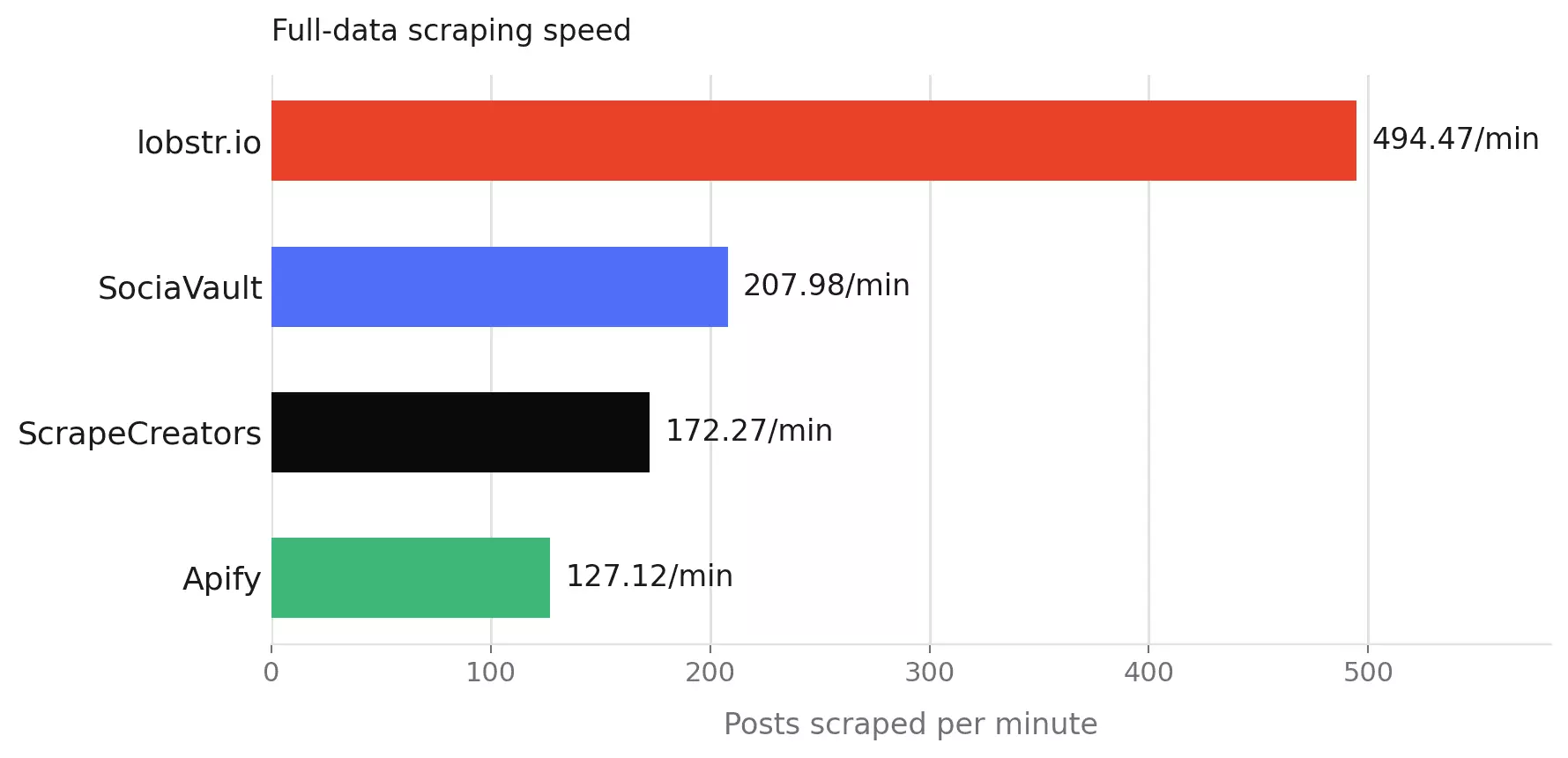
I timed the same 1,000-post baseline job for every tool.
Where comment enrichment was optional, I kept it out of the common baseline so every scraper performed a comparable job.
Comment-enriched speed is reported separately for lobstr.io and Apify, the two ranked tools that return comment text.
Scalability
I looked beyond raw speed.
The main questions were whether workloads could run in parallel, whether the full-volume test held up cleanly, and what happened to completed work if collection was interrupted.
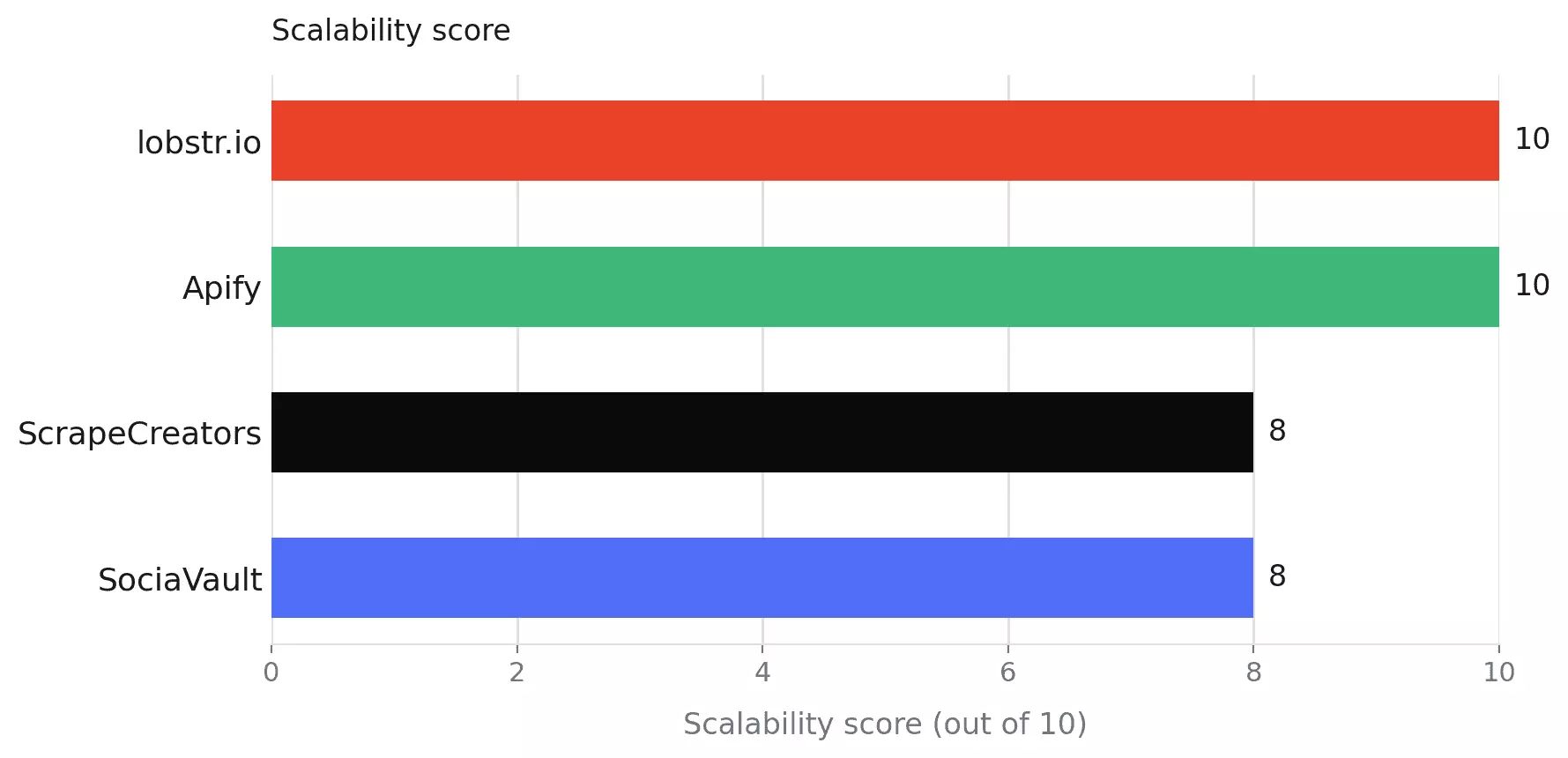
For context, I also translated each tool's measured baseline rate into a theoretical 24/7 monthly capacity using posts/min × 43,200 minutes.
That monthly figure is reported for scale context only... it does not feed the Scalability score, since that would effectively score Speed twice.
Customer support
I checked how directly you can reach human help, whether there is a real escalation path for technical problems, and what evidence exists that support is responsive and useful.
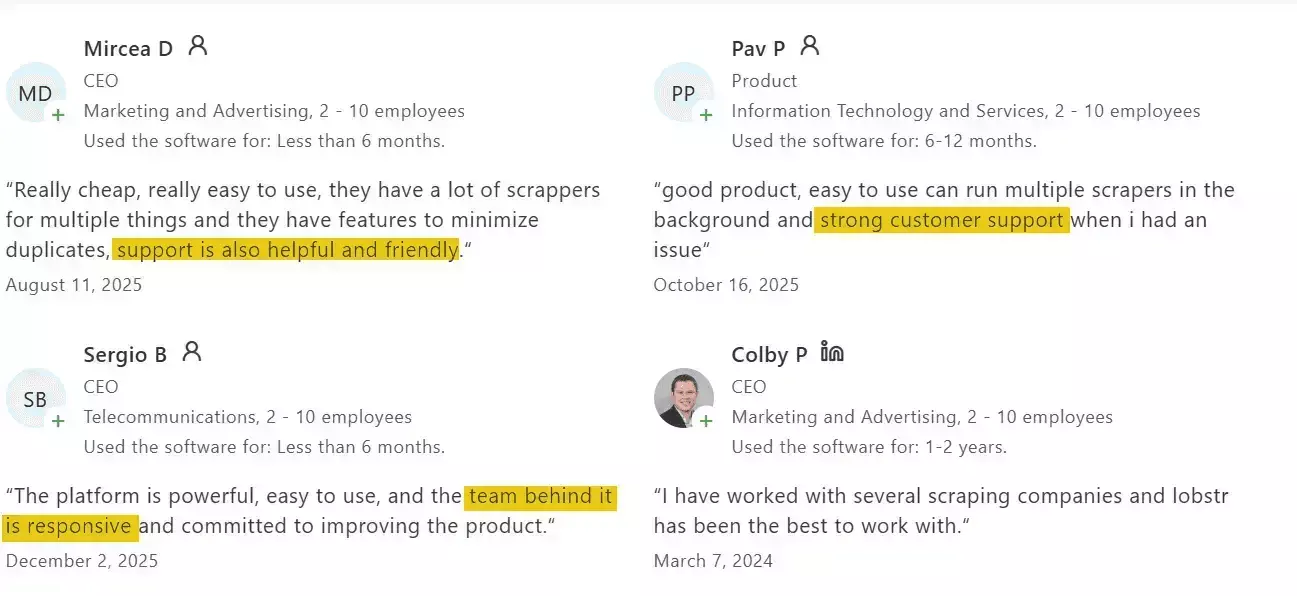
I didn't assume more channels meant better support. An impressive collection of unattended inboxes is still unattended.
How I narrowed the list
I removed tools that didn't fit the actual job:
- Login-required tools... I wasn't willing to make an Instagram account or session cookie part of the workflow.
- Abandoned projects... Instagram changes too frequently for an unmaintained scraper to be a sensible production bet.
- Thin marketplace wrappers... unclear ownership, maintenance, or support made them difficult to recommend.
- Low-use duplicate Apify actors... I tested the established Instagram Post Scraper rather than ranking dozens of near-identical marketplace entries.
Four tools made the ranked comparison.
CoreClaw, Scrapfly, and Bright Data were also tested, but each hit a dealbreaker significant enough to keep it out of the main ranking.
The best Instagram Post scrapers
| lobstr.io | Apify | ScrapeCreators | SociaVault | |
|---|---|---|---|---|
| User rating | 5/5 (33) | 4.75/5 (135) | 4.6/5 (197) | 5/5 (1) |
| Distinct data fields | 33 | 37 | 25 | 25 |
| Comments included | ✅ | ✅ | ❌ | ❌ |
| Input format | Username, profile URL, post URLs, reels | Username, profile URL, post URLs, reels | Username only | Username only |
| Price /1K (entry → scale) | $2.00 → $0.50 | $2.30 → $1.60 | $0.16 → $0.08 | $0.40 → $0.17 |
| Free tier | ✅ | ✅ | ❌ | ❌ |
| Billing model | Subscription | Subscription | Credit packs, no expiry | Credit packs, no expiry |
| Speed (per 1,000 posts) | 2.0 min | 7.9 min | 5.8 min | 4.8 min |
| Concurrency | ✅ | ✅ | ❌ | ❌ |
| Monthly ceiling | ~21.36M | ~5.49M | ~7.44M | ~8.98M |
| Batch input (multiple handles/request) | ✅ | ✅ | ❌ | ❌ |
| No-code UI | ✅ | ✅ | ❌ | ❌ |
| Skip pinned posts | ✅ | ✅ | ❌ | ❌ |
| Built-in scheduling | ✅ | ✅ | ❌ | ❌ |
| Export formats | CSV, JSON, XLSX, JSONL | CSV, JSON, XLSX, XML, JSONL | JSON only | JSON only |
| Webhook | ✅ | ✅ | ❌ | ❌ |
| Programmatic access | API + MCP + SDK + CLI | API + SDK + MCP | API | API |
| Support | Live chat + email | Live chat + Discord + tickets | Email only | Email only |
1. lobstr.io
| Category | Score |
|---|---|
| Data | 9.1/10 |
| Cost | 8.0/10 |
| Usability | 10/10 |
| Speed | 10.0/10 |
| Scalability | 10/10 |
| Support | 10/10 |
| Overall | 9.4/10 |
| Pros | Cons |
|---|---|
| Fastest tested: 494.47 posts/min | Comments slow runs by 7.89× |
| Deepest comments: 15/post avg. | Carousels cap at 10 items |
| No-code + API + SDK + CLI + MCP | reel_url is not a Reel signal |
| Up to 20 Slots/parallel concurrency | |
| 28-day data retention |
Data
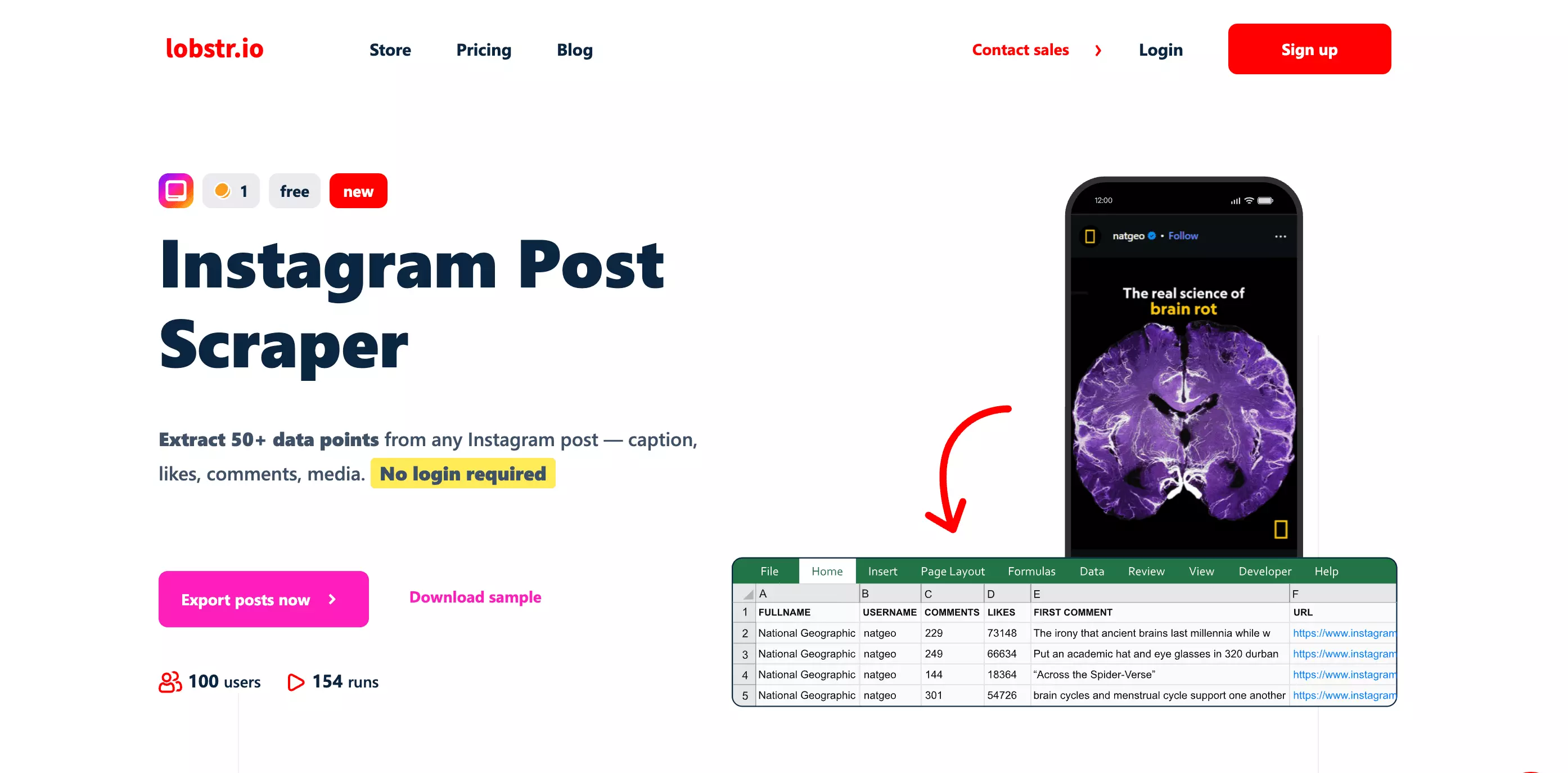
It exposes 61 output fields, representing 33 distinct useful data concepts.
Fields: 61 output columns / 33 distinct concepts
| Category | Fields |
|---|---|
| Post identity | post_id, shortcode, url |
| Content | caption, hashtags, display_url, dimensions |
| Engagement | likes_count, comments_count |
| Ownership | owner_id, owner_username, owner_full_name, owner_profile_pic_url, source_url |
| Media | media_type, product_type, video_url, reel_url, is_video, music, image_1–image_5 |
| Carousel | carousel_media_count, child_post_1–child_post_10 |
| Comments | comment_1–comment_15 |
| Tags | mentions, user_tags, coauthors |
| Metadata | timestamp, timestamp_datetime, is_pinned, is_paid_partnership, scraping_time |
| Always null | alt, functions |
Comments are the standout.
lobstr.io pulled all top 15 available comments on nearly every eligible post. Apify averaged just 9 comments in the same test.
If comment coverage feeds sentiment analysis, engagement research, or monitoring, that difference matters.
Honestly, the trade-off is carousel depth.
child_post_1 through child_post_10.That worked for 126 of 133 carousel posts in my dataset.
But seven posts contained more than 10 items. lobstr.io silently dropped everything after item 10.
The worst case was a 20-item carousel returning only 10 items... half the post, with no warning attached.
Apify, SociaVault, and ScrapeCreators preserved the full carousel on those same posts.
So the flattened format is tidy in a spreadsheet. It is less charming when item eleven disappears.
One more trap: don't classify Reels using reel_url.
lobstr.io populated that field on every post, including non-Reels.
is_video and product_type instead.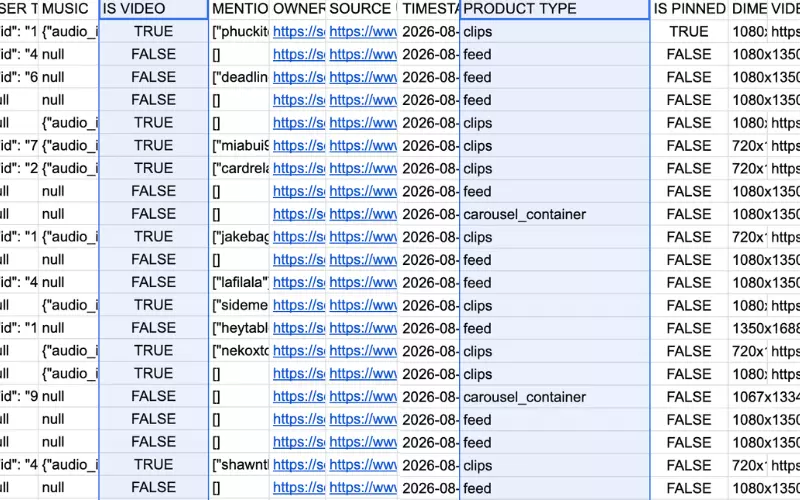
Data score: 9.1/10 — strong completeness and the deepest comment capture tested, offset slightly by its silent 10-item carousel cap.
Don't take my word for it:
Cost
lobstr.io uses a credit-based monthly subscription.
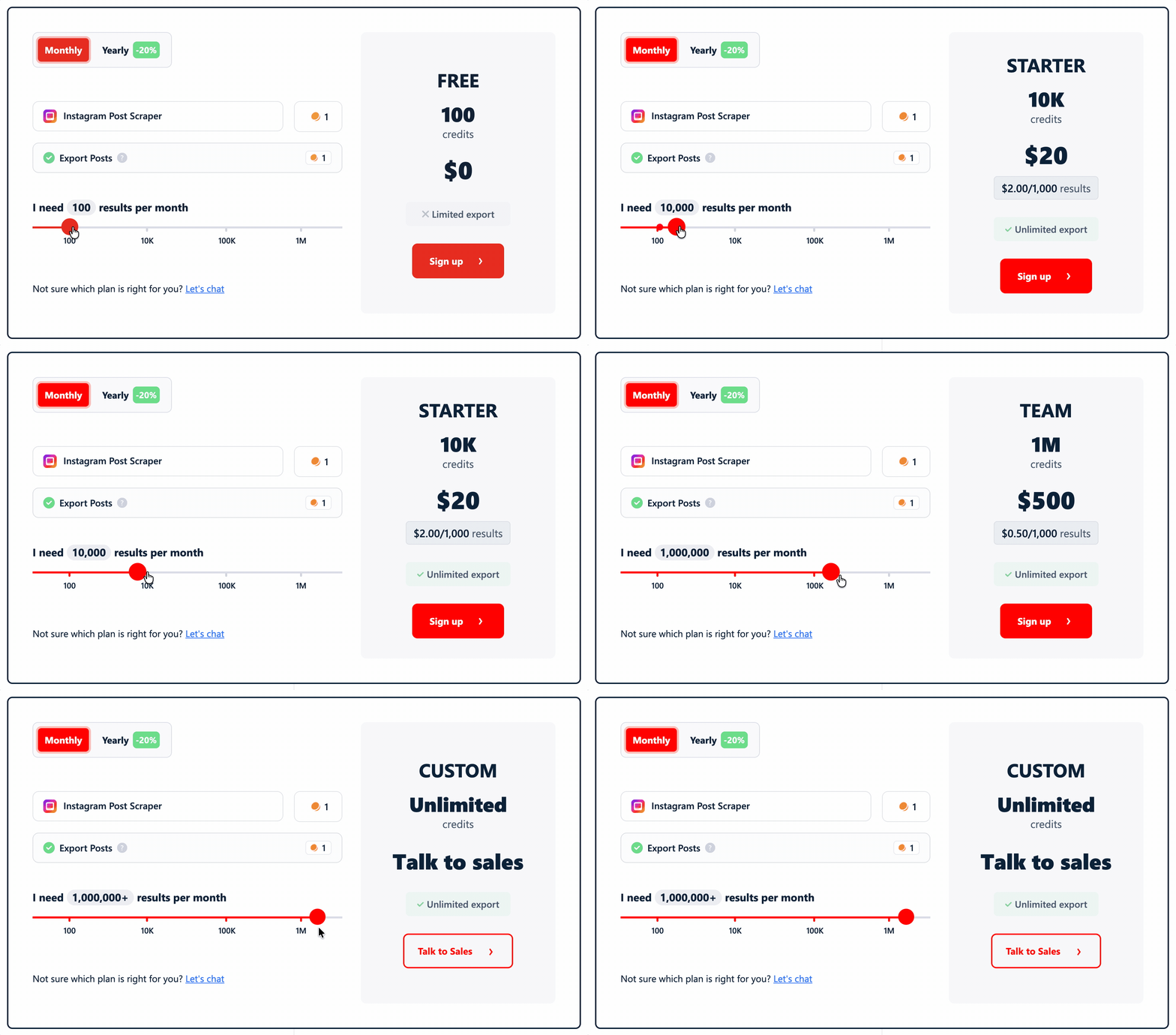
- Free: available
- Starts at: $2.00 per 1,000 results
- At scale: $0.50 per 1,000 results
The 1,000-post run held a flat 1 credit per post... the pricing scales linearly, with no surprises at volume.
Cost score: 8.0/10 — $0.50/1K at scale, predictable and linear, well under the $2.50/1K normalization ceiling
Usability
lobstr.io covers the full workflow without code, with a well-documented, developer-friendly API for teams that want to automate it.
Input
It accepts:
- Instagram usernames
- Full profile URLs
- Individual Post and Reel URLs
- CSV or TXT files for bulk input
Usernames and profile URLs are normalized automatically, so mixed input lists need little cleanup before launch.
Controls
The useful scrape-level controls include:
- Relative or absolute date filters
- Skip pinned posts
- Maximum results
- Unique-results-only mode
- Remove line breaks
The skip-pinned option is particularly useful for recent-post collection, where older pinned posts would otherwise need filtering afterward.
Workflow & delivery
Recurring runs can be scheduled by minute, hour, day, week, or month, with timezone control.
Results can be delivered through CSV, JSON, Excel, Google Sheets, S3, SFTP, email, or webhooks.
For programmatic workflows, lobstr.io also provides an API, Python SDK, CLI, and MCP support.
Limitations
I didn't find a material workflow limitation for this Instagram scraping job.
The no-code flow covers collection, filtering, scheduling, and delivery without forcing an extra cleanup or orchestration layer.
Usability score: 10/10 — broad input support, useful scrape controls, built-in automation and delivery, plus full developer access with no material workflow limitation found.
Speed
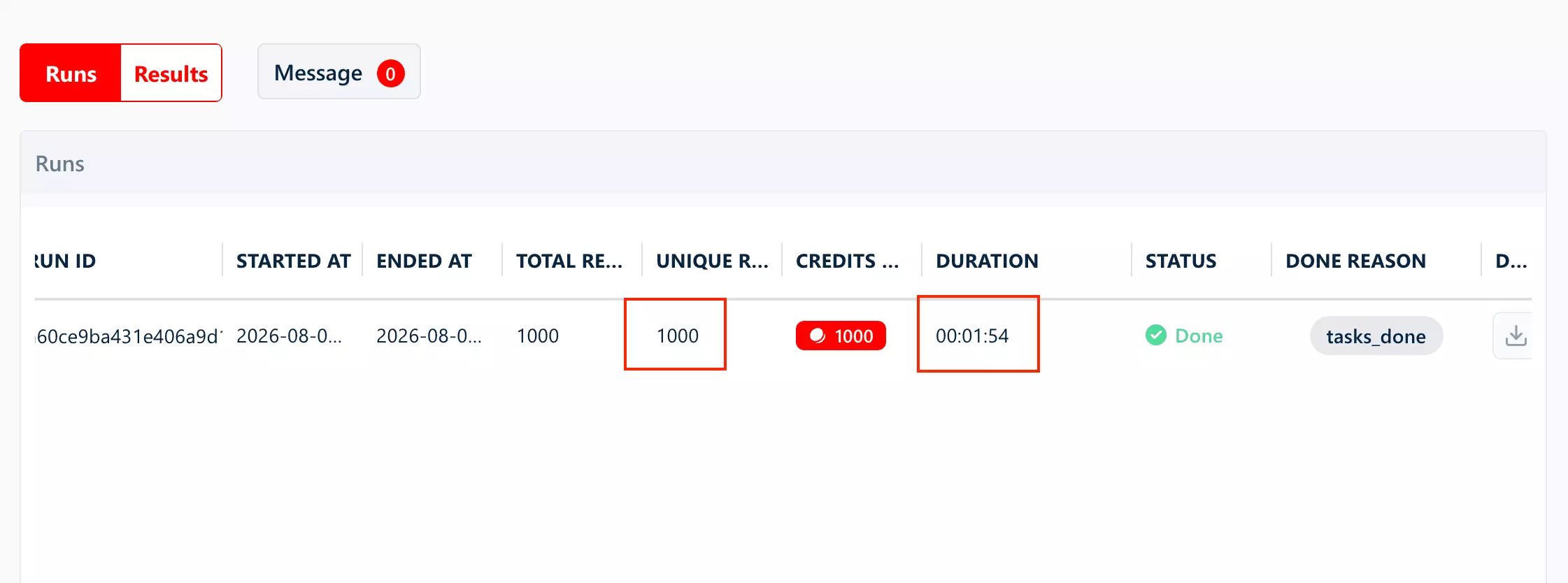
lobstr.io was the fastest in the baseline test, processing 1,000 posts in 2.02 minutes.
That works out to 494.47 posts/min... with comments turned off.
With comments
Enabling comment enrichment changed the picture.
The same 1,000-post job took 15.95 minutes, or 62.71 posts/min... a 7.89× slowdown.
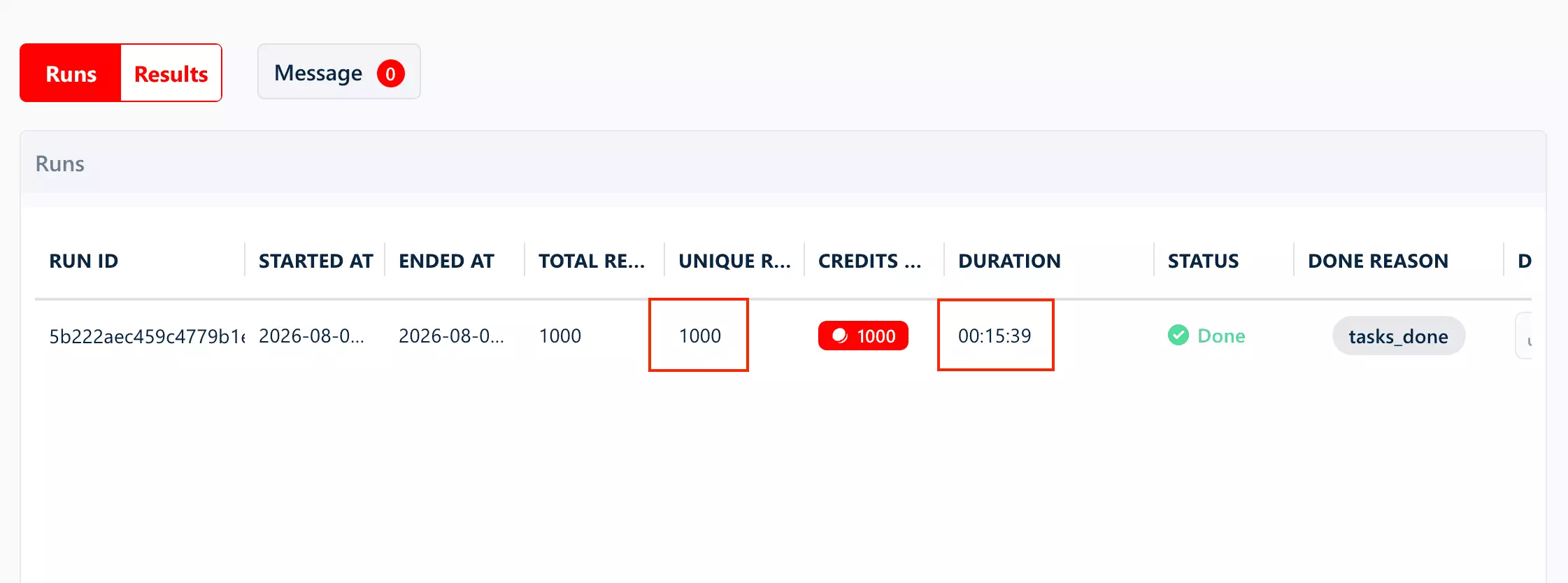
The credit cost stayed the same, so comments cost time here, not extra credits.
Speed score: 10/10 — 494.47 posts/min on the common baseline job, which sets the fixed Speed benchmark for this comparison.
Scalability
Parallel scaling
lobstr.io provides platform-managed concurrency with up to 20 Slots per Squid, each running as a separate worker.
That lets you increase throughput without building your own request orchestration.
Reliability
The 1,000-post test completed cleanly: 1,000/1,000 unique results, with no duplicates or pagination errors.
Recovery
If a run fails, lobstr.io pauses it rather than discarding progress.
Partial results remain available for 28 days, so completed work can still be recovered.
Capacity context
At the measured baseline rate, one Slot works out to roughly 21.36M posts/month if run continuously.
That figure is derived from Speed and shown for context only; it does not determine the Scalability score.
Scalability score: 10/10 — platform-managed scaling, clean sustained execution, and server-side recovery with 28-day retention.
Customer support
lobstr.io offers support through a live chat widget directly on the website, plus email support.
This is also one of the few themes that shows up repeatedly in Capterra reviews. Not the usual "great support" confetti, either.
Users specifically mention fast replies, friendly help, and a team that seems to know the product rather than just forwarding your issue into the void.
Support score: 10/10 — direct live-chat access, plus support-specific Capterra reviews confirming fast, competent responses (5/5, 33 reviews)
Best for: teams that want the fastest baseline collection, deep comment coverage, and a complete no-code/developer workflow... and can tolerate slower comment-enriched runs.
2. Apify
| Category | Score |
|---|---|
| Data | 8.6/10 |
| Cost | 3.6/10 |
| Usability | 10/10 |
| Speed | 2.6/10 |
| Scalability | 10/10 |
| Support | 8/10 |
| Overall | 6.8/10 |
| Pros | Cons |
|---|---|
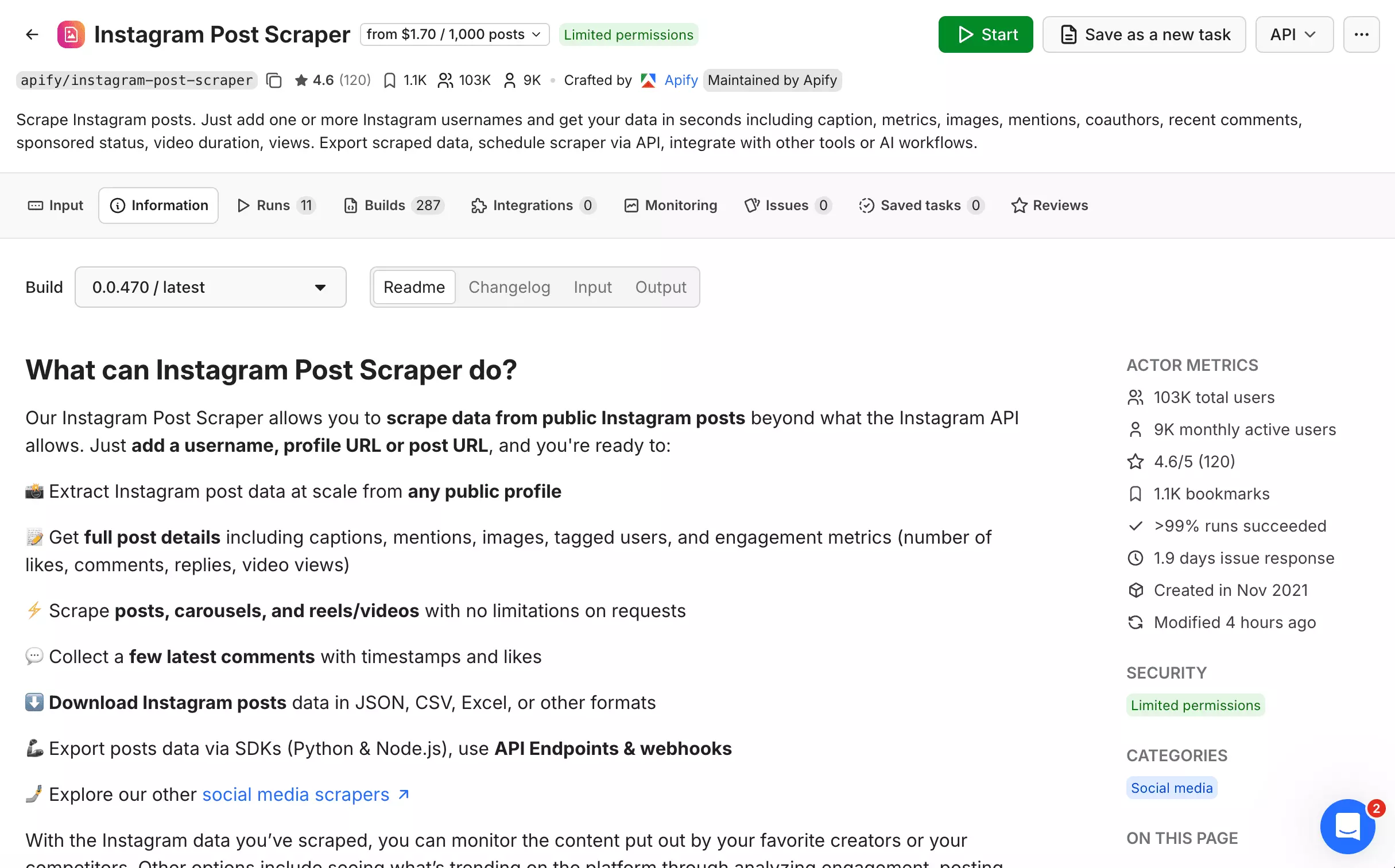
| Broadest data: 37 useful fields | Highest cost: $1.60/1K |
| Full capture on 133/133 carousels | Slowest baseline: 127.12 posts/min |
| Best video/tag metadata | Comments average only 9/post |
| No-code + API + SDK + CLI + MCP | 9/999 records were partial |
| Platform managed concurrency | |
| 31-day data retention |
Data
Apify exposes 39 output fields, representing 37 distinct useful data concepts.
Fields: 39 output fields / 37 distinct concepts
| Category | Fields |
|---|---|
| Post identity | id, type, shortCode, url, inputUrl |
| Content | caption, hashtags, firstComment, alt |
| Engagement | likesCount, commentsCount, isCommentsDisabled |
| Ownership | ownerUsername, ownerId, ownerFullName, coauthorProducers |
| Media | displayUrl, dimensionsHeight, dimensionsWidth, originalWidth, originalHeight, productType, videoUrl, videoViewCount, videoPlayCount, videoDuration, audioUrl, musicInfo, images, childPosts |
| Tags | mentions, taggedUsers |
| Metadata | timestamp, paidPartnership, sponsors, locationName, locationId, isPinned |
| Comments | latestComments |
Video and tag metadata is where Apify pulls ahead.
videoViewCount, videoPlayCount, videoDuration, audioUrl, and musicInfo instead of burying them inside broader media objects.taggedUsers is structured too, including names, verification status, and profile images for each tagged account.Carousel coverage is also stronger.
Across all 133 carousel posts, Apify captured every item. lobstr.io lost items on the seven posts containing more than 10.
The trade-off is comment depth.
lobstr.io scraped all 15 top available comments on nearly every post. Apify captured far fewer comments per post.
If your analysis depends heavily on comment text, that's a meaningful gap.
Honestly, there was also a small reliability miss.
Apify returned 999 of 1,000 requested posts, but nine came back partially populated after Instagram served restricted-page responses.
restricted_page error flag.That's better than dropping them unnoticed, but it still means 0.9% of returned posts lacked the full dataset.
Data score: 8.6/10 — the broadest distinct data coverage tested and complete carousel capture, offset by shallower comments and a small partial-record rate.
Don't take my word for it:
Cost
Apify runs on a monthly subscription.
There are two separate result charges: one for the post itself, and another if you collect post details.
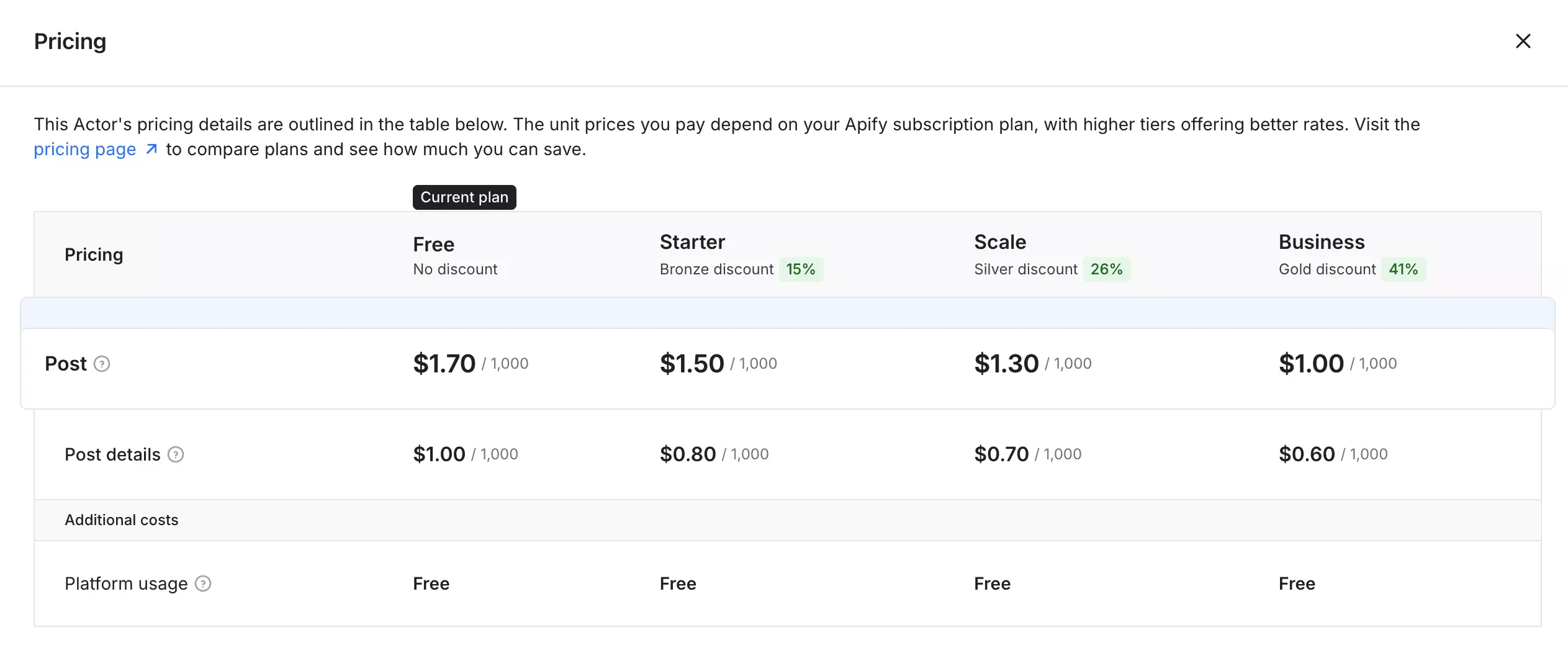
- Free: available, with $5 credit
- Starts at: $2.30 per 1,000 results
- At scale: $1.60 per 1,000 results
Compared with lobstr.io, Apify is over 3x more expensive at scale for the same Instagram post data.
Cost score: 3.6/10 — $1.60/1K at scale, most expensive of the 4 ranked tools, closing in on the $2.50/1K ceiling
Usability
Apify combines a no-code Actor form with full programmatic access, so the same scraper works for both manual and automated workflows.
Input
It accepts:
- Instagram usernames
- Full profile URLs
- Individual Post URLs
- Reel URLs
- Multiple targets in one run
That makes it flexible enough for both profile-level collection and direct post scraping.
Controls
The useful scrape-level controls include:
- Maximum posts per profile
- Skip pinned posts
- Absolute or relative date filters
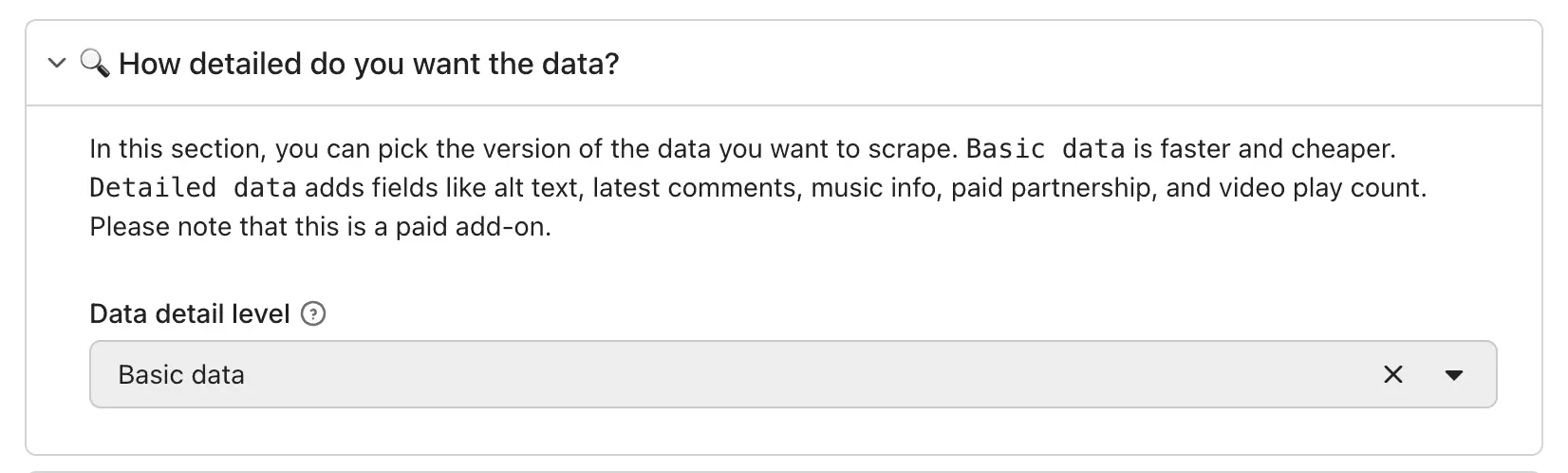
- Basic or detailed data mode
The detail-level toggle lets you choose between a lighter payload and richer metadata such as comments, music, partnership status, and video metrics.
Workflow & delivery
Runs can be scheduled and connected to webhooks through Apify.
Results export to JSON, CSV, Excel, XML, or JSON Lines.
For programmatic use, Apify also provides API access, Python and JavaScript SDKs, and MCP support.
Limitations
I didn't find a material workflow limitation for this Instagram scraping job.
However, the data detail level setting matters, and not in the direction you'd expect. I cover that under Speed rather than here.
Usability score: 10/10 — broad input support, useful scrape controls, built-in scheduling and exports, plus full developer access with no material workflow limitation found.
Speed
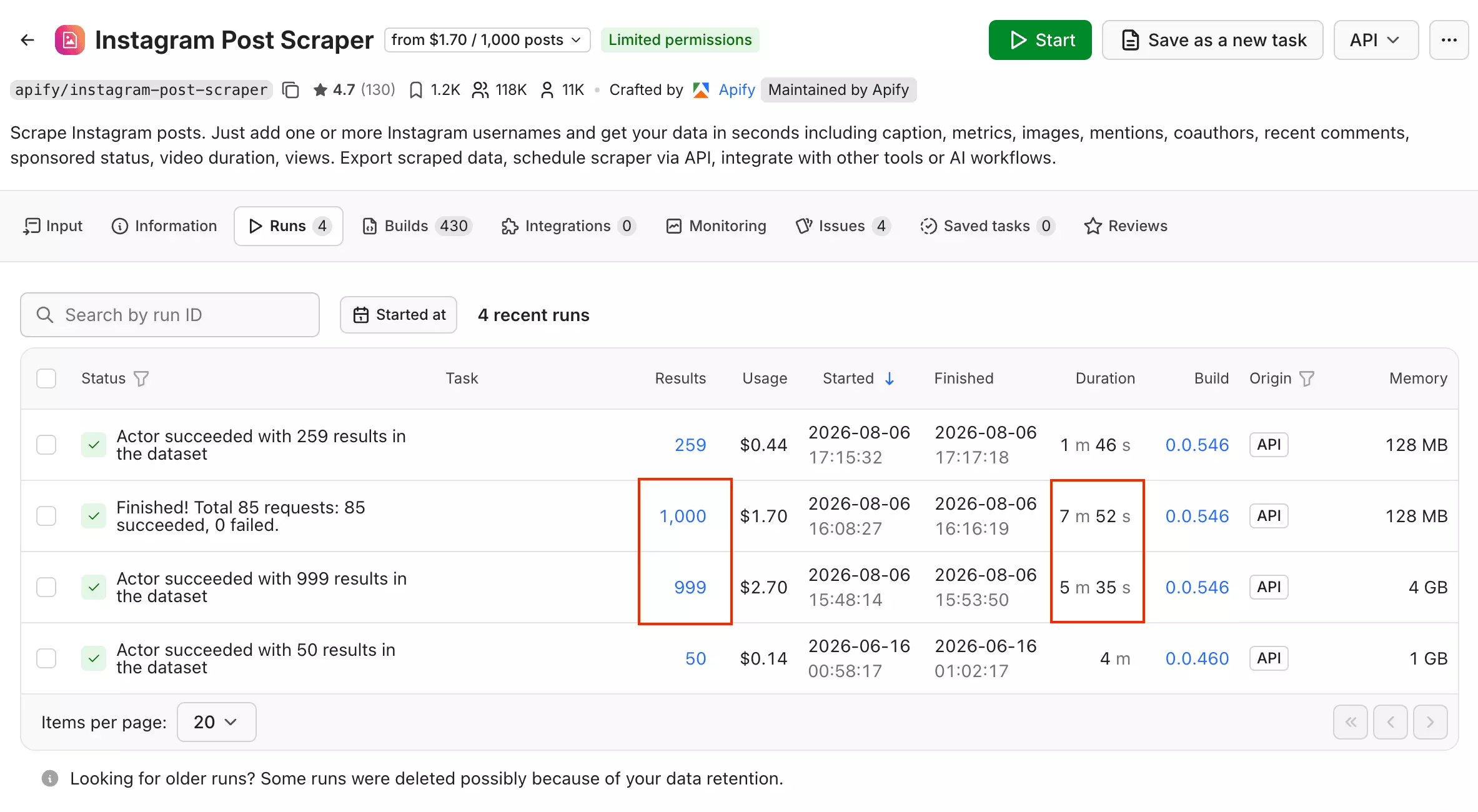
basicData.That works out to 127.12 posts/min... the slowest baseline rate of the four ranked tools.
With comments
detailedData, Apify returned 999 posts in 5.58 minutes, or 178.93 posts/min.That is faster than its basic mode despite returning more data, and repeated runs showed the same pattern.
Speed score: 2.6/10 — 127.12 posts/min on the common baseline job, about 26% of the fixed 494.47 posts/min benchmark.
Scalability
Parallel scaling
Apify provides platform-managed concurrency and supports multiple handles in one run.
The Actor handles parallel execution internally, though I did not independently load-test its concurrency multiplier.
Reliability
basicData run returned 1,000/1,000 requested posts, with none restricted or partial.One duplicate post ID did appear in the results (999 unique of 1,000), the only duplicate seen across either Apify mode tested.
Recovery
Apify preserves results already written before a run fails or restarts.
Stored datasets remain available for 31 days, so partial output can still be recovered.
Capacity context
basicData rate, Apify works out to roughly 5.49M posts/month if run continuously.That figure is derived from Speed and shown for context only; it does not determine the Scalability score.
Scalability score: 10/10 — platform-managed scaling, clean sustained execution, and server-side recovery with 31-day retention.
Customer support
Apify offers support through live chat, tickets, and Discord.
Live chat works for basic questions, while actor-specific troubleshooting is better handled through the issue system.
The catch: this actor has shown an 18-hour issue response time on past issues (not independently re-verified this session).
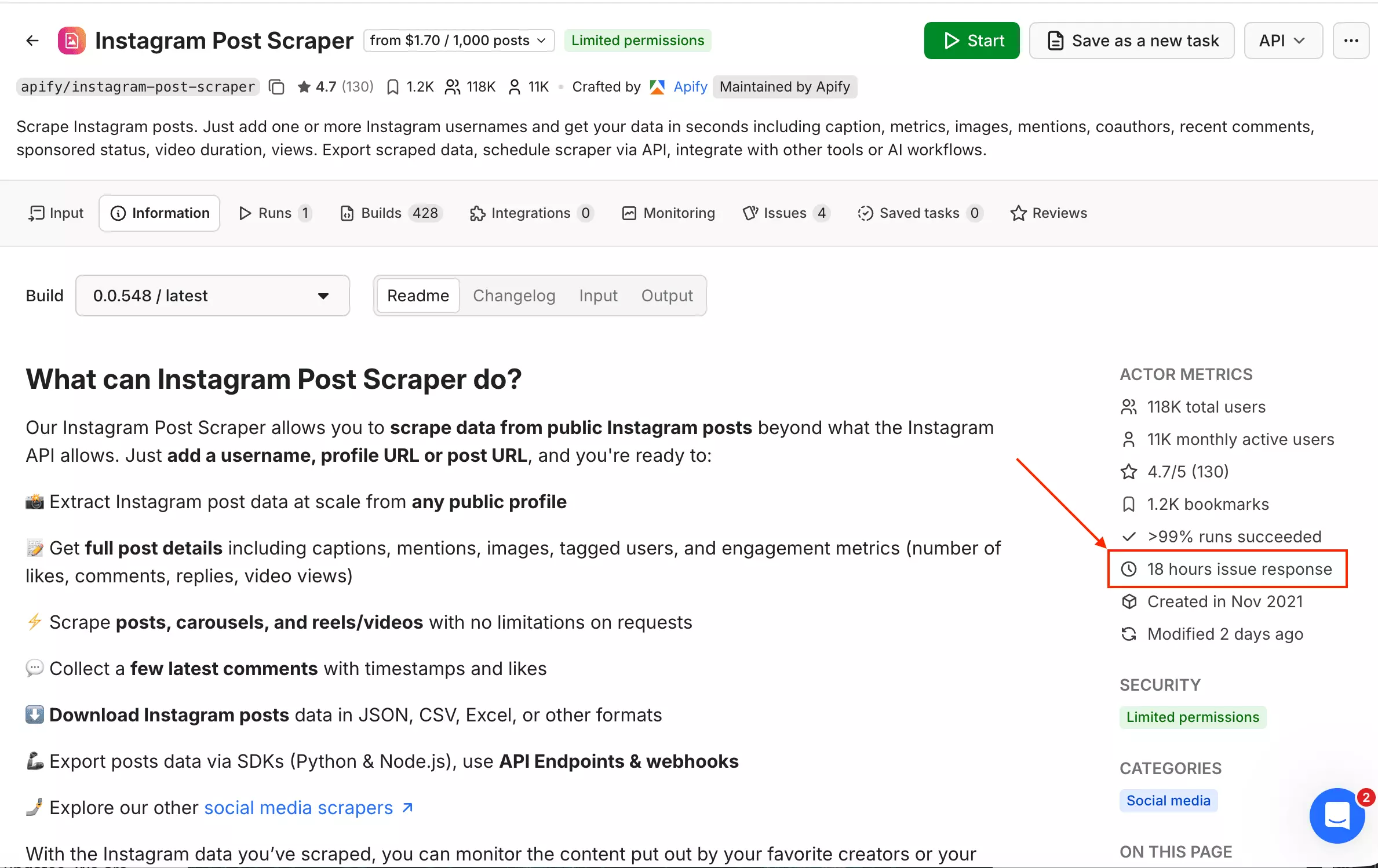
That is manageable for non-urgent bugs, but slow when a scraping workflow is already breaking politely in the background.
Support score: 8/10 — real technical escalation path via the issue tracker, but an 18-hour response time (not independently re-verified this session)
Best for: research teams that need broad metadata, complete carousels, and strong video/tag detail... while accepting higher cost and slower baseline collection.
3. ScrapeCreators
User rating: 4.6/5 (197 reviews, G2, as of August 9, 2026)
| Category | Score |
|---|---|
| Data | 6.6/10 |
| Cost | 9.7/10 |
| Usability | 6/10 |
| Speed | 3.5/10 |
| Scalability | 8/10 |
| Support | 6/10 |
| Overall | 6.7/10 |
| Pros | Cons |
|---|---|
| Cheapest: $0.08/1K | No comment text |
| 1,000/1,000 posts, 0 duplicates | Username-only input |
| Full 133/133 carousel capture | No filters, batching, or scheduling |
| Credits never expire | JSON-only, no server-side retention |
Data
ScrapeCreators exposes 26 output fields, representing 25 distinct data concepts.
Fields: 26 output fields / 25 distinct concepts
| Category | Fields |
|---|---|
| Post identity | id, pk, code, taken_at |
| Content | caption, image_versions2, carousel_media |
| Engagement | like_count, comment_count |
| Video | play_count, video_duration, video_versions, video_dash_manifest, clips_metadata |
| Ownership | user, owner |
| Carousel | carousel_media_count |
| Metadata | media_type, product_type, is_paid_partnership, filter_type, location, lat, lng |
| Tagged users / sponsors | usertags, sponsor_tags |
It's the least padded schema tested.
owner is a byte-for-byte copy of user, confirmed across all 1,000 rows. Everything else earns its place.Carousel capture is complete, too. All 133 test carousels, up to 20 items, came back whole... something only Apify and SociaVault also managed.
Honestly, the trade-off is comment content, not just depth.
comment_count only. No comment text, at any volume.lobstr.io averaged 15 comments per post; Apify averaged 9. ScrapeCreators returns zero.
If comment data matters at all, this rules it out entirely.
One more trap: filter_type isn't a real filter name.
It was populated on every post, but always with 0, rather than a usable Instagram filter name.
Don't build logic that expects real filter data here.
Data score: 6.6/10 — minimal redundancy and complete carousel capture, held back by having no comment content at all.
Don't take my word for it:
Cost
ScrapeCreators uses a credit-based model with one-time packs. Credits never expire.
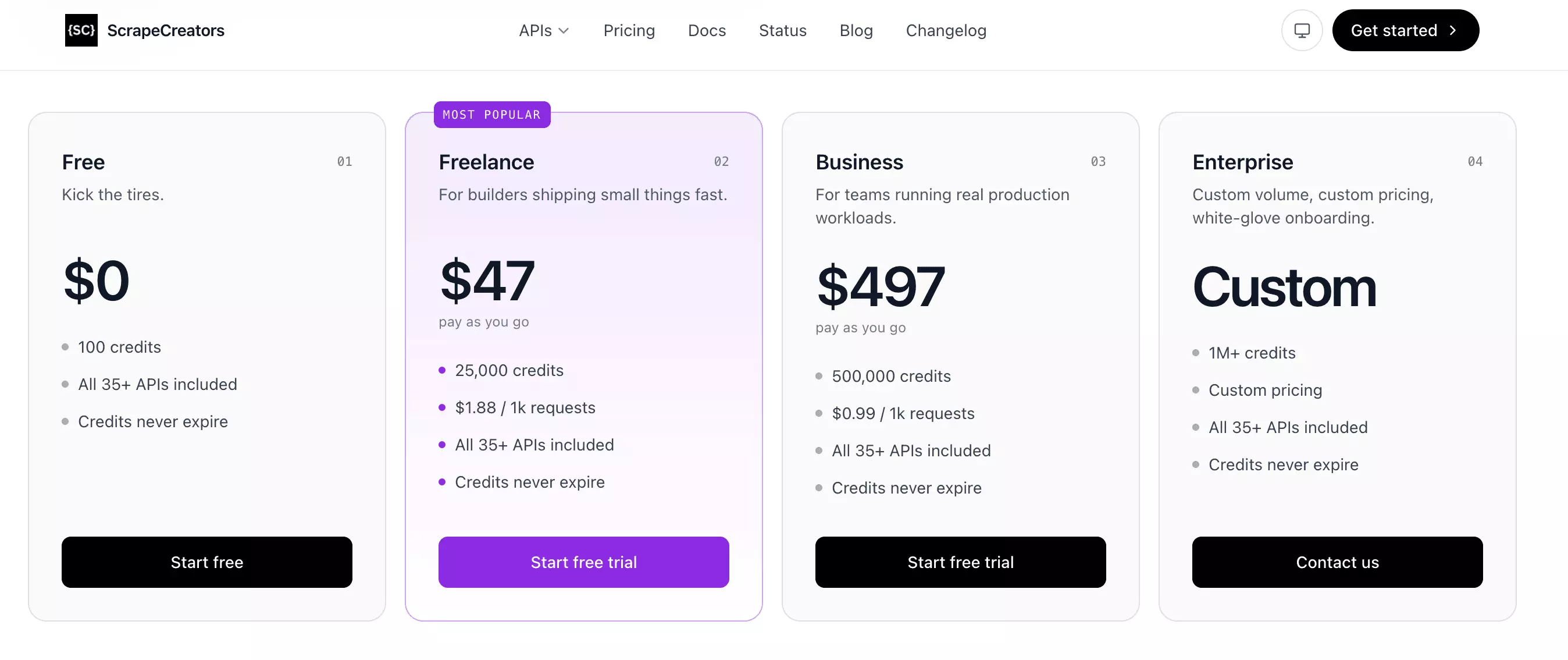
For Instagram post scraping, each page costs 1 credit and returns around 12 posts, so collecting 1,000 results takes about 84 credits... confirmed exactly at scale.
- Free: not available
- Starts at: $0.16 per 1,000 results
- At scale: $0.08 per 1,000 results
The real advantage here is price. At $0.08/1K at scale, ScrapeCreators is the cheapest of the four tools tested.
Cost score: 9.7/10 — $0.08/1K at scale, cheapest of the 4 ranked tools, barely dents the $2.50/1K ceiling
Usability
ScrapeCreators is easy to integrate, but most of the surrounding workflow still has to be handled on your side.
Input
It accepts:
- Instagram usernames only
Profile URLs, Post URLs, and Reel URLs are not accepted, so those need to be converted into usernames first.
Controls
The API is minimal:
handle: Instagram account to scrapenext_max_id: cursor for the next page
Each request returned about 12 posts in my test, so larger pulls require repeated cursor requests.
Workflow & delivery
items comes back as a normal JSON array.That keeps the response easy to parse, but delivery stops at JSON. There are no built-in CSV, Excel, webhook, or scheduled-run options.
Limitations
There is no multi-handle batch input, date filtering, skip-pinned control, or built-in scheduling.
Those are all manageable through code, but they leave several routine workflow steps to the buyer.
Usability score: 6/10 — clean API execution, but strict input, limited controls, and JSON-only delivery leave meaningful manual work around the scrape.
Speed
On the common baseline job, ScrapeCreators scraped 1,000 posts in 5.80 minutes.
That works out to 172.27 posts/min... slower than lobstr.io and SociaVault, but close to Apify's detailed-data rate.
ScrapeCreators does not return comment text, so there is no separate comment-enriched speed to report.
Speed score: 3.5/10 — 172.27 posts/min on the common baseline job, about 35% of the fixed 494.47 posts/min benchmark.
Scalability
Parallel scaling
ScrapeCreators handles one Instagram account per request and does not provide platform-managed concurrency.
Buyer-managed parallel requests appear viable, but I did not independently load-test them.
Reliability
The 1,000-post run completed cleanly: 1,000/1,000 posts, with no duplicates and all 84/84 page requests succeeding.
Recovery
ScrapeCreators does not store results long-term.
If you save each response and cursor as you go, completed work can be preserved client-side. Recovery therefore depends on your own implementation rather than the platform.
Capacity context
At the measured baseline rate, ScrapeCreators works out to roughly 7.44M posts/month if run continuously.
That figure is derived from Speed and shown for context only; it does not determine the Scalability score.
Scalability score: 8/10 — reliable at volume, but parallel scaling and recovery remain buyer-managed.
Customer support
ScrapeCreators also relies on email support, with the address shown directly inside the dashboard.
It is easy to find, but still fairly barebones: no live chat, no ticket status, no visible response time.
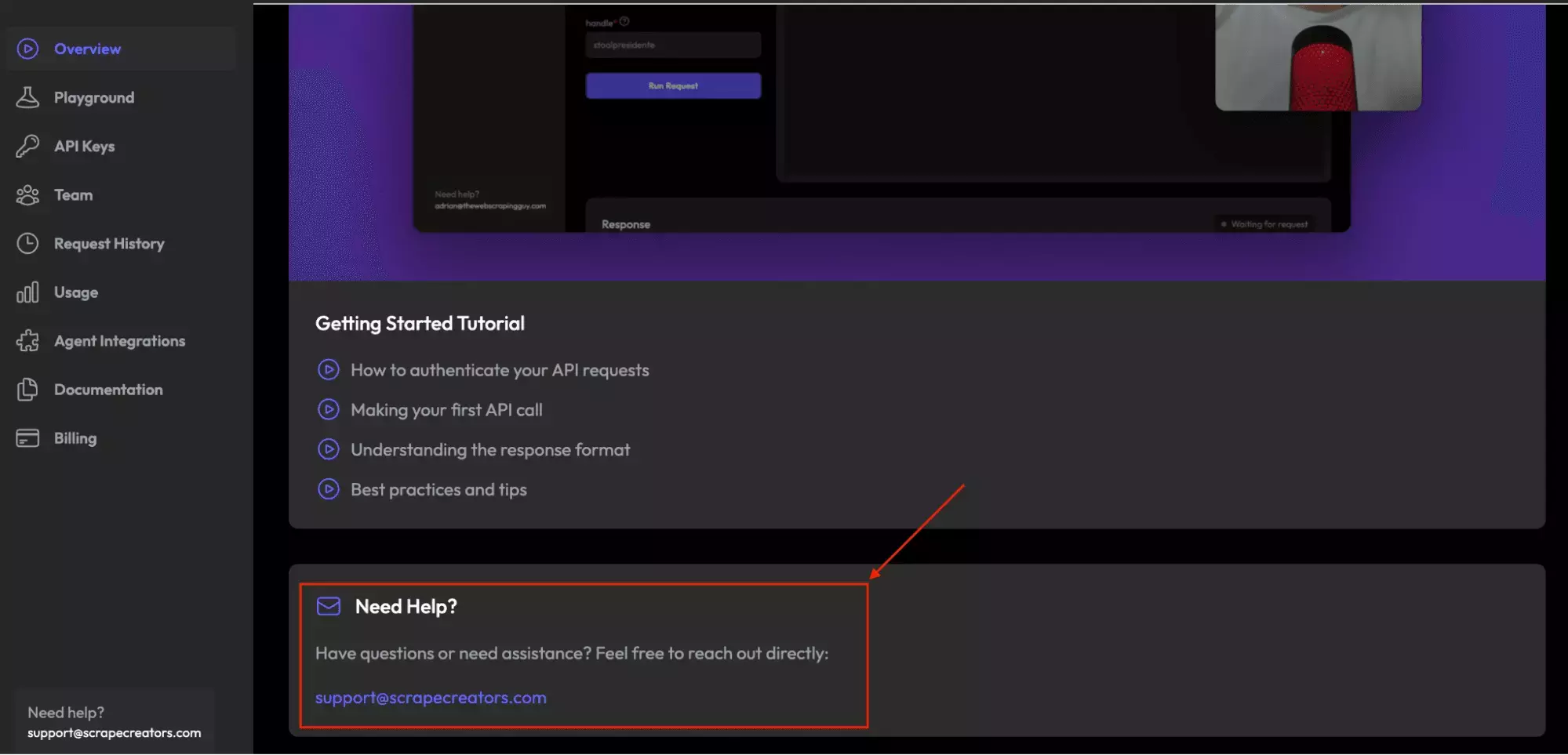
For a developer API, that may be acceptable. For urgent scraping issues, it feels like sending a message into the inbox cave.
Support score: 6/10 — email only, no live chat or ticket system, no support-specific review evidence either way
Best for: cost-conscious developers who need reliable core post data at the lowest price... and do not need comments, rich filters, or managed workflow tooling.
4. SociaVault
User rating: 5/5 (1 review, G2, as of August 9, 2026)
| Category | Score |
|---|---|
| Data | 6.6/10 |
| Cost | 9.3/10 |
| Usability | 5/10 |
| Speed | 4.2/10 |
| Scalability | 8/10 |
| Support | 6/10 |
| Overall | 6.6/10 |
| Pros | Cons |
|---|---|
| 1,000/1,000 posts, 0 duplicates | No comment text |
| Full 133/133 carousel capture | items needs extra parsing |
| Credits never expire | Username-only input |
| No filters, scheduling, or retention |
Data
SociaVault exposes 26 output fields, representing 25 distinct data concepts... the same data profile I measured from ScrapeCreators.
Fields: 26 output fields / 25 distinct concepts
| Category | Fields |
|---|---|
| Post identity | id, pk, code, taken_at |
| Content | caption, image_versions2, carousel_media |
| Engagement | like_count, comment_count |
| Video | play_count, video_duration, video_versions, video_dash_manifest, clips_metadata |
| Ownership | user, owner |
| Carousel | carousel_media_count |
| Metadata | media_type, product_type, is_paid_partnership, filter_type, location, lat, lng |
| Tagged users / sponsors | usertags, sponsor_tags |
On the actual data, SociaVault and ScrapeCreators are effectively tied.
They returned the same useful fields and the same coverage in this test.
Carousel capture was complete, too. All 133 carousel posts, including posts with up to 20 items, came back whole.
Honestly, the main limitation is comment content.
comment_count, but no actual comment text from this endpoint.That makes it a poor fit for sentiment analysis or workflows that need the conversation itself.
Location data is sparse.
location, lat, and lng populated on just 2 of 1,000 posts in this test.So those fields exist, but I wouldn't choose SociaVault for location-heavy analysis.
The meaningful difference versus ScrapeCreators is how the response is structured, not what data it contains. I cover that in Usability.
Data score: 6.6/10 — complete carousel capture and solid core post data, held back mainly by narrower coverage and no comment text.
Don't take my word for it:
Cost
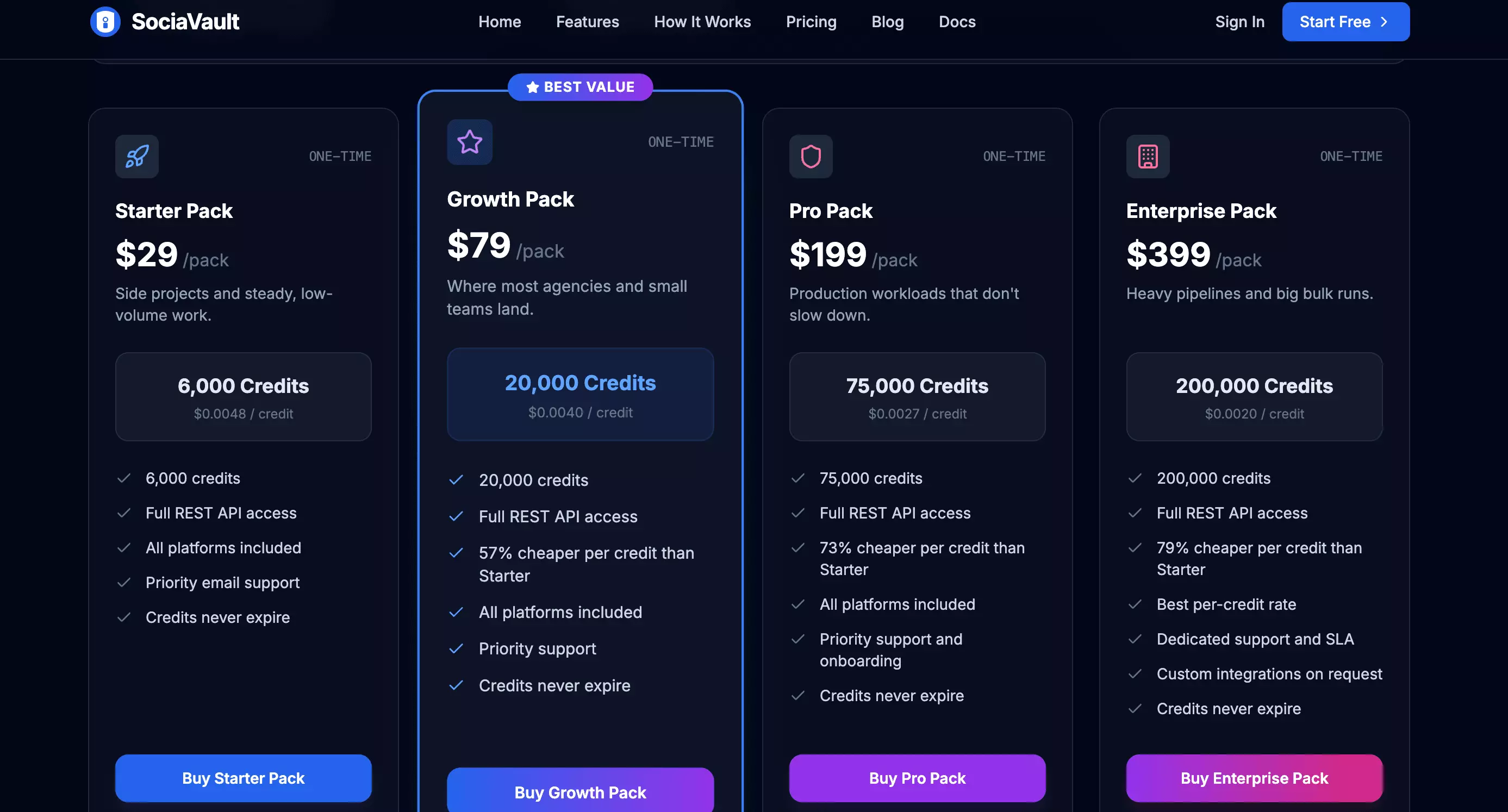
SociaVault uses prepaid credit packs instead of subscriptions, and unused credits do not expire.
- Free: not available
- Starts at: $0.40 per 1,000 results
- At scale: $0.17 per 1,000 results
Cost score: 9.3/10 — $0.17/1K at scale, second-cheapest of the 4 ranked tools, well under the $2.50/1K ceiling
Usability
SociaVault is simple to call, but most of the workflow around the API still has to be handled on your side.
Input
It accepts:
- Instagram usernames only
Profile URLs, Post URLs, and Reel URLs are rejected, so inputs need to be reduced to the handle first.
Controls
The API is minimal:
handle: Instagram username to scrapenext_max_id: cursor for the next page
There are no date filters, skip-pinned controls, or multi-handle batch input.
Workflow & delivery
Pagination is cursor-based, and output is JSON only.
There is no built-in scheduling, webhook delivery, CSV, or Excel export, so recurring jobs and downstream delivery need external tooling.
Limitations
items field."0", "1", and "2".It works once you account for it, but it adds an avoidable parsing step that ScrapeCreators does not.
Usability score: 5/10 — similar manual workflow to ScrapeCreators, with an extra response-parsing quirk that adds integration friction.
Speed
On the common baseline job, SociaVault scraped 1,000 posts in 4.81 minutes.
That works out to 207.98 posts/min... the second-fastest baseline rate of the four ranked tools.
SociaVault does not return comment text, so there is no separate comment-enriched speed to report.
Speed score: 4.2/10 — 207.98 posts/min on the common baseline job, about 42% of the fixed 494.47 posts/min benchmark.
Scalability
Parallel scaling
SociaVault handles one Instagram account per request and does not provide platform-managed concurrency.
Buyer-managed parallel requests appear viable, but I did not independently load-test them.
Reliability
The 1,000-post run completed cleanly: 1,000/1,000 posts, with no duplicates and all 84/84 page requests succeeding.
Recovery
SociaVault does not provide server-side result retention.
If you save each response and cursor as you go, completed work can be preserved client-side. Recovery therefore depends on your own implementation rather than the platform.
Capacity context
At the measured baseline rate, SociaVault works out to roughly 8.98M posts/month if run continuously.
That figure is derived from Speed and shown for context only; it does not determine the Scalability score.
Scalability score: 8/10 — reliable at volume, but parallel scaling and recovery remain buyer-managed.
Customer support
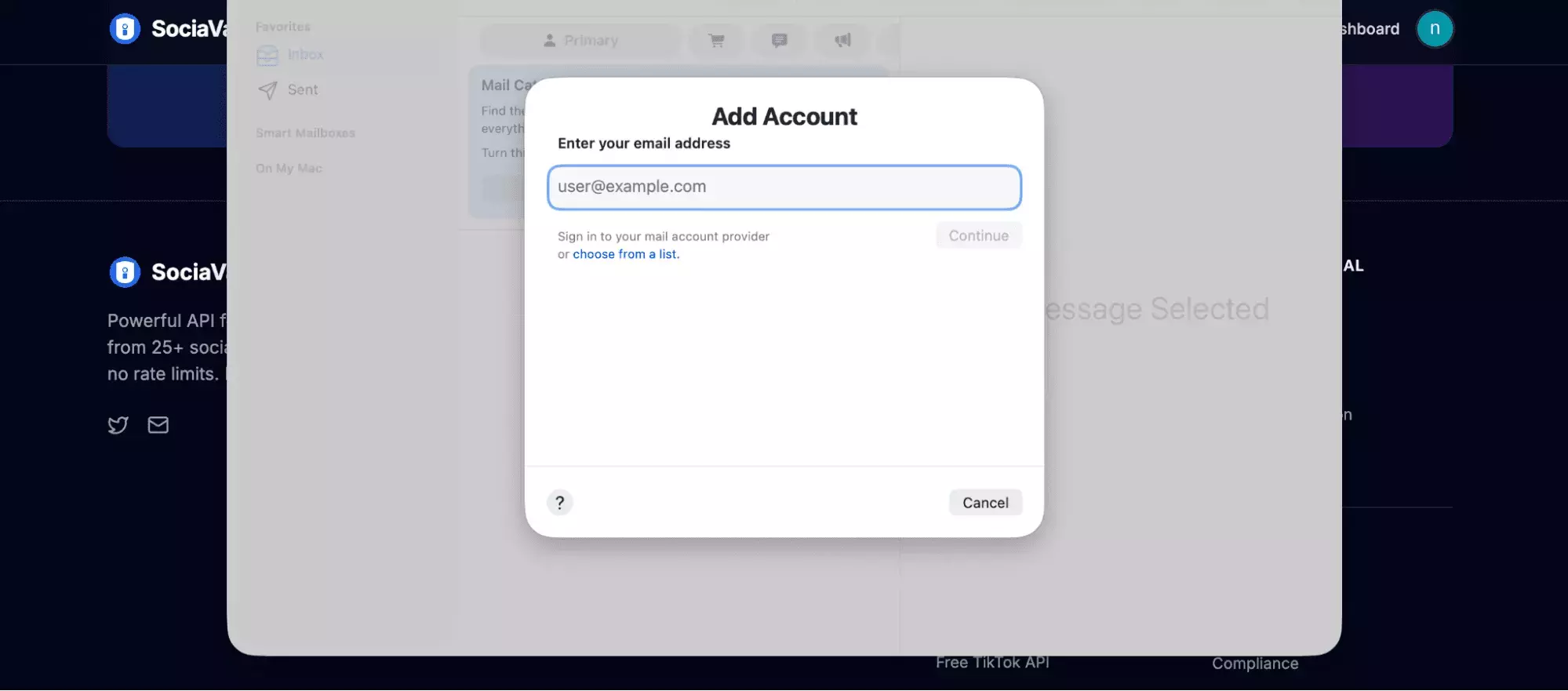
SociaVault's support is email-based, which already puts it a step behind tools with live chat or tickets.
Clicking the support option opens your default mail app, so there is no in-app thread, visible queue, or quick escalation path.
Support score: 6/10 — email only, no live chat or ticket system, no support-specific review evidence either way
Best for: developers who want a fast, inexpensive API and complete carousel data... and are comfortable handling parsing, orchestration, persistence, and scheduling themselves.
The scrapers that didn't make the list
Three more tools were worth testing, but each hit a different dealbreaker: CoreClaw on reliability, Scrapfly on practical throughput, and Bright Data on workload control.
CoreClaw
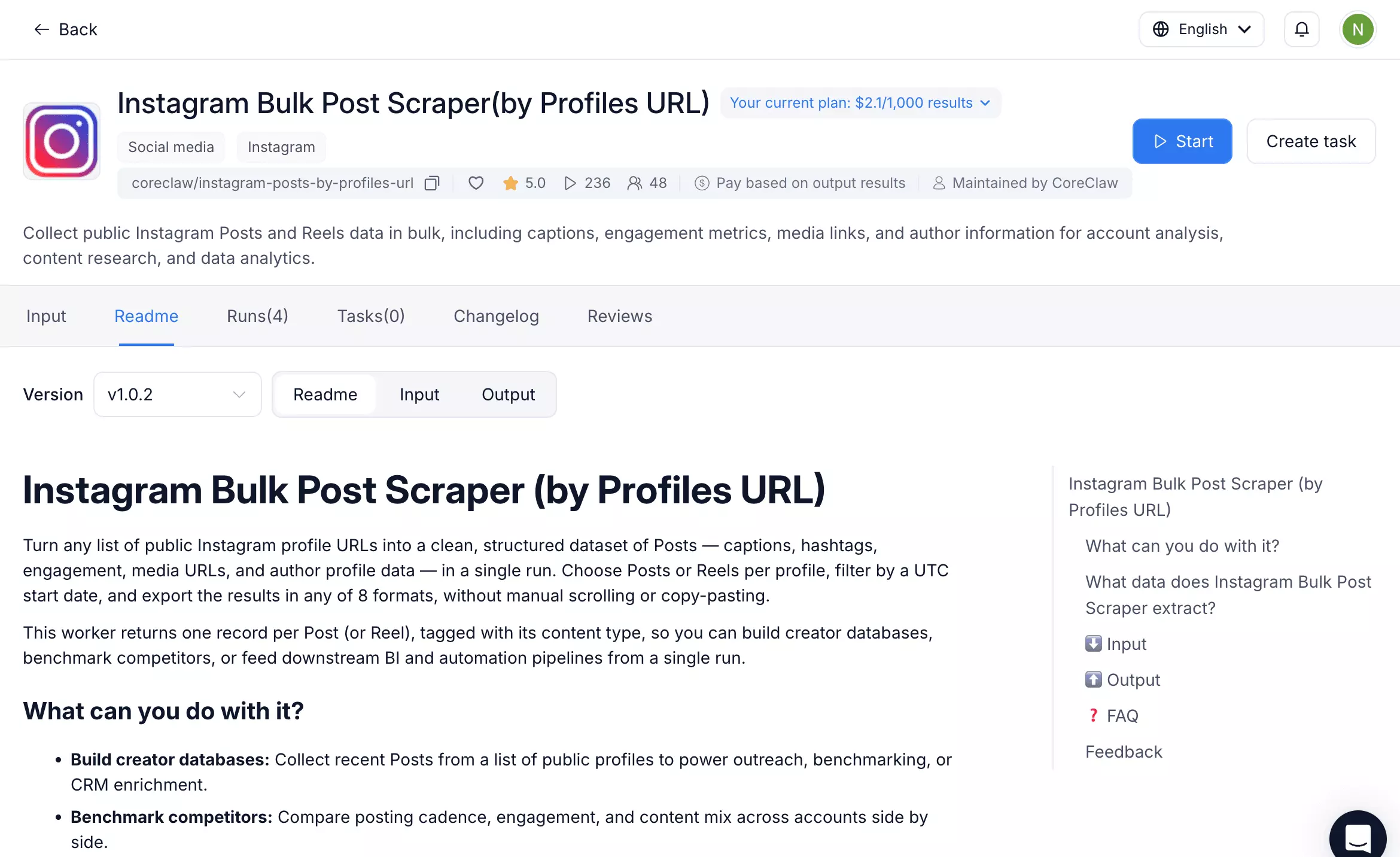
- Type: No-code + API / worker marketplace
- Schema: 40 fields
| Pros | Cons |
|---|---|
| Curated 40-field output | 1,000-post runs returned 13, 206, and 653 |
| No-code interface + API access | Every short run still reported status: "succeeded" |
| Small test returned data successfully | ~$2.10/1K, pricier than every ranked tool at scale |
Why it missed the list
Reliability fell apart at volume.
Three identical 1,000-post runs returned 13, 206, and 653 posts after Instagram rate-limited pagination.
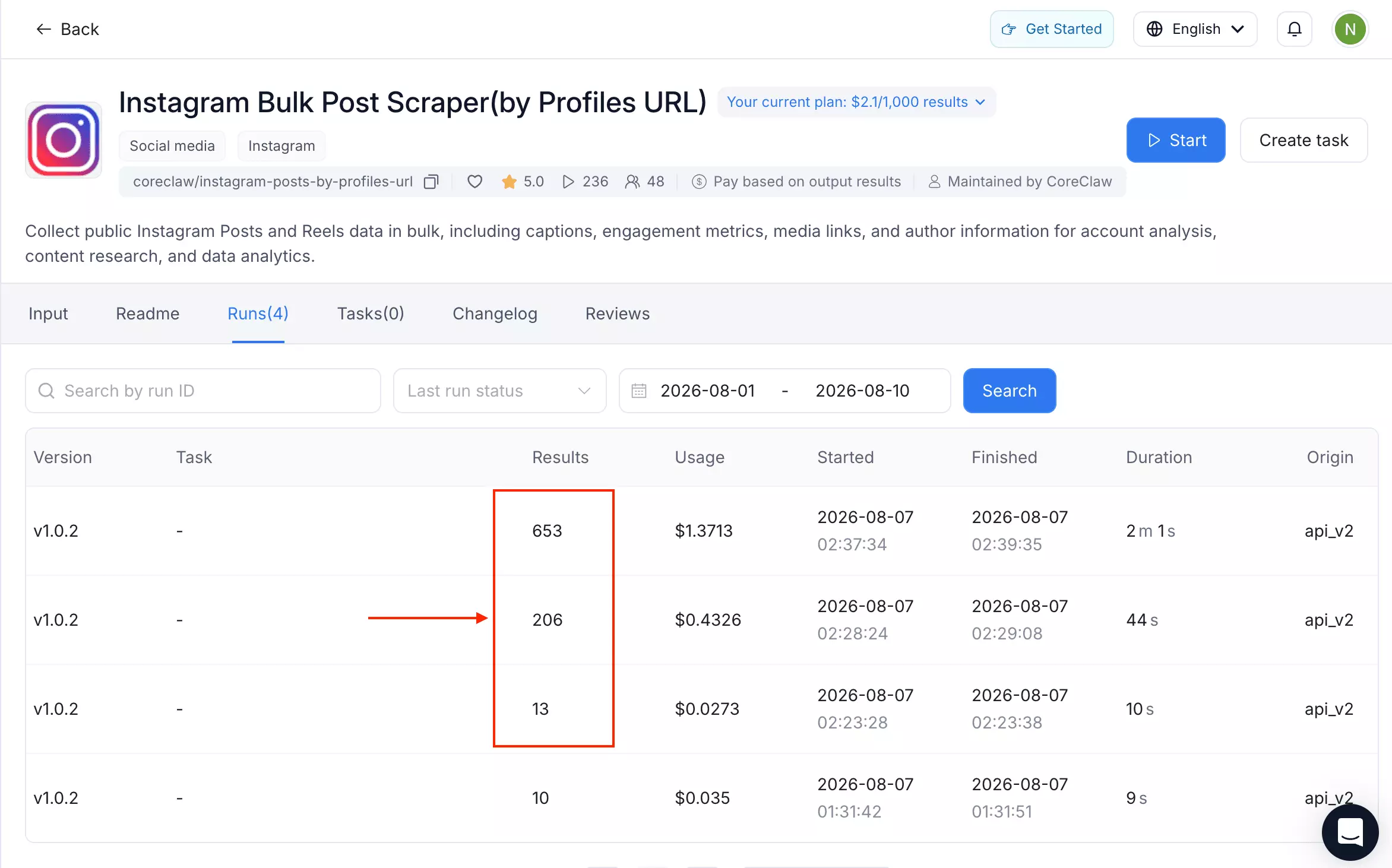
status: "succeeded".At that point, success starts feeling more philosophical than technical.
Why it's still worth knowing about
The worker has a usable no-code interface, API access, and reasonably tidy output.
Best for: experimentation, not a production workflow... at least until its result counts and success status become considerably more trustworthy.
Scrapfly
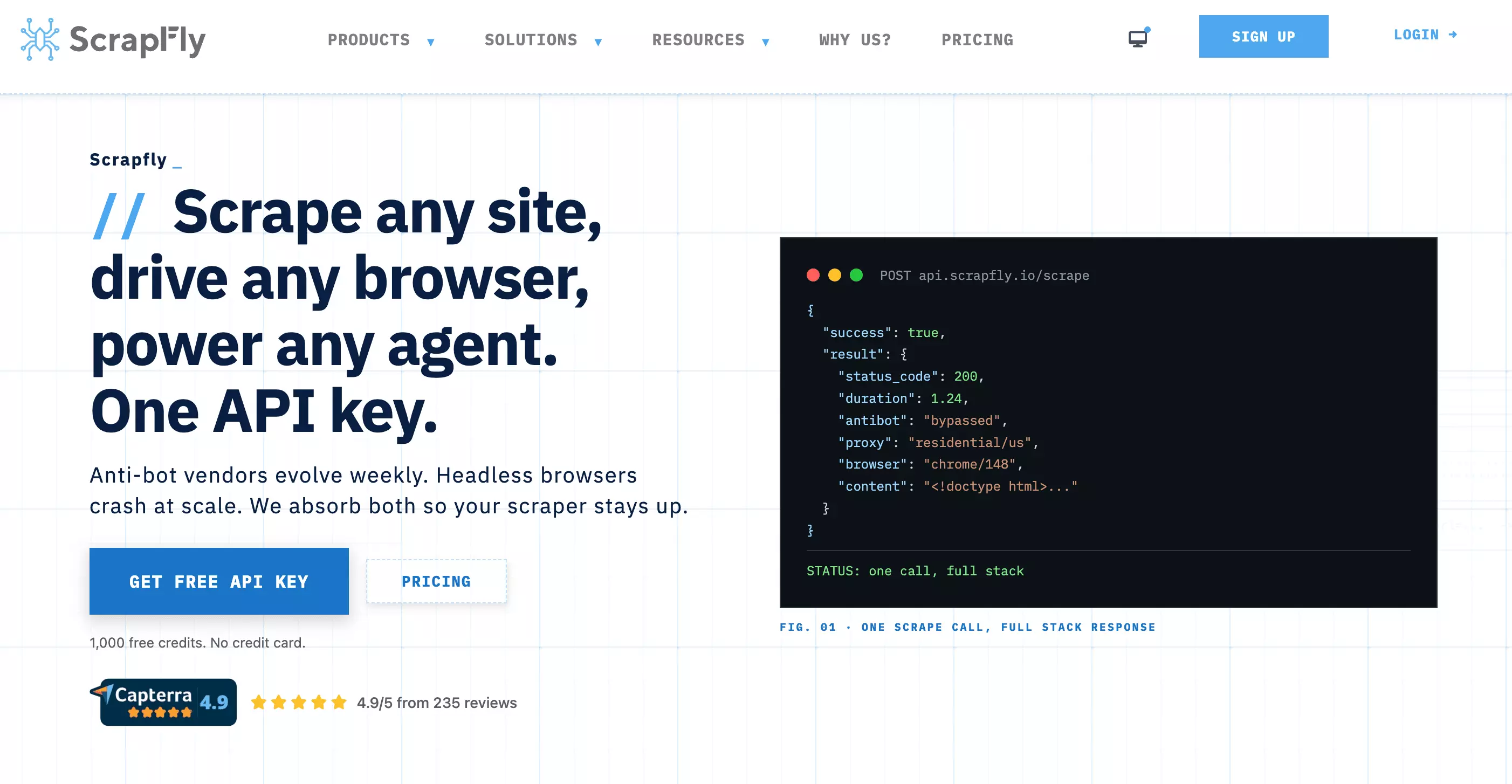
- Type: Python SDK / GitHub scraper
- Schema: 16 fields
| Pros | Cons |
|---|---|
| Smallest schema tested: 16 fields | Just 16.53 posts/min |
| Zero internal-noise fields | Test stopped at 492/1,000 posts |
| Open-source Python with anti-bot tooling | ~2,021 credits/1K measured |
Why it missed the list
Speed and cost compound badly here.
Scrapfly managed just 16.53 posts/min, several times slower than every ranked tool.
The 1,000-post attempt also exhausted the available credits at 492 posts, before the job could finish.
Why it's still worth knowing about
The output is compact and clean, and developers get full control over the scraping code and anti-bot setup.
Best for: developers who value code-level control and a lean schema more than throughput or predictable cost.
Bright Data
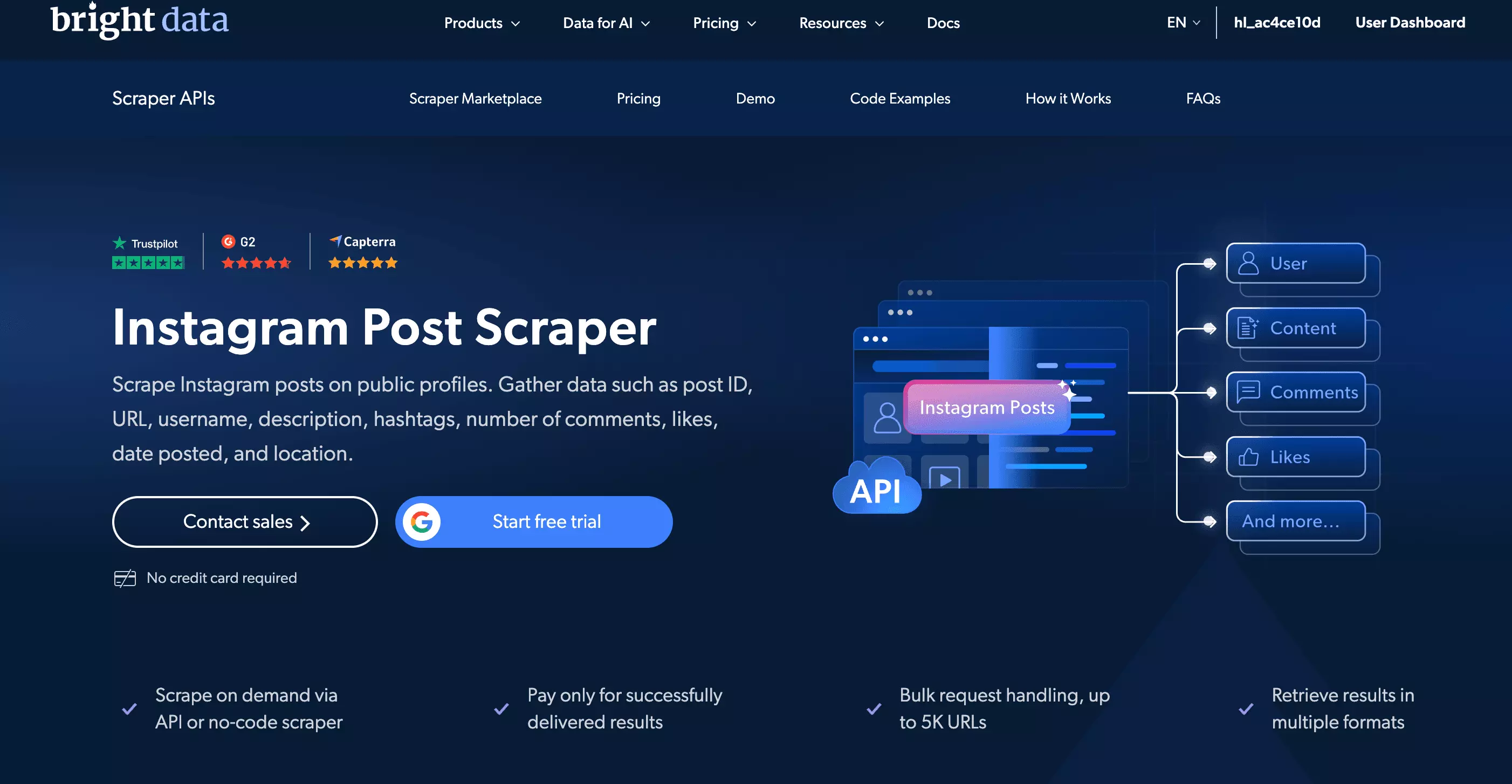
- Type: Dataset API
- Schema: 41 fields
| Pros | Cons |
|---|---|
| Strong 41-field dataset | Profile discovery ignored the result limit |
| Rich comment objects + follower counts | Requested 1,000, received 6,648+ |
| Collect-by-URL mode worked cleanly | Post URLs required for the reliable workflow |
Why it missed the list
The profile-discovery workflow does not reliably honor a requested result cap.
I asked for 1,000 posts. Bright Data returned 6,648 and kept collecting.
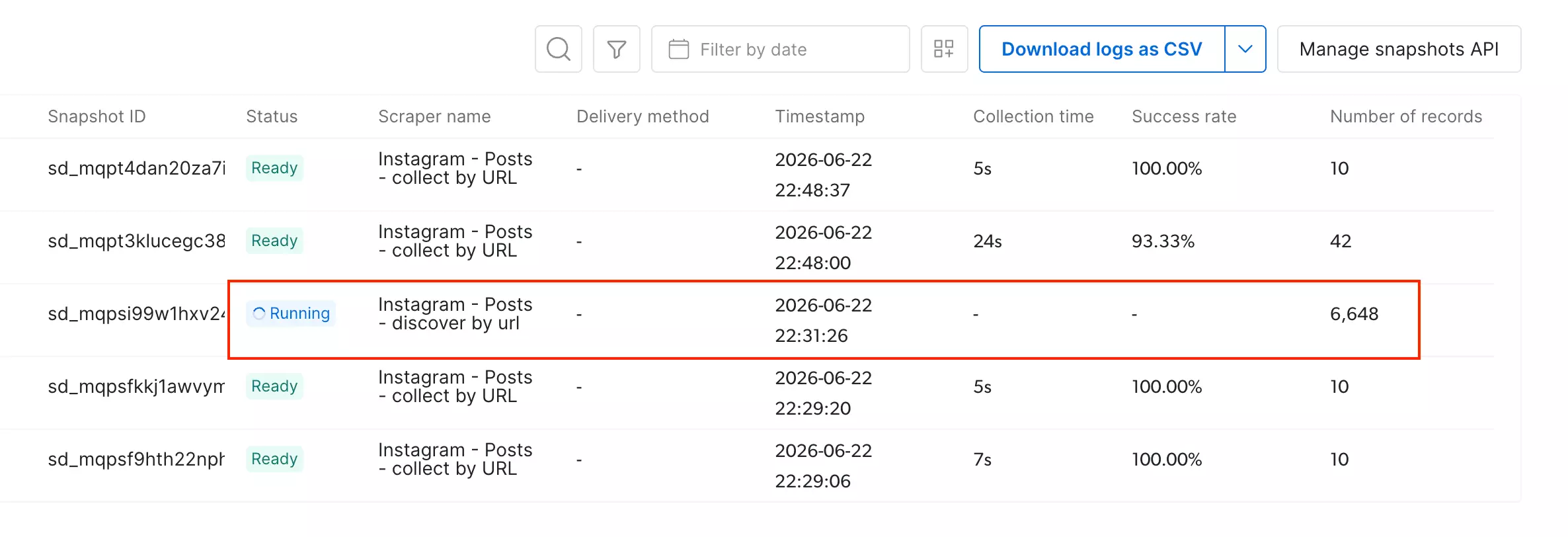
For a workflow built around "give me the latest N posts," that's not a small quirk. It's the wrong behavior.
Why it's still worth knowing about
The data itself is strong, and collect-by-URL works well when you already know which posts you want.
Best for: enriching known Instagram post URLs... not discovering a predictable, bounded set of posts from a profile.
FAQ
Do these scrapers require an Instagram login?
No. All 7 tools I tested work on public Instagram profiles without an account, session cookie, or login.
Can I scrape Instagram posts without code?
Yes... with lobstr.io or Apify.
Both have no-code interfaces. lobstr.io is more direct; Apify uses its Actor workflow but still requires no code once configured.
Can these tools scrape private Instagram accounts?
No. Every tool tested works on public profiles only.
Private-account data sits behind authentication, which these scrapers do not provide.
Can I scrape multiple Instagram accounts at once?
lobstr.io and Apify handle this natively.
ScrapeCreators and SociaVault accept one handle per request, so multi-account collection needs buyer-side orchestration.
How fresh is the scraped data?
Freshness was not a meaningful differentiator.
lobstr.io, Apify, and SociaVault returned the same newest and oldest posts when tested close together. ScrapeCreators ran later and picked up a newly published post.
What is the best Instagram Post scraper overall?
lobstr.io, at 9.4/10.
It leads on Data, Speed, and Support, while tying Apify on Usability and Scalability.
ScrapeCreators is much cheaper, but lobstr.io is the stronger all-rounder when price is not the only constraint.
What is the cheapest Instagram Post scraper?
ScrapeCreators.
It costs $0.16/1K at entry and $0.08/1K at scale.
SociaVault is next at $0.17/1K at scale.
What is the fastest Instagram Post scraper?
lobstr.io on the common baseline job: 494.47 posts/min.
With comments enabled, it drops to 62.71 posts/min.
SociaVault is the fastest ranked API that does not return comment text, at 207.98 posts/min.
What is the best Instagram Post scraper for marketers?
lobstr.io.
It combines no-code scraping, bulk input, scheduling, and exports to CSV, Excel, Sheets, S3, SFTP, email, and webhooks.
That is considerably more useful to a marketing team than being handed a JSON response and wished good luck.
What is the best Instagram Post scraper for developers?
It depends on what you want to optimize.
ScrapeCreators is the cheapest developer-first option at $0.08/1K.
items-as-object response shape.If you want an API without building scheduling, exports, recovery, and delivery yourself, lobstr.io or Apify are stronger platform options.
What is the best Instagram Post scraper for research?
Apify is the strongest fit for metadata-heavy research.
It returned the broadest distinct data coverage tested, plus richer video, music, tagged-user, and carousel data.
The trade-off is price: $1.60/1K at scale, the highest of the four ranked tools.
If deeper comment coverage matters more than metadata breadth, lobstr.io is the better fit.
Why isn't CoreClaw ranked?
Reliability.
Three identical 1,000-post jobs returned 13, 206, and 653 posts.
status: "succeeded", which makes the status field rather optimistic about its responsibilities.Why isn't Scrapfly ranked?
Throughput and credit usage.
It managed just 16.53 posts/min, and the 1,000-post test exhausted the available credits after 492 posts.
The schema is lean. The production economics are less charming.
Why isn't Bright Data ranked?
Its profile-discovery workflow would not respect the requested result limit.
I asked for 1,000 posts. It returned 6,648 and kept collecting.
Its collect-by-URL mode is useful, but that solves a different problem: enriching known post URLs rather than collecting a bounded set from a profile.
Conclusion
lobstr.io is the best overall pick at 9.4/10. Apify is stronger for metadata-heavy research, ScrapeCreators wins on price, and SociaVault offers a faster version of that API-first trade-off with a rougher integration.
CoreClaw, Scrapfly, and Bright Data each hit dealbreakers serious enough to stay out of the ranking.
Pricing, schemas, and Instagram behavior change... I'll update the comparison when the numbers do.