image
Coin

0.2

free

Google Maps Reviews Scraper

Scrape all reviews from a Google Maps Local Business. Extremely fast. For free.

Download sample
users3548 users
runs157123 runs

Trusted worldwide by the best

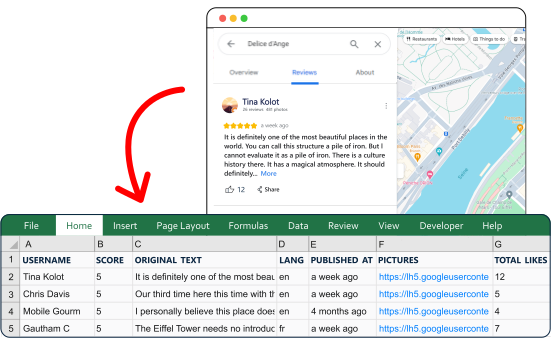
Export reviews from Google Maps — right now

Do not waste time on repetitive, error-prone and time-consuming tasks.
Get it done fast and perfect.

Extract

Capture reviews globally from any Google Maps business URL.

image

Export

Automate exports to Google Sheets, email, or S3 seamlessly.

image

Filter

Filter by language, recency, or sorting order with precision.

image

Schedule

Set up automated data collection on daily, weekly, or monthly schedules.

image

Scale

Boost data collection speed with multiple simultaneous bots at once.

image

Download

Download structured data in CSV, Excel or JSON format.

image

Built for Agents

Run it from your stack.
Or hand it to your agent.

Google Maps Reviews Scraper ships with a Python SDK, a one-line CLI and a native MCP server your agents can plug into directly — no rate limits to dodge, no bot mitigation to bypass, no parsing errors to chase down.

# install once (Python 3.10+)
pip install lobstrio

# check your token
lobstr whoami

# find the scraper
lobstr crawlers search "Google Maps"

# one call — launch, wait, download
lobstr go google-maps-reviews-scraper \
  "<any Google Maps URL>" \
  --param max_results=200 \
  -o results.csv

30 data attributes per review

Every scrape returns structured data you can export as CSV, JSON, or via API.

cid

Google Maps unique numeric business identifier (CID)

6617096495883696522
Export Reviews
Zero X

Internal Google Maps hex identifier for the reviewed business

0x0:0x5bd4a63441a1398a
Export Reviews
Place Id

Google Places API unique identifier for the reviewed business

ChIJg4octORx5kcRijmhQTSm1Fs
Export Reviews
Place Name

Name of the business or place being reviewed

La Rôtisserie d'Argent
Export Reviews
Place Address

Full formatted address of the reviewed business

19 Quai de la Tournelle, 75005 Paris, France
Export Reviews
Internal Review Id

Unique internal identifier for the Google Maps review

Ci9DQUlRQUNvZENodHljRjlvT2pnNVJFRnVlR0pFY2s5dFREUjBTa2hrT1hJeGRrRRAB
Export Reviews
User Name

Display name of the reviewer on Google Maps

za_zsc
Export Reviews
User Link

URL to the reviewer's Google Maps profile page

Export Reviews
User Internal Id

Internal Google identifier for the reviewer

103634612974133480000
Export Reviews
User Reviews Count

Total number of reviews the reviewer has posted on Google Maps

657
Export Reviews
image

Fast

250 reviews per minute
Lightning-fast performance

image

Solid

99.95% task success rate
Dependable, reliable data every time

image

Cost-competitive

$0.1 per 1000 reviews
Top affordability worldwide

Live

Built to run.

Most scrapers break in silence. This one doesn't — and we show it, openly.

99.98%

incident-free runs · last 90 days

19
incidents · 90 days
100%
resolved
318 min
median time to fix
90 days agoToday
Operational
Degraded
Down
Resolved incident
Open incident
How we measure →

Tracked from every run. Incidents stay on the record even after they're fixed.

Simulator plan

Trusted by the best

Used obsessively by the data-hungry around the world

★★★★★
★★★★★
★★★★★
★★★★★
★★★★★
★★★★★

Frequently Asked Questions

Why are some Google reviews missing from my scraper results?

Sort reviews by Newest to maximize coverage. Even then, Google may hide 5–20% of reviews due to spam filtering, moderation, or low-trust accounts. Hidden reviews count in totals but aren’t publicly accessible.

What are the rate limits and how frequently can I scrape reviews without issues?

There’s no fixed rate limit—you can scrape as many listings as you want without worrying about getting blocked. The only thing to watch is your credits. Each review you collect uses 1 credit, so just keep an eye on how many credits you have left in your lobstr.io account. As long as you have credits, you're good to go!

Is using a Google Maps reviews scraper legal?

Yes, it’s legal. Google reviews are public data, so collecting them with a scraper is allowed under most data usage laws. You’re not breaking any rules by scraping this info. If you want the full breakdown, check out this article.

Can I scrape reviews from multiple business locations simultaneously?

Yes, you can! Just drop all the business listing URLs into the Add Tasks section, or upload a file with a bunch of URLs. The scraper will go through each one and collect all their reviews for you—no need to do it one by one.

In what formats can I export or receive the scraped review data?

You can download the reviews in CSV format. If you want things to run on autopilot, you can also set it up to automatically export the data to Google Sheets or Amazon S3—no manual work needed.

How accurate and complete is the data collected by the scraper?

We collect exactly what you see on the Google Maps listing — nothing more, nothing less. That means all available reviews, in the right order, with all the public details like rating, author, date, and review text. What you see is what you get.

Can the scraper detect and collect review responses posted by the business owner?

Yup, it does! The scraper also picks up responses from the business owner along with each review, so you get the full picture—what customers said and how the business replied.

How can I integrate the scraper with my existing workflow?

Easy! You can plug the scraper right into your existing workflow using lobstr.io’s developer-friendly API. It’s super flexible and works well with most tools and platforms. Check out the docs here.

Does the scraper keep old reviews if they're changed or deleted on Google?

Yes, once we scrape the reviews, we store that data on our servers for up to 28 days. So even if a review gets edited or deleted on Google, you can still download the original data from your previous runs during that time.

Can I filter reviews by star rating (1-5 stars) when extracting data?

Not during scraping—but don’t worry. We collect the star rating for every review, so once you download the data, you can easily filter reviews by rating in Excel or Google Sheets.

Ready to get started?

Export your first reviews for free.

Contact sales