

1
YouTube Channel Scraper
Scrape any YouTube channel and get 67 data points including videos, shorts, playlists, comments and contact email.
 2291 users
 3958 runs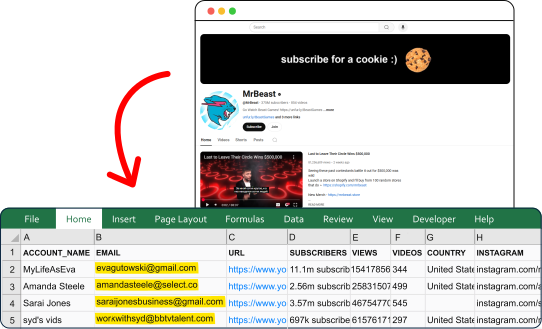
Trusted worldwide by the best
Export channels from YouTube — right now
Do not waste time on repetitive, error-prone and time-consuming tasks.
Get it done fast and perfect.
Extract Channels
Capture all Channel details — from any YouTube Channel URL worldwide.

Find Emails
Retrieve publicly available emails from the YouTube Channel description and the channel's linked website.

Download Data
Download data in an exhaustive, structured, and ready-to-use format: CSV, JSON, JSONL or XLSX.

Built for Agents
Run it from your stack.
Or hand it to your agent.
YouTube Channel Scraper ships with a Python SDK, a one-line CLI and a native MCP server your agents can plug into directly — no rate limits to dodge, no bot mitigation to bypass, no parsing errors to chase down.
# install once (Python 3.10+)
pip install lobstrio

# check your token
lobstr whoami

# find the scraper
lobstr crawlers search "youtube"

# one call — launch, wait, download
lobstr go youtube-channel-scraper \
  "https://www.youtube.com/c/LerussefacileavecDiana" \
  -o results.csv
101 data attributes per channel
Every scrape returns structured data you can export as CSV, JSON, JSONL, XLSX, or via API.
Unique YouTube channel identifier
Email address found on the YouTube channel or linked website. A plainly written address is preferred; when there is none, a disguised one such as "name [at] domain.com" or "name at gmail dot com" is rebuilt into a normal address
Where the email was found: channel (the channel's About section) or video_descriptions (the address repeated most across the video descriptions read by Get Video Details). Empty when no email was found.
Total number of videos published on the channel
YouTube channel display name
Total number of views across all channel videos
Total number of channel subscribers
Subscriber count as a number, converted from YouTube's rounded figure (183K becomes 183000, 21.3M becomes 21300000), so it is approximate above 1,000. Empty when YouTube shows no subscriber count for the channel, for example auto-generated Topic channels.
Date the YouTube channel was created
Country associated with the YouTube channel

Fast
77 channels per minute
Lightning-fast performance

Solid
99.95% task success rate
Dependable, reliable data every time

Cost-competitive
$0.5 per 1000 channels
Top affordability worldwide
Built to run.
Most scrapers break in silence. This one doesn't — and we show it, openly.
incident-free runs · last 90 days
Tracked from every run. Incidents stay on the record even after they're fixed.
Trusted by the best
Used obsessively by the data-hungry around the world
Frequently Asked Questions
Is web scraping YouTube legal?
Can I scrape video data using this YouTube channel scraper?
Can I find out what email is associated with a YouTube account?
Can I use the email list after data scraping for email marketing purposes?
How many videos, shorts, streams and playlists does it return per channel?
How does the Get Comments add-on work?
Get Comments requires Get Videos and/or Get Shorts to be enabled — it does nothing on its own. It collects comments from the videos and shorts already gathered, up to 5 combined (videos first), with up to 20 comments per video plus one page of replies for comments that have them.
This is the heaviest add-on: worst case is roughly 5 videos x 22 requests, so expect a noticeable increase in run time.
Are add-on credits charged per channel or per item?
Per channel, not per item. The add-ons cost 2 credits each for videos, shorts, streams and playlists, and 6 credits for comments: 14 credits per channel with all five on, or 15 credits per channel including the 1 base credit — not 15 credits per video or per comment. That covers up to 30 videos, up to 30 shorts, up to 30 streams and up to 30 playlists, plus comments on up to 5 of the collected videos and shorts. An add-on that finds nothing on a channel, such as streams on a channel with no Live tab, costs 0 credits.
See the pricing calculator above for the exact cost of each add-on and to estimate your run.
What YouTube channel URLs can I use as input?
Any YouTube creator URL format works:
@handle—https://www.youtube.com/@MrBeast/c/CustomName—https://www.youtube.com/c/MrBeast/channel/UC...—https://www.youtube.com/channel/UCX6OQ3DkcsbYNE6H8uQQuVA/user/LegacyName—https://www.youtube.com/user/MrBeast6000- Bare custom URL —
https://www.youtube.com/MrBeast
How fast is this YouTube channel scraper?
About 77 channels per minute on a single Slot with no add-ons enabled. With all add-ons on (videos, shorts, streams, playlists and comments), speed drops to around 3 channels per minute — comments are the main cost, since each video needs its own set of requests.
You can also schedule the scraper to run repeatedly, so channel stats stay up to date without you starting each run manually.