
Best Google News Scrapers of 2026 [No-Code + API]
lobstr.io is the best Google News scraper in 2026 (8.79/10), tested on data, usability, scalability, cost, speed, and support. It wins on 971 of 971 usable article URLs, 787 articles per minute, and $50 per 100K at scale. Outscraper finishes second (5.50/10) on price, at $90 per 100K, but returns 6 fields and no images at all.
⚡ 30-Second Summary
- I tested 4 Google News scrapers that can actually break the 100-results-per-query cap, judged on six criteria... data, usability, speed, cost, scalability, and support. Same keyword, same 1,000-article target, same 90-minute window, paid plans bought on all of them
- lobstr.io is the best overall pick (8.79/10). It returned 971 of 971 usable publisher URLs, zero duplicates, and 971 unique articles against a 1,000 target... the best coverage of any tool whose output you can actually open. Pick it for high-volume news monitoring. Trade-off: 65.1% of its descriptions arrive truncated, and its free tier is the weakest here at 100 results a month with a 30-row export cap
- Outscraper is the best on a budget (5.50/10). It does 100K articles for $90 at entry pricing, 2.2x cheaper than lobstr.io, and it carries the only credible review base in this test at 4.5 stars from 289 reviewers. Pick it for small, occasional pulls. Trade-off: 6 fields, no image field at all, a relative-only date, and 49.5 articles/min with no way to speed it up
- Apify's data_xplorer actor is the best for full article descriptions (5.29/10). It's the only tool that returned real, untruncated article descriptions, on 95.2% of rows. Pick it for editorial work that needs the description text. Trade-off: getting them took 30 minutes against 50 seconds, and its run timed out, restarted from record 1, and billed 1,177 rows to deliver 884 unique articles
- Apify's easyapi actor is the one I'd skip (4.33/10). It reads cleanly and ships both relative and absolute dates. Pick it for one-off single-keyword pulls on Apify's free credits. Trade-off: $500 per 100K with no volume discount, one query at a time with no bulk input, and 60 of its 689 links came back broken
- Nothing that cleared the entry bar failed a benchmark run, so there's no cut-table of broken tools at the end. What got cut, got cut before testing... and the reason it got cut is the whole point of this article
The 100-result wall nobody mentions
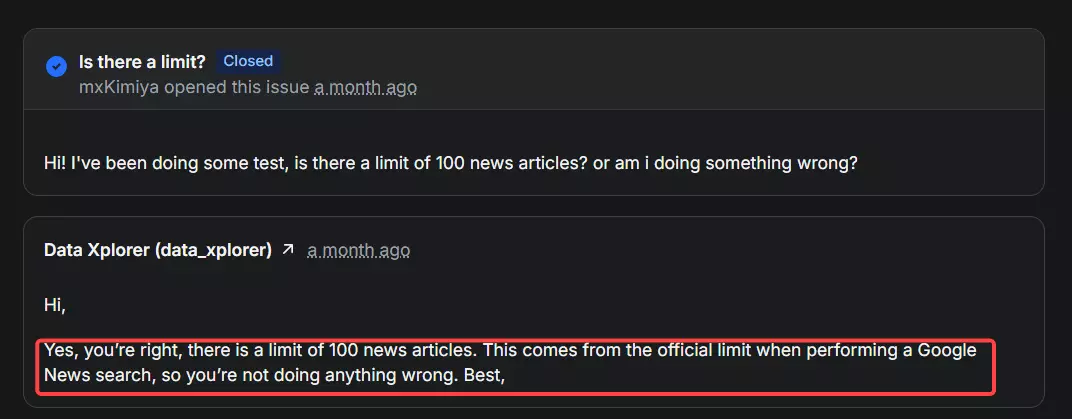
Go looking for a Google News scraper and you'll find dozens. Then you'll run one and hit the same wall I did.
Most of them cap at 100 news results per query. One hundred. 🙃
That's fine if you want today's headlines for one keyword.
It's useless if you're tracking a story across a month, building a media-monitoring dataset, or feeding a model. You hit 100, the run stops, and no filter in the UI changes it.
So that cap became my entry requirement.
A tool had to clear three bars to even get tested:
- Pull more than 100 results per query
- Offer a no-code interface
- Expose an API for when you outgrow the UI.
That criteria eliminated most of the Google News Scrapers I found online. Only 4 survived, and I tested them brutally.
I bought the paid plans, ran them multiple times, and asked each for minimum 1,000 articles per run.
Before diving into details, if you're short on time, here's a quick overview. 😁
Just tell me which one
| If you want... | Go with | The number |
|---|---|---|
| The best all-rounder | lobstr.io | 8.79/10 weighted |
| The cheapest way in | Outscraper | $90 per 100K at entry |
| The cheapest at real volume | lobstr.io | $50 per 100K at scale |
| The fastest usable output | lobstr.io | 787 articles/min |
| Full untruncated descriptions | Apify data_xplorer | 95.2% real prose |
| The most reviewed vendor | Outscraper | 4.5 from 289 reviews |
| The best support | lobstr.io | 12.9h median fix |
Too quick? Don't worry, I love tables, here's a more detailed overview 😂
Google News scrapers compared
| Criteria | lobstr.io | Outscraper | Apify data_xplorer | Apify easyapi |
|---|---|---|---|---|
| Meaningful fields | 8 | 6 | 8 (6 with toggles off) | 8 |
| Unique articles (1,000 asked) | 971 | 666 | 884 | 675 |
| Usable publisher URLs | 971/971 (100%) | 653/693 (94.2%) | 1,177/1,177 (100%, toggle on) / 0% off | 629/689 (91.3%) |
| Duplicate rows | 0 | 27 (3.9%) | 293 (24.9%) | 14 (2.0%) |
| Publisher-original images | ✅ 90.3% | ❌ no image field | ⚠️ 1.6% (98.4% Google proxy) | ⚠️ base64 blobs, not URLs |
| Untruncated descriptions | ⚠️ 34.9% | ⚠️ 17.0% | ✅ 93.5% | ⚠️ 17.7% |
| Absolute publish date | ✅ | ❌ relative only | ✅ + typed epoch | ✅ both formats |
| Global rank field | ✅ 1-971 | ✅ 1-693 | ❌ none | ⚠️ per-page 1-10 only |
| Bulk input upload | ✅ CSV/TSV/TXT | ✅ CSV/TSV/TXT | ❌ paste only | ❌ single query only |
| Filter: dedupe | ✅ (free) | ❌ | ❌ | ❌ |
| Filter: topic/section | ✅ (free) | ❌ | ✅ (free) | ❌ |
| Filter: time range | ✅ (free) | ✅ (free) | ✅ (free) | ✅ (free) + custom dates |
| Filter: language | ✅ (free) | ❌ | ✅ (free) | ✅ (free) |
| Speed (articles/min) | 787 | 49.5 | 46.7 toggles on / 1,200 off | 59 |
| 100K anchor: time | 2.1 h | 33.7 h | 35.7 h | 28.2 h |
| 100K anchor: cost at scale | $50 | $60 | $100 | $500 |
| Cost /1K (entry → scale) | $2 → $0.50 | $0.90 → $0.60 | $4 → $1 | $5 → $5 |
| Max articles/month (24/7, entry config) | ~34.0M | ~2.1M | ~2.0M | ~2.5M |
| Concurrency | ✅ Slots, 20/Squid | ❌ none | ⚠️ memory tier | ⚠️ memory tier |
| Export formats | CSV, XLSX, JSON, JSONL | CSV, Excel, JSON, Parquet | 6 formats | 6 formats |
| Switch format after run | ✅ | ❌ re-run required | ✅ | ✅ |
| Free tier | 100/mo, 30-row export cap | ⚠️ needs top-up first | ~1,250/mo | 1,000/mo |
| API access | ✅ API, MCP, SDK, CLI | ⚠️ vague docs, no MCP | ✅ API, MCP, SDK, CLI | ✅ API, MCP, SDK, CLI |
| Support | ✅ live chat + email | ✅ live chat, generic replies | ❌ Issues tab only | ❌ Issues tab only |
| User rating | 5.0 (33, Capterra) | 4.5 (289, Trustpilot) | 4.9 (5, Apify) | 3.9 (9, Apify) |
| Overall | 8.79/10 | 5.50/10 | 5.29/10 | 4.33/10 |
But wait... is scraping Google News even legal? 🤔
Is it legal to scrape Google News?
Disclaimer: I'm not a lawyer and none of this is legal advice. If you're running a serious operation, talk to a professional. What follows is the general lay of the land.
Generally, yes. Scraping publicly available data is legal, and Google News is about as public as data gets.
There's no login wall, no account requirement, and no authentication step between you and a Google News results page.
You're reading pages any browser can reach, and every tool in this article collects headlines, links, sources, dates and images... not private data.
The part worth actually thinking about isn't collection. It's what you do afterward.
News articles are copyrighted. Collecting a headline, a link, a publisher name and a timestamp is a different act from republishing the article text. The first is metadata about public web pages. The second is republishing someone else's work.
Practical version:
- ✅ Collect headlines, links, sources, dates, images for monitoring, analysis, alerting, and research
- ✅ Aggregate and summarize ... trends, sentiment, coverage volume, source distribution
- ❌ Don't republish full article text wholesale on your own domain
- ❌ Don't scrape at denial-of-service rates ... be reasonable about request volume
- ❌ Don't route around a login ... anything behind authentication is a different legal question entirely
So scraping is on the table. Now, how did I decide what counts as "best"?
How I chose the best Google News scrapers
Four tools cleared the three entry bars. Then I scored every one of them on the same six criteria (my golden 6) to find the best.
- Data
- Cost
- Usability
- Speed
- Scalability
- Support
Data
I fed the same keyword to every tool and counted what came back, field by field, by parsing the raw JSON rather than reading a marketing page.
Raw column counts lie, so I set aside operational columns... record IDs, task IDs, run config echoed back... before counting anything.
Then I measured fill rate per field, opened every URL to see how many actually resolved to a publisher page, counted duplicate rows, and logged the shape: nesting depth, typed values, absolute versus relative dates.
Cost
Everything normalized to cost per 1,000 articles, at entry and at scale, then converted into one anchor job I reference throughout... 100,000 articles.
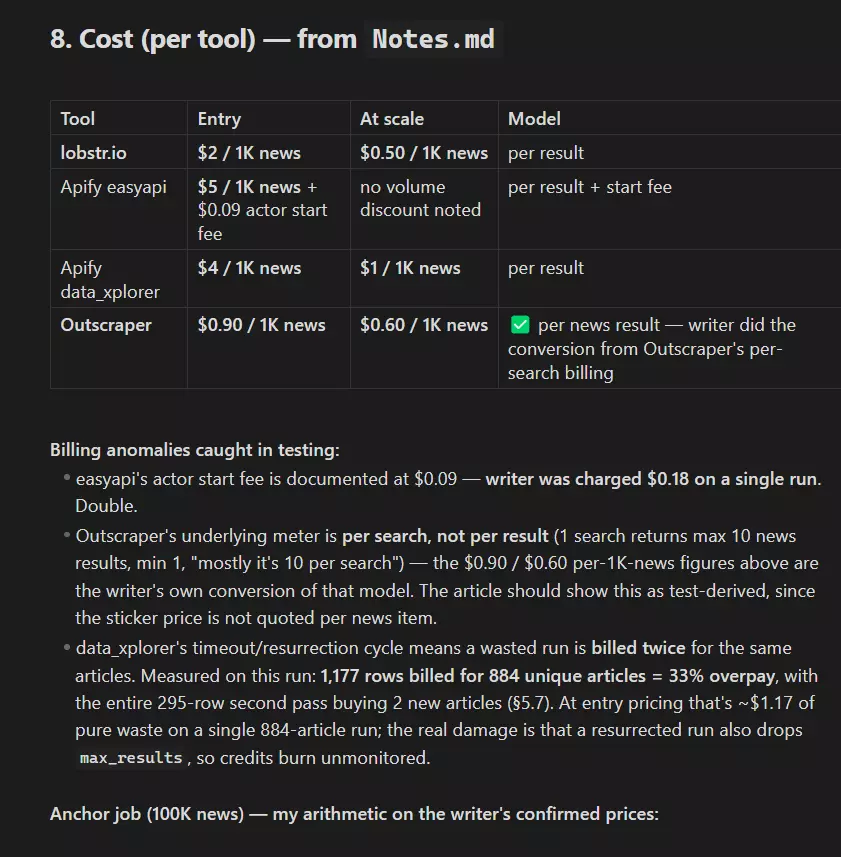
Where a tool bills in units that aren't articles, I derived the rate from the actual run and labeled it as derived. Start fees, re-billed duplicates and free-tier limits are all folded in.
Usability
How you feed it a job, how many clicks to launch, which filters are free UI fields versus buried URL parameters, and what comes out the other end.
I tested every documented toggle with and without. None of them silently did nothing, which is worth saying since that's not always true... but one of them returns a weaker asset than its label implies, and you only find that by looking at the values instead of the fill rate.
Speed
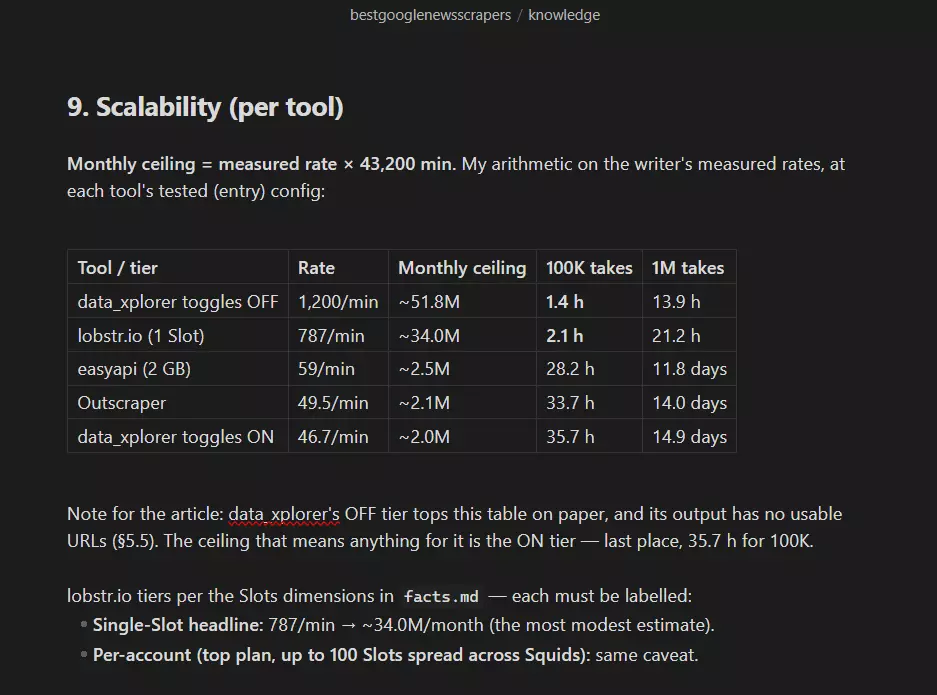
Articles per minute on the same target. Where a tool has a fast mode and a full-data mode, both got timed separately, because tools quote the fast number and hide the drop.
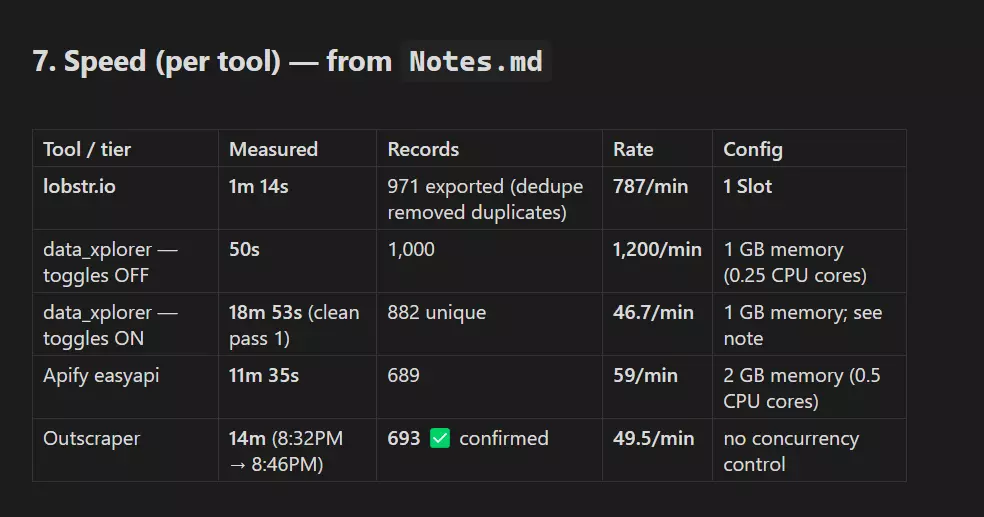
One honest asterisk travels with every speed number here: every tool ran at its entry configuration.
lobstr.io at 1 Slot of a possible 20, both Apify actors at their lowest memory tier, and Outscraper has no concurrency setting to change.
That's the fairest like-for-like I could run, and it means every number except Outscraper's goes up if you pay for more compute.
Scalability
That's the whole point of scraping news. Nobody monitoring a story wants 100 articles.
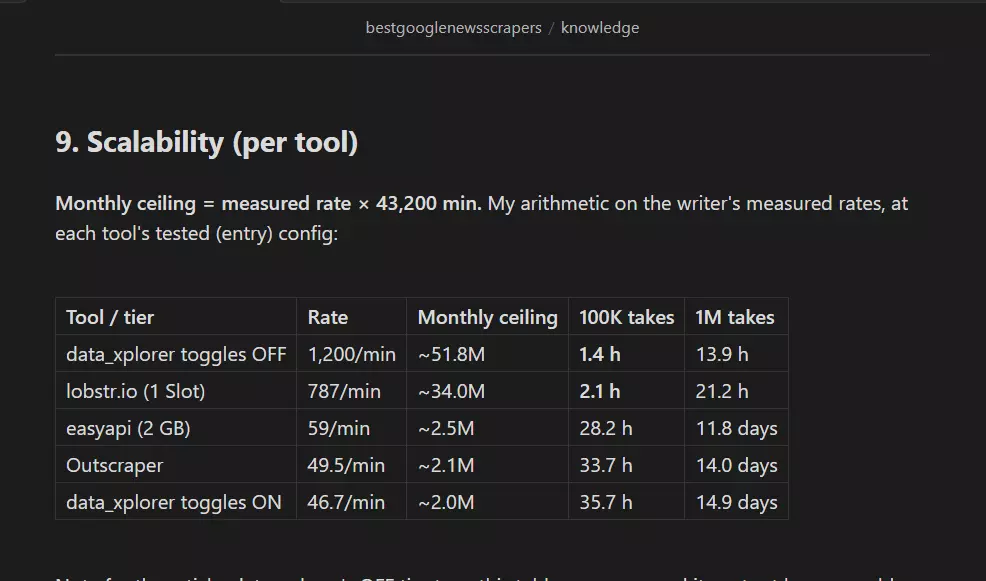
So I checked how many articles each tool can realistically pull in a month at the config I tested it on, what 100K and 1M cost in hours and dollars, and what happens to your data when a run breaks... because a ceiling means nothing if one timeout costs you the dataset.
Support
I used review sentiment and published stats rather than sending identical tickets. Each tool is rated on the platform where it has the most and freshest reviews, not one platform forced across all four. A 4.9 from five reviewers and a 4.5 from 289 aren't the same signal.
For the marketplace actors I scoped support to the specific actor, never the platform. Apify's company-wide support is not what you get on someone's community actor.
One thing I want to be straight about: I could not send the same test ticket to all four, because two of them have nowhere to send one. That absence is the finding, and I scored it as such rather than pretending the methods were equivalent.
How they scored
| Pillar | Weight | lobstr.io | Outscraper | Apify data_xplorer | Apify easyapi |
|---|---|---|---|---|---|
| Data | 2.2 | 8.5 | 5.5 | 7.0 | 6.5 |
| Cost | 2.2 | 7.5 | 8.0 | 5.5 | 3.5 |
| Usability | 1.8 | 9.5 | 5.0 | 6.0 | 4.5 |
| Speed | 1.8 | 9.5 | 3.5 | 4.5 | 4.0 |
| Scalability | 1.0 | 9.5 | 3.5 | 3.5 | 4.0 |
| Support | 1.0 | 9.0 | 6.5 | 3.0 | 2.0 |
| Weighted total | 8.79 | 5.50 | 5.29 | 4.33 |
What I left out and why
- API-only platforms ... Bright Data is the name here. Capable, but there's no no-code interface, so it fails bar two. If you're comfortable in code, it's a real option that this article isn't about
- Stale GitHub repos ... they break the week Google ships a layout change, and nobody's merging your issue
- Everything capped at 100 results per query ... which is most of the market, and the entire reason this list is four tools long instead of fifteen
For Apify specifically, there are several Google News actors. I picked the two with the most monthly active users, the highest run success rates, and signs of active maintenance. Not a perfect signal, but it beats ranking a ghost actor.
So which ones held up?
Best Google News Scrapers of 2026
You've seen the scorecard. Here's the story behind the numbers, tool by tool.
1. lobstr.io Google News Scraper
| Pillar | Score |
|---|---|
| Data | 8.5/10 |
| Cost | 7.5/10 |
| Usability | 9.5/10 |
| Speed | 9.5/10 |
| Scalability | 9.5/10 |
| Support | 9.0/10 |
| Overall | 8.79/10 |
- User rating: 5.0 from 33 reviews on Capterra, read 2026-08-10
- My score: 8.79/10
- Type: No-code cloud platform with API
- Pricing from: $2 per 1,000 articles, dropping to $0.50 at scale
- Best for: High-volume news monitoring where every URL has to actually open
| Pros | Cons |
|---|---|
| Only tool with 971 of 971 usable publisher URLs | 65.1% of descriptions arrive truncated |
| Fastest usable output at 787 articles/min | Weakest free tier: 100/month, 30-row export cap |
| Zero duplicate rows across 971 results | |
| Best coverage: 971 unique against a 1,000 target | |
| Only publisher-original images, free and by default | |
| Bulk upload plus topic and section targeting | |
| Published per-scraper uptime with a 12.9h median fix |
Data
lobstr.io returned 8 meaningful fields, tied for the most in this test. Here's every key in the export, all 16 of them:
| Category | Fields |
|---|---|
| 📰 Article | TITLE, SHORT DESCRIPTION, URL, IMAGE |
| 🏷️ Source | SOURCE |
| 🕐 Timing | PUBLISHED AT, COLLECTED AT |
| 📊 Ranking | RESULT POSITION 🎁 |
| ⚙️ Operational | ID, OBJECT, TASK ID, INPUT KEYWORD, PARAM LANGUAGE, PARAM MAX RESULTS, PARAM TIME RANGE, PARAM MAX UNIQUE RESULTS PER RUN |
The field count isn't the interesting part anyway, because three tools tied at 8. What they contain is.
Every single URL resolved to a publisher page. 971 out of 971.
That sounds unremarkable until you see that it's the only tool in this test that managed it.
Google News wraps every link in a redirect, and lobstr.io unwraps all of them for free with no toggle and no slowdown.
IMAGE came back populated on 877 of 971 rows (90.3%), and those are the publisher's own image URLs, ready to drop into an <img src>.It's the only tool here that returns real image URLs.
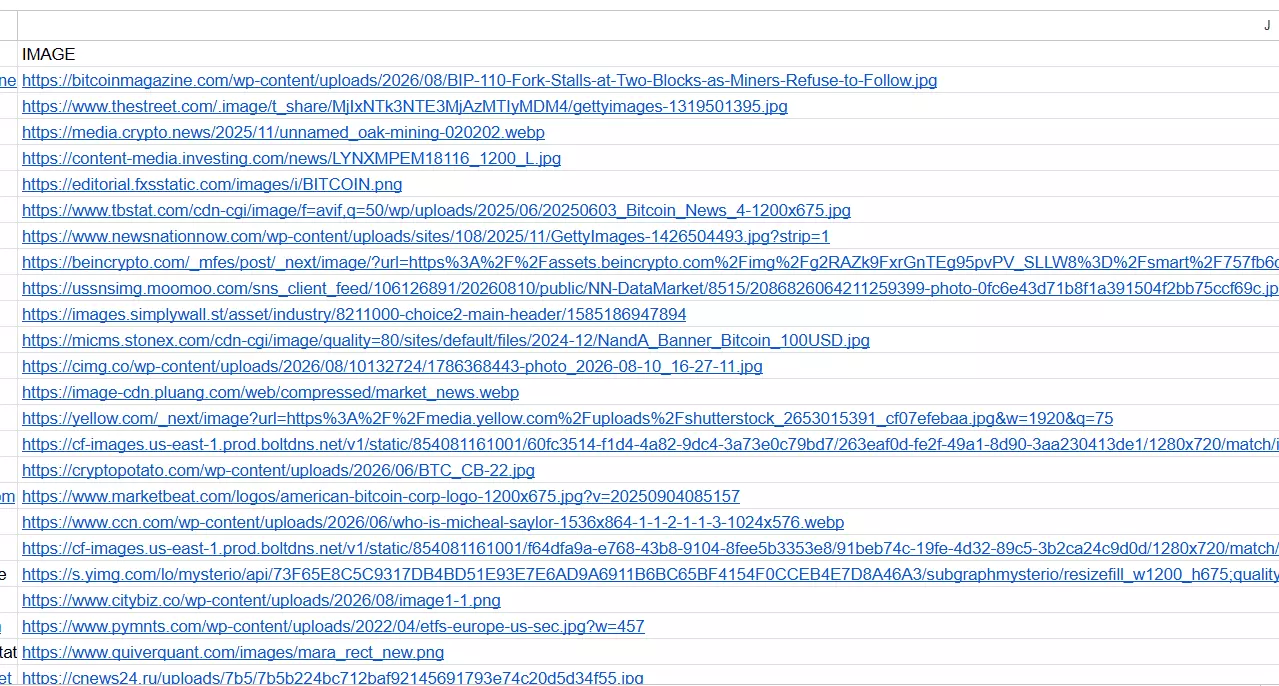
RESULT POSITION runs 1 to 971 with 971 distinct values, which makes it a true global rank... you can tell whether a story surfaced 3rd or 300th in Google's own ordering.Zero duplicate rows, thanks to a dedupe filter no other tool here has. And it returned 971 unique articles against a 1,000 target, the best coverage of any tool whose output you can open.

SHORT DESCRIPTION is the Google News snippet, not the article's own description, and 632 of 971 rows (65.1%) end in an ellipsis.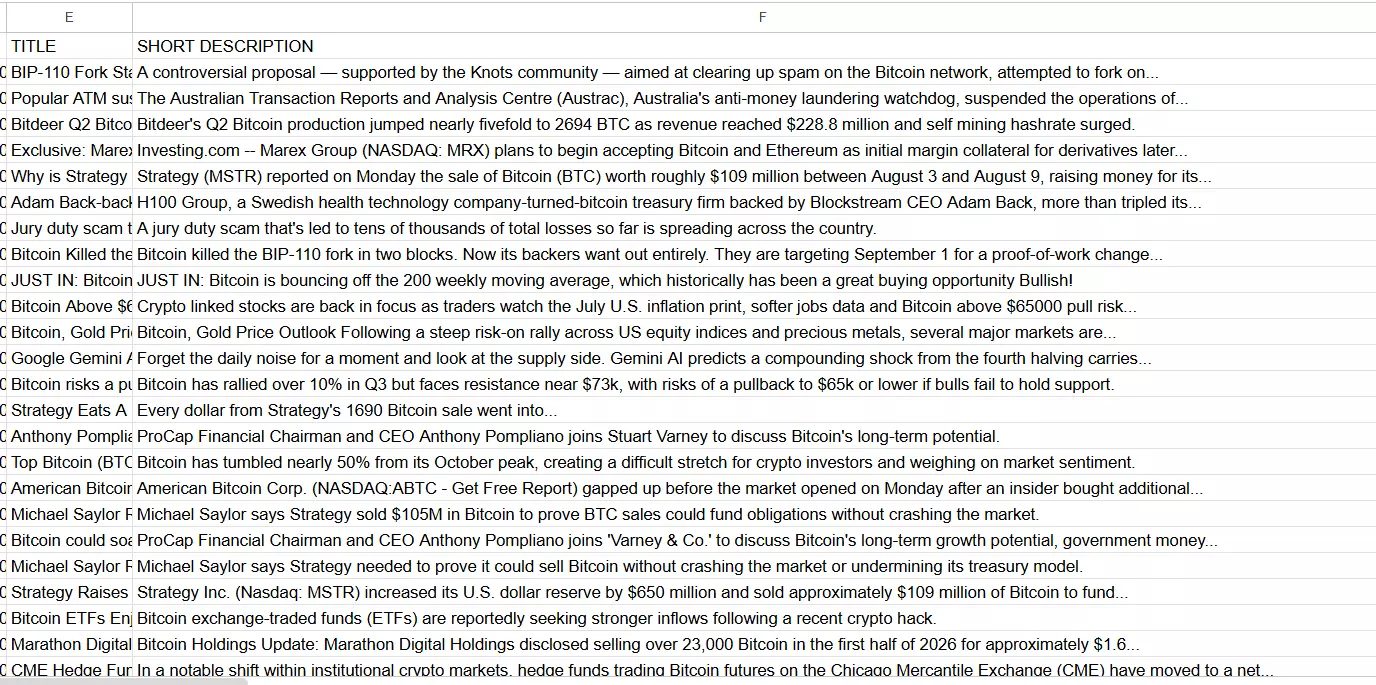
If you need the full description text, this isn't the tool for it.
Usability
The flow is a five-step wizard... Create a Squid, add tasks, adjust settings, pick a launch preference, launch.
Ways to feed it a job:
- A keyword, typed straight in
- A Google News topic name in caps, like
WORLD,BUSINESS,TECHNOLOGY,SPORTS,SCIENCE,HEALTH - A topic or section URL pasted from
news.google.com - A bulk list uploaded as CSV, TSV, or TXT
Pre-scrape filters, all free:
- Max unique results across the whole run
- Max results per task, defaulting to 100
- Time range from the past hour out to any time
- Newer than, taking either a relative duration like
7dor an absoluteYYYY-MM-DD HH:MM:SS - Topic or section targeting
- Language and country
- Unique results, which is the dedupe filter
- Slots, for concurrency
That "newer than" filter with an absolute timestamp is something no other tool here offers, and it's the difference between "articles from the past week" and "articles since my last run finished."
For getting data out: CSV, XLSX, JSON and JSONL, switchable after the run completes, plus automated delivery to email, Google Sheets and S3.
Verdict. The only tool here where every filter I wanted was a free field in the UI rather than a URL parameter or a paid toggle.
Speed
COLLECTED AT timestamps in the export span 70 seconds, so the run is self-documenting.
That's 13x the next fastest here, measured at one twentieth of lobstr.io's available concurrency.
Verdict. Fastest usable output by a wide margin, measured at its floor.
Cost
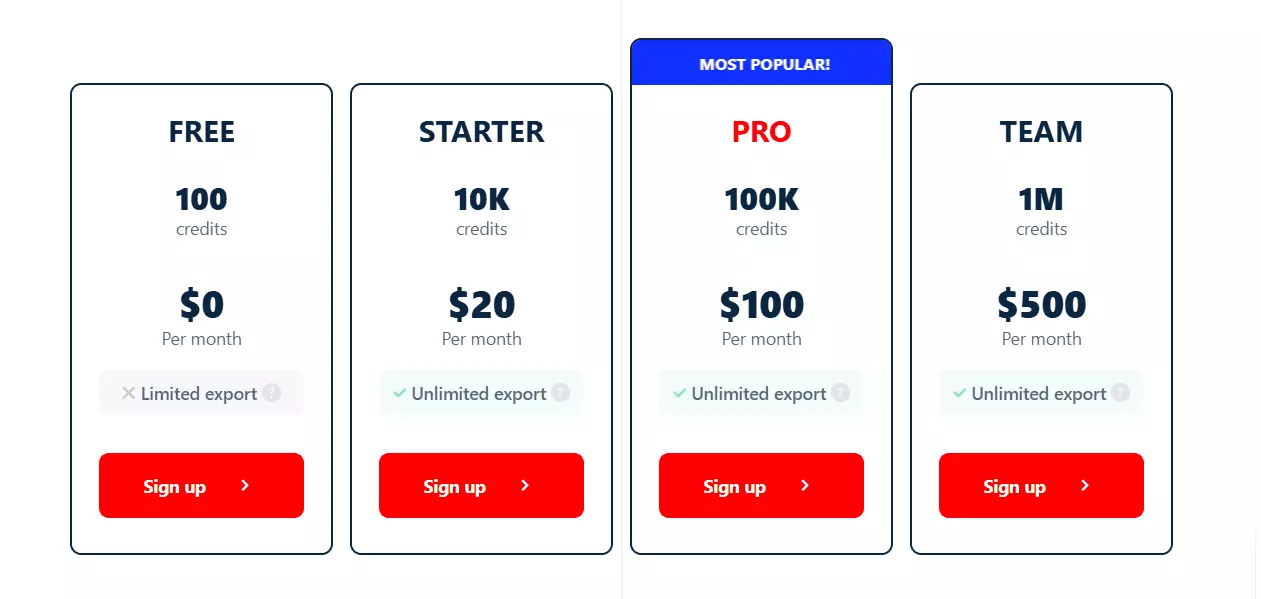
- Free tier: 100 articles a month, with a 30-row cap per export
- Entry: $2 per 1,000 articles
- At scale: $0.50 per 1,000 articles
- Anchor job, 100,000 articles: as low as $50 at scale, in about 2.1 hours
Billing is per result, so there's no compute layer to budget separately and no toggle that quietly changes the rate.
But the free tier is the weakest here. 100 results a month, and a 30-row export cap means a single free run gives you 30 downloadable articles. That isn't enough to properly test anything.
Verdict. Cheapest at scale, clearly beaten at entry, and the free tier doesn't cover a real trial.
Scalability
787 articles/min running 24/7 works out to a ceiling of roughly 34.0 million articles a month on a single Slot.
That number is too big to be useful, so here it is in jobs you'd actually run: 100,000 articles takes 2.1 hours. One million takes 21 hours.
On the Slots tiers, and I want to be precise because these are two different dimensions:
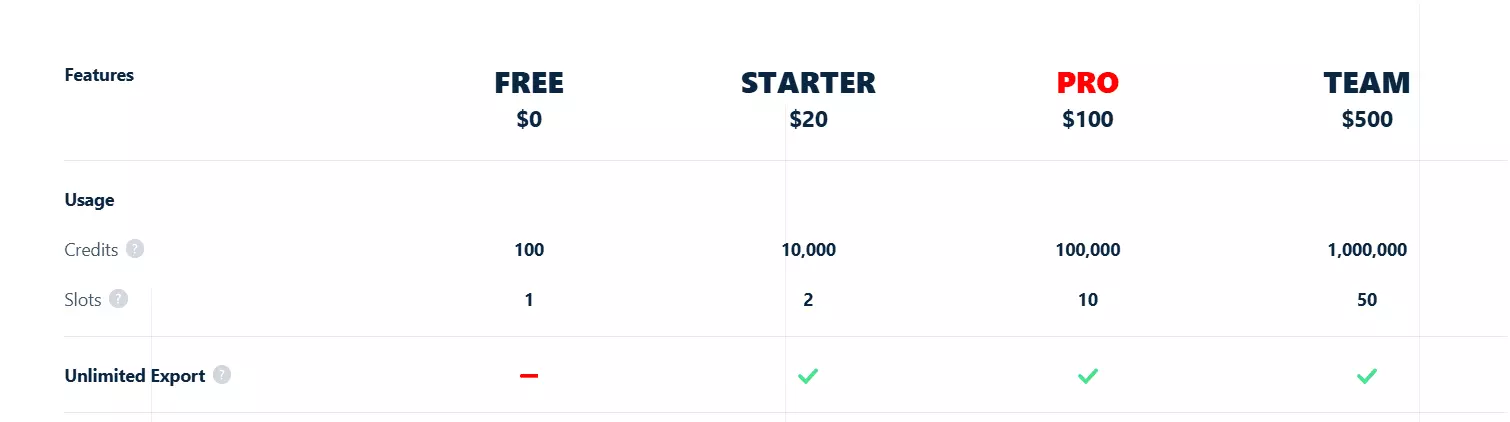
- Single Slot: 787/min, the number above, and the only figure I actually measured
- Per Squid: up to 20 Slots on one Squid, each an additional bot pulling in parallel
- Per account: up to 100 Slots across your account on the top plan, spread over multiple Squids
I only clocked 1 Slot, so treat the multi-Slot tiers as available headroom rather than a measured rate. The honest framing is that the ceiling above is the floor you get without buying anything.
On reliability, lobstr.io publishes uptime on the individual scraper's store page, which nobody else in this comparison does:
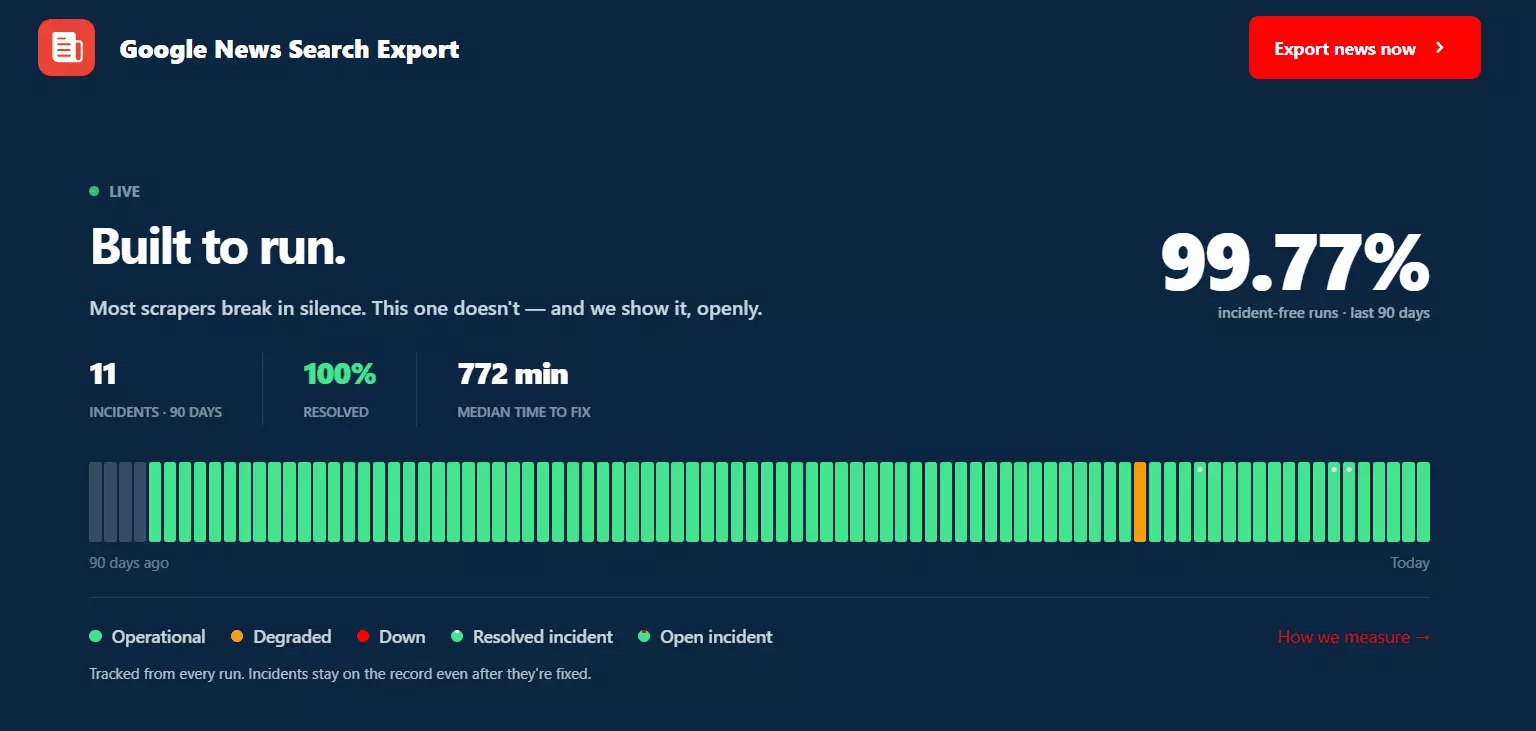
- 99.77% incident-free runs over the last 90 days
- 11 total incidents, 100% resolved
- 772 minutes (12.9 hours) median time to fix.
Verdict. The highest usable ceiling here, and the only tool that publishes its own failure record.
Support
Support runs on live chat and email, and it's answered by people who understand scraping rather than a script-reading first line. It's the most consistently praised part of the product in reviews.
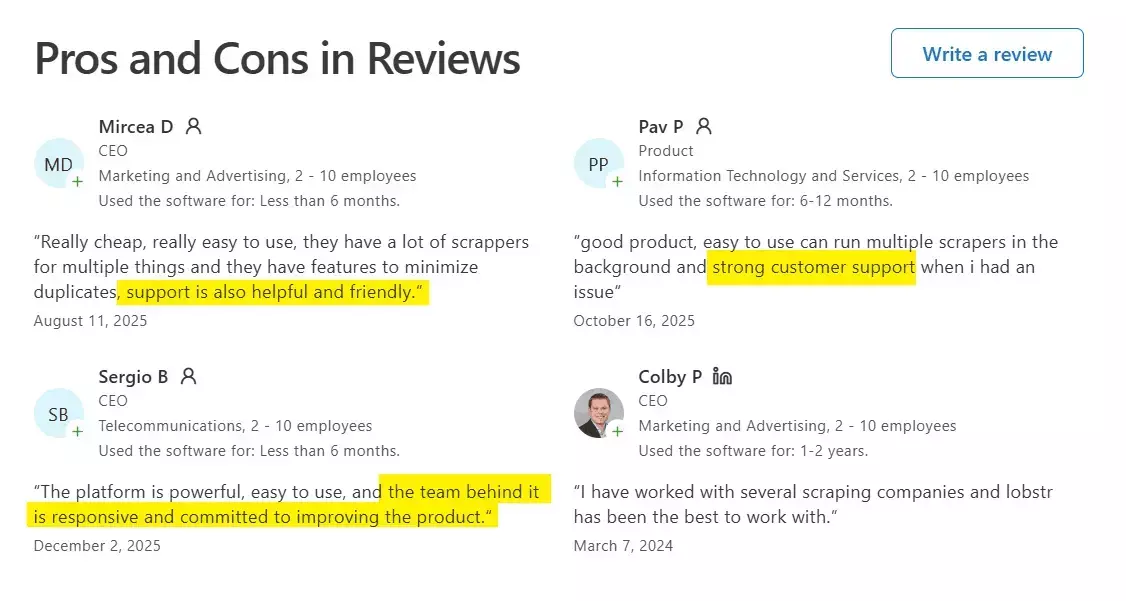
Verdict. Best support in the category, on the smallest review base of the two tools that have real ones.
Best for: anyone running Google News at high volume... media monitoring, brand tracking, dataset building... who needs every URL to open and can live with snippet-length descriptions.
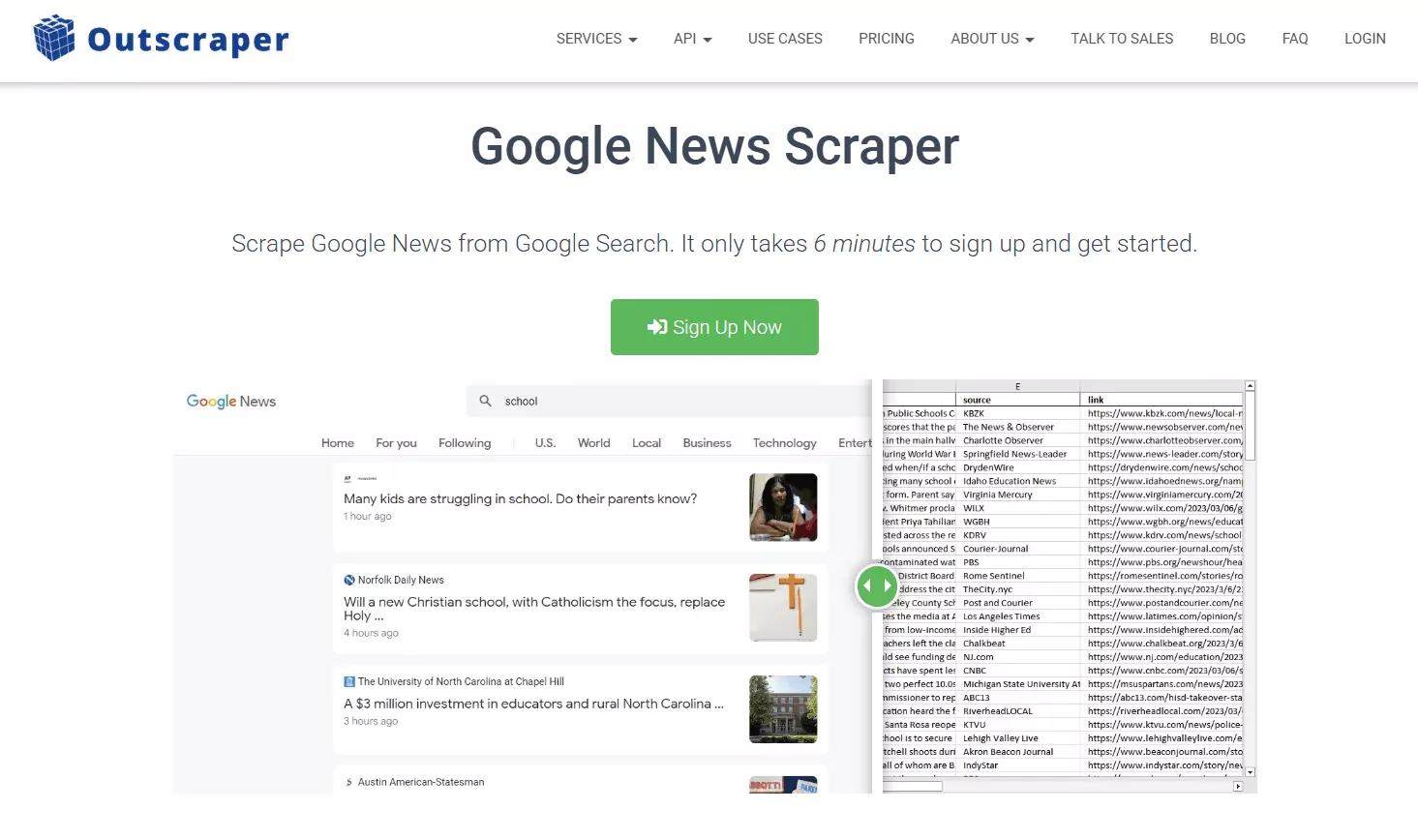
2. Outscraper Google News Scraper
| Pillar | Score |
|---|---|
| Data | 5.5/10 |
| Cost | 8.0/10 |
| Usability | 5.0/10 |
| Speed | 3.5/10 |
| Scalability | 3.5/10 |
| Support | 6.5/10 |
| Overall | 5.50/10 |
- User rating: 4.5 from 289 reviews on Trustpilot, read 2026-08-10...
- My score: 5.50/10
- Type: No-code SaaS with API
- Pricing from: $0.90 per 1,000 articles, dropping to $0.60 at scale
- Best for: Small, occasional pulls where entry price is what matters
| Pros | Cons |
|---|---|
| Cheapest at entry: $90 per 100K | One export format per run |
| Largest review base: 4.5 from 289 reviewers | No image field at all |
| Bulk upload plus multiple queries | Relative-only dates, with no run timestamp |
| True global rank field, 1 to 693 | 40 of 693 links came back broken |
| Genuinely fast live chat | |
| Simple enough to learn in one run |
Data
Outscraper returned 6 meaningful fields, the fewest here. That's the entire export, all 7 keys:
| Category | Fields |
|---|---|
| 📰 Article | title, body, link |
| 🏷️ Source | source |
| 🕐 Timing | posted 🐛 |
| 📊 Ranking | position |
| ⚙️ Operational | query |
Two gaps do real damage. There's no image field at all ... not a proxy URL, not a thumbnail, nothing. It's the only tool here without one.
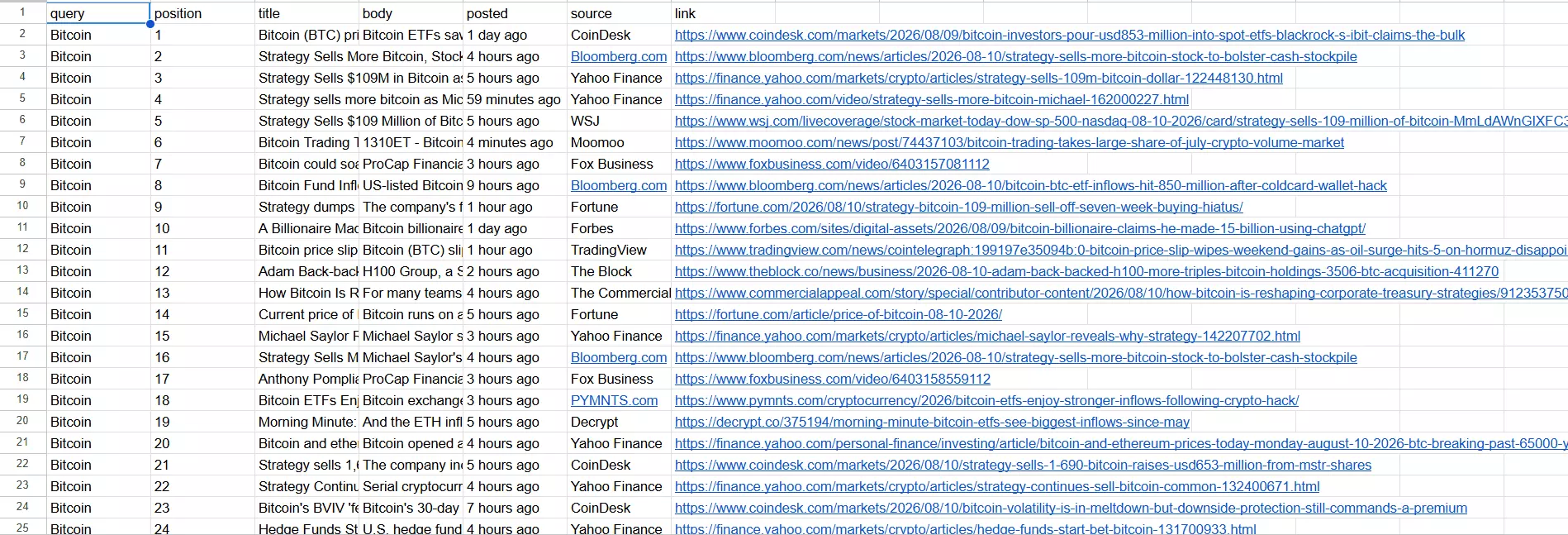
posted is relative only. Every row says something like 1 day ago.There's no absolute timestamp anywhere in the export, and no run timestamp either, so the moment you save the file you've lost the ability to work out when anything was published.
That's the one field flaw here I'd call properly broken rather than merely thin.
653 of 693 URLs resolved (94.2%).
/goto?url=, which no browser will open. It also returned 27 duplicate rows (3.9%) with no dedupe filter to prevent them.On coverage: 666 unique articles against a 1,000 target, or 67%. It quietly returned two thirds of what I asked for, which matters when you're comparing per-1,000 prices, because it never actually delivered 1,000.
position runs 1 to 693 with 693 distinct values, so credit where it's due... that's a genuine global rank, and both Apify actors lack it.Usability
The input side is genuinely good. It takes multiple search queries, and you can bulk upload them as CSV, TSV or TXT...
Then the run starts and the experience falls over.
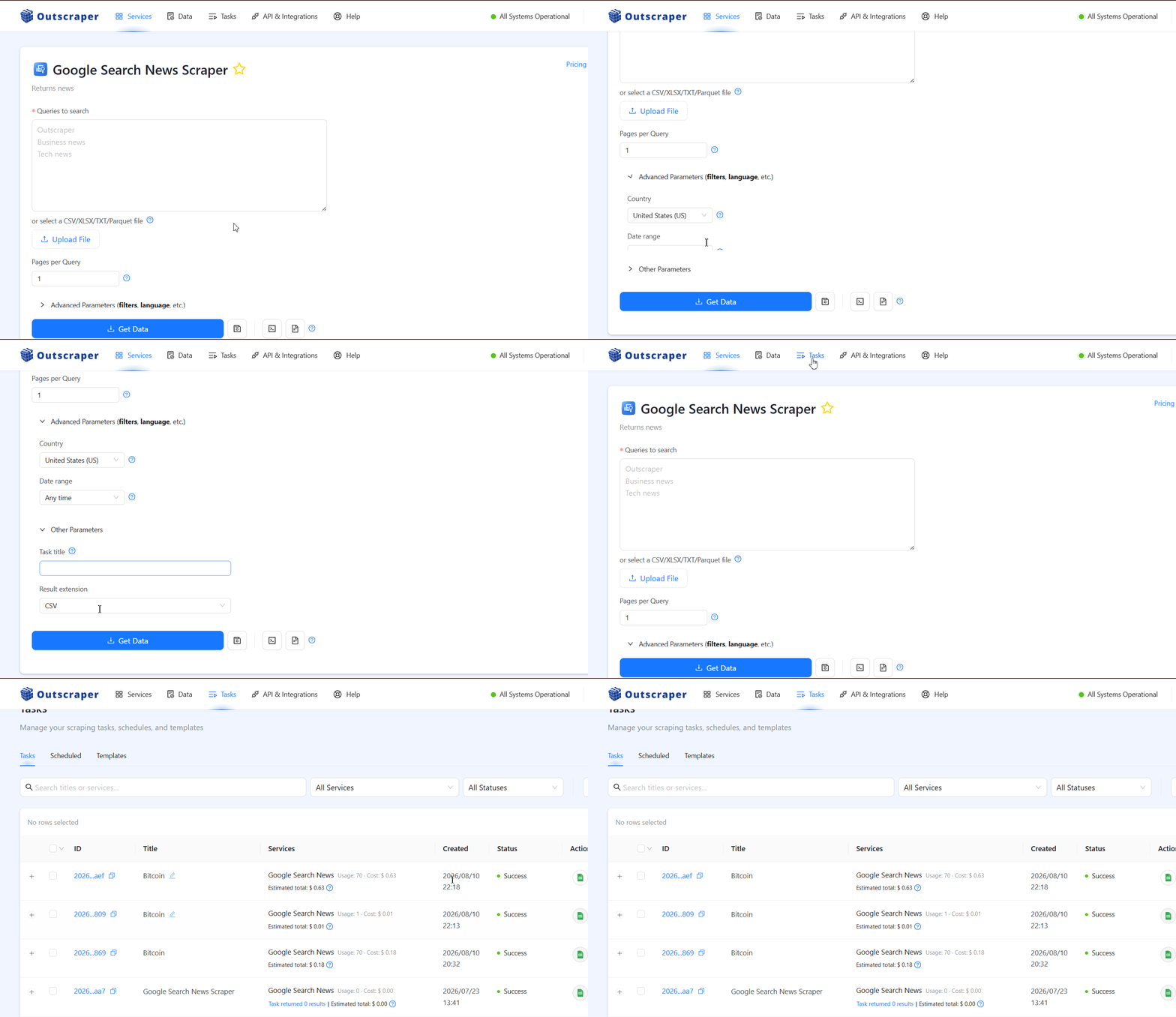
- No live progress tracking, no console, no run visibility. You refresh the page or come back later. If something breaks, you find out when you check
- You can't schedule a run until you've run it once. There's no scheduling option in the setup flow at all. You launch, go to Tasks, click the three-dot menu, and schedule from there
- One export format per run. The format is fixed at configuration time. To get this test's data as both CSV and JSON, I had to run the scraper twice and pay for it twice
Filters are thin too: country and date range, and that's it. No language filter, no dedupe, no topic targeting.
Verdict. A clean front door and a frustrating room behind it.
Speed
693 articles in 14 minutes, from 8:32PM to 8:46PM. That's 49.5 articles per minute.
It's the only tool here with no speed lever at all. No slots, no memory tier, no concurrency setting. What you measured is what you get, permanently.
Verdict. Slow, and structurally unable to get faster.
Cost
Outscraper bills per search rather than per result, where one search returns up to 10 articles.
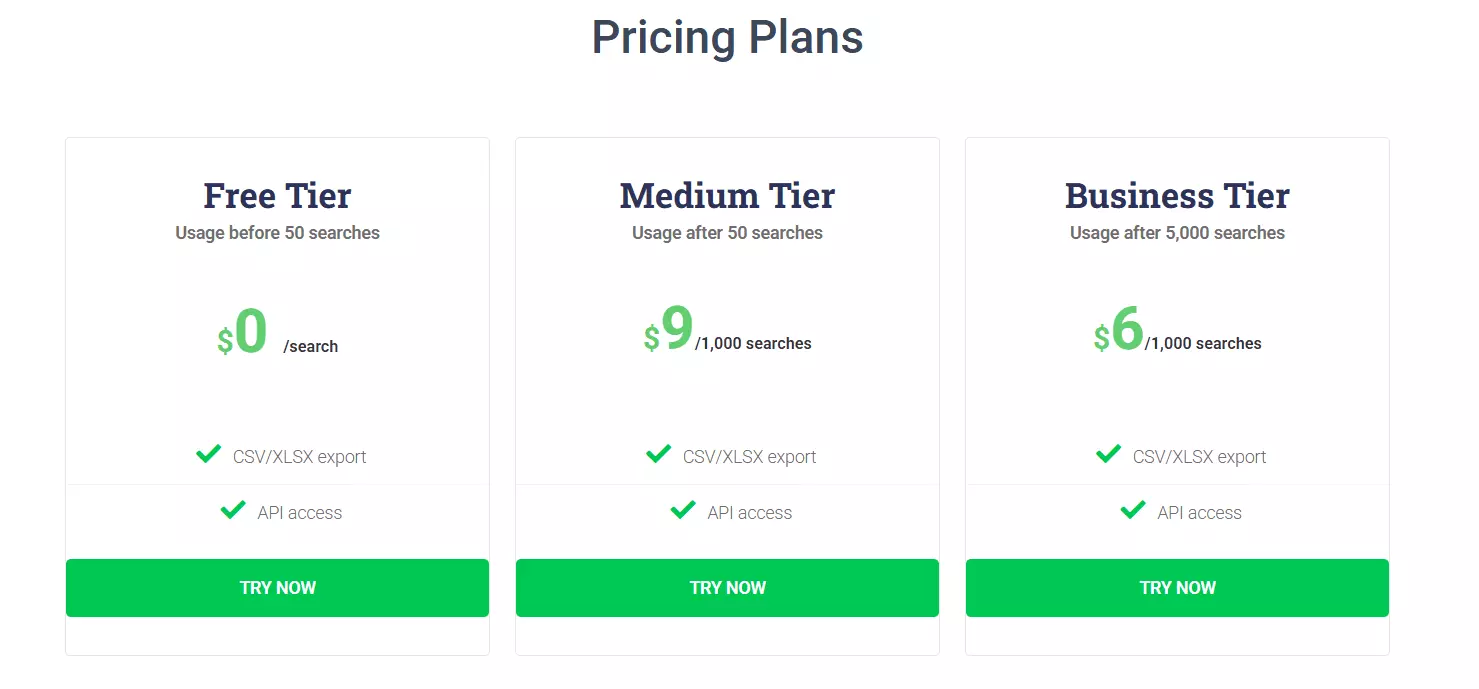
The $0.90 and $0.60 per-1,000-article figures below are converted from that model based on this run, not quoted off a price page.
- Free tier: the first 50 searches of every run, but you have to top up your balance before the scraper will run at all
- Entry: $0.90 per 1,000 articles
- At scale: $0.60 per 1,000 articles
- Anchor job, 100,000 articles: $90 at entry, $60 at scale, in about 33.7 hours
This is where Outscraper wins outright, and it's not close.
$90 for 100K is 2.2x cheaper than anything else at entry pricing. If your volume sits at the entry tier, this is the cheapest way to get Google News data of anything I ran.
The free tier is the weak spot: needing a top-up before anything runs makes it a discount rather than a trial.
Verdict. Best entry pricing in the test, on the joint-heaviest pillar. Second at scale.
Scalability
49.5/min running 24/7 gives a ceiling of roughly 2.1 million articles a month, and there's no concurrency lever to raise it.
In real jobs: 100,000 articles takes 33.7 hours, one million takes 14 days.
The bigger scale problem is the blindness. With no live progress and no console, a stalled run is invisible until you go looking, which is a poor foundation for anything scheduled and unattended.
Verdict. A hard ceiling with no lever, and no visibility into whether you're approaching it.
Support
Support is fast and responsive over live chat, and the 4.5 from 289 reviewers is the most credible satisfaction signal in this whole comparison.
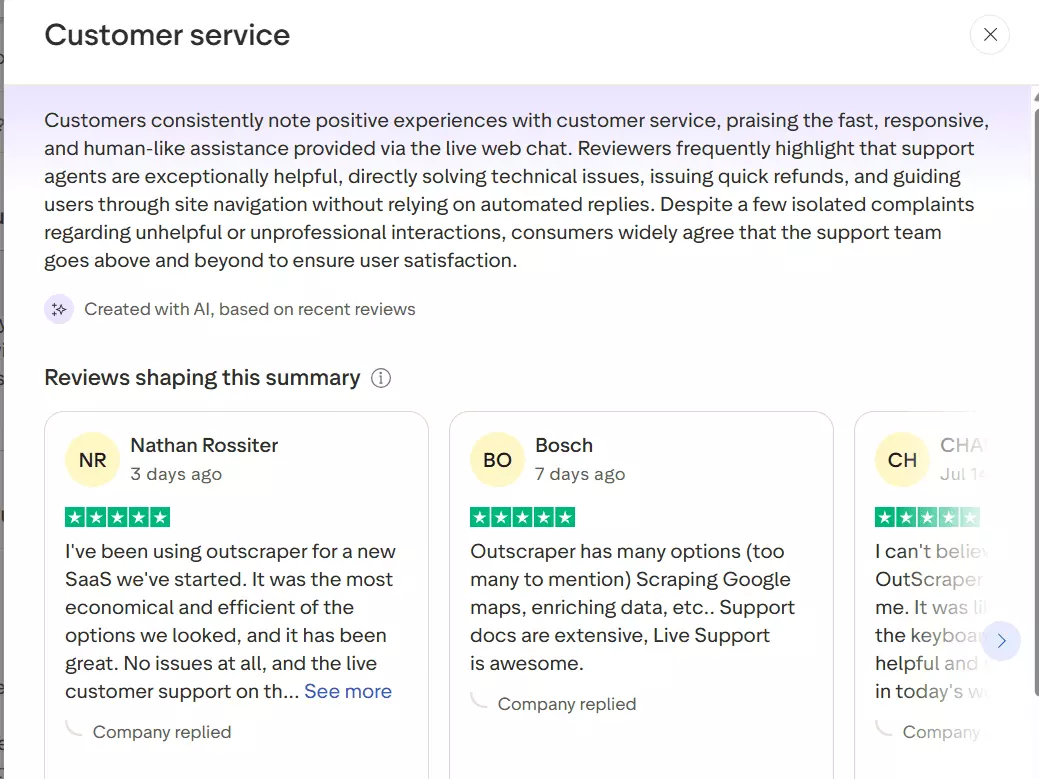
The quality is where it wobbles.
I asked about the one-format-per-run export limit. Support restarted my run, which cost me money, and told me JSON was working fine... which wasn't what I'd asked.
On follow-up I was told it would be raised with the tech team, with no ETA and no confirmation.
Verdict. Genuinely responsive, not technically deep. Fast answers to the wrong question.
Best for: anyone pulling modest volumes of Google News who's optimizing for entry price and doesn't need images or absolute dates. If you need to know exactly when something was published, this one can't tell you.
Before moving to #3 and #4, a small note. Both of theses scrapers are community actors hosted on Apify by independent developers or agencies.
I checked multiple actors on Apify and chose the 2 best ones. Both of them have the highest number of monthly active users and successful runs in past 30 days.
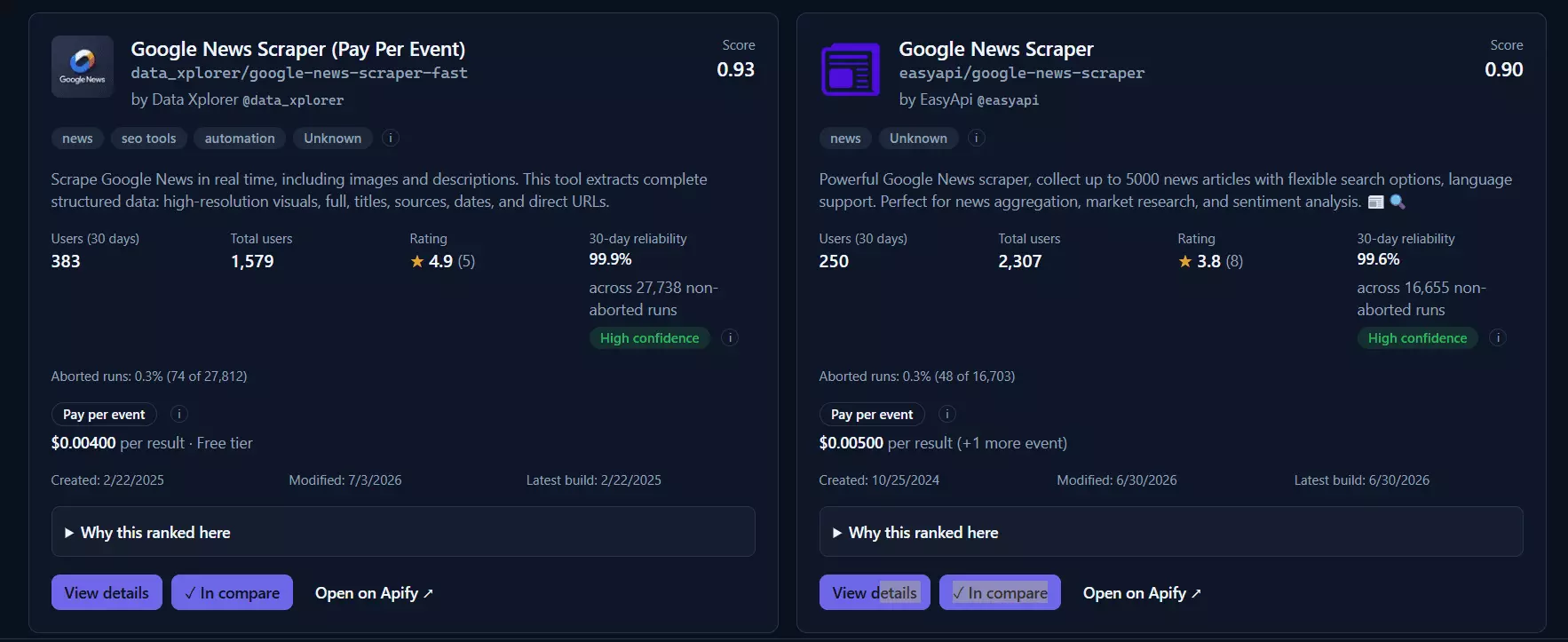
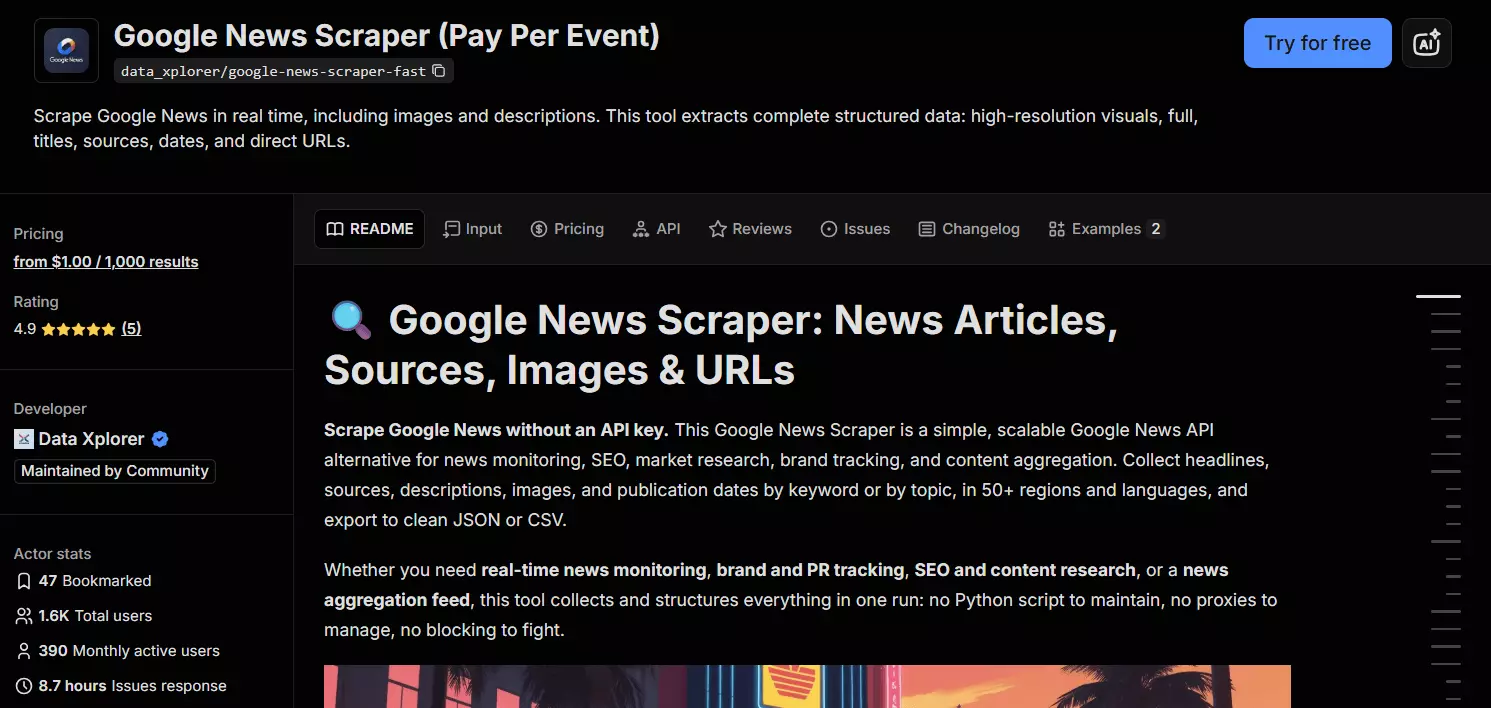
3. Apify data_xplorer Google News Scraper Fast
This is a community actor, not an Apify-built one, and I picked it for its monthly active users, run success rate, and signs of active maintenance.
| Pillar | Score |
|---|---|
| Data | 7.0/10 |
| Cost | 5.5/10 |
| Usability | 6.0/10 |
| Speed | 4.5/10 |
| Scalability | 3.5/10 |
| Support | 3.0/10 |
| Overall | 5.29/10 |
- User rating: 4.9 from 5 reviews on the Apify store, read 2026-08-10... five reviews is not a meaningful sample and I'd treat that number as decorative
- My score: 5.29/10
- Type: Marketplace actor with API
- Pricing from: $4 per 1,000 articles, dropping to $1 at scale
- Best for: Editorial work that needs complete article descriptions
| Pros | Cons |
|---|---|
| Only untruncated article descriptions, 95.2% real prose | Run timed out and restarted from record 1 |
| Only typed epoch timestamp in the test | No rank field of any kind |
| Most generous free tier at ~1,250/month | No support channel exists |
| Fastest raw rate measured at 1,200/min | With toggles off, 0 of 1,000 URLs open |
| Topic and custom section URL targeting | |
| Straightforward single-page interface |
Data
I ran this actor twice, once with all toggles on and once with all toggles off, because the toggles change what comes back that dramatically.
With everything switched on it returns 8 meaningful fields, tied for most.
metadata:| Category | Fields |
|---|---|
| 📰 Article | title, url, image, description 🎁 |
| 🏷️ Source | source |
| 🕐 Timing | publishedAt, publishedTimestamp 🎁, metadata.scrapeTimestamp |
| ⚙️ Operational | metadata.keyword, metadata.sourceType, metadata.timeframe |
The description field is the genuine win here, and it deserves proper credit.
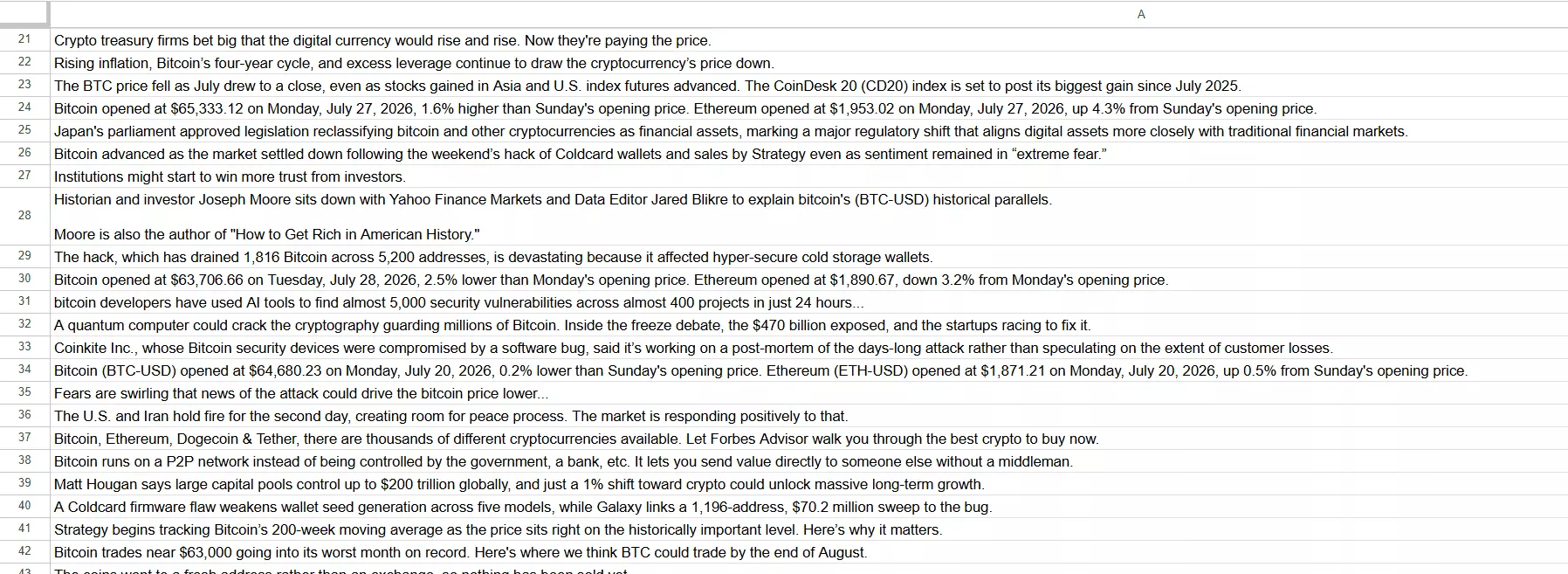
It's the only field in this comparison that returns a real article meta description rather than the Google News snippet.
It averaged 156 characters with only 6.5% of rows truncated. Across 1,177 rows, 1,121 held real prose (95.2%), with 37 missing, 10 containing just a bare date, and 9 too short to be useful.
publishedTimestamp is exclusive too... a typed epoch integer alongside the ISO date, so no date parsing on your end.Now the toggles, because this is where it gets interesting. I ran it both ways, and the difference isn't subtle:
| Toggles off | Toggles on | |
|---|---|---|
| Wall-clock | 50 seconds | 30 minutes |
| Usable URLs | 0% | 100% |
| Images | 0%, null on every row | 100% filled |
| Descriptions | field absent | 95.2% real prose |
| Meaningful fields | 6 | 8 |
With the toggles off, not one of its 1,000 URLs can be opened.
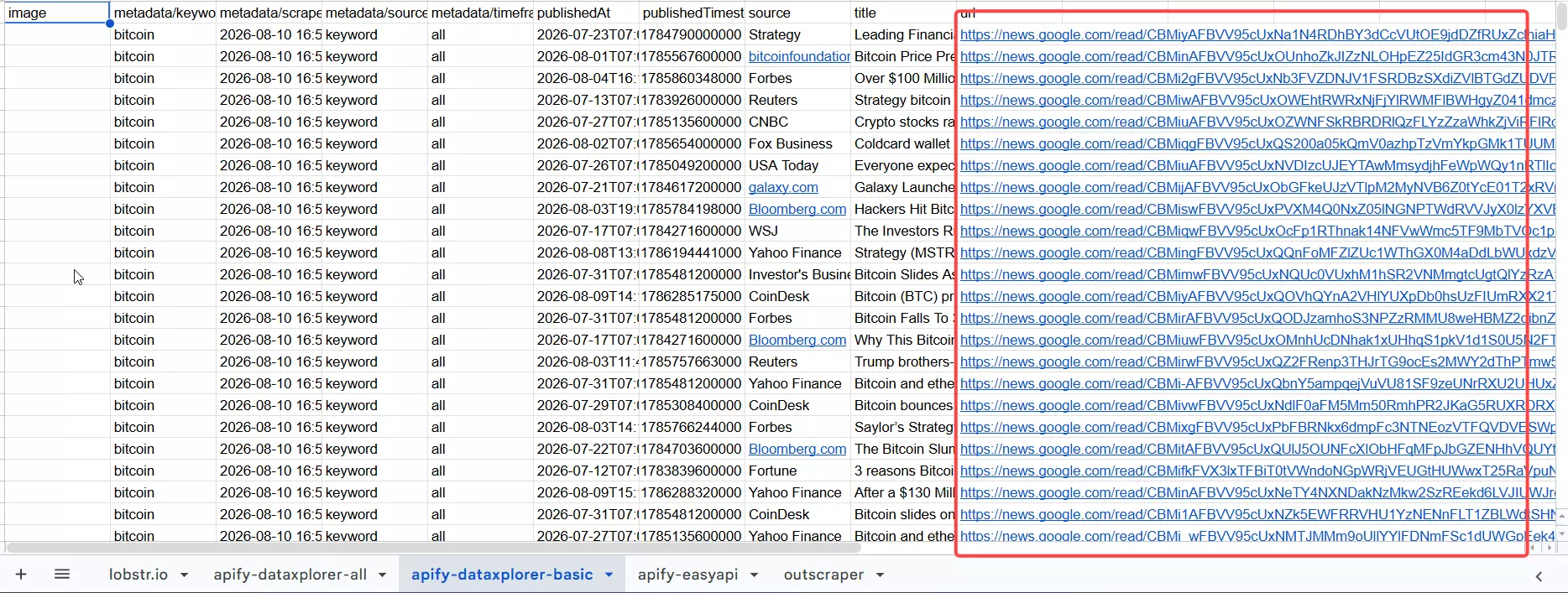
news.google.com/read/... redirect. The images field is null on all 1,000 rows. So the "fast" tier produces output you cannot do anything with.Turn everything on and the data becomes genuinely good... and the run takes 36 times longer.
To be clear about the money: these toggles are free to enable. The actor bills per result, so switching them on doesn't change the per-article price. They cost you time, not credits.
image values are Google News proxy URLs on 1,158 of 1,177 rows (98.4%), not the publisher's own image.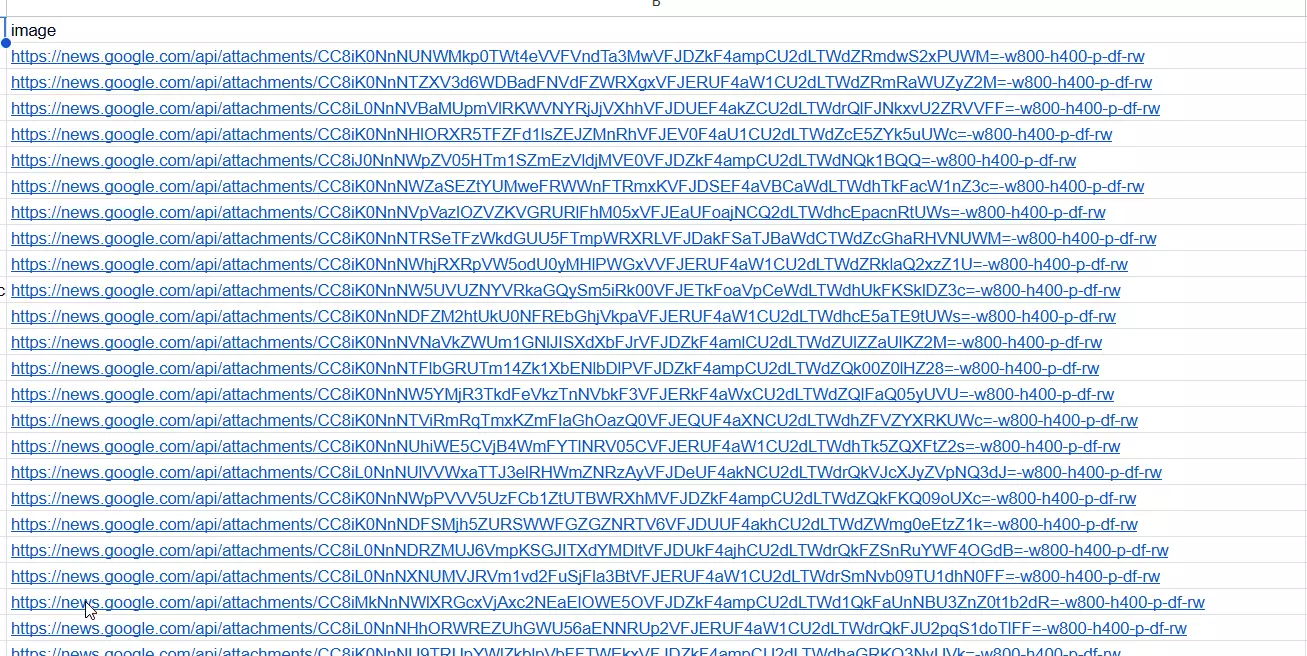
Only 19 were originals. And there's no rank field of any kind, so you get no ordering signal at all.
On the duplicates, which need explaining properly.
The export has 293 duplicate URLs across 1,177 rows (24.9%), and the cause isn't the scraper.
The run timed out, I resurrected it per Apify's own recovery flow, and the timestamps show exactly what happened:
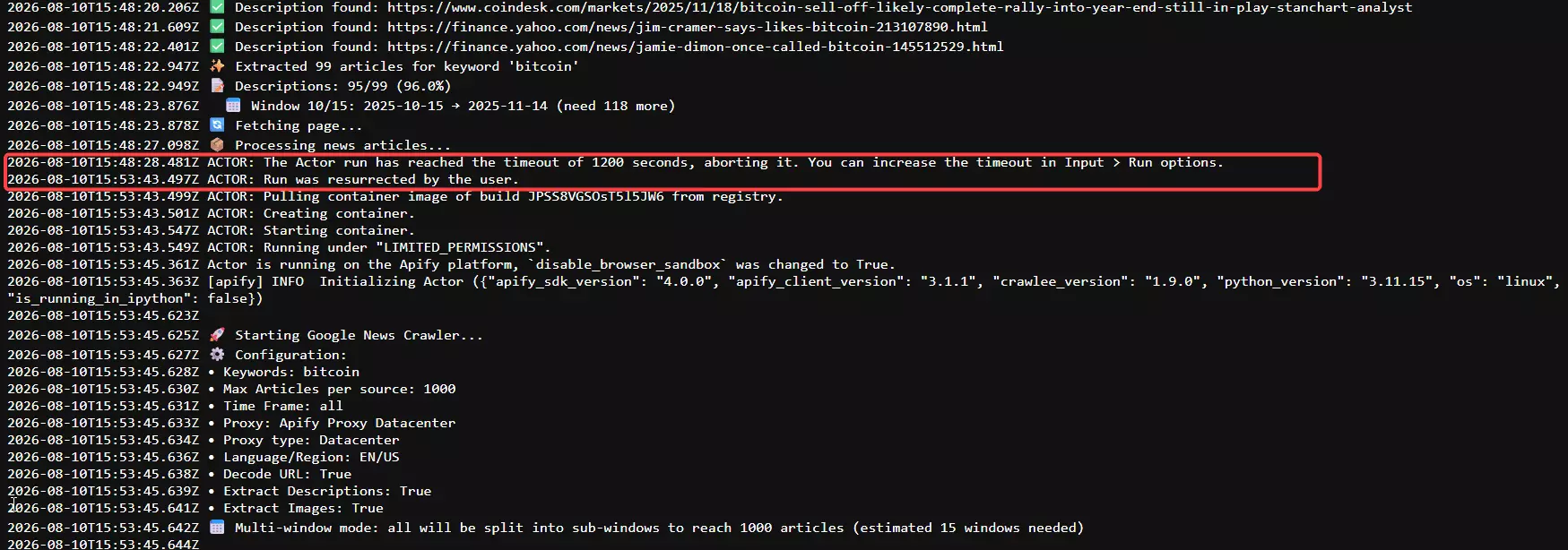
| Rows | Window | New articles | |
|---|---|---|---|
| First pass | 882 | 15:28:34 to 15:47:27 | 882 |
| After resurrect | 295 | 15:53:47 to 15:58:41 | 2 |
The first pass has zero internal duplicates.
The second pass starts with the same three URLs as the first, in the same order, and of its 295 rows, 293 were re-scrapes and 2 were new articles.
Apify's resurrect is documented as continuing where a run left off. On this actor it restarted from record 1.
Usability
The interface is the classic Apify single page, and it's genuinely straightforward. Input is flexible for a marketplace actor:
- Multiple search keywords, pasted into the UI
- Predefined Google News topics
- Custom topic or section URLs, useful for niche topics not in the list
No file upload though... it's paste-only.
Then there's the timeout, and it's the worst usability failure in this article.
My run timed out mid-scrape. Recovering means setting a longer timeout and restarting, so the data you already paid for is wasted.
And when I resurrected the run, it ignored the max_results parameter entirely and kept scraping past my 1,000 limit until I aborted it manually at 1,177.
If you're not watching the run, that combination burns credits with no ceiling.
Add-on decision block. Three toggles: decode URLs, extract descriptions, extract images.
- Skip them for anything where you only need headlines, sources and dates, and where 50 seconds beats 30 minutes
- Turn them on only if you need complete article descriptions, which is the one thing no other tool here provides... and accept that you're trading a 36x slowdown and a much higher timeout risk for it
... menu top-right, which you won't find unless you already know Apify. Exports cover six formats and switch freely after the run, and you get the full Apify integration and API surface.Verdict. Pleasant to set up, genuinely dangerous to leave unattended.
Speed
At 1 GB memory (0.25 CPU cores), two very different numbers:
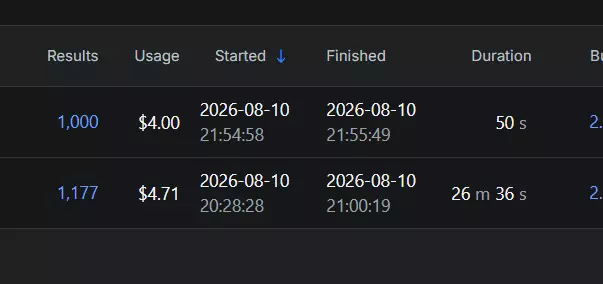
- Toggles off: 1,000 articles in 50 seconds, or 1,200 per minute. That's the fastest raw rate I measured on anything
- Toggles on: 882 unique articles in 18 minutes 53 seconds, or 46.7 per minute. That's the slowest usable rate I measured on anything
I'm quoting the first clean pass for the toggles-on number rather than the full two-pass span, because the run never cleanly completed. Measured across both passes it's 29.4/min.
The fast number is real but it's not useful, because that tier's output has no openable URL. The number that matters for this actor is 46.7/min.
Verdict. Holds both the fastest and the slowest rate in this test, and the fast one comes with unusable data.
Cost
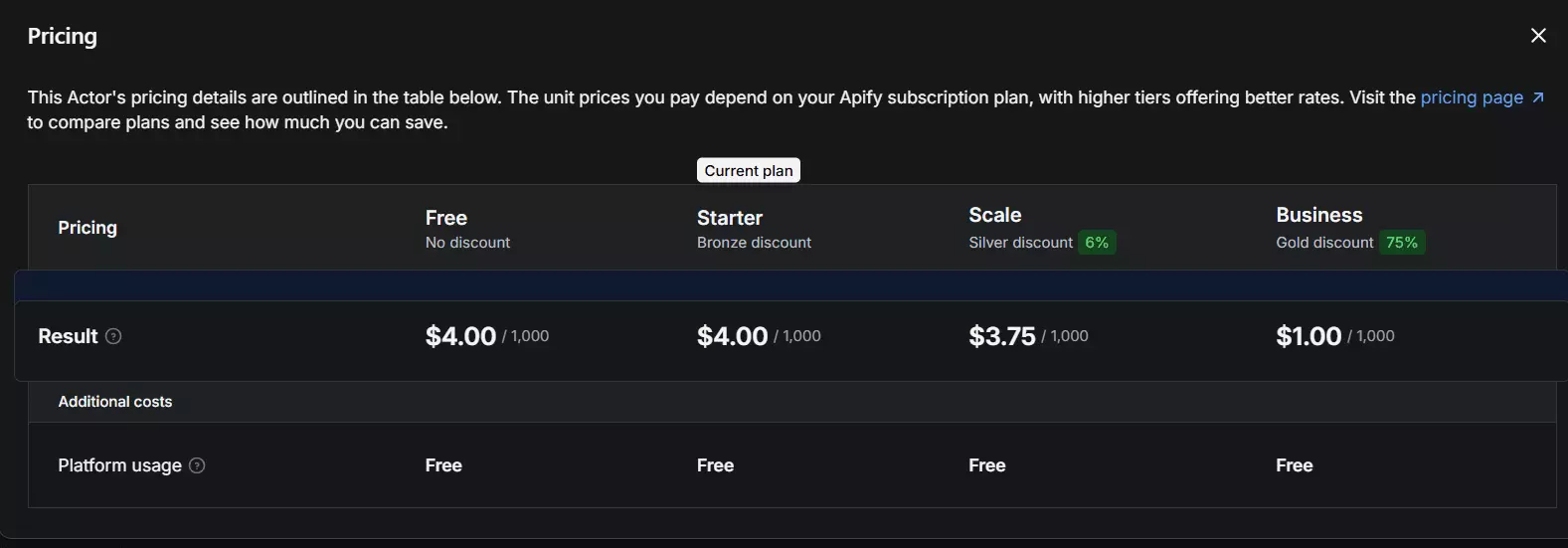
- Free tier: Apify gives $5 of credits a month, which at $4 per 1,000 works out to roughly 1,250 free articles a month... the most generous free tier in this comparison
- Entry: $4 per 1,000 articles
- At scale: $1 per 1,000 articles
- Anchor job, 100,000 articles: $400 at entry, $100 at scale, in about 35.7 hours
The toggles are free, as covered above.
The real cost risk is indirect: a slower run is likelier to time out, and a timeout leads to the resurrect that re-scrapes what you already paid for.
On my run that meant 1,177 rows billed for 884 unique articles, a 33% overpay.
Verdict. Expensive per article, redeemed slightly by the best free tier, undermined by billing for work it repeated.
Scalability
At 46.7/min the ceiling is roughly 2.0 million articles a month, the lowest here. In real jobs: 100,000 takes 35.7 hours, one million takes about 15 days.
The toggles-off tier computes to ~51.8M a month, which would top the table, but a ceiling on unopenable URLs isn't a ceiling worth quoting.
Concurrency is a memory tier rather than a slider, so more speed means paying for more compute rather than adding workers you control.
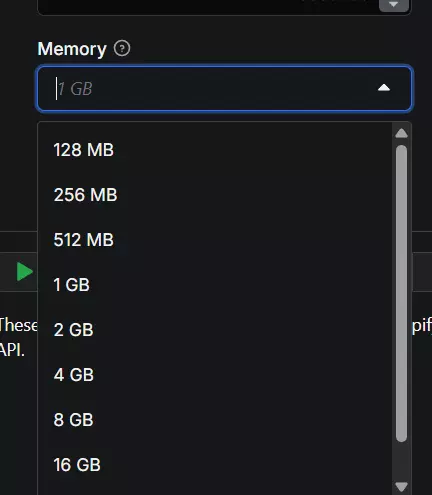
And this is where the data-loss story bites.
A timeout doesn't pause and resume... it restarts and re-bills.
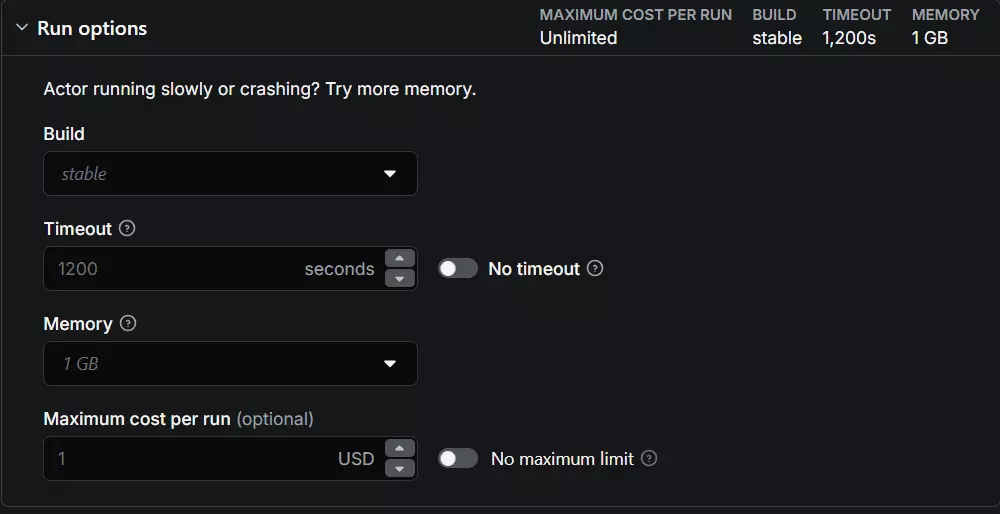
Of the 295 rows the recovery produced, 293 were work already done. For anything scheduled and unattended at volume, that's the failure mode that costs you most.
Verdict. Lowest usable ceiling in the test, and the worst behaviour under failure.
Support
It's a community actor, so Apify provides no official support for it, and the developer publishes no Discord and no email.
The Issues tab is the only route, which is why I read every ticket on it instead.
The actor's store page advertises an 8-hour average response time. That's misleading. One issue was answered a month after it was posted.
Typical response is 1 to 2 days, and fixes land somewhere between one and three weeks.
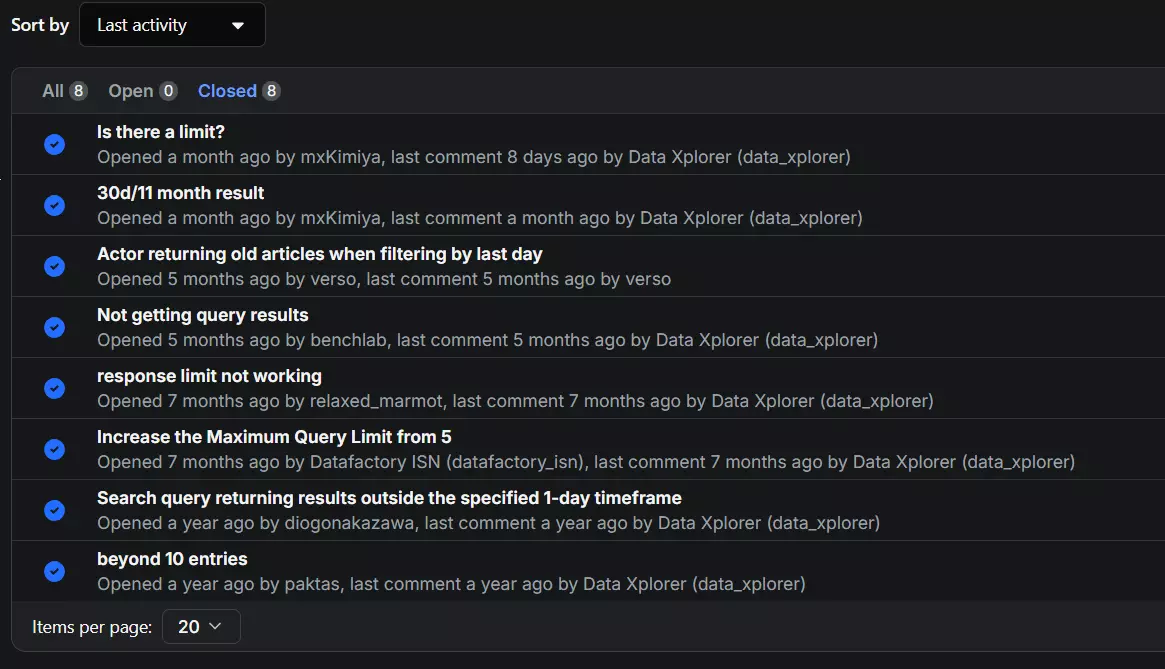
Verdict. A published response stat that its own ticket history contradicts.
Best for: editorial and content teams who need complete article descriptions and can babysit a slow run. If you need it unattended, or at volume, the timeout behaviour will eventually cost you a dataset.
4. Apify easyapi Google News Scraper
| Pillar | Score |
|---|---|
| Data | 6.5/10 |
| Cost | 3.5/10 |
| Usability | 4.5/10 |
| Speed | 4.0/10 |
| Scalability | 4.0/10 |
| Support | 2.0/10 |
| Overall | 4.33/10 |
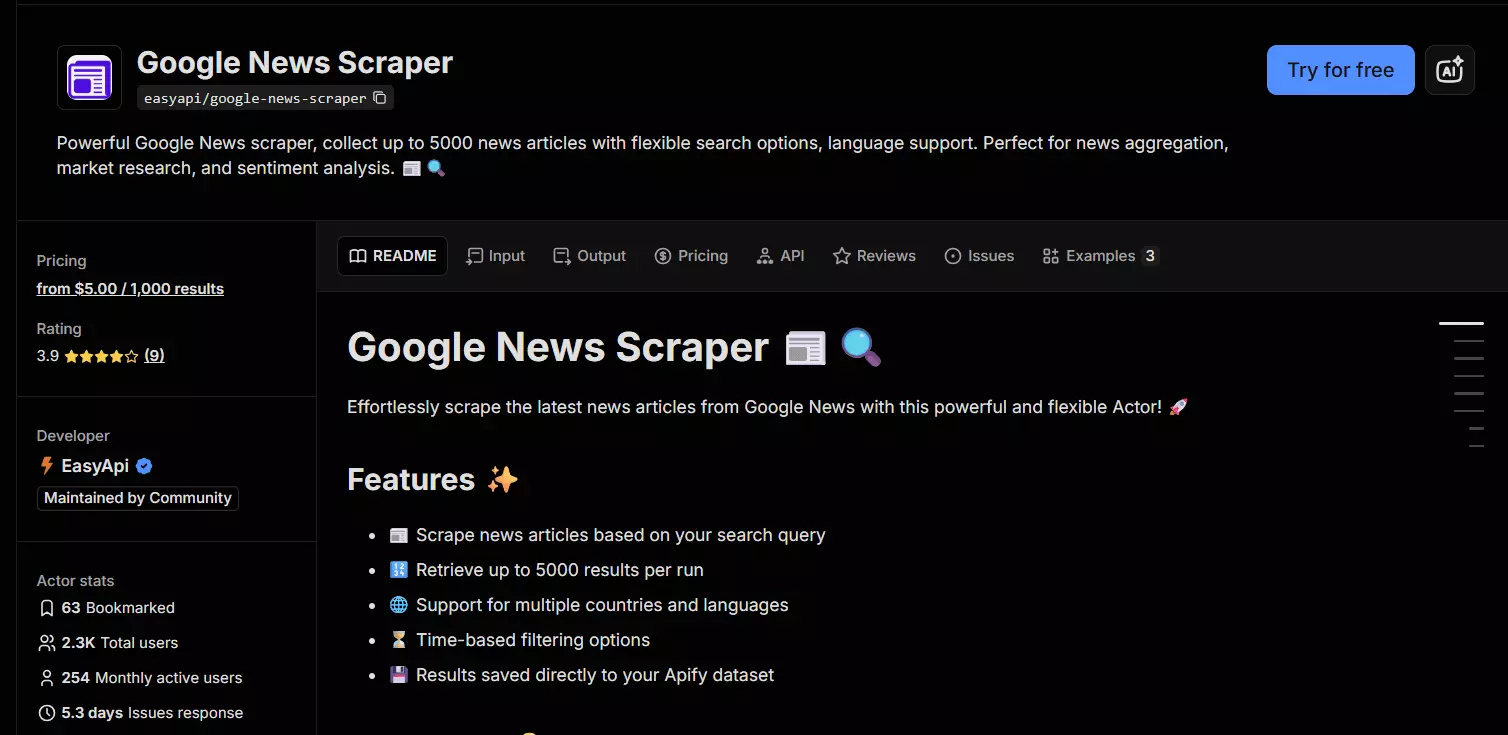
- User rating: 3.9 from 9 reviews on the Apify store, read 2026-08-10... the lowest rating here, on a sample too small to lean on
- My score: 4.33/10
- Type: Marketplace actor with API
- Pricing from: $5 per 1,000 articles, plus a $0.09 actor start fee
- Best for: One-off single-keyword pulls on Apify's free credits
| Pros | Cons |
|---|---|
| Ships relative and absolute dates together | Most expensive in the test: $500 per 100K |
| Custom min and max date filter | No volume discount at any tier |
| 1,000 free articles a month | One query at a time, no bulk input |
| Clean, consistent publisher names | Images are base64 blobs, not URLs |
| Six export formats plus full Apify API |
Data
8 meaningful fields, tied for most on count. All 10 keys in the export:
| Category | Fields |
|---|---|
| 📰 Article | title, link, snippet, thumbnail |
| 🏷️ Source | source |
| 🕐 Timing | date, date_utc 🎁 |
| 📊 Ranking | position 🐛 |
| 🔁 Redundant | domain, block_position |
1 day ago alongside 2026-08-09T15:25:27.506Z.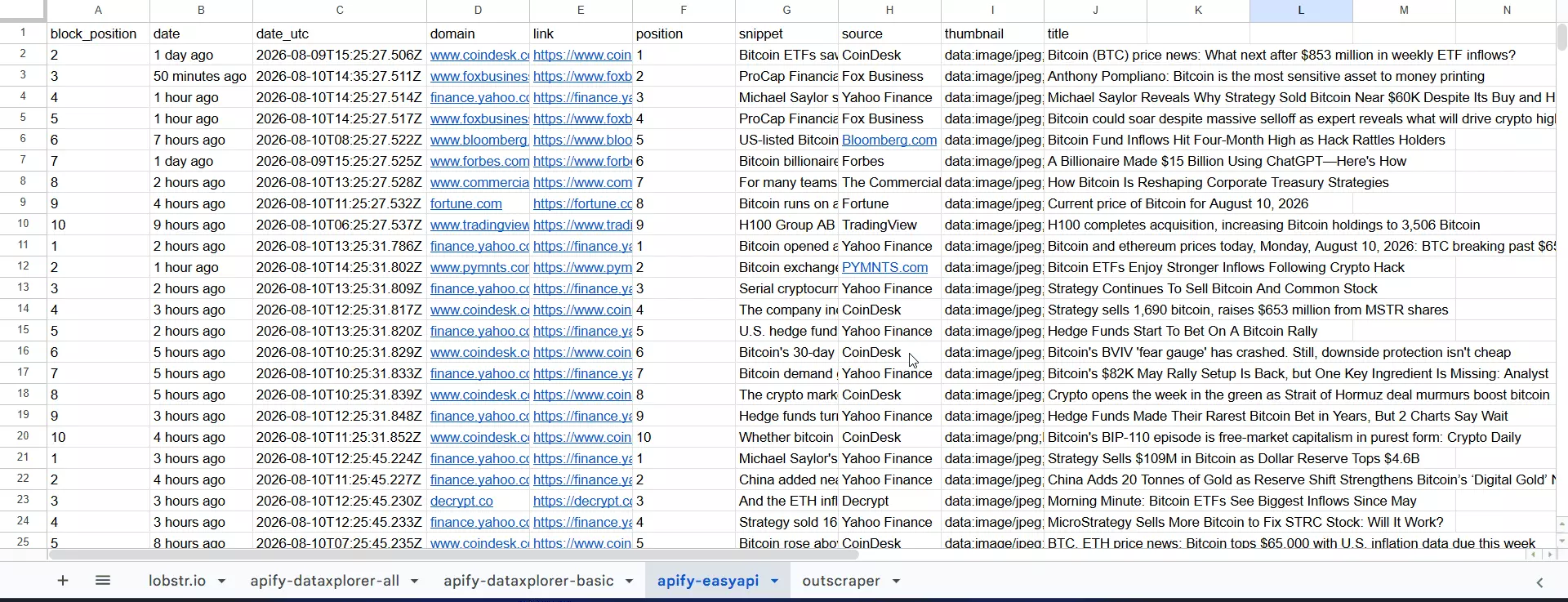
source values are also the most consistently formatted publisher names of the four./goto?url=, the worst URL failure rate of any tool whose output works at all.domain field is blank, so it's one failure showing up twice.thumbnail is populated on all 689 rows, but as base64 data URIs averaging 3,389 characters each rather than image URLs.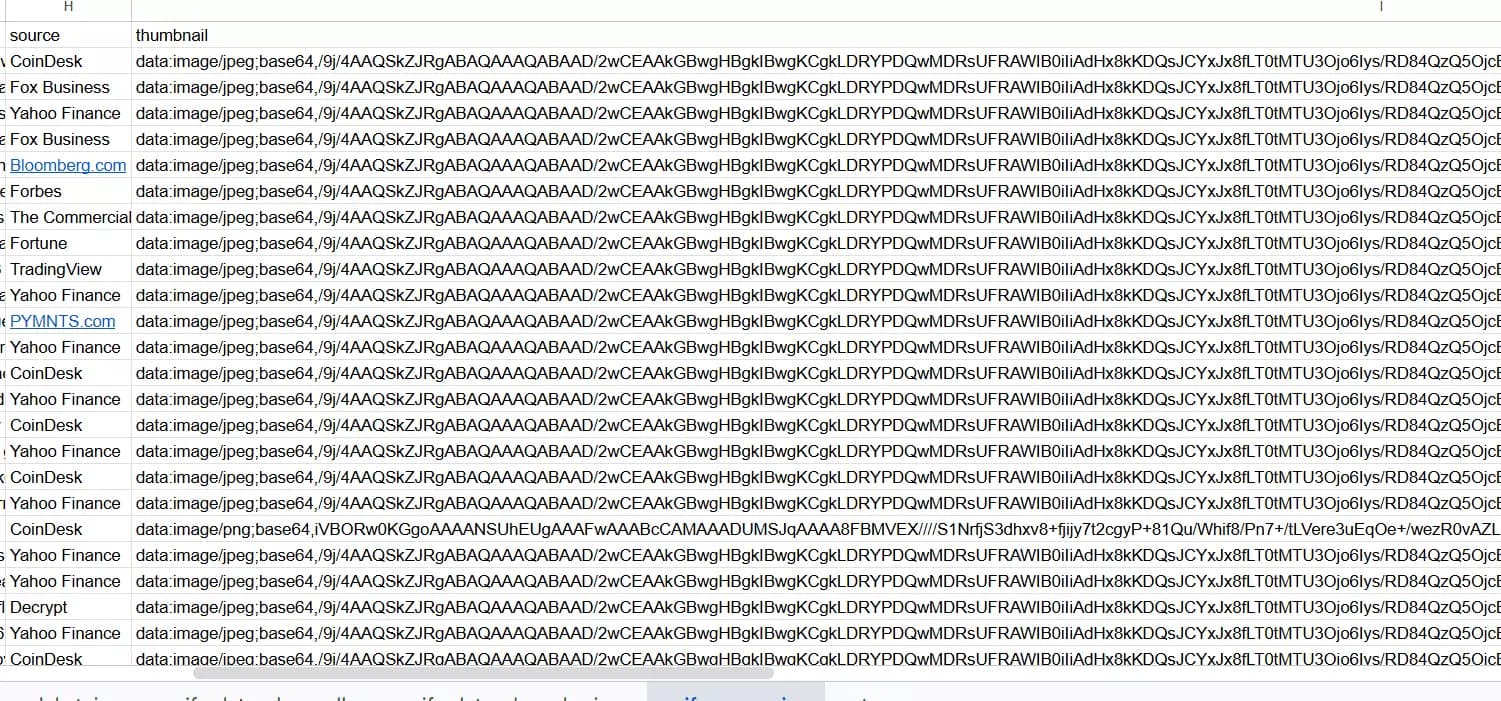
<img src> without decoding them first.position only ever holds values 1 to 10 and resets every ten rows, so it records the slot inside a result block, not where an article ranked. It cannot tell you whether a story came back 3rd or 300th.Coverage was weak too: 675 unique articles against a 1,000 target, or 68%. Plus 14 duplicate rows (2.0%).
Usability
It takes one search query at a time. No multiple queries, no bulk upload, no list paste.
For an article about breaking the 100-result cap, a tool that can't batch keywords is working against you from the start.
The filters look plentiful and are partly redundant.
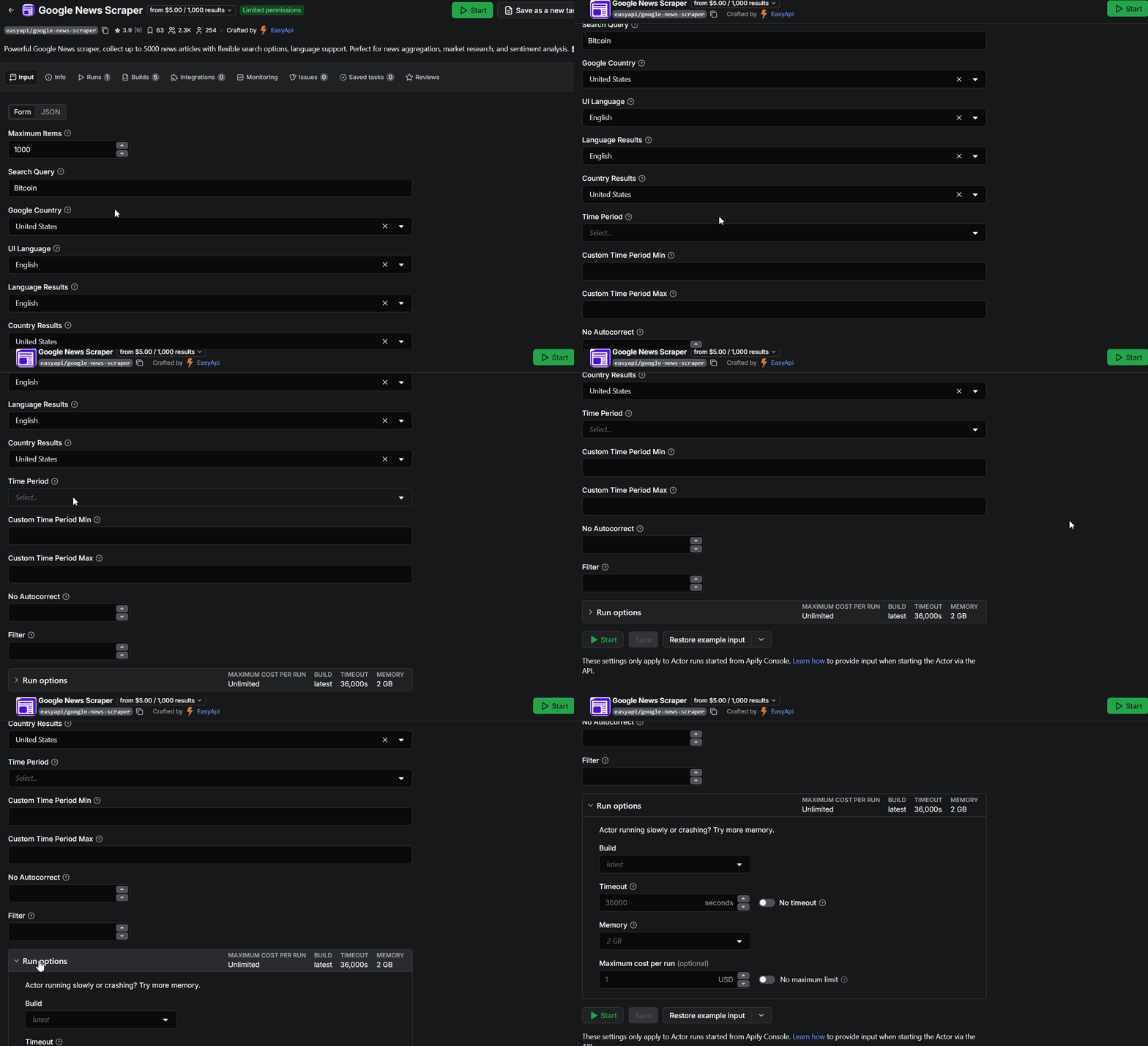
There's Google Country and UI Language, then Language Results and Country Results, which do effectively the same job described twice.
No Autocorrect and Filter, are documented nowhere... the UI never explains what either does, so you're guessing.The one filter genuinely worth having is the custom time period with explicit min and max dates, which no other tool here offers in that form.
... menu as the other Apify actor. Exports are the standard six formats, switchable after the run, with the full Apify API, MCP, SDK and CLI behind it.Verdict. A single-keyword tool with a filter panel that says the same thing twice and explains two options not at all.
Speed
At 2 GB memory (0.5 CPU cores): 689 articles in 11 minutes 35 seconds, or 59 articles per minute.
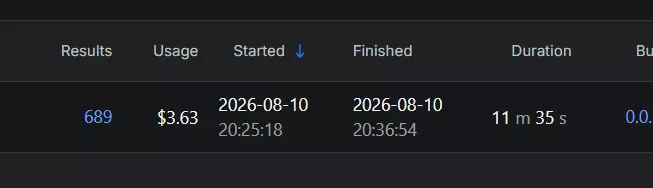
That makes it the second-fastest tool in this test, which is worth stating plainly.
Speed here is a memory tier, not a concurrency control, so going faster means paying for more compute.
Verdict. Best of the rest on speed, a long way off the top.
Cost
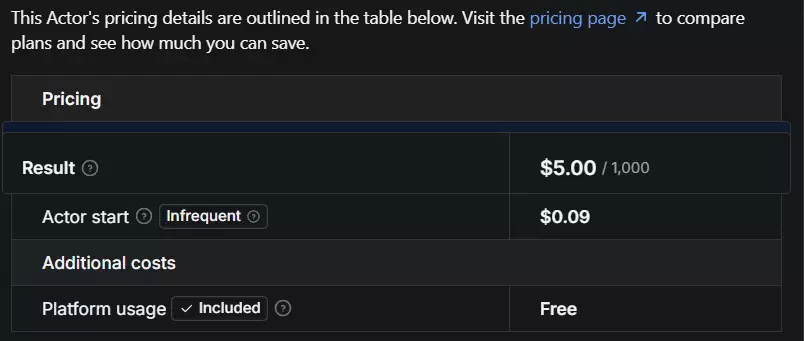
- Free tier: Apify's $5 monthly credit at $5 per 1,000 gives you 1,000 free articles a month
- Entry: $5 per 1,000 articles, plus a $0.09 actor start fee
- At scale: still $5 per 1,000. No volume discount at any tier
- Anchor job, 100,000 articles: $500 plus start fees, at entry and at scale alike, in about 28.2 hours
$500 for 100K, and there's no volume tier, so it never gets cheaper no matter how much you scrape. It's the most expensive way to pull Google News data of anything I tested.
And the billing has a real accuracy problem. The start fee is documented at $0.09. I was charged $0.18 on a single run.
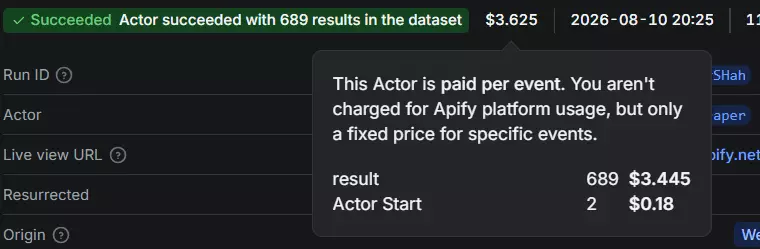
Double the published number, on the one cost component that's supposed to be fixed.
Verdict. The most expensive option here, with no discount curve and a start fee that didn't match its own documentation.
Scalability
59/min running 24/7 gives roughly 2.5 million articles a month, the second-highest ceiling in this test. In real jobs: 100,000 takes 28.2 hours, one million takes about 12 days.
Raising it means buying memory rather than adding workers you control. And as a community actor with no official Apify support, a Google layout change is fixed when the developer gets to it... which, based on its ticket history, can be weeks.
Verdict. Best ceiling of the also-rans, on the least maintainable footing.
Support
It's a community actor with no official Apify support, and the developer lists no support channel of any kind. The Issues tab is it, so that's what I read.
The pattern in those tickets is the worst I saw:
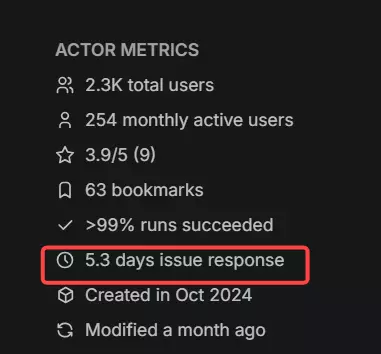
- Many tickets marked closed with no response and no fix
- Some closed after the user followed up to say the problem persisted... still with no reply
- Average response 5 to 7 days, with resolution sometimes taking over a month
Verdict. The weakest support in the category, and closing tickets without answering them is worse than being slow.
Best for: someone running a single keyword occasionally on Apify's free credits who wants both date formats in one row. At any real volume the price and the broken links make it hard to justify.
The scrapers that didn't make the list
Here's the thing worth being straight about: no tool that cleared my entry bar failed a benchmark run.
All four completed, all four produced data I could score. So there's no cut-table of broken scrapers here, because I'd have to invent one.
The cuts happened before testing, and they're category-level. These aren't bad tools. They just weren't eligible for this comparison.
| What got cut | Why | Who it's right for |
|---|---|---|
| API-only platforms (Bright Data) | No no-code interface, so it fails the second entry bar | Engineering teams comfortable writing and maintaining their own parsers |
| Stale GitHub repos | Break the week Google ships a layout change, with nobody merging fixes | Developers who want a starting point to fork and own outright |
| Scrapers capped at 100 results per query | Can't be compared on volume, speed, or cost per thousand, because they never reach a thousand | Anyone who genuinely only needs today's headlines for one keyword |
That last row is most of the market, and it's the reason this list has four entries instead of fifteen. A clean feature page and a low sticker price mean nothing if the tool stops at 100 results.
On the Apify side specifically, there are several Google News actors and I ranked two. I picked them on monthly active users, run success rate, and evidence of recent maintenance. Not a perfect signal, but ranking a ghost actor would be worse.
Frequently asked questions
Which Google News scraper returns the most data?
It's a three-way tie at 8 meaningful fields ... lobstr.io, Apify's easyapi actor, and Apify's dataxplorer actor with all toggles on. Outscraper returns the fewest at 6 and has no image field at all. But field count isn't the deciding number: only lobstr.io returned 971 of 971 usable publisher URLs. easyapi shipped 60 broken link stubs, Outscraper 40, and dataxplorer with its decode toggle off returned 1,000 URLs of which zero could be opened.
What's the cheapest Google News scraper?
Outscraper at entry, lobstr.io at scale. Outscraper does 100,000 articles for $90 against lobstr.io's $200, which makes it 2.2x cheaper if you're buying small. At scale pricing the order flips: lobstr.io is $50 per 100,000 against Outscraper's $60, then data_xplorer at $100 and easyapi at $500.
What's the fastest Google News scraper?
lobstr.io ... 971 articles in 1 minute 14 seconds, about 787 per minute, measured at 1 Slot of a possible 20. Next fastest usable output was easyapi at 59/min, Outscraper at 49.5/min, and dataxplorer at 46.7/min with its data toggles on. dataxplorer's toggles-off tier clocked the highest raw rate at 1,200/min, but that output has no openable URL and no images. Every tool ran at its entry configuration.
Which Google News scraper is most accurate?
lobstr.io ... 100% usable URLs and zero duplicate rows across 971 results. Outscraper returned 3.9% duplicates, easyapi 2.0%, and data_xplorer 24.9%, though that last figure traces to a timeout and restart rather than the scraper itself.
Which Google News scraper actually returns the volume you ask for?
lobstr.io came closest ... 971 unique articles against a 1,000 target, or 97%. data_xplorer's toggles-off tier hit 1,000 but none of its URLs open. easyapi returned 675 and Outscraper 666, both about a third short of the 1,000 requested. Worth knowing before you compare per-1,000 prices, since neither actually delivered 1,000.
Which Google News scraper gives full article descriptions?
Only Apify's data_xplorer actor, and only with its description toggle on. 95.2% of its rows carried real article meta descriptions, with just 6.5% truncated. Every other tool returns the Google News snippet, which truncates on 65.1% of rows for lobstr.io, 82.3% for easyapi and 83.0% for Outscraper. The toggle is free but slow ... the same job ran 50 seconds with it off and over 30 minutes with it on.
What's the best Google News scraper for high-volume monitoring?
lobstr.io. At 787 articles/min on a single Slot it clears 100,000 articles in about 2.1 hours and a million in 21 hours, with up to 20 Slots available per Squid. The nearest competitor needs 28 hours for the same 100,000.
What's the best Google News scraper for small or occasional jobs?
Outscraper, on price ... $90 per 100,000 at entry against lobstr.io's $200. You give up a fair amount for it: no image field, no absolute publish date, no concurrency control, and no live progress tracking.
Is there a free Google News scraper?
No fully free option, but Apify's credits go furthest. Apify gives $5 of credits a month, which at data_xplorer's $4 per 1,000 works out to roughly 1,250 free articles a month, the most generous free tier here, or 1,000 on easyapi at $5 per 1,000. lobstr.io gives 100 articles a month but caps exports at 30 rows per run, so a free run yields 30 downloadable articles. Outscraper advertises the first 50 searches of every run free, but you have to top up your balance before the scraper will run at all, which makes it a discount rather than a trial.
What's the limit on Google News results per query?
Most Google News scrapers cap at 100 results per query, which is exactly why this list is four tools long ... clearing that cap was the entry requirement. lobstr.io walks backwards day by day on keyword tasks to get past it, while topic tasks are bounded by what the topic page itself returns, around 100 to 200.
Is it legal to scrape Google News?
Do I need a no-code scraper or an API?
Both, and every tool here offers both ... that was one of my three entry requirements. Start in the UI to see what the data looks like, then move to the API once you know what you want. API-only platforms were excluded from this comparison, which is why Bright Data isn't ranked.
Can I verify these numbers myself?
Conclusion
That's a wrap on the best Google News scrapers for 2026.
Who owns what:
- lobstr.io owns data usability, speed, scale and support at 8.79/10. The only tool where every URL opened, and the pick for anyone monitoring news at volume
- Outscraper owns entry pricing at 5.50/10. $90 per 100,000 is the cheapest way into Google News data, and the pick for small occasional pulls
- Apify data_xplorer owns article descriptions at 5.29/10. The only complete description text in the test, and the pick for editorial work that can tolerate a slow, fragile run
- Apify easyapi lands at 4.33/10. Both date formats in one row, at 10x lobstr.io's scale price
Two of those four finish within 0.2 of each other, so treat Outscraper and data_xplorer as level on aggregate for opposite reasons ... one is cheap and thin, the other is rich and unreliable. Which one fits depends entirely on whether your constraint is budget or data depth.
This list evolves as tools ship updates, and I'll keep it current.