Facebook Ad Library Scraper
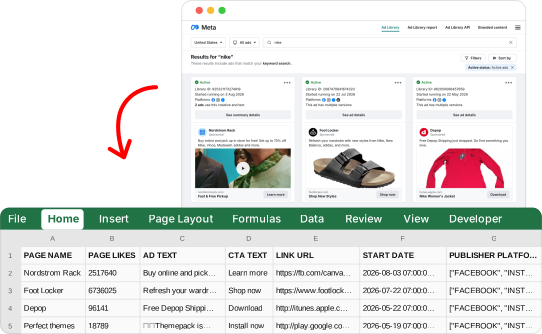
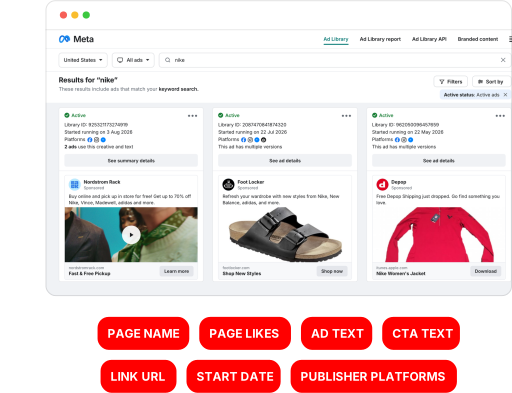
Give it an Ad Library URL, get the ads: headline, caption, categories, contains digitally created media, page owner phone, page owner address, instagram followers, link description and 101 more fields, in a spreadsheet, in your tools, through the API or from your AI agent.
| Headline | Caption | Categories | Contains digitally created media |
|---|---|---|---|
| Fast & Free Pickup | Nordstromrack.com | UNKNOWN | FALSE |
| Shop New Styles | footlocker.com | UNKNOWN | FALSE |
| {{product.name}} | itunes.apple.com | UNKNOWN | FALSE |
| ππ¦π‘ππ£ ππ π₯ π¨πππππ₯π€ ππ‘π‘ οΌ | play.google.com | UNKNOWN | FALSE |
| {{product.name}} | jdsports.com | UNKNOWN | FALSE |
| {{product.name}} | NIKE.COM | UNKNOWN | FALSE |
| {{product.name}} | shiekh.com | UNKNOWN | FALSE |
| π₯°a FREE and personalized APP for you | play.google.com | UNKNOWN | FALSE |
| Whatnot: Shop, Sell, Connect | itunes.apple.com | UNKNOWN | FALSE |
| {{product.name}} | amazon.com | UNKNOWN | FALSE |
Real rows this scraper collected, 10 of 50.Download the 50 rows (CSV)
109 fields per ads
Every run returns them, as CSV, JSON, JSONL, Excel, or through the API.
Export Ads
included74 fields- ad_archive_id
- id
- Unique Meta Ad Library identifier of the ad
925321173274919- ad_url
- link
- Direct Ad Library URL of this ad. Meta never returns this string, we build it from `ad_archive_id`; opening it renders exactly this ad
- facebook.com/ads/library/?id=925321173274919
- ad_id
- object
- Meta's internal ad id. Facebook does not populate it on the public Ad Library surface, so it is empty on every ad; the column is kept for parity with other Ad Library exports. Use `ad_archive_id` as the ad identifier.
- empty in the example
- page_id
- id
- Numeric identifier of the Facebook Page running the ad. On branded content ads this is the advertiser's Page, while `page_name` shows the creator's name - that is how Meta itself publishes those ads.
89516513179- page_name
- text
- Name of the Facebook Page running the ad. On branded content ads Meta shows the content creator's name here while `page_id` stays the advertiser's Page id, so the two can look mismatched.
- Nordstrom Rack
Ad Details
+1 per result, if you switch it on35 fields- payer
- text
- Declared payer of the ad
- Whatnot
- beneficiary
- text
- Declared beneficiary of the ad
- Whatnot
- targets_eu
- yes / no
- Whether the ad targets the European Union
- Yes
- eu_total_reach
- number
- Total number of EU accounts the ad reached
- 383,905
- eu_location_audience
- list
- Locations the ad was targeted at in the EU
[ 2 items ]
What it costs
Switch on the options you need and pick a volume.
1 credit per ad with these options
Ads a month
10,000
Built to run
Most scrapers break in silence. This one doesn't, and we show it, openly.
- Incident-free runs, 90 days
- 100.00%
- Fixing rate
- 100%
- Median time to fix
- -
Frequently asked questions
What people ask before running the Facebook Ad Library Scraper.
Facebook Ad Library
Is it legal to scrape the Facebook Ad Library?
Yes β Meta built the Ad Library so that anyone could look. Every ad in it is published on purpose, with no login and no paywall in the way, and collecting what is already on show is fair game. The full picture is in our guide to the legality of web scraping.
Do I need a Facebook account to use this scraper?
No login required. No account, no cookie, no Chrome extension to babysit β it reads the public Ad Library exactly as a stranger with a browser would. Nothing of yours is ever on the line, which is a nice way to research rivals.
What data do I get for each ad?
100+ data points per ad. The advertiser and its page details, the whole creative β ad text, headline, call-to-action, images, videos, carousel cards β the destination link, the run dates, whether it is still live, the platforms it runs on and what Meta discloses about who paid for it.
How fast is it?
Around 355 ads a minute. A keyword search is done in less time than it takes to open a competitor's website, so the afternoon goes on reading the creative rather than collecting it. Long advertiser exports keep the same pace.
Can I scrape one advertiser instead of a keyword search?
Yes β any Ad Library address works. A keyword search, one advertiser's page, or a single ad on its own. Build the search you want on Meta's site, copy what is in the address bar, paste it in, and you are done choosing.
How many ads can I export from a single search?
Roughly 400 to 550 per search β and that ceiling is Meta's, not ours. Meta stops serving results long before the total it advertises at the top of the page. To go deeper, slice the job: one advertiser, one country, one date window, one media type at a time.
Can I filter by country, date or media type?
Country, ad status, category, media type, platform, language, date range and sort order. Set them here, or bake them into the URL β whatever is already in the address bar wins, so a search you built on Meta's own site arrives exactly as you left it.
Do you extract ad spend, impressions and EU reach?
Yes, everything the transparency panel shows. Political and issue ads bring their spend and impression ranges, the declared payer and beneficiary, and EU reach by country, age and gender. It rides on the Ad Details add-on: 1 extra credit per ad.
Can I get the ad creatives themselves?
Yes β direct links to every image and video. Each ad carries its media, plus the body, title and link of each card in carousel and catalogue ads. That is a whole swipe file in one export, and not a right-click in sight.
Where can I send the ads once they are scraped?
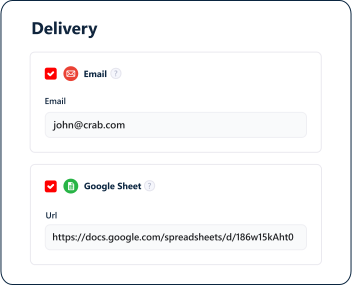
Just about anywhere you already work. Google Sheets, Make, n8n, Amazon S3, email, webhooks β plus our MCP server, so Claude or ChatGPT can start a run and read the ads back for you. CSV, Excel and JSON downloads too. See all integrations.
Inputs and data
What do I give the Facebook Ad Library Scraper?
URL, such as https://www.facebook.com/ads/library/?active_status=active&ad_type=all&country=US&q=nike&search_type=keyword_unordered&media_type=all. Paste thousands at once or upload a CSV; duplicate inputs are skipped. 12 settings shape the run: see them in the playground.
What data does it return?
109 data attributes per ad, each with its description and an example: see the full list.
Do I get duplicates?
No. Duplicates are removed, and you only pay for unique results.
How fresh is the data?
As fresh as your run: each run collects the data from the site at the moment it runs, nothing comes from a stored database.
In what formats do I get the results?
CSV, Excel or JSON from the dashboard, through the API, or sent after every run to Google Sheets, Amazon S3, an SFTP server, a webhook or by email.
How long are my results kept?
7 days on the free plan, 28 days on paid plans. Then they are deleted. Download or deliver what you want to keep.
Speed and reliability
How fast is the Facebook Ad Library Scraper?
Around 355 ads a minute for one squid. Your plan's slots run several squids at the same time.
How reliable is it?
100.00% of its runs had no incident over the last 90 days (0 incidents, 100% fixed). Every day is on this page.
What happens when the site changes?
Our team fixes the scraper: every scraper on lobstr.io is built and maintained by us. How we measure.
Can runs repeat on their own?
Yes, on paid plans: every hour, every day, every weekday or on a custom schedule, in your time zone.
Can I cap a run?
Yes: set the most results per task and per run in the settings. The run stops there and so does the bill.
Pricing
How much does the Facebook Ad Library Scraper cost?
1 credit per result. Options add to it: Ad Details +1. The playground shows the price as you pick them.
Can I use it on the free plan?
Yes. The free plan gives 100 credits every month, 100 results with this scraper, with exports capped at 30 rows.
How do the plans work?
Every month a plan gives credits, which pay for results, and slots, which set how many squids run at the same time. Starter: $20 for 10,000 credits; Pro: $100 for 100,000 credits; Team: $500 for 1,000,000 credits. Upgrades start right away and are prorated; downgrades and cancellations take effect at the end of the cycle.
Do unused credits roll over?
No. Your credits refresh every month with your plan.
What if I run out of credits?
You choose, per squid: pause and pick up where it stopped, or end the run. To keep going, upgrade or reset your billing cycle: your plan renews right away and your credits come back. Auto Billing Reset does it for you when your usage crosses a threshold you set.
Is there a yearly discount?
Yes: paying yearly takes 20% off every plan.
Can I get a refund?
A monthly plan: within 10 days of the charge, if no credit was used in that period. A yearly plan: within 30 days, in full if no credit was used, otherwise minus one month. Cancel from your billing page, then write to contact@lobstr.io. The details are in the terms of use.
Legal and privacy
Is scraping Facebook legal?
Collecting publicly available data is generally allowed, but you choose what you collect and you are responsible for how you use it. Our terms of use (article 6) ask every user to respect the rights of the sites, not to extract substantial parts of a database, not to access confidential data and to follow personal data law such as the GDPR. This is not legal advice.
How does the GDPR apply?
When results contain personal data, you are the data controller and lobstr.io, a French company, processes them on your behalf, under our personal data agreement. You need a lawful basis for what you collect, must inform the people concerned and honor their requests.
How long does lobstr.io keep the data?
Results: 7 days on the free plan, 28 days on paid plans, then they are deleted; you can delete them sooner. Your account data: see the privacy notice.
Can I use the emails and phone numbers for outreach?
It depends on where the people are. In the EU, prospecting businesses by email is generally possible with an opt-out in every message, while consumers must have agreed first; calls follow each countryβs do-not-call list. In the US, CAN-SPAM asks for your address and an opt-out in every email. This is not legal advice.
API and agents
Can I run it from my code?
Yes, through the REST API at https://api.lobstr.io/v1, with your key from the dashboard. The playgroundβs Code tab writes the calls for your settings, in cURL and Python. The documentation has the full reference.
Can my AI agent run it?
Yes. Add our MCP server, https://mcp.lobstr.io/mcp, to Claude, ChatGPT, Cursor or any MCP client and sign in with lobstr.io. Your agent shows the cost and asks you before a run spends credits. The playgroundβs Agent tab gives you a prompt.
Do API calls cost credits?
No. Credits pay for results, not for requests.
Can I know when a run ends?
Yes. Point a webhook at your server and lobstr.io calls it when a run succeeds or fails.
Are there rate limits?
Yes, per endpoint: 120 requests a minute on squids and runs, 90 on tasks, 2 a second on results. Above that the API answers 429 with a Retry-After header.